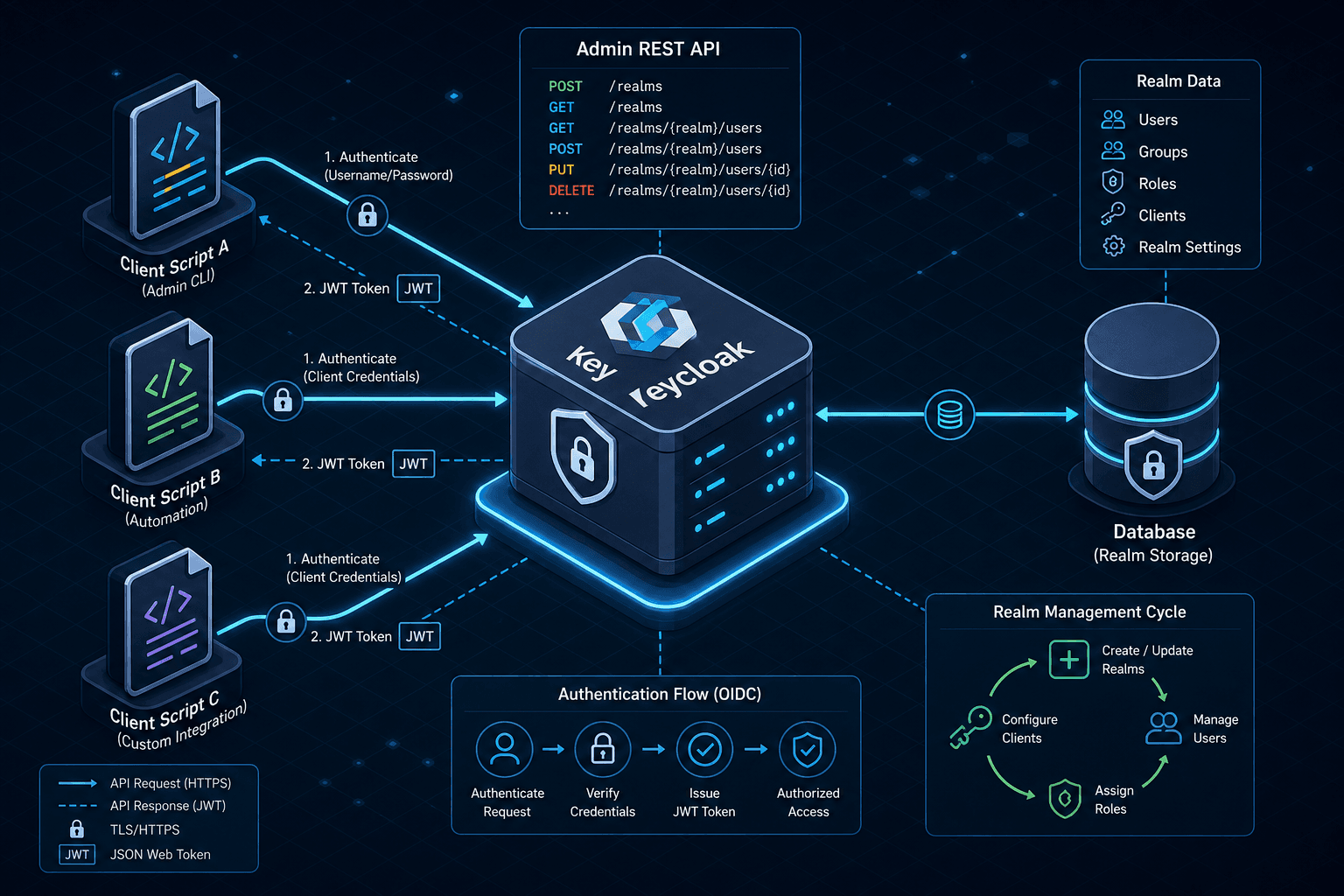
Keycloak REST API: Programmatic Realm and User Management
A guide to managing Keycloak realms and users via the Keycloak REST API for automation and administrative tasks.
When automating Identity and Access Management (IAM), the most common failure point is assuming the Keycloak Admin API behaves like a standard CRUD database. It does not. The API enforces a strict state machine where every write operation must account for the current state of the resource to avoid 409 Conflict errors or silent data corruption. To manage realms and users programmatically, you must first understand the authentication handshake that grants the authority to mutate the security boundary itself.
This article is Part 12 of the Keycloak Masterclass Series.
Authentication Mechanism
The mechanism begins with the admin-cli client. In a fresh Keycloak installation, the master realm contains a client named admin-cli. This client is pre-configured with the admin role, which acts as a superuser within that specific realm. To interact with the API securely, your script should perform an OAuth 2.0 token exchange using the client_credentials grant type with a Service Account. While the password grant exists, it requires enabling 'Direct Access Grants' on the client, which is not the default secure configuration and exposes credentials in plain text.
curl -X POST "http://localhost:8080/realms/master/protocol/openid-connect/token" \
  -H "Content-Type: application/x-www-form-urlencoded" \
  -d "grant_type=client_credentials" \
  -d "client_id=admin-cli" \
  -d "client_secret=<service_account_secret>"
This response yields a JWT (JSON Web Token). The crucial mechanism here is that this token is not just an ID; it carries the scope and roles of the requester. Every subsequent API call must include this token in the Authorization: Bearer <token> header. Without this, the server rejects the request with a 401 Unauthorized. If you attempt to manage a realm other than master without the proper permissions, the server returns 403 Forbidden, enforcing the principle of least privilege at the API gateway level.
Realm Lifecycle Management
Once authenticated, the management of Realms follows a specific resource hierarchy. A realm in Keycloak is a tenant isolation boundary. To create one, you issue a POST request to /admin/realms. The body must be a JSON object conforming to the RealmRepresentation schema. The most critical field is realm, which serves as the unique identifier.
{
  "realm": "my-new-realm",
  "enabled": true,
  "registrationAllowed": true,
  "loginWithEmailAllowed": false,
  "duplicateEmailsAllowed": false,
  "passwordPolicy": "length(8) and notUsername()"
}
When Keycloak receives this request, it does not simply insert a row. It validates the realm string against existing entries. If my-new-realm already exists, the server returns a 409 Conflict. This is a mechanism to prevent accidental overwrites of production environments. If the creation succeeds, the API returns the full RealmRepresentation with generated IDs for internal components like the default identity provider. To update this realm later, you must use PUT /admin/realms/{realm}, passing the entire object again. Keycloak performs a full replacement, not a patch. If you omit the passwordPolicy field in the update request, the server clears the policy unless you explicitly include it. This behavior forces the consumer to maintain the complete state of the resource locally before sending updates.
User Provisioning and Credentials
With a realm established, user management becomes the primary automation target. Users are stored within the context of a specific realm. The entry point is POST /admin/realms/{realm}/users. Unlike a standard database insert, Keycloak requires the username field to be globally unique within that realm. If you attempt to create a user with an existing username, the server returns a 409 Conflict due to a constraint violation, distinct from the state-based conflicts seen in realm updates.
curl -X POST "http://localhost:8080/admin/realms/my-new-realm/users" \
  -H "Authorization: Bearer $ACCESS_TOKEN" \
  -H "Content-Type: application/json" \
  -d '{
    "username": "alice",
    "email": "alice@example.com",
    "emailVerified": true,
    "enabled": true,
    "credentials": [
      {
        "type": "password",
        "value": "secure-password-123",
        "temporary": false
      }
    ]
  }'
The credentials array is where the security mechanism lives. When you provide a value, Keycloak does not store the plaintext string. It hashes the value using the configured password policy (e.g., PBKDF2 or Argon2) and stores only the hash and salt. The temporary flag dictates whether the user must change the password on their next login. If you omit the credentials array entirely, the user is created but cannot log in until a password is set via the PUT /admin/realms/{realm}/users/{id}/reset-password endpoint. This separation of creation and credential assignment allows for secure provisioning workflows where the initial password is generated by an external system and sent securely to the user, rather than hardcoded in the API payload.
Role and Group Association
Beyond basic creation, automation often requires attaching roles and groups. Keycloak separates these concepts: Roles define permissions (what a user can do), while Groups define organizational structure (who a user belongs to). The mechanism for assigning roles is a direct relationship update. To assign the offline_access role to a user, you POST to /admin/realms/{realm}/users/{id}/roles.
curl -X POST "http://localhost:8080/admin/realms/my-new-realm/users/abc-123-def-456/roles" \
  -H "Authorization: Bearer $ACCESS_TOKEN" \
  -H "Content-Type: application/json" \
  -d '[{"name": "offline_access", "composite": false}]'
Note that the payload is an array of role objects. This design allows you to assign multiple roles in a single request. If the role does not exist in the realm, the API returns a 404 Not Found. This implies that role definitions must exist before they can be assigned to users. Similarly, group membership is managed via PUT /admin/realms/{realm}/users/{id}/groups. Here, you provide a list of group IDs. The server resolves the group IDs to their internal UUIDs and updates the user's membership table.
Operational Constraints and Error Handling
A common operational pattern involves bulk user imports. Because the API is stateless, you cannot rely on a simple loop to create thousands of users without handling rate limiting. Keycloak does not impose a hardcoded default rate limit on the Admin API in standard distributions; rate limiting must be explicitly configured via server properties or external proxies. If your script exceeds a configured limit, the server returns 429 Too Many Requests. The mitigation strategy is to implement exponential backoff in your consumer logic.
Another subtle mechanism involves the id field. When you create a user, the server generates a UUID for the id field. This ID is immutable. You cannot change a user's ID via the API. If you need to migrate a user, you must create a new user with the desired ID (if you have control over the generation) or simply copy the data to a new user record. The old record must be deleted explicitly via DELETE /admin/realms/{realm}/users/{id}. This deletion cascades: removing a user also removes their associated tokens, sessions, and role assignments. There is no soft-delete flag in the standard API; the record is physically removed from the database.
Finally, consider the error handling strategy. The Keycloak Admin API returns standard HTTP status codes, but the response body often contains a detailed error message. For example, a 400 Bad Request might include a JSON object with a message field explaining that the passwordPolicy was violated. Parsing these messages programmatically is brittle because they are intended for human readability and may change between versions. A robust automation script should validate inputs against the schema (e.g., ensuring the password meets complexity rules) before sending the request, rather than relying on the API to reject it.
Conclusion
In summary, the Keycloak Admin API provides an interface for infrastructure as code, but it demands strict adherence to state management. You must manage tokens, handle unique constraints, and respect the full-replacement nature of updates. By treating the API as a stateful service rather than a simple data store, you can build reliable automation pipelines for identity management.
FAQ
Q: How do I handle 409 Conflict errors during bulk user creation? A: A 409 error indicates a uniqueness constraint violation (e.g., duplicate username) or a state mismatch. For bulk operations, implement a retry loop that checks for the specific error. If the error is a duplicate username, skip the user or log it for manual review. If it is a state mismatch, fetch the current resource state and retry the update with the merged data.
Q: What is the recommended strategy for rate limiting with the Keycloak API?
A: Since rate limiting is not enabled by default, you must configure it if you plan to run high-volume scripts. If configured, implement an exponential backoff strategy (e.g., waiting 1s, then 2s, then 4s) upon receiving a 429 response. Avoid hardcoding delays; instead, parse the Retry-After header if the server provides one.
Q: How are password policies formatted in the API payload?
A: Password policies are defined as a string expression (e.g., length(8) and notUsername()). You must validate that the expression syntax matches the Keycloak version you are running. Complex policies involving regular expressions or custom providers should be tested in the Admin Console first to ensure the syntax is correct before automating it via the API.
Practical Takeaways
- State Overwrite: Treat all
PUToperations as full replacements. Never assume partial updates are supported; always send the complete object state you desire. - Unique Constraints: Distinguish between 409 errors caused by duplicate values (like usernames) versus state mismatches. Handle them with different logic in your automation.
- Immutable IDs: Never attempt to modify the
idfield of a resource. If a change is needed, create a new resource and delete the old one.
Common Pitfalls
- Hardcoded Passwords: Storing plaintext passwords in API payloads or scripts is a critical security risk. Use temporary flags or external secrets managers to inject credentials securely.
- Direct Access Grants: Relying on the
passwordgrant type without explicitly enabling it or understanding its implications leaves your instance vulnerable to credential exposure. Prefer service accounts withclient_credentials. - Silent Data Loss: Updating a realm object without including all required fields can result in the server clearing optional configurations (like password policies). Always maintain a local copy of the full resource state before updating.
Related posts
Migrating from ForgeRock to Keycloak: Lessons Learned
A guide covering the migration from ForgeRock to Keycloak, highlighting key lessons on identity migration and platform adoption.
Building Identity-Aware Load Balancing with NGINX and Keycloak
Learn how to implement identity-aware load balancing using NGINX and Keycloak for secure authentication routing.
Implementing WebAuthn in Keycloak: Passkey Authentication Setup
A walkthrough for configuring WebAuthn and passkeys within Keycloak to enable passwordless authentication using FIDO2 standards.