Keycloak User Federation vs Identity Provider
Understand the distinction between Keycloak user federation and identity providers for effective identity management.
In the landscape of Identity and Access Management (IAM), confusion often arises between two mechanisms that both involve connecting Keycloak to an external system: User Federation and Identity Brokering. While both enable Single Sign-On (SSO) and external data integration, they solve fundamentally different problems regarding data ownership and authentication trust. This distinction is critical because misapplying these patterns can lead to security vulnerabilities, increased administrative overhead, and architectural rigidity that hinders scalability.
This article breaks down the mechanism-level differences between these two patterns, helping you choose the correct integration strategy for your architecture.
The Core Distinction: Data Locality vs. Trust Delegation
To understand the difference, we must look at the flow of authentication and the location of the "Source of Truth."
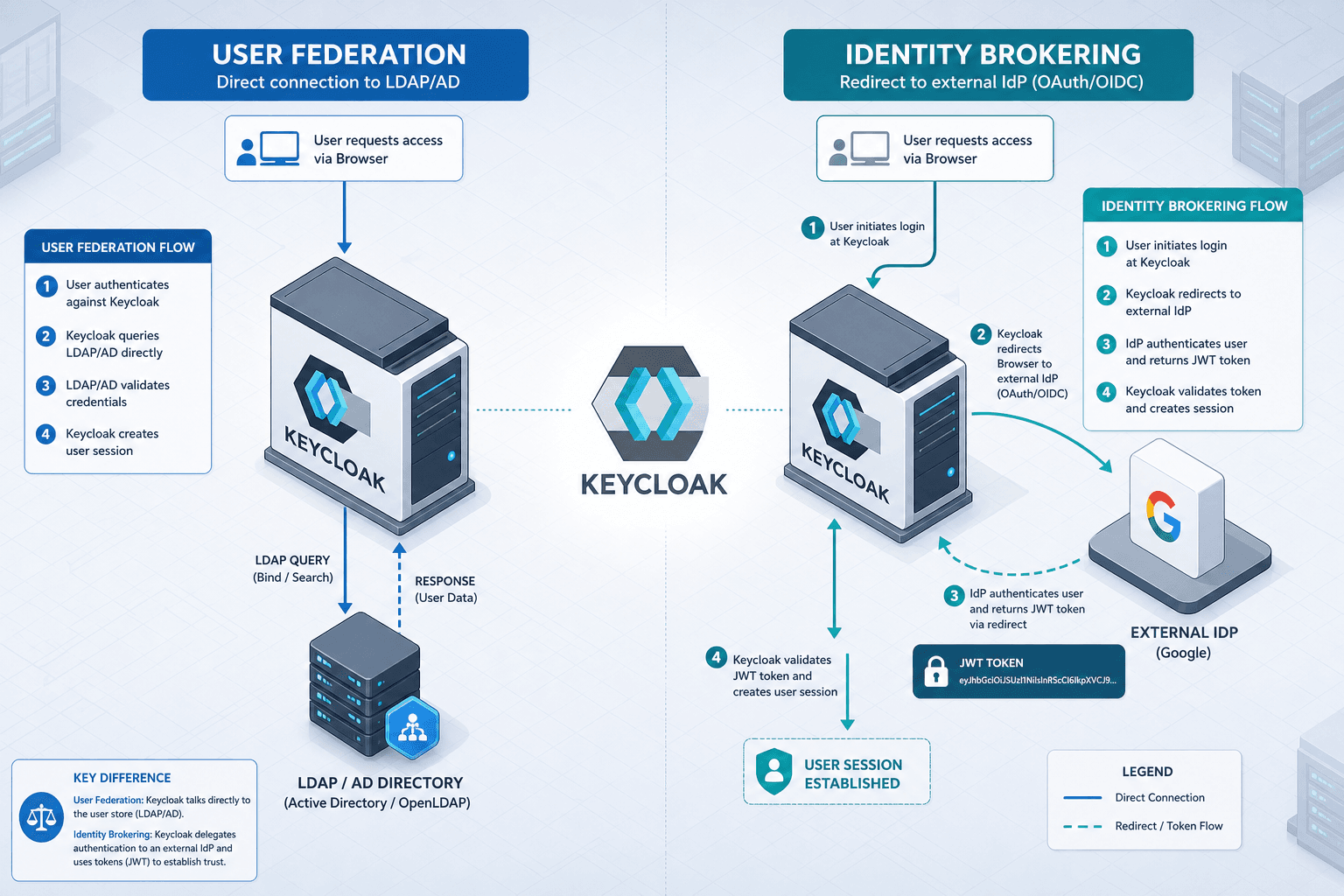
In a User Federation scenario, Keycloak remains the authoritative source for the user’s existence and attributes. The external system (e.g., an LDAP server) is a mirror. When a user logs in, Keycloak queries the LDAP server to verify the password and retrieve attributes. If the LDAP server is down, Keycloak cannot authenticate users, but Keycloak still "owns" the user record in its database. The authentication flow is internal to Keycloak; it simply delegates the credential check to the backend. This aligns with traditional directory services where the identity provider manages the credential store directly.
In an Identity Brokering scenario, Keycloak delegates the authentication act entirely. The external IdP (e.g., Google) is the source of truth. Keycloak does not know the user’s password. Instead, Keycloak redirects the user to Google, Google authenticates the user, and then sends a signed token back to Keycloak claiming, "This user is valid." Keycloak trusts the token signature. If Google is down, Keycloak cannot authenticate users because it has no local credentials and no external verifier. This model relies on standards like OpenID Connect (OIDC) to establish trust through cryptographic signatures rather than direct credential verification.
User Federation: The Backend Mirror
User Federation in Keycloak is implemented via the Service Provider Interface (SPI), specifically the UserStorageProvider interface. This mechanism allows Keycloak to treat an external directory as if it were its own internal database, as detailed in the Keycloak User Storage SPI documentation.
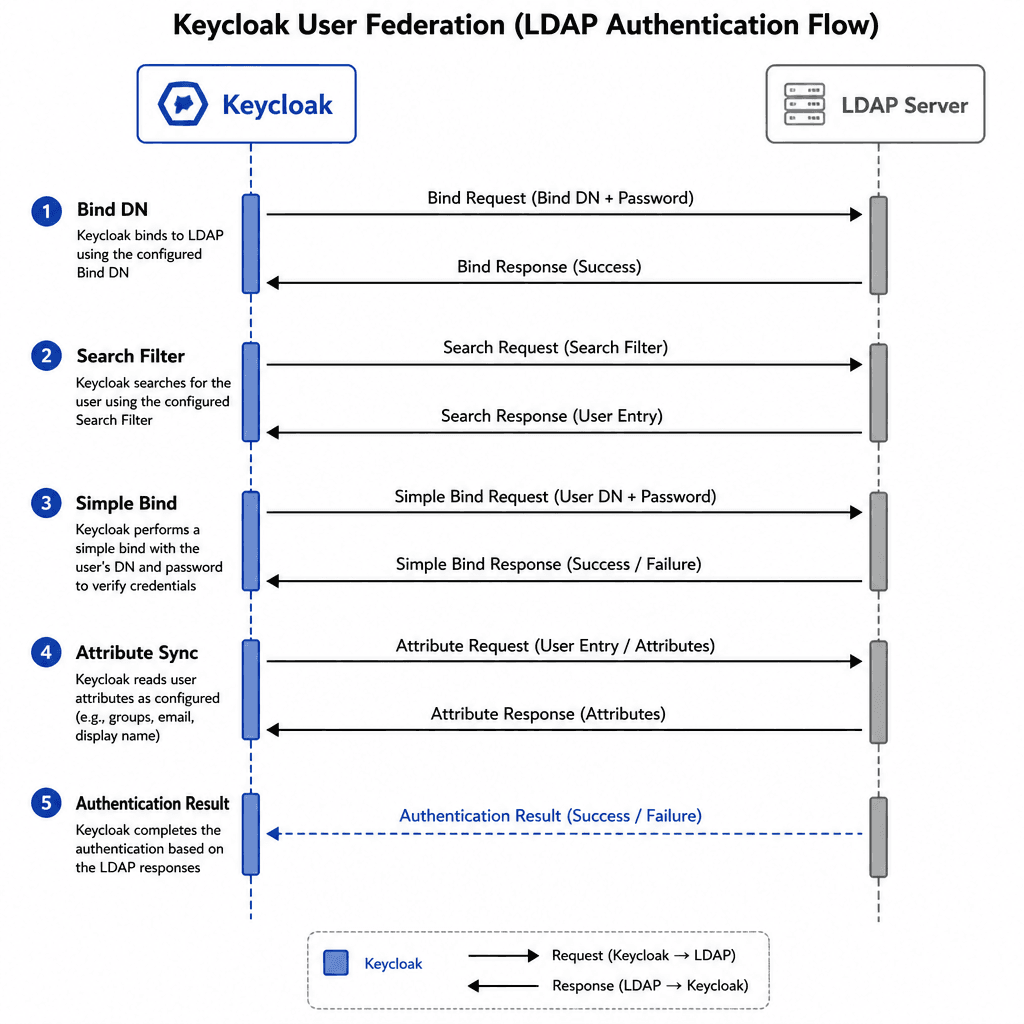
The most common implementation is the LDAP Storage Provider. Here is the mechanism flow:
- Configuration: You define an LDAP connection in Keycloak’s admin console, specifying the host, bind DN, and search base.
- Authentication Request: A user attempts to log in with username
jdoeand passwordsecret123. - Lookup: Keycloak’s
LDAPStorageProvidertranslates the username into an LDAP search filter (e.g.,(uid=jdoe)). - Credential Verification: Keycloak binds to the LDAP server using the bind DN and attempts to authenticate as
jdoewithsecret123. This is a standard LDAPsimple bindoperation. - Attribute Sync: If authentication succeeds, Keycloak reads the user’s attributes (email, groups, roles) from the LDAP response and caches them in its local memory for the session.
A critical feature of User Federation is write-back. Depending on the provider configuration, Keycloak can push changes made in the Keycloak admin console back to the external system. For example, if an admin updates a user’s email in Keycloak, the LDAPStorageProvider issues an LDAP modify operation to update the mail attribute in Active Directory.
This model is ideal for enterprise internal users. You want to manage users in a central directory (AD/LDAP) but allow Keycloak to handle the SSO experience. Keycloak does not need to store passwords; it only needs to verify them against the backend.
Identity Brokering: The Trust Delegation
Identity Brokering, often referred to as "Social Login," relies on OAuth 2.0 and OpenID Connect (OIDC) standards. In this model, Keycloak acts as an OIDC Client, and the external provider (e.g., Google) acts as the OIDC Provider. This process typically involves securing the authorization code exchange with PKCE (RFC 7636) to prevent authorization code interception attacks.
The mechanism flow is distinct:
- Redirect: The user clicks "Login with Google" on a Keycloak-protected application. Keycloak generates an OAuth 2.0 authorization request and redirects the user’s browser to Google’s authorization endpoint.
- External Authentication: The user enters credentials on Google’s login page. Google verifies the identity.
- Token Exchange: Google redirects the user back to Keycloak’s callback URL with an authorization code. Keycloak exchanges this code for an ID Token and Access Token from Google.
- Claim Mapping: Keycloak validates the ID Token’s signature using Google’s public keys. It then extracts claims (sub, email, name) from the token.
- Local Provisioning: Keycloak checks if a user with the mapped
sub(subject identifier) exists locally. If not, it creates a new user record in Keycloak’s database, populated with the claims from Google.
Here, Keycloak never sees the user’s password. The trust is established via cryptographic signatures on the JWT (JSON Web Token). The external IdP is the sole source of truth for authentication.
This model is ideal for external-facing applications where you do not want to manage password resets, MFA, or credential storage for your customer base. You offload that security burden to the IdP.
Decision Matrix: Choosing the Right Path
The choice between User Federation and Identity Brokering depends on three factors: data ownership, credential management, and user type.
| Feature | User Federation (e.g., LDAP) | Identity Brokering (e.g., Google) |
|---|---|---|
| Source of Truth | External Directory (LDAP/AD) | External IdP (Google/Azure) |
| Credential Storage | External Directory | External IdP |
| Keycloak Role | Authenticator (verifies against backend) | Relying Party (trusts external token) |
| Write-Back | Supported (modify user attributes) | Rarely Supported (read-only claims) |
| Best For | Internal Employees, Enterprise Users | External Customers, Social Users |
When to Use User Federation
Use User Federation when:
- You have an existing directory of users (Active Directory, LDAP) that HR or IT manages.
- You need to synchronize user attributes (groups, roles, custom attributes) from that directory into Keycloak.
- You want to maintain a single source of truth for user data, which happens to be outside Keycloak’s database.
- You need to enforce corporate password policies via the backend directory.
When to Use Identity Brokering
Use Identity Brokering when:
- Your users are external customers or partners who already have accounts with major providers (Google, Facebook, GitHub).
- You do not want to manage password storage, reset flows, or MFA for these users.
- You are okay with creating a new user record in Keycloak for each external login (unless you use advanced claim mapping to merge identities).
- You want to leverage the security posture of the external IdP.
Hybrid Approaches
In complex enterprise architectures, you will often use both. Keycloak allows you to configure multiple User Federation providers and multiple Identity Providers simultaneously, as supported by its multi-provider configuration capabilities.
For example, an enterprise might use LDAP User Federation for internal employees and Google Identity Brokering for external contractors. Keycloak’s unified login page will present both options. The underlying mechanisms remain distinct: the LDAP login verifies a password against an AD server, while the Google login redirects to an OAuth flow.
Understanding this distinction prevents architectural errors. You cannot use Identity Brokering to sync user attributes from an LDAP server, nor can you use User Federation to delegate authentication to a social login provider. They are complementary tools in the IAM toolkit, each solving a specific problem in the identity lifecycle.
Common Pitfalls
- Assuming User Federation supports social login flows: User Federation providers (like LDAP) are designed for directory synchronization and credential verification, not for handling OAuth/OIDC authorization codes. Attempting to use them for social login will fail because they lack the necessary protocol handlers.
- Expecting Identity Brokering to sync user attributes back to the IdP: Most external IdPs (Google, Facebook) do not allow write-back of user attributes via the standard OIDC flow. If you need to update the user’s profile in the external system, you must implement custom logic or use a different mechanism, as Keycloak’s default broker behavior is read-only regarding the upstream IdP.
- Confusing Keycloak's internal user storage with federation: Users created directly in Keycloak’s database (via the Admin Console) are stored locally and are not federated. These users are independent of any external federation provider. Mistaking internal users for federated ones can lead to incorrect assumptions about attribute synchronization and credential management.
Practical Takeaways
- User Federation = Keycloak owns the user record: Keycloak manages the user entity in its database, using the external system only for credential verification and attribute retrieval.
- Identity Brokering = External IdP owns the authentication event: The external provider authenticates the user, and Keycloak trusts the resulting token. Keycloak may create a local record, but the authentication authority lies elsewhere.
- Use Federation for internal employees, Brokering for external customers: Align the technology with the user lifecycle. Internal users typically require centralized management and policy enforcement (Federation), while external users benefit from frictionless, managed-onboarding (Brokering).
FAQ
Can I use both User Federation and Identity Brokering? Yes. Keycloak supports configuring multiple federation providers (e.g., LDAP, Active Directory) and multiple identity providers (e.g., Google, GitHub) simultaneously. You can even combine them so that internal employees log in via LDAP (User Federation) while external contractors log in via Google (Identity Brokering).
Does Identity Brokering store passwords? No. In an Identity Brokering flow, Keycloak never receives or stores the user’s password. The password is entered directly into the external IdP’s login interface. Keycloak only receives the resulting ID Token and Access Token.
How does Keycloak handle user merging in hybrid setups?
Keycloak uses a unique identifier (sub in OIDC, or a specific attribute in LDAP) to match users. If a user logs in via Identity Brokering and then later via User Federation with the same email or identifier, Keycloak can be configured to merge the identities or keep them separate, depending on the merge if exists settings in the identity provider configuration.
Related posts
Keycloak: Multiple IdPs, HRD, and Account Linking
Configure Keycloak for multiple identity providers using Home Realm Discovery and account linking to prevent duplicate accounts and streamline user access.
OIDC and SAML Identity Brokering in Keycloak
A technical walkthrough of configuring OIDC and SAML identity brokering in Keycloak, covering first broker login flows and mapper configurations.
Token Lifetimes, Sessions, and Revocation in Keycloak
A technical examination of Keycloak token lifetimes, session management, and revocation strategies for identity engineers.