Token Lifetimes, Sessions, and Revocation in Keycloak
A technical examination of Keycloak token lifetimes, session management, and revocation strategies for identity engineers.
In Single Sign-On (SSO) architectures, trust is not binary; it is temporal. For identity engineers, understanding Keycloak’s security model requires moving beyond simple "login/logout" mental models and examining the precise mechanics of token validity, session state synchronization, and revocation propagation. This article examines the mechanisms governing these three pillars, providing the technical depth required to secure production environments effectively.
The Token Lifecycle and Refresh Token Rotation
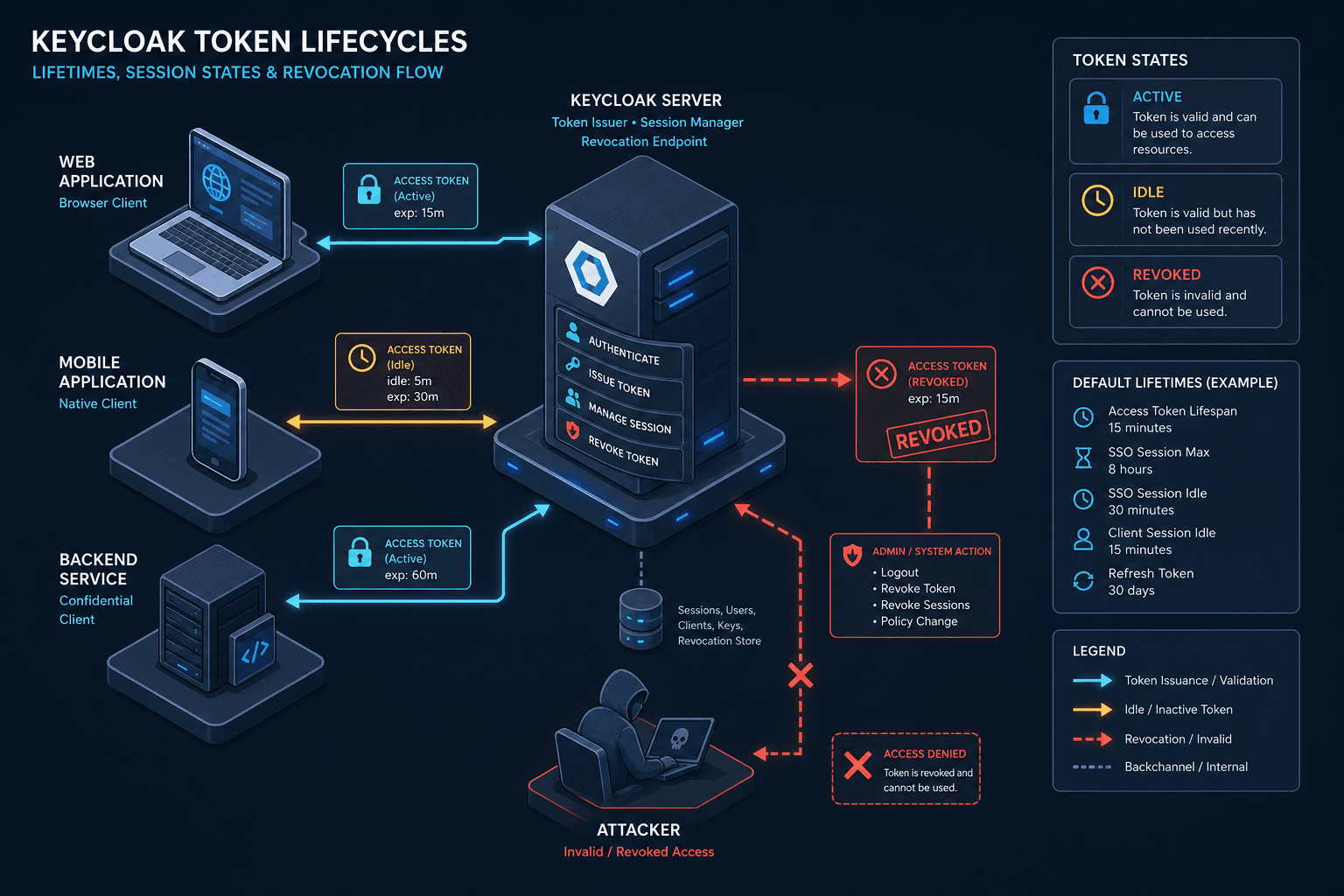
Understanding keycloak token lifetime configuration is the first step in securing an identity infrastructure. Common default configurations often use short-lived access tokens (typically 5 minutes) and longer-lived refresh tokens (typically 30 minutes). This separation is critical for security: if an access token is intercepted, its window of exploitation is minimal. However, the refresh token is the long-term key to the kingdom. If stolen, it can generate infinite new access tokens until it expires.
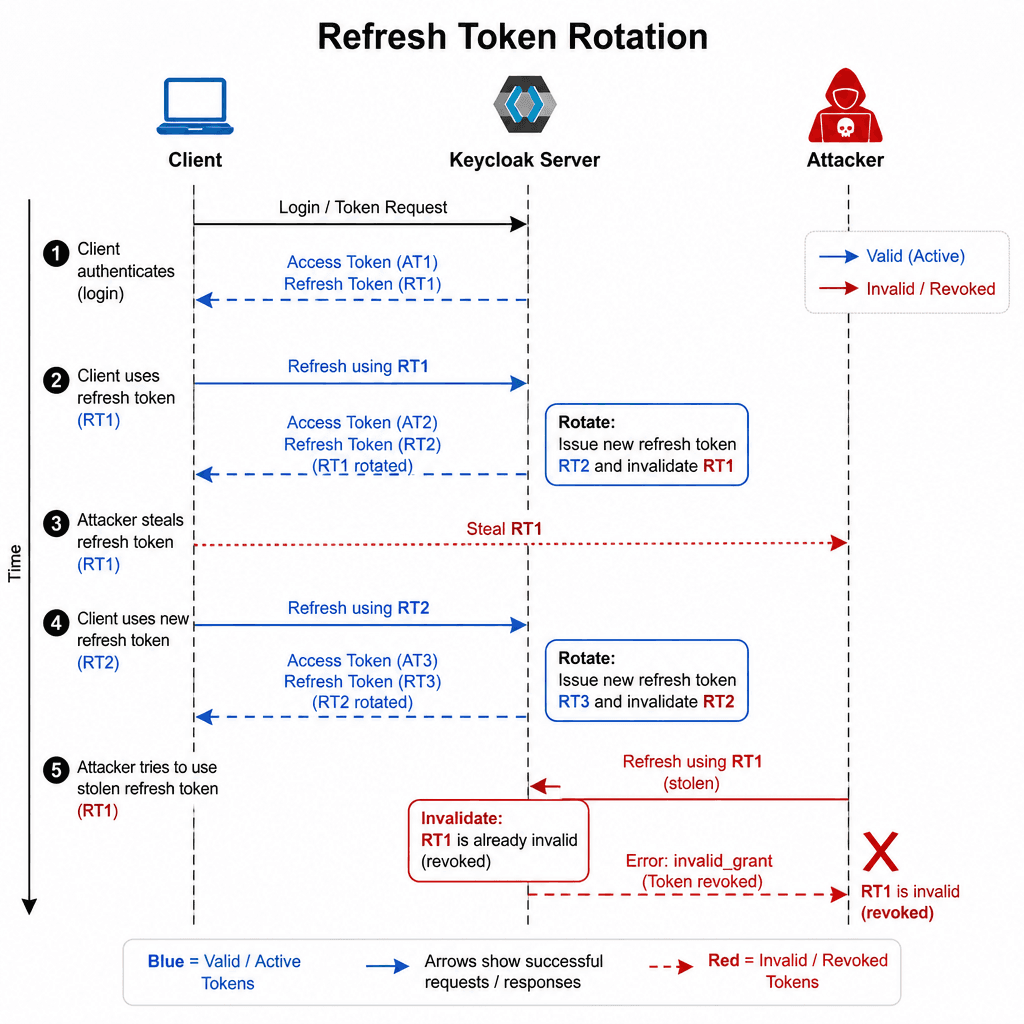
To mitigate this, Keycloak implements Refresh Token Rotation (RTR). When RTR is enabled, every time a client uses a refresh token to obtain a new access token, Keycloak invalidates the old refresh token and issues a new one.
{
  "access_token": "eyJhbGciOiJSUzI1NiIsInR5cCI6...",
  "refresh_token": "MqK3...new_token...",
  "expires_in": 300,
  "refresh_expires_in": 1800
}
If an attacker steals a refresh token and uses it, they receive a new access token. However, when the legitimate client attempts to use the original stolen refresh token, Keycloak detects that it has already been used (because the rotation replaced it). Keycloak returns an invalid_grant error, and the stolen token is permanently invalidated. This mechanism effectively limits the damage of a token theft to a single session.
RTR is disabled by default in Keycloak and must be explicitly enabled via the Revoke Refresh Token toggle under Realm Settings > Tokens. Leaving it disabled for performance reasons is a significant security trade-off, as it allows token replay attacks where a stolen refresh token can be used indefinitely until expiration.
Session State: Idle vs. Max Lifetimes
Keycloak maintains server-side session records that track user activity. These sessions are governed by three distinct lifetime parameters, often confused due to their overlapping names.
- SSO Session Idle: This defines the sso session idle timeout, representing the maximum time a session can be inactive. If a user does not interact with any client application within this window, the session is considered idle.
- SSO Session Max: The absolute maximum lifetime of a session, regardless of activity. This acts as a hard cap.
- Offline Session Max: This parameter controls the validity of an offline session, which is specific to refresh tokens used for offline access (e.g., mobile apps or background services) when the
offline_accessscope is explicitly granted. Standard refresh tokens belong to 'Online Sessions' unless this scope is present.
Consider a scenario where SSO Session Idle is set to 30 minutes and SSO Session Max is set to 24 hours. A user logs in at 10:00 AM. If they remain inactive, their session expires at 10:30 AM. If they are active, the session can persist up to 10:00 PM (24 hours from login).
When a client attempts to use a refresh token after the session has expired (either idle or max), Keycloak rejects the request. The client must then redirect the user to the login page. This behavior ensures that long-lived tokens do not grant indefinite access without periodic re-authentication.
For offline sessions, the Offline Session Max setting is critical. If set to 7 days, an offline refresh token will expire after 7 days, even if the user is still active in other contexts. This prevents stale credentials from being used indefinitely in automated systems.
Revocation Strategies
Revocation is the process of invalidating tokens before their natural expiration. Keycloak offers two primary mechanisms: client-specific revocation and realm-level revocation.
Client-Specific Revocation
This approach invalidates tokens for a specific client. It is useful when a user logs out of one application but wishes to remain logged in elsewhere. Keycloak maintains a list of revoked tokens per client. When a client presents a token, Keycloak checks this list.
To revoke tokens for a specific client, you can use the Keycloak Admin API by invalidating the user's session directly:
curl -X DELETE \
  https://keycloak.example.com/admin/realms/{realm}/sessions/{session-id} \
  -H "Authorization: Bearer {admin_token}"
This operation removes the session from the server's active session store. Future validation requests for tokens associated with this session will fail. Note that this is a session-based action; the token may still be valid for other clients if they have separate active sessions.
Realm-Level Revovation
For a complete logout across all applications, realm-level revocation is required. This invalidates all tokens for a specific user across all clients. Keycloak implements this by marking the user's session as invalid in the session store.
When a user logs out via the OpenID Connect End Session endpoint, Keycloak invalidates the session. Any subsequent token validation requests will fail because the server rejects the token based on the invalid session state, not because the token itself contains a 'revoked' claim. Existing JWTs remain valid until their natural expiration unless a blacklist is explicitly used.
GET /auth/realms/{realm}/protocol/openid-connect/userinfo
Authorization: Bearer {access_token}

HTTP/1.1 401 Unauthorized
WWW-Authenticate: Bearer error="invalid_token", error_description="Token revoked"
This mechanism ensures that a user's logout request propagates across the entire SSO ecosystem. However, it requires that clients actively check for revocation status, typically by validating the token on each request or using introspection endpoints.
Conclusion
Securing a Keycloak deployment requires careful configuration of token lifetimes, session states, and revocation policies. Refresh Token Rotation provides a strong defense against token theft, while clear distinction between idle and max session lifetimes ensures appropriate access control. Finally, understanding the difference between client-specific and realm-level revocation allows engineers to implement logout flows that match their security requirements. By treating these components as interconnected mechanisms rather than isolated settings, identity engineers can build SSO environments that are both secure and user-friendly.
Related posts
Validating a SAML Assertion Correctly
A technical walkthrough on validating SAML assertions, covering audience restrictions, timestamp checks, and replay prevention for secure identity flows.
SAML Single Logout (SLO): The Mechanics of Session Termination
A technical examination of SAML Single Logout (SLO) mechanisms, covering front-channel and back-channel flows, session index handling, and protocol compliance for identity engineers.
SAML Assertions, Statements, and the Schema
An examination of SAML 2.0 assertion structure, statement types, and schema validation for developers and identity engineers.