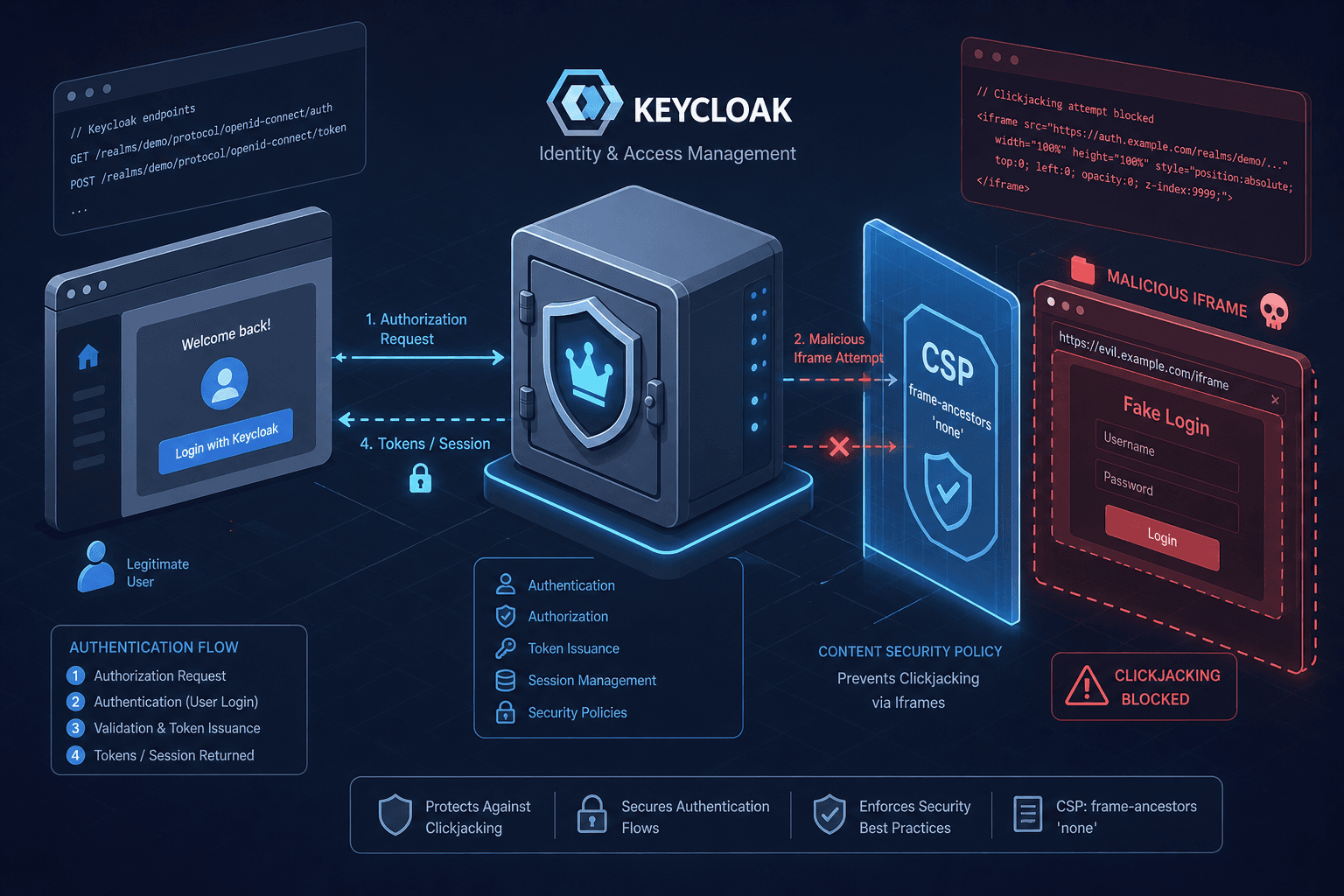
Content Security Policy and Security Headers in Keycloak
Implement Content Security Policy and security headers in Keycloak to prevent clickjacking and enhance authentication security for frontend developers.
This is Part 3 of the Keycloak Security Hardening series.
Authentication flows are high-value targets for attackers. When an application delegates login to Keycloak, it hands control of the browser’s context to an external identity provider. If the Keycloak server returns weak security headers, an attacker can exploit mechanisms like clickjacking to trick users into authorizing malicious actions or stealing session cookies.
Most frontend developers treat security headers as a backend concern. However, when Keycloak serves the login UI, it becomes the source of truth for those headers. Default configurations often leave Content-Security-Policy (CSP) too permissive or rely on deprecated directives, creating vulnerabilities that bypass modern browser protections. This guide details the mechanism of header enforcement in Keycloak and provides a concrete implementation for robust security.
The Mechanism of Clickjacking in Auth Flows
Clickjacking occurs when an attacker embeds a legitimate site (like Keycloak’s login page) inside a transparent or opaque <iframe> on a malicious site. The user interacts with the malicious site, unaware they are clicking elements on the Keycloak interface. If the user clicks "Login" or "Authorize," the attacker gains access.
Browsers prevent this using two primary mechanisms:
X-Frame-Options: An older HTTP header with two values:DENY(never allow framing) andSAMEORIGIN(allow only if the embedding page shares the same origin). Keycloak defaults toSAMEORIGIN.Content-Security-Policy: frame-ancestors: A modern CSP directive that supersedesX-Frame-Options. It specifies valid parent pages that can embed the resource.
The mechanism works at the rendering level. When the browser parses the HTML response from Keycloak, it checks these headers before painting the DOM. If the current window’s origin does not match the allowed list in frame-ancestors, the browser refuses to render the page, blocking the clickjacking attempt.
For Keycloak, SAMEORIGIN is secure but functionally incompatible with cross-origin authentication flows. Keycloak’s login UI is typically served from a different origin than the client application (e.g., auth.example.com vs. app.example.com). Therefore, relying solely on SAMEORIGIN prevents the OAuth flow from functioning in contexts where cross-origin framing is required. To resolve this, administrators must use the frame-ancestors directive in the CSP to explicitly relax the restriction and allow the specific client origin, ensuring both security and functionality.
Keycloak’s Header Configuration Model
Keycloak does not use a simple key-value store for headers. Instead, each realm stores a browserSecurityHeaders map that merges default security headers with custom overrides. This is controlled through the Admin Console’s Realm Settings → Security Defenses → Headers page, or by updating the same fields via the Admin REST API.
These defaults are applied automatically to every realm and include a baseline set of headers, such as:
X-Content-Type-Options: nosniff
X-XSS-Protection: 1; mode=block
Strict-Transport-Security: max-age=31536000; includeSubDomains
However, X-XSS-Protection is deprecated and ignored by modern browsers. Relying on it provides false confidence. The more critical component is Content-Security-Policy.
To customize headers, edit the corresponding fields on the Security Defenses page, or update the realm’s browserSecurityHeaders map directly via the Admin REST API:
{
  "browserSecurityHeaders": {
    "contentSecurityPolicy": "default-src 'self'; ..."
  }
}
This allows you to override any default header. This is essential because Keycloak’s default CSP (frame-src 'self'; frame-ancestors 'self'; object-src 'none';) is often too restrictive for production environments that use inline scripts or specific third-party analytics during the authentication redirect flow.
Implementing a Strict CSP for Keycloak
A strict CSP for Keycloak must balance security with functionality. Keycloak dynamically injects JavaScript for form validation, CSRF token handling, and OAuth state management. A strict CSP that blocks all inline scripts ('unsafe-inline') will break the login page. Understanding how to configure a keycloak csp effectively is crucial for maintaining this balance.
Step 1: Identify Required Sources
Keycloak loads assets from its own domain and potentially from CDNs for fonts or icons. It also uses inline scripts for nonces.
Step 2: Construct the CSP Directive
The following CSP configuration is a recommended starting point. It allows scripts from Keycloak’s origin, uses nonces for inline scripts, and restricts framing.
Content-Security-Policy: default-src 'self'; script-src 'self' 'nonce-<random-value>'; style-src 'self' 'unsafe-inline'; img-src 'self' data:; frame-ancestors 'self' https://app.example.com; base-uri 'self'; form-action 'self';Mechanism Breakdown:
script-src 'self' 'nonce-<random-value>': Allows scripts from Keycloak’s domain. The nonce is a cryptographic value generated per request. Keycloak injects this nonce into its inline<script>tags. The browser validates the hash before execution. This prevents XSS attacks that rely on injecting arbitrary inline scripts, as the attacker cannot guess the nonce.frame-ancestors 'self' https://app.example.com: Explicitly allows the client application (app.example.com) to embed Keycloak’s login UI. This is critical for the OAuth 2.0 Authorization Code flow with PKCE, where the browser may need to interact with the login page in a specific context.style-src 'self' 'unsafe-inline': Keycloak’s login page uses inline styles for dynamic theming. Blocking these breaks the UI. While'unsafe-inline'is a weakness, it is currently necessary for Keycloak’s default themes unless you customize the theme to use external CSS files.form-action 'self': Restricts where forms can submit data. This prevents phishing pages from submitting Keycloak login forms to external endpoints.
Step 3: Configure Keycloak
On the realm’s Security Defenses → Headers page in the Admin Console, set the Content-Security-Policy field:
default-src 'self'; script-src 'self' 'nonce-<random-value>'; style-src 'self' 'unsafe-inline'; img-src 'self' data:; frame-ancestors 'self' https://app.example.com; base-uri 'self'; form-action 'self';You can apply the same value via the Admin REST API by setting browserSecurityHeaders.contentSecurityPolicy on the realm.
Note: Replace <random-value> with a dynamically generated nonce that matches the nonce your theme templates inject into inline <script> tags, or use a tool like csp-evaluator to generate a static hash if nonces are not feasible.
Common Pitfalls and Debugging
When hardening Keycloak, three errors are most common:
-
Mixed Content Errors: If Keycloak is served over HTTPS but the client application is on HTTP, the browser will block the mixed content. Ensure both Keycloak and the client use TLS.
-
Refused to Execute Script: This occurs when the CSP blocks a script. Use the
Content-Security-Policy-Report-Onlyheader for testing. This header logs violations to the console without blocking execution.Content-Security-Policy-Report-Only: default-src 'self'; report-uri /csp-report; -
Nonce Mismatch Errors: If nonces are implemented incorrectly, valid scripts may be blocked. Ensure that the nonce value in the CSP header matches exactly with the nonce injected into the HTML
<script>tags. A mismatch results in immediate script execution failure, breaking the login form.
Configure Keycloak to report violations by setting the Content-Security-Policy-Report-Only field on the realm’s Security Defenses → Headers page (or the browserSecurityHeaders.contentSecurityPolicyReportOnly field via the Admin REST API):
default-src 'self'; report-uri /csp-report;Monitor the /csp-report endpoint (if configured) or browser console for violations. Adjust the CSP directives iteratively.
Conclusion
Securing Keycloak requires more than enabling HTTPS. Properly configured security headers, particularly CSP and frame-ancestors, are essential to prevent clickjacking and XSS attacks. By understanding the mechanism of header enforcement and carefully configuring Keycloak’s http.headers, developers can ensure that authentication flows remain secure and functional. Always test with Content-Security-Policy-Report-Only before enforcing strict policies.
Related posts
Securing Keycloak: Hardening Guide for Production
A technical examination of Keycloak security and hardening strategies for production environments, covering brute force mitigation and Content Security Policy implementation.
Token Lifetimes, Sessions, and Revocation in Keycloak
A technical examination of Keycloak token lifetimes, session management, and revocation strategies for identity engineers.
Keycloak Hardening: A Checklist for a Fresh Install
A practical checklist for securing a fresh Keycloak installation, covering TLS, authentication, and access control best practices.