Branding a Keycloak Login: CSS, Assets, and Email Templates
Learn how to customize Keycloak login pages using CSS, assets, and email templates for a branded user experience.
Customizing Keycloak requires overriding its theme resolution engine. To achieve consistent branding across login pages and email notifications, developers must understand the hierarchy of theme loading, the specific CSS isolation mechanisms required by Keycloak’s UI components, and the template syntax needed to inject assets and styles without breaking the underlying authentication flow. This guide details how to build a maintainable theme that aligns with your organization's identity.
The Theme Resolution Mechanism
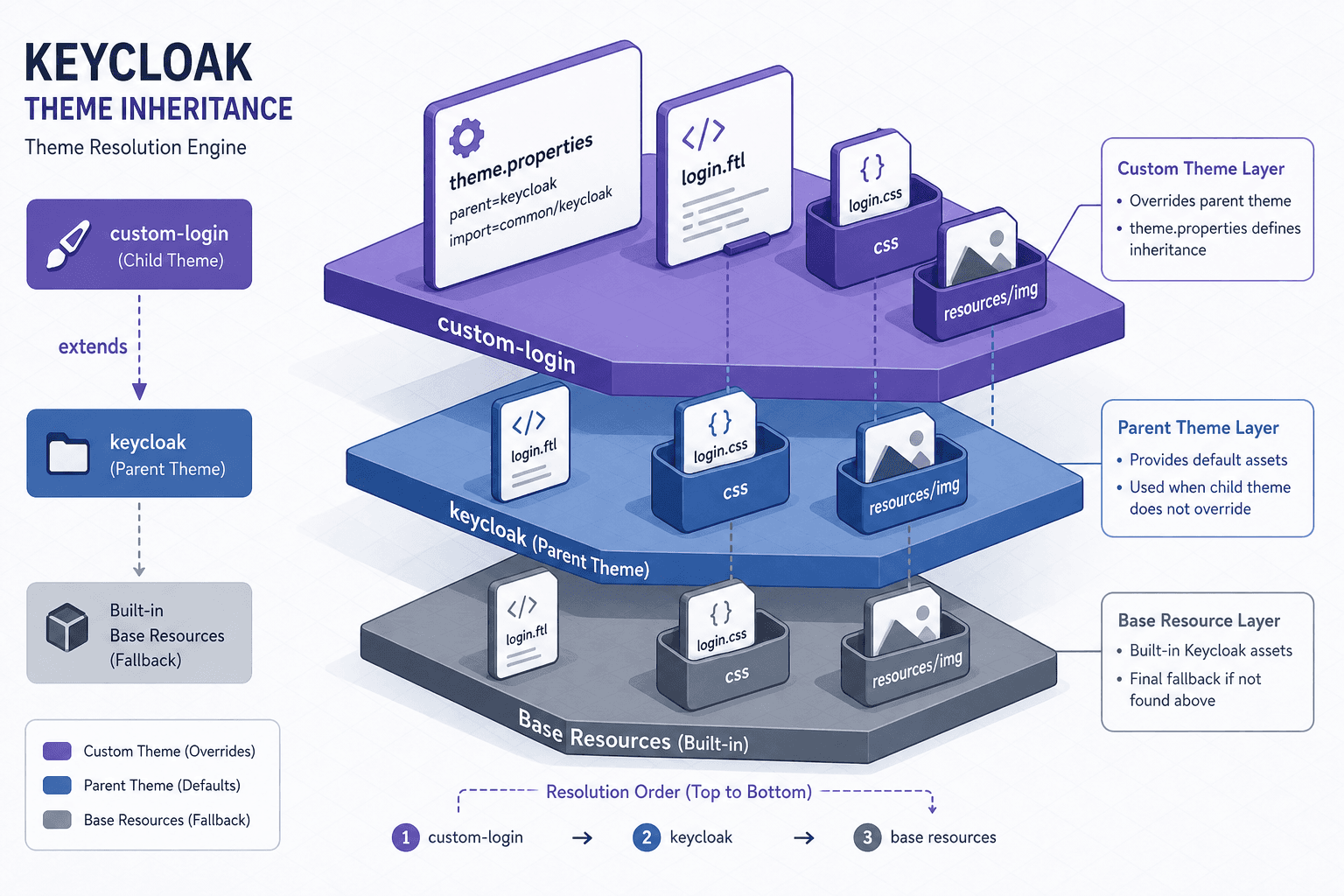
Customizing Keycloak begins not with CSS, but with configuration. Keycloak uses a hierarchical theme resolution system that prioritizes custom themes over built-in ones. When a user accesses the login page, Keycloak checks for a custom theme directory. If found, it loads theme.properties to determine the parent theme. This inheritance model is critical: your custom theme should typically extend keycloak or base, ensuring you inherit default styles and scripts while only overriding what you need.
The theme.properties file acts as the manifest. It defines the parent theme and locale. Crucially, the theme type (e.g., login, admin, email) is determined by the directory structure (e.g., a folder named login/) rather than a property within theme.properties. As documented in Keycloak's official theme documentation, this structure allows the engine to locate resources based on the context of the request. Without this file, Keycloak ignores your directory structure. For example, a minimal theme.properties for a custom login theme looks like this:
parent=keycloakThis configuration tells Keycloak to look for a directory structure relative to the parent theme. The absence of an import statement here is intentional for minimal examples, though importing specific services may be required for advanced SPI integrations.
CSS Isolation and Specificity
Once the theme is registered, the next challenge is CSS. Keycloak’s login pages are generated via FreeMarker templates that include inline styles and external stylesheets. A common mistake is using generic CSS selectors like button or .btn, which fail because Keycloak's default templates rely on specific selectors like #kc-login or .form-control.
Moreover, Keycloak’s UI components are often wrapped in containers that may have their own styling contexts. To ensure your styles override defaults, you must use high-specificity selectors. For instance, to change the background color of the login button, you cannot rely on a simple #kc-login selector if the default stylesheet uses !important or more specific parent selectors. As noted in Keycloak's UI customization guides, adhering to the specific class naming conventions is essential for effective styling.
Consider this example for a custom CSS file (css/login.css):
/* Override the default login button color */
.form-pf #kc-login {
    background-color: #0056b3;
    border-color: #0056b3;
    color: #ffffff;
}

/* Ensure input fields have consistent padding */
.form-control {
    padding: 10px;
    border-radius: 4px;
}
The selector .form-pf #kc-login is more specific than the default #kc-login, ensuring your style takes precedence. These same CSS isolation principles apply when customizing the admin theme, where similar specificity challenges exist. Always inspect the rendered HTML to identify the exact class hierarchy, as Keycloak’s structure can vary between versions.
Asset Management and Path Resolution
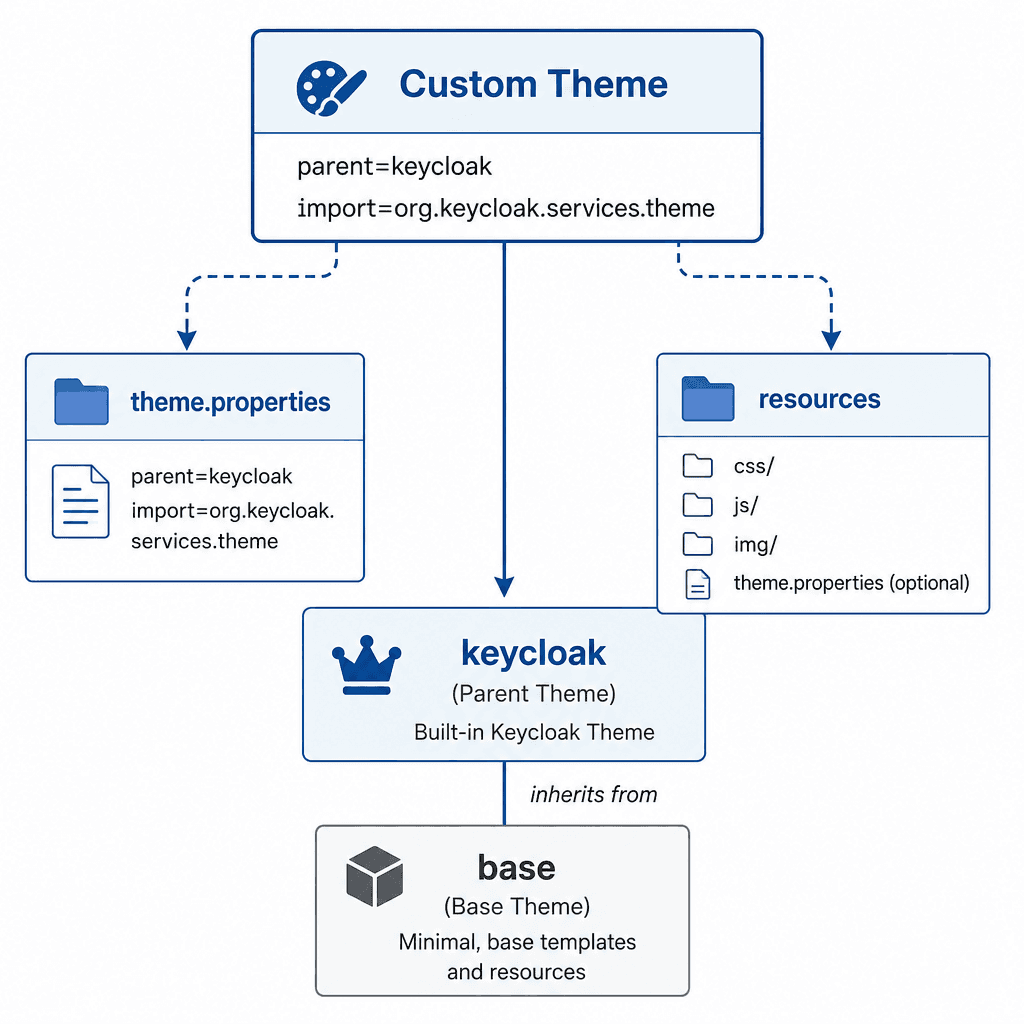
Branding requires assets: logos, favicons, and background images. Keycloak serves static resources from the resources directory within your theme. The critical aspect is path resolution. Keycloak deployments often use a context path (e.g., /auth). If you hardcode paths like /images/logo.png, they will break if the context path changes.
Instead, use FreeMarker’s ${url.resourcesPath} variable to generate correct URLs. This ensures that assets are always served relative to the current theme's resources, regardless of deployment configuration. As highlighted in Keycloak's resource handling documentation, using the resources path variable is the standard practice for ensuring asset availability in different deployment scenarios.
Your directory structure should look like this:
custom-theme/
└── login/
    ├── theme.properties
    ├── login.ftl
    └── resources/
        ├── css/
        │   └── login.css
        └── img/
            └── logo.png
In your FreeMarker template (login.ftl), reference the logo like this:
<img src="${url.resourcesPath}/img/logo.png" alt="Logo">This approach guarantees that the logo loads correctly whether Keycloak is accessed via http://localhost/auth or https://sso.example.com/auth.
Email Template Customization
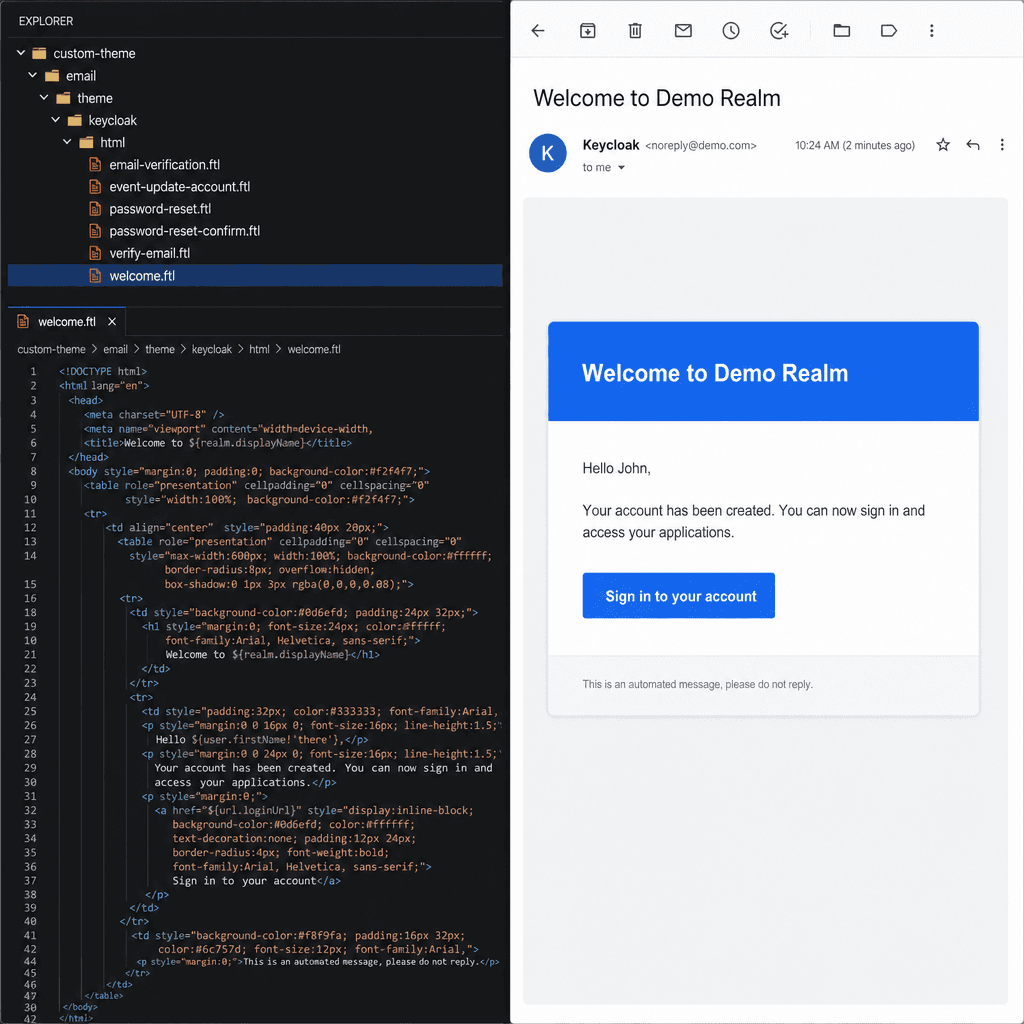
Keycloak customization extends beyond the login page to email notifications. Keycloak sends emails for password resets, account verification, and more. These emails use a separate theme structure under email/html/ within your custom theme, mirroring the built-in keycloak theme's email templates.
Email clients have strict limitations on CSS. They often strip external stylesheets and ignore <style> blocks in the <head>. Therefore, email templates require inline CSS. Keycloak’s default email templates use inline styles, and your custom templates should follow suit. As stated in Keycloak's email template documentation, maintaining inline styles is necessary to ensure consistent rendering across various email clients.
To customize an email, create a directory structure mirroring the default:
custom-theme/
└── email/
    └── html/
        ├── welcome.ftl
        └── ...
In welcome.ftl, apply inline styles directly to HTML elements:
<table style="background-color: #f8f9fa; padding: 20px;">
    <tr>
        <td style="font-family: Arial, sans-serif; font-size: 16px;">
            Welcome to our platform.
        </td>
    </tr>
</table>
You can also reference custom assets in emails using the same ${url.resourcesPath} mechanism, but ensure images are hosted on a public URL if your email client cannot access local resources.
Conclusion
Customizing Keycloak’s branding is a systematic process of overriding its theme resolution engine, managing CSS specificity, and handling asset paths correctly. By understanding the inheritance model, using high-specificity CSS selectors, and leveraging FreeMarker variables for path resolution, you can create a branded experience that is maintainable. Remember that email templates require inline CSS due to client limitations, so always test your emails across multiple clients. This approach ensures that your Keycloak instance not only functions correctly but also aligns with your organization’s identity.
Related posts
Keycloak Client Scopes and Protocol Mappers Explained
A detailed look at Keycloak client scopes and protocol mappers for token customization and claim management.
Building a Custom Login Theme With FreeMarker
Learn to build a custom Keycloak login theme using FreeMarker templates, covering login.ftl, i18n, and theme structure.
Keycloak Theme Structure and the Base Theme
A technical overview of Keycloak's theme structure, focusing on the base theme, theme.properties, and inheritance mechanisms for frontend developers.