A technical overview of Keycloak's theme structure, focusing on the base theme, theme.properties, and inheritance mechanisms for frontend developers.
By Ashish Kumar·Part 1 of Keycloak Themes and SPIs
Keycloak does not use a traditional CSS framework or a component library that you import. Instead, it uses a hierarchical template inheritance system built on top of the Freemarker engine. For frontend developers, this means you are not just styling pages; you are managing a dependency graph of templates. The core of this system is the base theme, which serves as the atomic source of truth for all UI components.
Understanding how Keycloak resolves templates and loads assets is critical. A misunderstanding of the inheritance chain often leads to broken stylesheets or missing JavaScript modules when overriding default behaviors. This article dissects the filesystem structure, the role of theme.properties, and the mechanism of template resolution.
Keycloak themes are stored on the filesystem or in the classpath under the themes/ directory. The structure is rigid and follows a specific resolution order based on scope.
The general path is:
themes/<themeName>/<themeType>/
<themeName>: The name of the theme, such as keycloak, base, or a custom name like acme. A realm does not automatically map to a theme directory of the same name; instead, each realm is explicitly configured, via its realm settings, to use a particular theme name for each theme type.
<themeType>: The type of UI being themed. Common types include login, account, admin, and email. Each type has its own set of templates and assets.
Within each directory, you will find:
templates/: Freemarker templates (.ftl files).
resources/: Static assets like CSS, JavaScript, images, and fonts.
When Keycloak starts, it scans these directories and builds a cache of available templates. It does not scan the filesystem on every request. This caching mechanism is important for performance but means you must restart the server (or reload the theme) after making structural changes to the theme directory.
The base theme is the root of the inheritance tree. It is not a theme you typically edit directly. Instead, it provides the default implementation for all template types. Every other theme inherits from base unless explicitly configured otherwise.
The base theme contains:
Default Templates: Files like login.ftl, register.ftl, and error.ftl provide the initial HTML structure.
Shared Partials: Small, reusable snippets of HTML (e.g., _messages.ftl for displaying error messages) located in a _partials directory.
Global Styles: CSS files that define the core layout, typography, and color variables.
The base theme is defined in the themes/base/login/ directory (and similarly for other theme types). It includes a theme.properties file that does not specify a parent, indicating it is the root.
This import statement is crucial. It tells Keycloak to load common resources from the common theme type, which contains shared logic used across all Keycloak themes.
When Keycloak renders a page, it follows a strict resolution order to find the correct template. This process is hierarchical and resolves from the most specific scope to the most general scope.
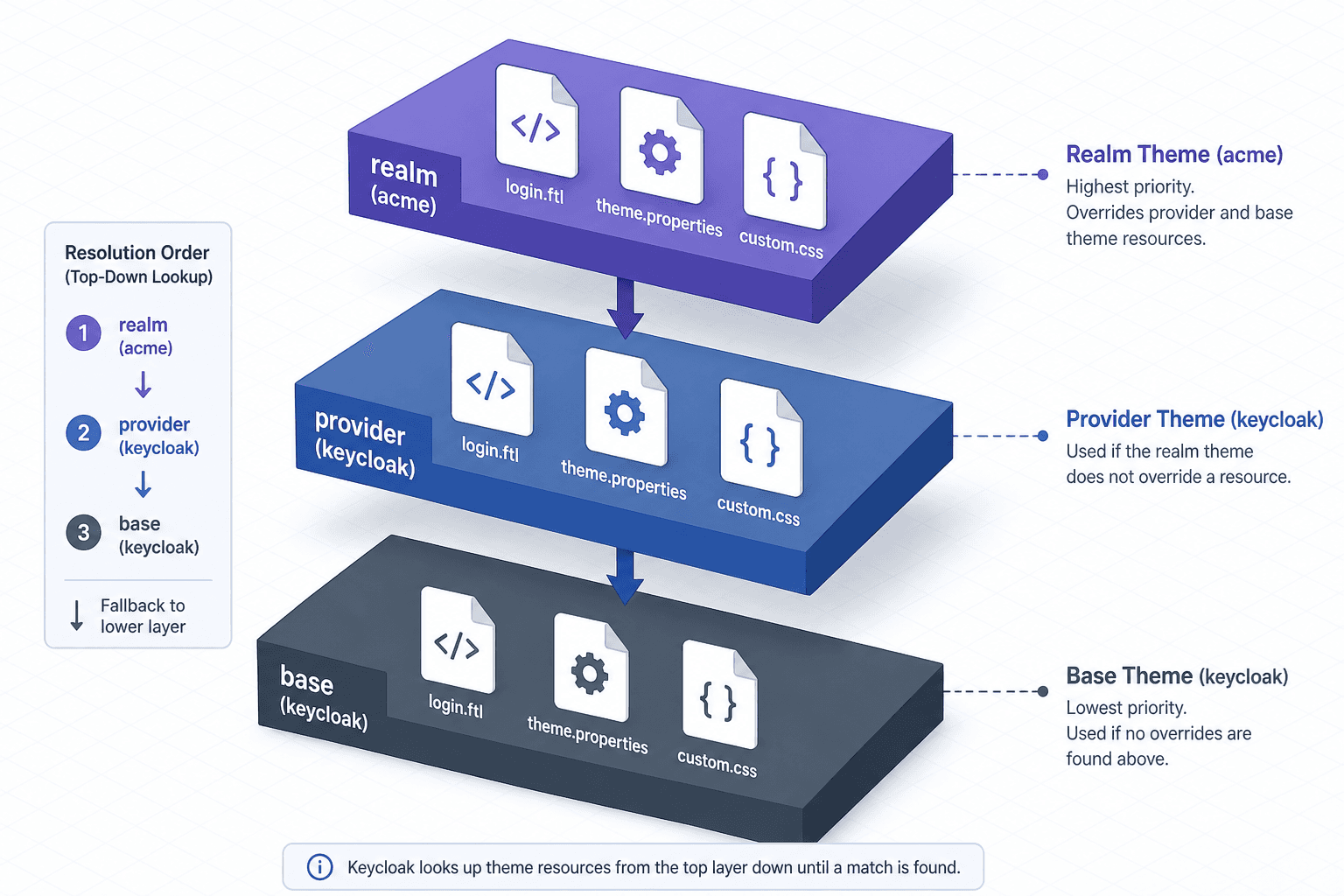
Consider a realm that is configured to use a custom login theme named acme, whose theme.properties sets parent=keycloak (and the keycloak theme's own theme.properties sets parent=base). Keycloak looks for the template login.ftl in the following order:
If the file exists in step 1, Keycloak uses it and stops searching for that specific template. If it does not exist, it moves to step 2. If it still does not exist, it falls back to step 3.
This mechanism applies to all templates, including partials. If login.ftl includes a partial like <#include "resources/_partials/messages.ftl">, Keycloak searches for that partial in the same resolution order.
Freemarker macros defined in parent templates are available in child templates. If base/login.ftl defines a macro named renderInput, you can call ${renderInput('username')} in your realm-specific login.ftl without redefining it.
However, if you redefine the macro in your realm-specific template, you shadow the parent's version. This is a powerful feature but can lead to subtle bugs if you accidentally override a macro you didn't intend to change.
The theme.properties file is the configuration layer for the template engine. It controls how templates are loaded, imported, and localized. Key properties include:
parent: Specifies the parent theme. For most custom themes, this is base.
parent=base
import: Lists additional resources to import. This is often used to include common CSS or JavaScript files.
import=common/keycloak
properties: Defines custom variables available in templates.
myCustomVar=someValue
You can access this in a template using ${properties.myCustomVar}.
locales: Specifies the list of supported locales for internationalization.
locales=en,de,fr
The theme.properties file is parsed once at startup. Changes to this file require a server restart.
Copying entire templates creates fragile dependencies that may miss security updates in future Keycloak releases. If Keycloak updates the base template in a future release, your copy will not receive the fix, potentially leading to security vulnerabilities or broken layouts.
Instead, use partial overrides. If you need to change only the logo on the login page, do not copy login.ftl. Instead, create a new template that extends the existing one or overrides specific blocks.
Suppose you want to change how error messages are displayed. The base theme defines a partial _messages.ftl. Instead of copying this file, you can create a new file in your realm theme:
If this file exists, Keycloak will use it instead of the one in base. You can then customize the HTML structure without affecting other parts of the login page.
When developing Keycloak themes, developers often encounter the following issues:
Incorrect Import Paths: Using import=common instead of import=common/keycloak in theme.properties can cause missing resources because the import property requires both the theme type and theme name (for example, common/keycloak) to resolve correctly.
Overriding Entire Templates: Copying full templates from the base theme breaks the inheritance chain. Future updates to Keycloak will not patch your copied templates, leaving you with outdated or insecure code.
Ignoring Caching: Keycloak caches template structures at startup. Modifying files in the themes/ directory without restarting the server or clearing the cache will result in no visible changes, leading developers to believe their edits failed.
Keycloak's theming system is a structured mechanism for customizing the user interface. By understanding the inheritance hierarchy and the role of the base theme, you can make targeted changes without breaking the underlying structure. Always prefer partial overrides over full template copies, and use theme.properties to manage imports and configurations. This approach ensures your themes remain maintainable and compatible with future Keycloak updates.