Keycloak Backup, Upgrade, and Disaster Recovery
A practical guide to Keycloak backup strategies, upgrade procedures, and disaster recovery planning for platform engineers and SREs.
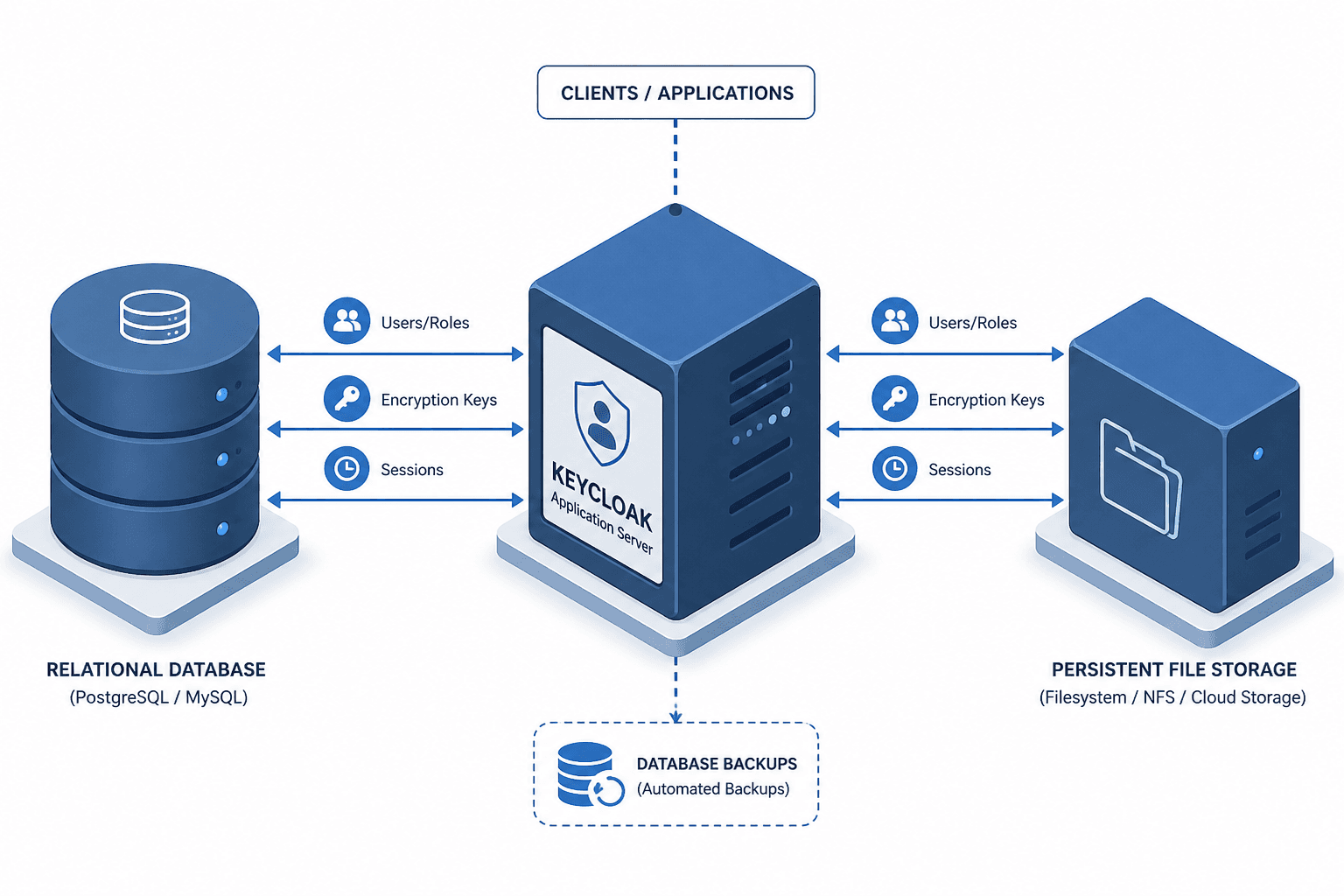
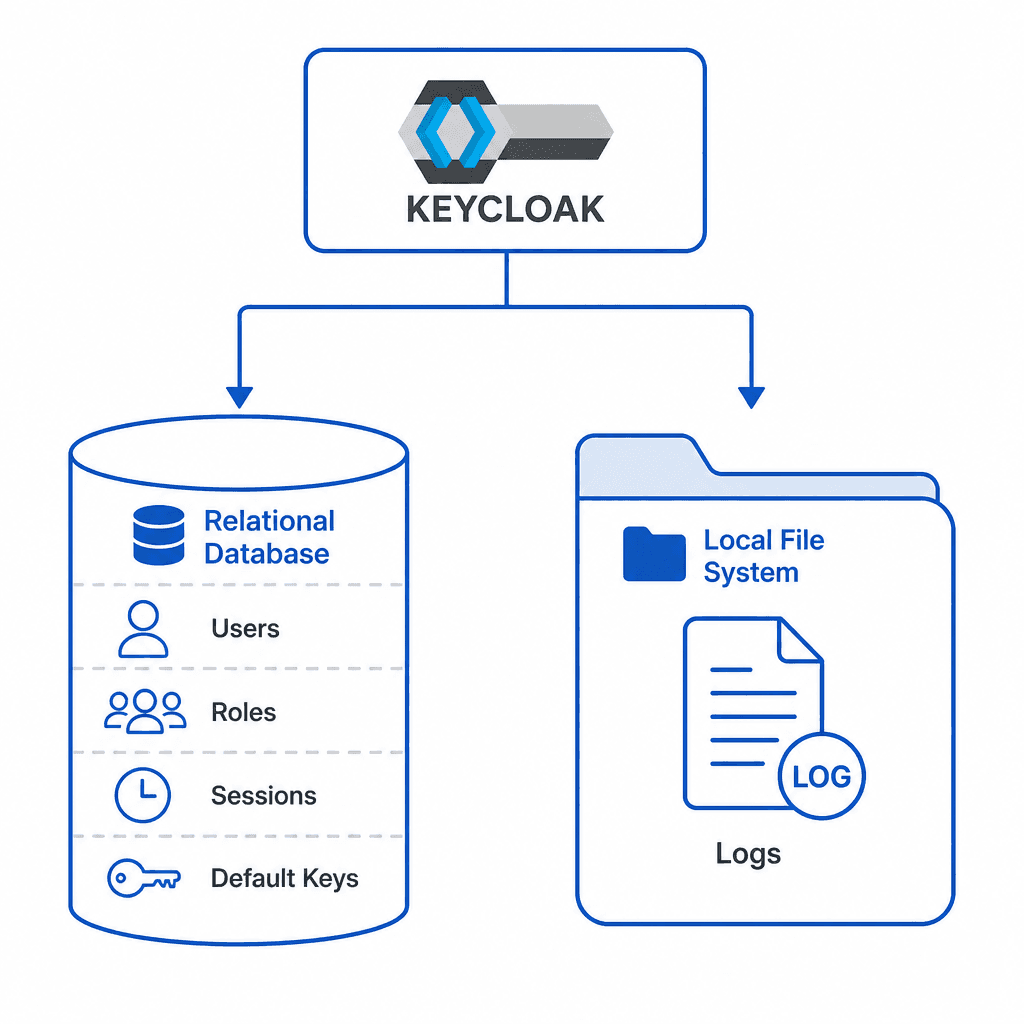
Keycloak is often mistaken for a stateless proxy because it handles authentication requests. It is not. Keycloak is a stateful application server. Its "state" is split between two distinct mechanisms: the relational database (users, roles, client registrations, and sessions) and the local file system (logs, and potentially configuration files). If you treat Keycloak like a load-balanced web app and only back up the code or the config, you will lose identity data upon failure.
For platform engineers and SREs, the goal is not just "backup" but ensuring Recovery Time Objectives (RTO) and Recovery Point Objectives (RPO) are met without corrupting cryptographic keys or session states. This guide details the mechanism of Keycloak’s data persistence, how to back up correctly, and the strict protocol required for upgrades.
The State Model: Where Data Lives
Before designing a backup strategy, you must understand where Keycloak writes data. Keycloak operates on two primary storage backends:
- The Database: Stores users, groups, roles, client configurations, authentication sessions, and offline tokens. By default, cryptographic keys are also stored in the database using JPA or SPI providers, making the database the single source of truth for identity and security material.
- The File System: Stores application logs and, only if explicitly configured via a custom file-based key provider, local key storage. The file system is generally ephemeral in containerized deployments.
The critical vulnerability in most DR plans is the assumption that the file system is ephemeral. If your Keycloak nodes are ephemeral containers or VMs that do not persist /opt/keycloak/data/, you may lose local logs or custom file-based keys on restart. However, since default key storage is database-backed, you retain signing capability upon restart provided the database is restored. You must ensure your rto rpo targets account for database restore times rather than file system reconstruction.
Backup Strategies: Exports vs. Snapshots
There are two primary methods for backing up Keycloak, and they serve different purposes.
1. Realm Export (JSON)
The command kc.sh export --realm <realm-name> --file realm.json serializes the realm configuration into a JSON file. This includes users, roles, and client definitions. This process is commonly referred to as a realm export.
When to use: For migrating realms between environments, version-controlling configuration, or low-stakes recovery.
Why it fails for DR:
- No Sessions: User sessions are stored in the database (or cache). Exports do not include active sessions.
- No Keys: While the export includes public keys, it may not include the private keys required to verify existing offline tokens if those keys were rotated or generated locally.
- Data Loss: Any data created after the last export is lost.
2. Database Snapshots (Recommended for DR)
Back up the underlying database (PostgreSQL, MySQL, etc.) using native tools (pg_dump, mysqldump, or cloud provider snapshots).
When to use: For all production disaster recovery scenarios.
Why it works:
- Consistency: Captures the exact state of users, sessions, and keys at a point in time.
- RPO Control: You can schedule frequent backups (e.g., every 5 minutes) to minimize data loss.
Operational Mechanism:
Ensure your database backups are transactionally consistent. If using PostgreSQL, use pg_basebackup (see PostgreSQL Continuous Archiving) for continuous archiving or logical replication. Do not rely on mysqldump alone for high-availability setups without considering replication lag.
Disaster Recovery Execution
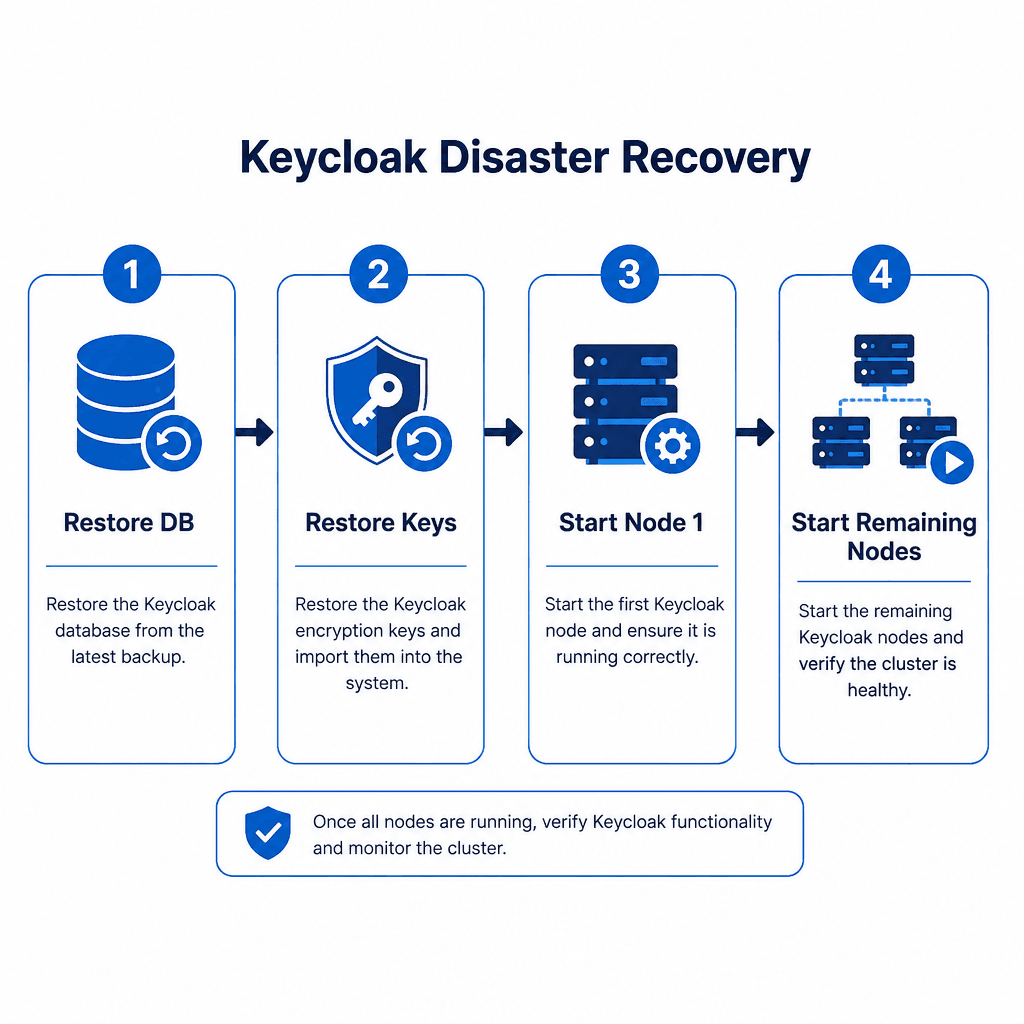
Restoring Keycloak is not as simple as starting the server. The order of operations matters to prevent cache inconsistencies and key mismatches.
Step 1: Restore the Database
Restore the database dump to your target instance. Verify the schema version matches the Keycloak version you are about to deploy.
Step 2: Restore Cryptographic Keys
If your keys are stored in the file system (non-default, custom configuration), you must restore the specific key storage files from your backup. If keys are stored in the database (default in recent versions), they are restored with the DB. Crucial: If you restore a DB backup from a different environment, you must ensure the key store matches, or you will face signature verification failures.
Step 3: Start Nodes Sequentially
Do not start all cluster nodes simultaneously.
- Start one node first. This node will perform any pending database migrations (Liquibase) and initialize the cache.
- Once the first node is fully started and healthy, start the remaining nodes. They will join the cluster and sync their cache from the leader.
Starting multiple nodes simultaneously against a restored DB can lead to "split-brain" scenarios where nodes disagree on the cache state or attempt concurrent migrations, leading to corruption. Refer to JGroups documentation for cluster synchronization details.
Step 4: Validate Cache Consistency
Check the logs for cache replication errors. If you have a distributed cache (e.g., JGroups, Redis), ensure all nodes have synchronized their state.
Upgrade Mechanics and Risks
Upgrading Keycloak is a destructive operation if not handled correctly. Keycloak uses Liquibase for database schema migrations. These migrations are run on startup.
The Risk
If you upgrade the binary and start the node, Liquibase will alter the database schema. If the process is interrupted (crash, OOM kill, network partition), the database may be left in a partially migrated state. Liquibase does not automatically roll back a failed migration, and Keycloak does not configure such a mechanism, so a pre-upgrade backup is still critical. A backup protects against data-level corruption, unexpected migration failures, or an interrupted schema upgrade. It is the primary safeguard against a partially migrated database, and taking one before every upgrade is a non-negotiable best practice.
Safe Upgrade Protocol
- Backup the Database: Take a full snapshot of the database. This is non-negotiable for safety.
- Stop All Nodes: Ensure no nodes are writing to the database.
- Upgrade the Binary: Update the Keycloak jar/Docker image on all nodes.
- Start One Node First: Start a single node. This node will run all pending Liquibase migrations. Monitor the logs for completion.
- Verify Schema: Check the
DATABASECHANGELOGtable to ensure all migrations are marked as executed. - Start Remaining Nodes: Once the first node is stable, start the other nodes. They will detect the new schema and join the cluster without running migrations.
Version Compatibility
Always check the release notes for major version jumps. Support for skipping major versions varies by release. Check the specific upgrade path in the Keycloak release notes for the target version, as support for skipping versions varies by release. Each step requires a fresh DB backup if an incremental upgrade is performed.
Conclusion
Keycloak’s reliability depends on treating it as a stateful system. Your backup strategy must prioritize database snapshots over realm exports to ensure true RPO compliance. Your disaster recovery plan must account for cryptographic key integrity and sequential node startup. Your upgrade procedure must isolate schema migrations to a single node to prevent corruption. By following these mechanisms, you ensure that your identity infrastructure remains resilient under failure and change.
Related posts
Identity Disaster Recovery Planning
A practical guide for SREs and security engineers on building identity disaster recovery plans, covering break-glass procedures, RTO targets, and resolving circular dependencies.
Keycloak Zero Trust Configuration
Implement zero trust security in Keycloak using client policies, step-up authentication, token binding, and session evaluation.
Writing a Keycloak Custom User Storage Provider
A technical guide for Java developers on implementing a Keycloak custom user storage provider to integrate legacy databases and manage user federation.
