Implement zero trust security in Keycloak using client policies, step-up authentication, token binding, and session evaluation.
By Ashish Kumar
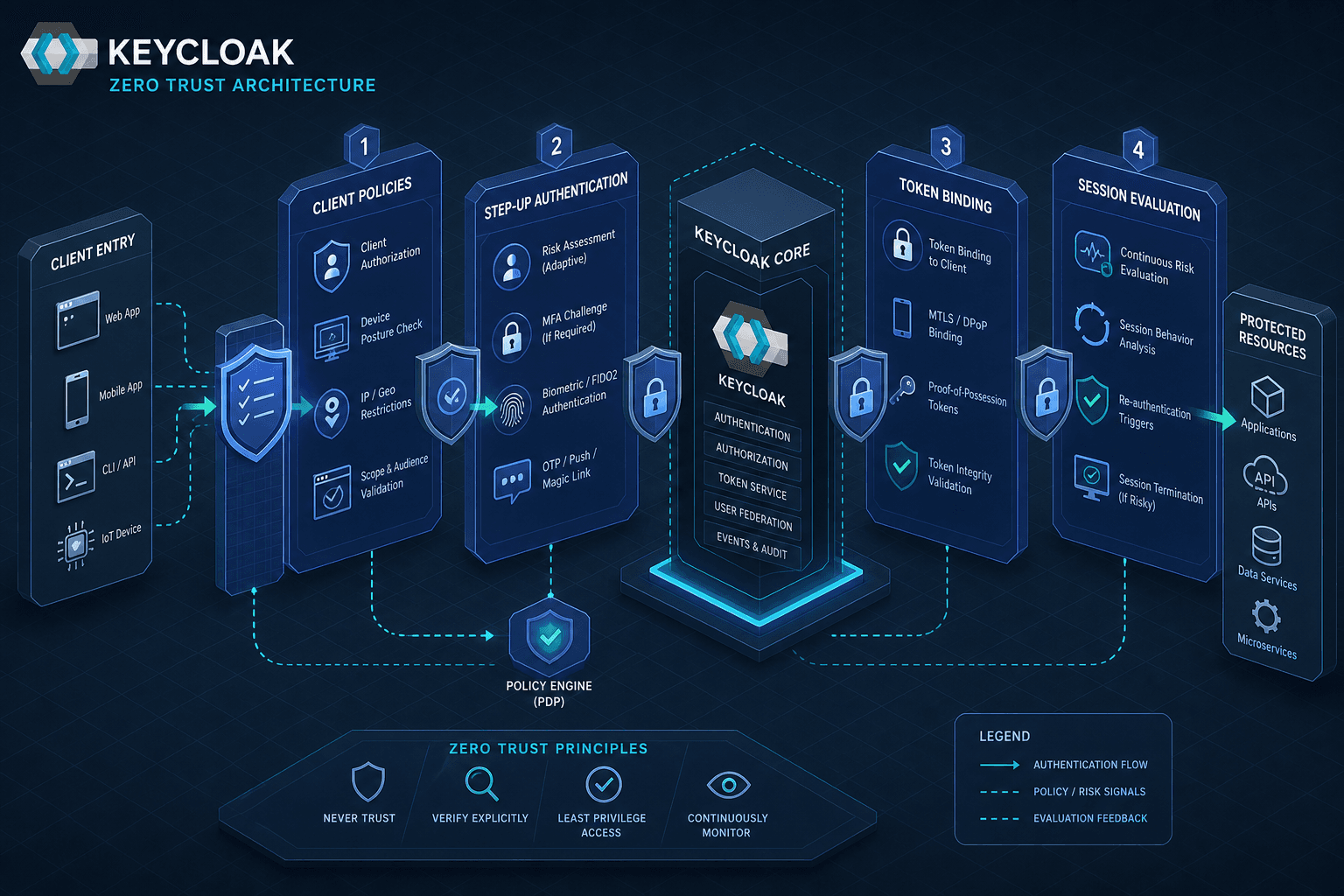
Zero Trust is often misunderstood as a product category rather than an architectural strategy. In the context of Identity and Access Management (IAM), keycloak zero trust means "never trust, always verify." For Keycloak, this translates to moving beyond static credential validation to dynamic, context-aware decision-making. This walkthrough details how to implement Zero Trust principles in Keycloak using four specific mechanisms: Client Policies, Step-Up Authentication, Token Binding, and Session Evaluation.
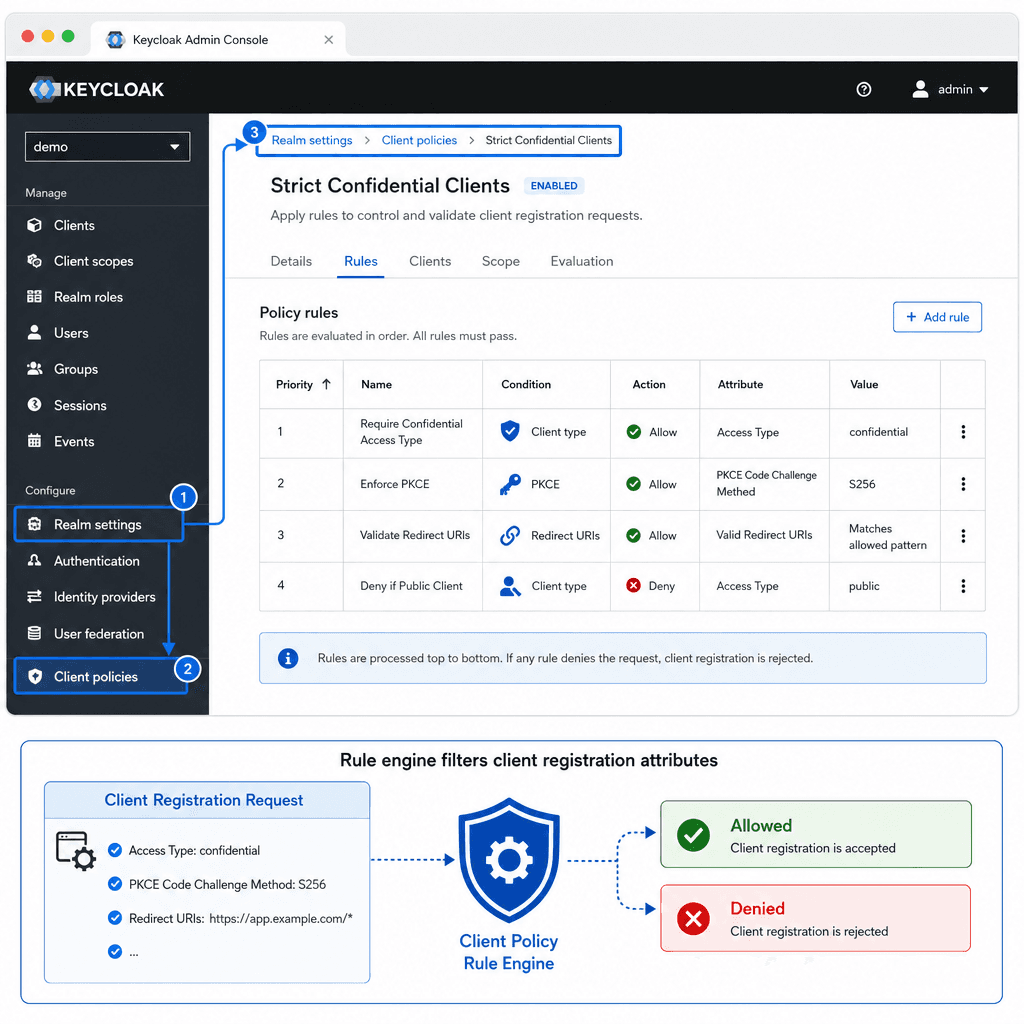
The first layer of Zero Trust is ensuring that only authorized clients can interact with the identity provider. Keycloak’s Client Policies feature allows administrators to define rules that validate client registrations before they are saved or updated. This prevents misconfiguration and ensures that clients adhere to security standards from inception.
Client Policies operate as a filter chain during client creation or update. They evaluate attributes such as client type, redirect URIs, and required scopes. If a policy condition fails, the operation is rejected.
Consider a scenario where we want to ensure that all confidential clients (e.g., server-side applications) use PKCE (Proof Key for Code Exchange) and restrict their redirect URIs to a specific domain.
Navigate to Realm Settings > Client Policies.
Create a new policy named Strict Confidential Clients.
Define a rule:
Condition: Client Type is Confidential.
Action: Enable PKCE and set Valid Redirect URIs pattern to https://app.example.com/*.
Assign this policy to the relevant client types or realms.
This ensures that no confidential client can be registered without PKCE, mitigating authorization code interception attacks.
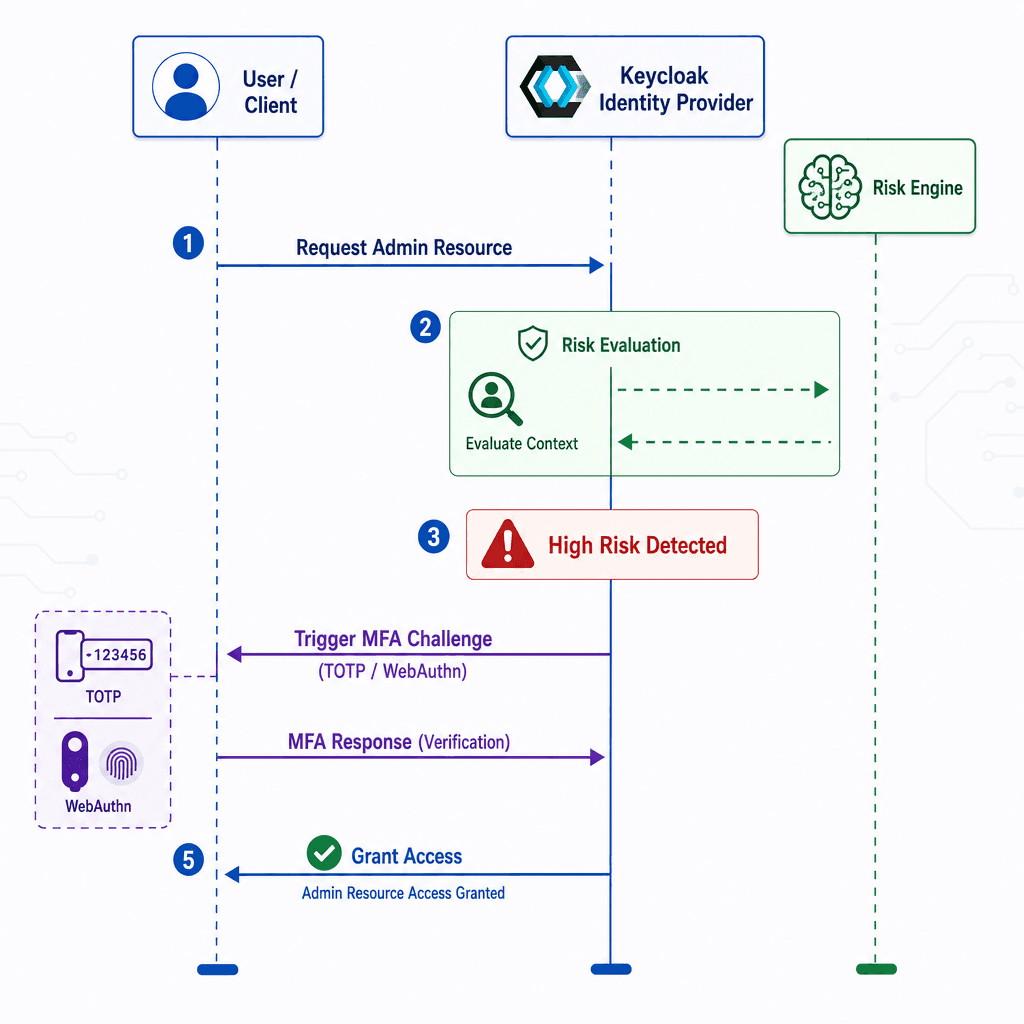
Zero Trust requires that authentication strength matches the sensitivity of the requested resource. Static MFA prompts are inefficient and user-hostile. Keycloak supports Step-Up Authentication (also known as Adaptive Authentication), where additional verification challenges are triggered dynamically based on context.
When a user attempts to access a protected resource, the identity provider evaluates the current session context. If the context indicates high risk (e.g., new device, unusual location) or the resource requires elevated privileges, Keycloak interrupts the flow and presents an additional challenge (e.g., TOTP, WebAuthn).
Let’s configure a scenario where accessing the /admin endpoint requires multi-factor authentication (MFA), while /public does not.
Configure Authentication Flows:
Create a new flow named Step-Up Admin Flow.
Add Conditional OTP Form or WebAuthn Authenticator as a required step.
Bind to Clients/Realms:
In Realm Settings > Authentication, bind the Step-Up Admin Flow to the Browser flow using the Bindings tab, or use a custom event listener to trigger it.
Client-Side Trigger:
The client application must initiate a new authentication request with a specific scope or parameter (e.g., acr_values=urn:ietf:params:oauth:acr:level2) to signal the need for step up authentication.
This mechanism ensures that users are not challenged unnecessarily, while high-risk actions are strictly controlled.
Access tokens are often stolen via XSS or network sniffing. Token binding cryptographically links the token to the client’s public key, ensuring that only the intended client can use it. This is a core Zero Trust control for preventing token replay attacks.
Keycloak supports OAuth 2.0 Demonstrating Proof-of-Possession (DPoP, RFC 9449) and mutual-TLS client certificate-bound access tokens (RFC 8705) as token binding mechanisms. The client generates a key pair and includes the public key as a jwk claim inside the header of a signed DPoP proof JWT, which is sent in the DPoP HTTP header during the authorization code exchange. Keycloak binds a thumbprint of this public key to the issued access token. Subsequent API requests must present a fresh DPoP proof signed with the same private key. Crucially, the Resource Server (not Keycloak) is responsible for validating the proof of possession (DPoP header or mTLS) against the bound key in the access token. Keycloak issues the token; the RS validates it.
In the client's Advanced settings tab, enable OAuth 2.0 DPoP Bound Access Tokens.
Alternatively, configure mutual TLS certificate-bound access tokens for mTLS-based binding.
Client Configuration:
The client (e.g., a SPA or mobile app) must support DPoP (Demonstrating Proof-of-Possession) or MTLS token binding.
Example OAuth request using DPoP:
POST /realms/myrealm/protocol/openid-connect/token HTTP/1.1Host: keycloak.example.comContent-Type: application/x-www-form-urlencodedDPoP: <signed_jwt>grant_type=authorization_code&code=...&client_id=myclient
The DPoP header contains a signed JWT that proves possession of the private key corresponding to the public key bound to the access token.
Resource Server Validation:
The resource server must validate that the token’s bound key matches the client’s presented key by verifying the DPoP signature and ensuring the key in the htm (HTTP Method) and htu (HTTP URI) claims of the DPoP proof matches the incoming request.
This ensures that even if an attacker steals the access token, they cannot use it without the corresponding private key.
Static sessions are vulnerable to session hijacking. Keycloak’s Session Evaluation allows for real-time assessment of session validity based on contextual factors.
Keycloak natively enforces session timeout settings defined in Realm Settings > Sessions, and additional contextual checks can be layered on top via custom SPI implementations or event listeners. These checks can include:
Idle Timeout: Maximum time since last activity (native Keycloak setting).
Absolute Timeout: Maximum session lifetime (native Keycloak setting).
IP Address Validation: Restrict sessions to specific IP ranges (requires a custom SPI or event listener, not a built-in Keycloak setting).
Device Fingerprinting: Detect changes in device characteristics (requires a custom SPI or event listener, not a built-in Keycloak setting).
Implement a custom SPI or event listener, since Keycloak does not provide a built-in IP Address Validation toggle.
Define allowed IP ranges or networks within that custom implementation.
Event Listeners:
Implement a custom Event Listener to monitor login and token refresh events. If an IP change is detected, log a warning and optionally invalidate the session.
This ensures that sessions are continuously validated against expected behavior, reducing the window of opportunity for attackers.
Implementing Zero Trust in Keycloak requires a layered approach. Client Policies ensure only authorized clients exist. Step-Up Authentication adapts to risk levels. Token Binding prevents token misuse. Session Evaluation maintains continuous trust. Together, these mechanisms create a robust security posture that aligns with Zero Trust principles. Security engineers should view these configurations not as one-time setups but as evolving controls that adapt to threat landscapes.