Spring Boot Keycloak: The Current Way
A guide to securing Spring Boot applications with Keycloak using the current OAuth2 Resource Server and JWT Decoder standards, replacing deprecated adapters.
For years, the spring boot keycloak integration meant wrestling with the keycloak-spring-security-adapter. It was a heavy, opaque layer that injected itself into the servlet container, managing sessions and token validation behind the scenes. If you followed those tutorials, you likely ended up with a tangled mess of deprecated annotations and unclear failure modes.
The current approach is fundamentally different. Spring Boot 3.x (and late 2.x) treats Keycloak not as a special entity requiring a dedicated adapter, but as a standard OpenID Connect (OIDC) provider. You no longer need the adapter. You need a JwtDecoder and an OAuth2ResourceServer configuration. This shift moves the complexity from a hidden filter chain to explicit bean definitions, giving you control over token validation and role mapping.
The Mechanism of Trust
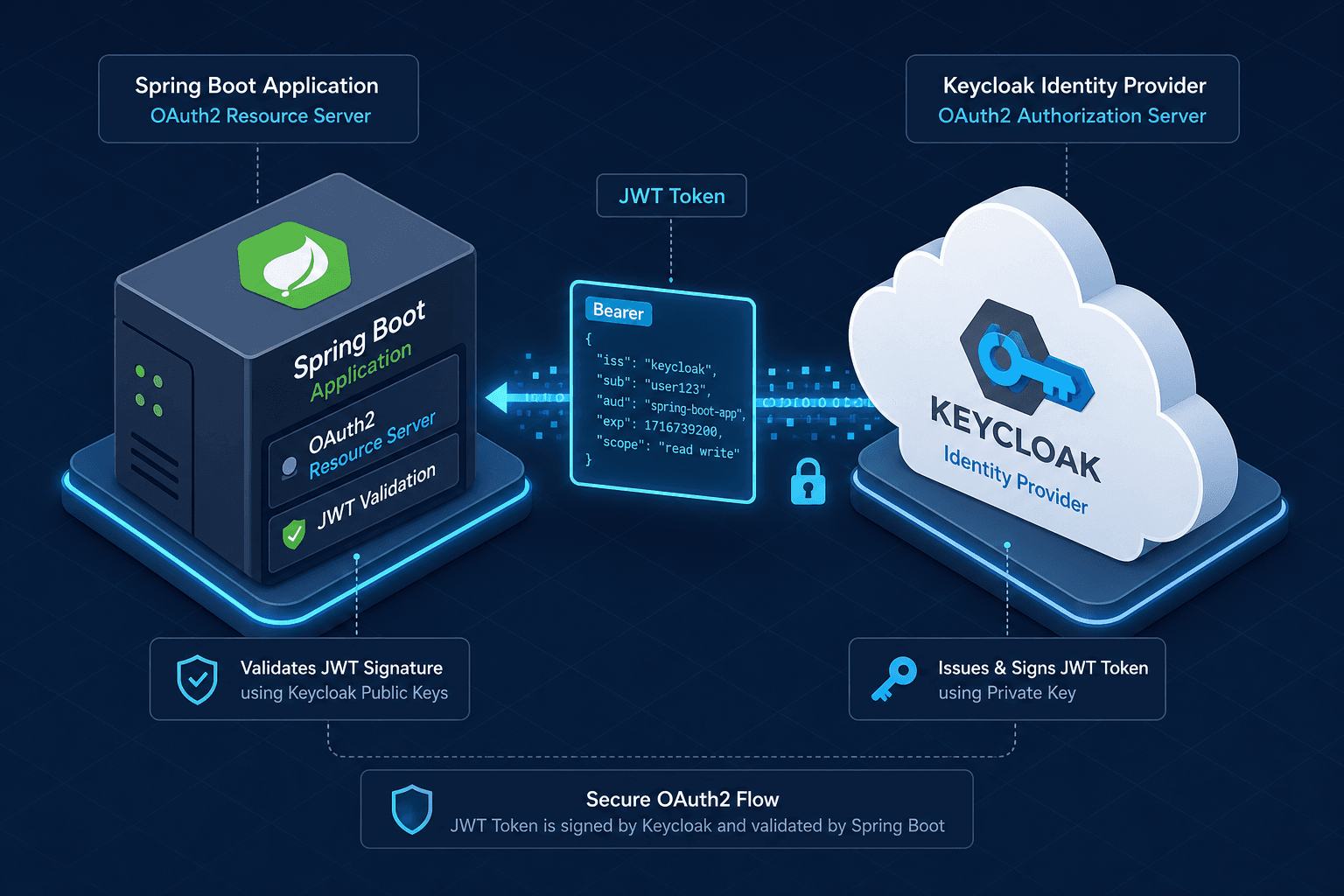
To understand the modern integration, you must understand where trust lives. In the legacy adapter model, the application often maintained a session state with Keycloak. In the modern model, the application is stateless. It trusts the JSON Web Token (JWT) issued by Keycloak because it can cryptographically verify its signature.
The mechanism works as follows:
- Issuance: Keycloak issues a JWT containing user claims (roles, groups, email) and signs it with its private key.
- Transmission: The client (browser, mobile app, or another service) includes this JWT in the
Authorization: Bearer <token>header. - Verification: Spring Boot’s
JwtDecoderfetches Keycloak’s public keys (JWKs) from thejwks_uriendpoint. It verifies the JWT signature using these keys. - Mapping: If the signature is valid, the
JwtAuthenticationConverterextracts specific claims (likeroles) and converts them into Spring SecurityGrantedAuthorityobjects. - Authorization: The
SecurityFilterChainchecks if the authenticated user has the required authority to access the resource.
The critical insight here is that the application never "calls home" to Keycloak to validate every token. It fetches the public keys once (or refreshes them periodically via cache) and verifies the signature locally. This is significantly faster and more resilient to Keycloak network partitions than the old adapter approach.
Configuration Mechanics
The first step in the modern integration is configuring Spring Boot to recognize Keycloak as an OIDC provider. You do this in application.yml (or application.properties). The most common mistake is using the old spring.security.oauth2.client configuration. You must use the resourceserver block.
spring:
  security:
    oauth2:
      resourceserver:
        jwt:
          issuer-uri: https://keycloak.example.com/realms/my-realm
          jwk-set-uri: https://keycloak.example.com/realms/my-realm/protocol/openid-connect/certs
Why both?
The issuer-uri is used for issuer validation (checking that the token was actually issued by Keycloak). The jwk-set-uri is the endpoint where Spring Boot fetches the public keys for signature verification. In older tutorials, you might see auth-server-url. That is deprecated. The jwk-set-uri is the standard OIDC endpoint for JWKs, as defined by the OpenID Connect Discovery specification (RFC 7517 defines the JWK Set format itself).
Spring Boot’s JwtDecoder factory will automatically use these URIs to create a decoder. You don’t need to manually instantiate it unless you need custom claims processing.
Role Mapping Strategy
Here is where most developers hit a wall. Keycloak roles are stored in the token under realm_access.roles (for realm roles) or resource_access.<client-id>.roles (for client roles). Spring Security, however, expects authorities in a specific format, typically prefixed with ROLE_ or SCOPE_.
If you leave the default configuration, Spring Security will not map these claims correctly. You will get 403 Forbidden even if the user has the right role, because the authorities list is empty or mismatched.
You must define a JwtAuthenticationConverter bean. This converter is the bridge between the JWT payload and Spring Security’s GrantedAuthority model.
import org.springframework.context.annotation.Bean;
import org.springframework.context.annotation.Configuration;
import org.springframework.security.core.GrantedAuthority;
import org.springframework.security.core.authority.SimpleGrantedAuthority;
import org.springframework.security.oauth2.server.resource.authentication.JwtAuthenticationConverter;

import java.util.Collection;
import java.util.List;
import java.util.Map;
import java.util.stream.Collectors;

@Configuration
public class SecurityConfig {

    @Bean
    public JwtAuthenticationConverter jwtAuthenticationConverter() {
        JwtAuthenticationConverter converter = new JwtAuthenticationConverter();
        // Keycloak stores roles in nested claims, so the built-in
        // JwtGrantedAuthoritiesConverter (which only reads top-level claims)
        // can't extract them directly. Use a custom converter instead.
        // For realm roles: "realm_access.roles"
        // For client roles: "resource_access.my-client.roles"
        converter.setJwtGrantedAuthoritiesConverter(jwt -> {
            Map<String, Object> realmAccess = jwt.getClaimAsMap("realm_access");
            if (realmAccess == null || realmAccess.get("roles") == null) {
                return List.of();
            }
            @SuppressWarnings("unchecked")
            Collection<String> roles = (Collection<String>) realmAccess.get("roles");
            return roles.stream()
                .map(role -> (GrantedAuthority) new SimpleGrantedAuthority("ROLE_" + role))
                .collect(Collectors.toList());
        });
        return converter;
    }
}
In your SecurityFilterChain, you wire this converter in:
@Bean
public SecurityFilterChain filterChain(HttpSecurity http) throws Exception {
    http
        .oauth2ResourceServer(oauth2 -> oauth2
            .jwt(jwt -> jwt
                .jwtAuthenticationConverter(jwtAuthenticationConverter())
            )
        );
    return http.build();
}
Now, when Keycloak sends a token with "realm_access": { "roles": ["ADMIN", "USER"] }, the converter transforms these into ROLE_ADMIN and ROLE_USER authorities. You can then use standard Spring Security annotations like @PreAuthorize("hasRole('ADMIN')").
Worked Scenario
Let’s walk through a concrete request.
Actor: Alice, a user in Keycloak realm my-realm.
Artifact: Alice has the realm role ADMIN assigned.
Action: Alice calls GET /api/admin/dashboard with her JWT.
-
Request: Alice’s client sends:
GET /api/admin/dashboard HTTP/1.1 Host: api.example.com Authorization: Bearer eyJhbGciOiJSUzI1NiIsInR5cCI6IkpXVCJ9... -
Decoding: Spring Boot’s
JwtDecoderreceives the token. It checks theissclaim againstissuer-uri. It then extracts thekid(Key ID) from the JWT header and looks up the corresponding public key from its cached JWK set. It verifies the signature. If valid, it decodes the payload. -
Conversion: The payload contains:
{
  "realm_access": {
    "roles": ["ADMIN", "USER"]
  }
}
The
JwtAuthenticationConverter(configured earlier) readsrealm_access.roles. It converts"ADMIN"toROLE_ADMINand"USER"toROLE_USER. -
Authorization: The
SecurityFilterChainintercepts the request. The endpoint is annotated with:@GetMapping("/admin/dashboard") @PreAuthorize("hasRole('ADMIN')") public String getDashboard() { return "Admin Dashboard"; }Spring Security checks the
ROLE_ADMINauthority. It exists. Access is granted. -
Response: Alice receives the dashboard content.
If Alice only had the USER role, the converter would still create ROLE_USER, but the hasRole('ADMIN') check would fail, and Spring Security would return 403 Forbidden.
Why This Matters
The legacy adapter approach was convenient for quick prototypes but opaque for debugging. It hid the token validation logic inside the adapter’s internal filters. The modern OAuth2ResourceServer approach is explicit. You see the decoder. You see the converter. You see the filter chain.
This transparency allows you to:
- Cache JWKs: Spring Boot caches the JWK set by default, but you can customize the cache size and TTL.
- Custom Claims: You can easily add additional claim mapping if your Keycloak setup includes custom claims beyond roles.
- Standard Compliance: You are using standard Spring Security OAuth2 Resource Server features, which are well-documented and supported by the Spring community.
The key takeaway is to stop looking for a "Keycloak Adapter" and start looking for a "JWT Decoder." Once you frame the problem as "verifying a JWT from an OIDC provider," the solution becomes straightforward and robust. This spring boot keycloak integration pattern ensures your application remains secure, maintainable, and aligned with industry standards.
Conclusion
By embracing the OAuth2ResourceServer and JwtDecoder beans, you align your Spring Boot application with modern OIDC standards. This approach eliminates the fragility of legacy adapters, provides clear visibility into token validation, and leverages Spring Security’s extensive filtering ecosystem. Stop fighting the adapter; start trusting the JWT.
Related posts
Spring Security SAML: A Working Integration
A practical guide to integrating Spring Security SAML with Spring Boot, covering SAML2 relying party configuration, service provider setup, and metadata handling.
Keycloak Zero Trust Configuration
Implement zero trust security in Keycloak using client policies, step-up authentication, token binding, and session evaluation.
Spring Security SSO With Group and Role Mapping
Implement Spring Security SSO with group and role mapping using GrantedAuthoritiesMapper and OIDC claims for secure access control.
