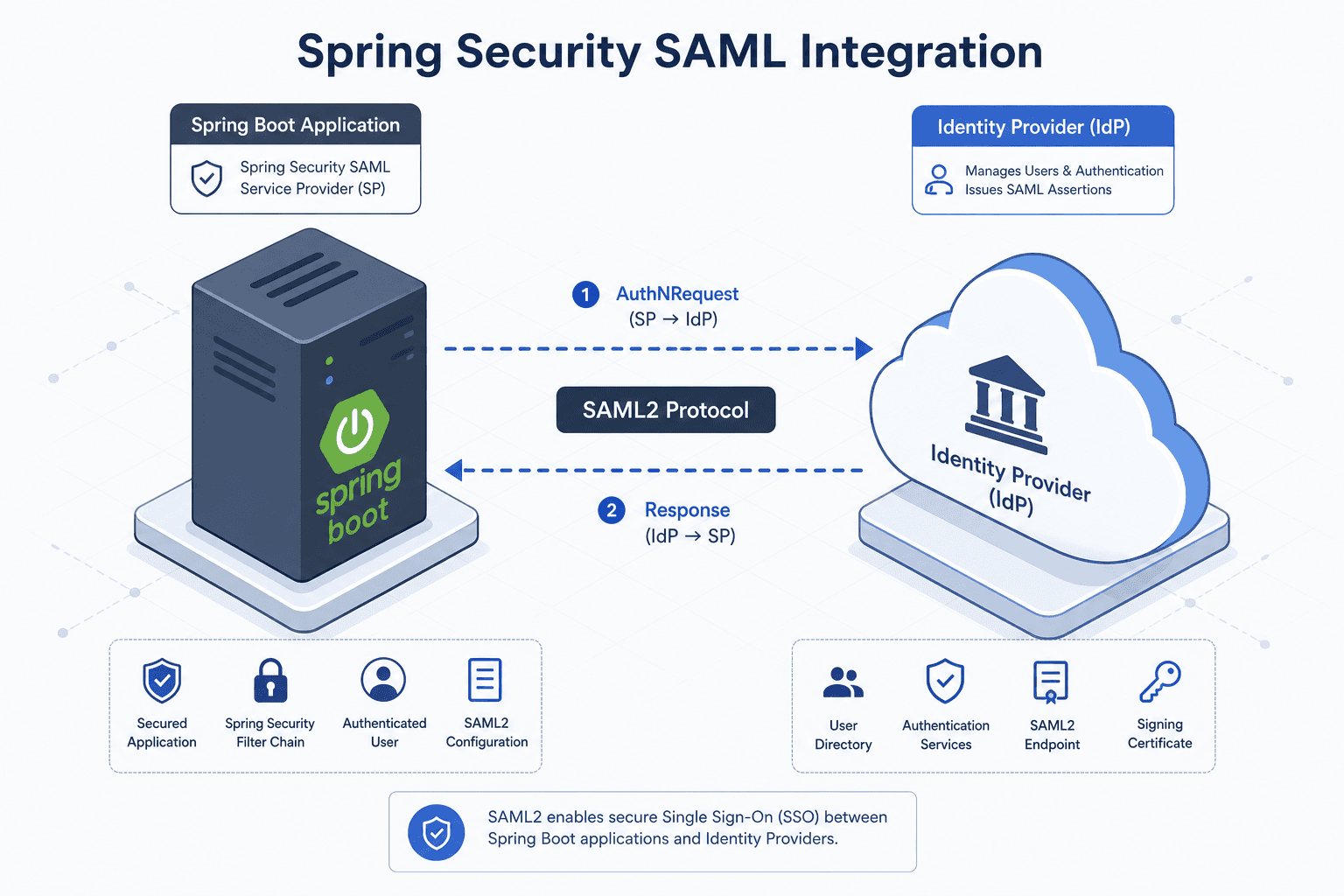
Spring Security SAML: A Working Integration
A practical guide to integrating Spring Security SAML with Spring Boot, covering SAML2 relying party configuration, service provider setup, and metadata handling.
Integrating spring security saml into a Spring Boot application used to require manually wiring Saml2WebSsoAuthenticationFilter instances, managing MetadataProvider beans, and handling raw XML parsing. In Spring Security 6.x, the mechanism has shifted from imperative filter chaining to a declarative configuration model centered on RelyingPartyRegistrationRepository. This shift reduces boilerplate and enforces correctness by treating the SAML configuration as data rather than code. This guide details how to build a working integration by focusing on the RelyingPartyRegistration artifact, its metadata exchange, and the underlying HTTP flow.
The RelyingParty Registration Artifact
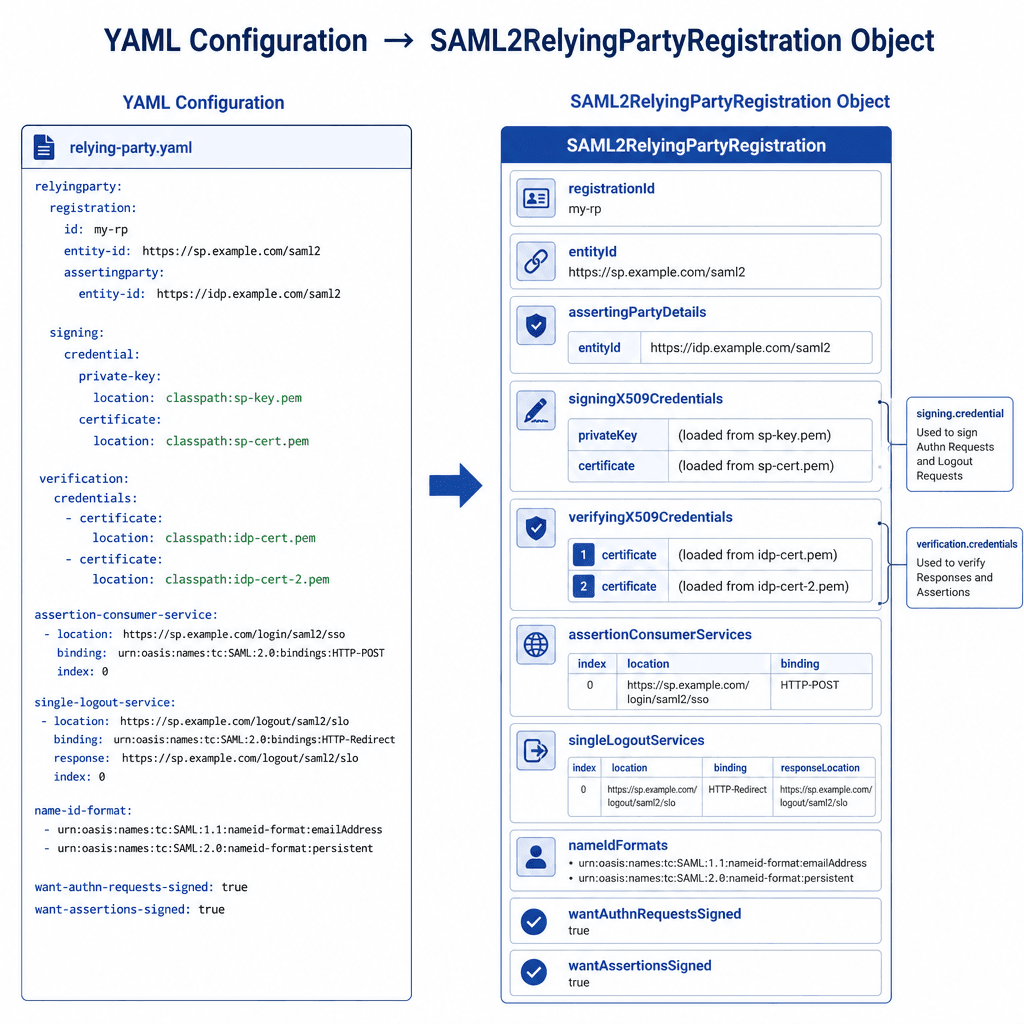
The core mechanism in modern Spring Security SAML is the RelyingPartyRegistration. Unlike previous versions where you manually instantiated filters, Spring Boot now uses this registration object to automatically configure the entire authentication filter chain. The RelyingPartyRegistration holds three critical pieces of state: the cryptographic material (certificates and keys), the endpoint URLs (IdP Single Sign-On and Logout URLs), and the entity identifiers.
When Spring Security starts, it looks for a bean of type RelyingPartyRegistrationRepository. If you provide a YAML or Properties configuration, Spring Boot auto-creates this repository. This repository acts as a lookup table. When a user attempts to log in, the Saml2WebSsoAuthenticationRequestFilter queries this repository to determine which IdP to contact. This decouples the authentication logic from specific IdP implementations, allowing you to switch IdPs by changing configuration data, not code.
Configuration as Data
To establish a working integration, you must define the relying party in application.yml. The structure maps directly to the RelyingPartyRegistration.Builder methods. The most common mistake is misaligning the entityId or providing an incorrect signing certificate.
spring:
  security:
    saml2:
      relyingparty:
        registration:
          my-idp: # This key is the registration ID
            assertingparty:
              entity-id: https://idp.example.com/entityID
              singlesignon:
                url: https://idp.example.com/sso
                binding: REDIRECT
              singlelogout:
                url: https://idp.example.com/logout
                binding: REDIRECT
              verification:
                credentials:
                  - certificate: |
                      MIID... (IdP's public cert for validating assertions)
            signing:
              credentials:
                - certificate: |
                    MIID... (Base64 encoded X.509 cert)
In this configuration, my-idp is the registration ID used in your security config. The assertingparty.entity-id is the unique identifier for the IdP. The assertingparty.singlesignon.url is where the browser will be redirected. The verification.credentials are crucial: they tell Spring Security which public key to use to validate the digital signature on the SAML Assertion returned by the IdP. Without this, the OpenSaml4AuthenticationProvider will reject the assertion as untrusted.
The SSO Flow Mechanism
Understanding the HTTP flow is essential for debugging. The process begins when a user accesses a protected resource, triggering Spring Security’s AuthorizationFilter. Since the user is unauthenticated, they are redirected to the login page. In a SAML setup, the login page is not a HTML form but a redirect trigger.
- Redirect Initiation: The user hits
/login. Spring Security’sSaml2WebSsoAuthenticationRequestFilterintercepts this. It looks up theRelyingPartyRegistration(defaulting to the first available if no specific ID is provided). It constructs aSaml2RedirectAuthenticationRequestand redirects the browser to the IdP’sassertingparty.singlesignon.urldefined in the YAML. - IdP Processing: The IdP authenticates the user (via username/password, MFA, etc.) and generates a SAML Assertion. This assertion is signed with the IdP’s private key.
- POST Response: The IdP sends an HTTP POST response to the Spring Boot application’s
/login/saml2/sso/{registrationId}endpoint. This endpoint is automatically mapped by Spring Security based on theRelyingPartyRegistration. - Validation: The
Saml2WebSsoAuthenticationFilterreceives the POST data. It extracts theSAMLResponseparameter and validates the embedded XML digital signature within the assertion. It uses theverification.credentialsfrom theRelyingPartyRegistrationto verify the signature. If valid, it parses the assertion to extract attributes (likeemailorname). - Authentication Creation: Spring Security creates a
Saml2AuthenticatedPrincipaland places it in theSecurityContext. The user is now logged in.
This flow relies entirely on the OpenSaml4AuthenticationProvider. If the signature verification fails, the provider throws an exception, and the login fails silently or with a generic error. Always check your logs for Saml2AuthenticationException if the flow breaks at step 4.
Metadata Handling and Discovery
One of the most powerful features of this integration is automatic metadata generation. Instead of manually uploading an XML file to your IdP, Spring Security exposes the Service Provider (SP) metadata at /saml2/service-provider-metadata/{registrationId}.
This endpoint is handled by Saml2MetadataFilter. It dynamically generates the XML metadata document based on your RelyingPartyRegistration. The metadata includes your SP’s entityID, your ACS (Assertion Consumer Service) URL (/login/saml2/sso/{registrationId}), and your public signing certificate (if configured for request signing).
To expose this, ensure your security config allows access to the metadata endpoint. Typically, you do this by permitting all requests to /saml2/** for unauthenticated users, or by explicitly mapping the metadata filter.
@Configuration
public class SecurityConfig {

    @Bean
    public SecurityFilterChain securityFilterChain(HttpSecurity http,
            RelyingPartyRegistrationRepository registrations) throws Exception {

        http
            .authorizeHttpRequests(authorize -> authorize
                .requestMatchers("/saml2/**").permitAll() // Allow metadata access
                .anyRequest().authenticated()
            )
            .saml2Login(saml2 -> saml2
                .relyingPartyRegistrationRepository(registrations)
            );

        return http.build();
    }
}
By accessing /saml2/service-provider-metadata/my-idp, you get the XML needed to configure the IdP. This ensures that your SP’s certificate and endpoints are always in sync with the application’s runtime configuration. If you change the certificate in application.yml, the metadata endpoint reflects the change immediately upon restart.
Conclusion
Spring Security’s SAML2 integration works by treating SAML configuration as structured data (RelyingPartyRegistration) rather than imperative code. By defining the IdP endpoints, certificates, and entity IDs in YAML, Spring Boot automatically wires the Saml2WebSsoAuthenticationFilter and Saml2MetadataFilter. The mechanism hinges on the validation of the IdP’s signature using the configured verification credential and the dynamic generation of SP metadata. This approach minimizes boilerplate, reduces the risk of misconfiguration, and aligns with Spring Boot’s convention-over-configuration principles. For production deployments, ensure that the entityID matches exactly between the SP and IdP configurations, as any mismatch will cause the IdP to reject the authentication request.
Related posts
Spring Security SSO With Group and Role Mapping
Implement Spring Security SSO with group and role mapping using GrantedAuthoritiesMapper and OIDC claims for secure access control.
SecurityFilterChain in Spring Security 6
A technical walkthrough of configuring SecurityFilterChain in Spring Security 6 using the Lambda DSL and RequestMatchers for Java developers.
Spring Boot Keycloak: The Current Way
A guide to securing Spring Boot applications with Keycloak using the current OAuth2 Resource Server and JWT Decoder standards, replacing deprecated adapters.
