Running Keycloak on Kubernetes: A Guide
A guide for platform engineers and SREs on deploying Keycloak on Kubernetes, covering the Keycloak Operator, JGroups, DNS_Ping, rolling updates, and health probes.
Running Keycloak on Kubernetes: A Mechanistic Guide
Deploying Keycloak on Kubernetes is often misunderstood as simply containerizing a Java WAR file. For platform engineers and SREs, the challenge is not packaging; it is managing distributed state. Keycloak is not a simple stateless API; it is a clustered identity provider that relies on session replication and consistent token signing keys across all replicas. If these mechanisms fail, authentication breaks silently or inconsistently. This guide details the operational mechanics of running Keycloak reliably, focusing on the interaction between the Keycloak Operator, JGroups clustering, and Kubernetes lifecycle controls.
The Clustering Mechanism: JGroups and DNS_Ping
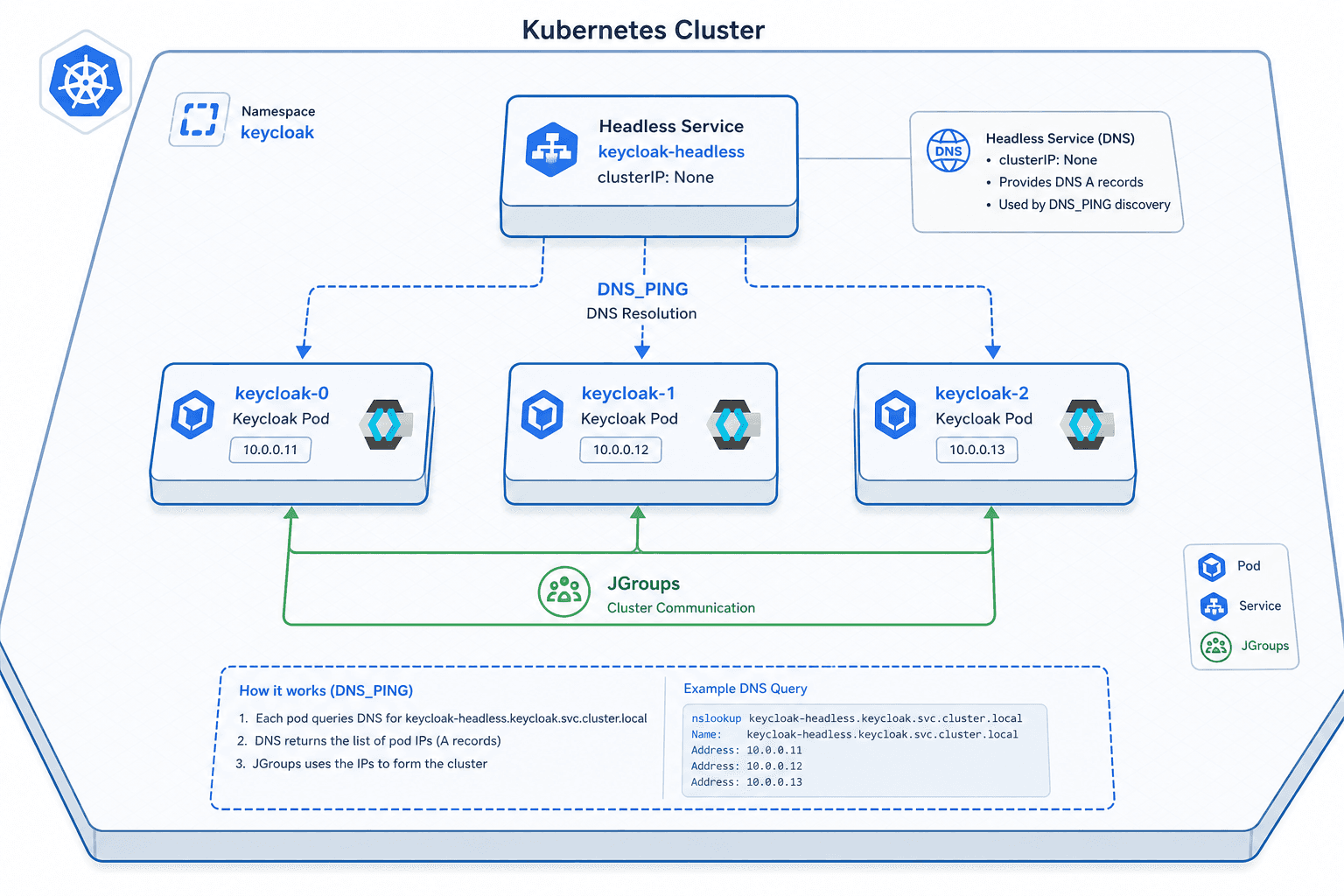
Keycloak uses JGroups, a Java-based toolkit for reliable group communication, to maintain a cluster view. In a traditional data center, nodes discover each other via multicast or static TCP lists. In Kubernetes, multicast is rarely supported due to network policy restrictions, and static IP lists fail because pod IPs are ephemeral.
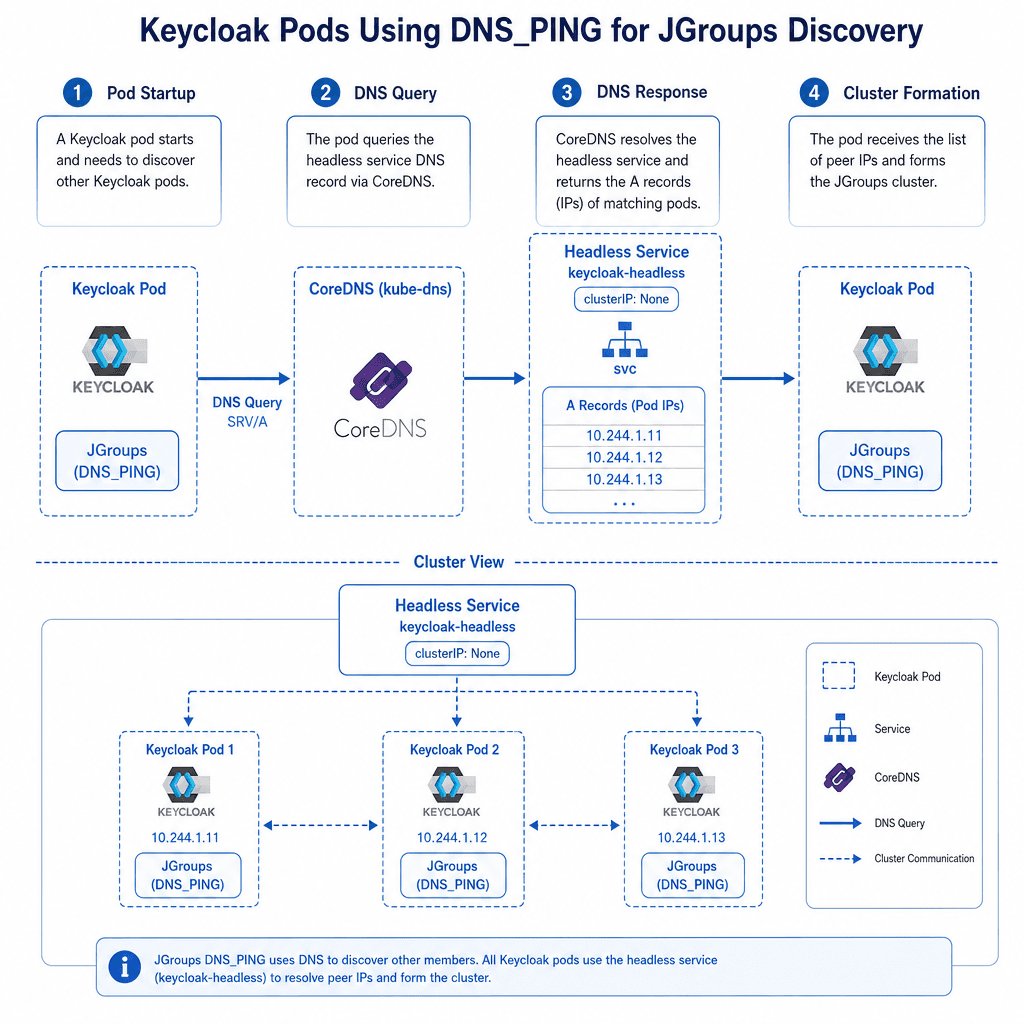
Therefore, you must configure JGroups to use the DNS_PING protocol. This mechanism allows Keycloak nodes to discover each other by querying the Kubernetes DNS service.
When a Keycloak pod starts, it initializes JGroups. The DNS_PING provider queries the local CoreDNS service for the headless service associated with the Keycloak StatefulSet. It extracts the A records (pod IPs) from this DNS query.
# Example JGroups configuration snippet for DNS_PING
<config>
  <tcp bind_addr="auto" ... />
  <dns_ping dns_query="keycloak-headless.namespace.svc.cluster.local" ... />
  <merge_server_list max_merge_attempts="3" />
</config>
The critical mechanism here is that every node must see the same set of IPs. If one pod queries DNS and sees 3 replicas while another sees 2 due to DNS propagation latency, the cluster enters a "split-brain" state. To mitigate this, Keycloak’s cache-stack property should be set to kubernetes, which pre-configures the DNS_PING provider correctly. You must also ensure the KUBE_NAMESPACE environment variable is set so the DNS query targets the correct namespace.
Without this configuration, Keycloak pods will start, believe they are standalone, and fail to replicate sessions. When a user logs in from Pod A and then refreshes their token from Pod B, Pod B will not have the session data, resulting in an authentication error.
The Keycloak Operator: Reconciliation Loop
The Keycloak Operator acts as a Kubernetes Controller. It watches for changes to the Keycloak Custom Resource Definition (CRD) and reconciles the cluster state. It does not just deploy pods; it manages the lifecycle of the underlying StatefulSet and Service resources.
When you apply a YAML manifest defining a Keycloak resource, the Operator performs the following steps:
- Validation: Checks for required fields (e.g., database credentials, TLS secrets).
- Resource Creation: Creates or updates a
StatefulSetwith the specified replica count and image. - Service Management: Ensures a headless service exists for JGroups discovery and a regular service for HTTP/HTTPS traffic.
- Database Initialization: Manages the Liquibase migrations to update the Keycloak database schema if the image version has changed.
The Operator’s value lies in its ability to handle complex updates. For example, if you change the number of replicas, the Operator updates the StatefulSet. It does not force an immediate restart but follows Kubernetes’ rolling update strategy. This decouples the Keycloak application logic from the infrastructure management, allowing platform engineers to declare what they want (5 replicas, Postgres DB) rather than how to achieve it.
Health Probes: Liveness vs. Readiness
Improper health probe configuration is the most common cause of Keycloak instability on Kubernetes. Keycloak is a heavy Java application that can take several minutes to start, especially during the initial database migration phase.
Liveness Probes: The Danger Zone
A liveness probe checks if the application is alive. If it fails, Kubernetes kills the pod and restarts it. For Keycloak, using a liveness probe during startup is dangerous. If the initial migration takes 3 minutes and your liveness probe checks every 10 seconds with a 30-second timeout, Kubernetes will kill the pod repeatedly before it ever becomes ready. This creates a crash loop.
Opinion: Avoid liveness probes for Keycloak in production unless you have a very specific, fast-starting health check that doesn’t depend on full initialization. Rely on Kubernetes’ default restart policy for transient failures.
Readiness Probes: The Traffic Gate
A readiness probe determines if the pod should receive traffic. This is where you must exercise caution. Keycloak exposes a /health endpoint. However, this endpoint returns 200 OK only when the cluster view is stable and the node is ready to handle requests.
readinessProbe:
  httpGet:
    path: /health/ready
    port: 8080
  initialDelaySeconds: 60
  periodSeconds: 10
  failureThreshold: 3
The mechanism here is crucial. During startup, the /health/ready endpoint will return 503 Service Unavailable until JGroups has formed a cluster view and the database is migrated. By using initialDelaySeconds, you give the pod time to start. By checking /health/ready, you ensure that no traffic is sent to a pod that is still initializing or has lost cluster membership.
If a pod loses network connectivity to the rest of the cluster, JGroups will mark it as down. The /health/ready endpoint will then reflect this state, and Kubernetes will remove the pod from the Service’s endpoint list. This prevents users from being routed to an isolated Keycloak instance.
Rolling Updates and Cluster Stability
Rolling updates in a StatefulSet are designed to minimize downtime. However, for a clustered application like Keycloak, the order of operations matters. When you update the Keycloak image, Kubernetes terminates one pod at a time and replaces it with a new one.
The risk is that the new pod joins the cluster while the old pod is still active. If the new pod assumes a role (like coordinator) before the old pod has gracefully left the view, conflicts can arise. This leads to token validation errors.
To mitigate this, configure the StatefulSet update strategy carefully. The Keycloak Operator manages the StatefulSet using Kubernetes' default rolling update strategy, which updates one pod at a time and helps prevent split-brain scenarios.
updateStrategy:
  type: RollingUpdate
  rollingUpdate:
    maxUnavailable: 1
Setting maxUnavailable: 1 ensures that only one pod is unavailable at a time during the update, since StatefulSets do not create additional surge pods beyond the declared replica count. This keeps the cluster size constant. The old pod is terminated only after the new pod is running and passing its readiness probe. This sequential handoff allows the cluster to stabilize before removing the old member.
Additionally, ensure that the KUBE_PING or DNS_PING configuration is robust. If the new pod cannot discover the existing cluster members due to DNS lag, it will start as a standalone node. When it finally joins the cluster, it may trigger a full re-sync, causing a brief performance dip.
Conclusion
Running Keycloak on Kubernetes is not about deploying a pod; it is about managing a distributed system. The Keycloak Operator simplifies the infrastructure layer, but the platform engineer must understand the underlying mechanisms: JGroups for clustering, DNS for discovery, and health probes for traffic management. By configuring DNS_PING correctly, avoiding aggressive liveness probes, and using sequential rolling updates, you can achieve a high-availability Keycloak deployment that survives node failures and updates without disrupting user authentication.
Related posts
Keycloak Zero Trust Configuration
Implement zero trust security in Keycloak using client policies, step-up authentication, token binding, and session evaluation.
Writing a Keycloak Custom User Storage Provider
A technical guide for Java developers on implementing a Keycloak custom user storage provider to integrate legacy databases and manage user federation.
Keycloak Performance Tuning and Capacity Planning
A practical guide to Keycloak performance tuning and capacity planning, covering connection pools, hashing iterations, and benchmarking strategies.
