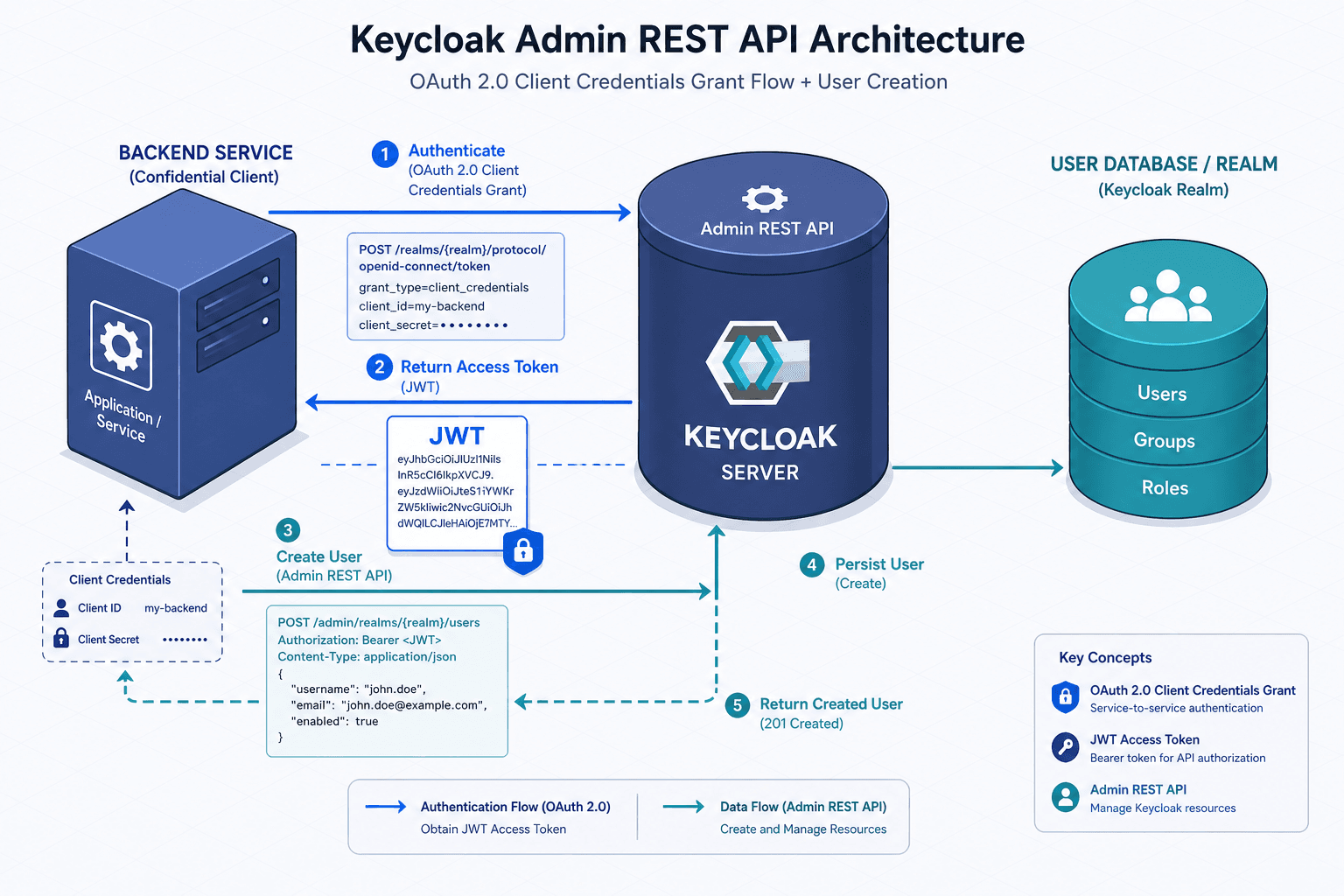
The Keycloak Admin REST API
A practical guide to using the Keycloak Admin REST API for automation, covering service accounts, user creation, and backend integration.
For platform engineers and backend developers, the Keycloak Admin REST API is not just a management interface; it is the programmable layer that turns identity infrastructure into code. While the Keycloak Admin Console allows manual oversight, production systems require automation for user provisioning, role assignment, and realm configuration. This guide explains the mechanism of authenticating as a service account and executing administrative actions, ensuring your backend systems can interact with Keycloak reliably.
The Authentication Mechanism: Service Accounts
The Admin API requires authentication via an OAuth 2.0 access token. Unlike end-user authentication, which uses the Authorization Code Grant (involving user interaction), administrative automation uses the Client Credentials Grant. This flow allows machine-to-machine authentication where the "client" is a registered application with a secret, and no user is present. As defined in RFC 6749, this grant type is specifically designed for clients acting on their own behalf.
To authenticate, your backend service must exchange its client ID and client secret for an access token from the Keycloak token endpoint.
curl -X POST \
  'http://localhost:8080/realms/master/protocol/openid-connect/token' \
  -H 'Content-Type: application/x-www-form-urlencoded' \
  --data-urlencode 'grant_type=client_credentials' \
  --data-urlencode 'client_id=admin-cli' \
  --data-urlencode 'client_secret=YOUR_CLIENT_SECRET'
The response contains a JWT (JSON Web Token) in the access_token field. This token is valid for a short period (default 5 minutes) and must be included in the Authorization: Bearer <token> header for all subsequent Admin API requests. In production, you should implement token caching to avoid the overhead of requesting a new token for every API call, refreshing only when the token expires.
Configuring Administrative Privileges
A newly created client in Keycloak has no administrative permissions by default. To allow a client (e.g., my-backend-service) to manage users, you must explicitly grant it the necessary roles. This is done by mapping client roles from the realm-management client, such as manage-users or view-users, to the service account. For more details on role scopes, refer to the Keycloak documentation on Realm Roles vs. Client Roles.
- Navigate to Clients in the Admin Console.
- Select your client (e.g.,
my-backend-service). - Go to the Service Account Roles tab.
- Click Assign Role.
- Select Client Roles, choose the
realm-managementclient, and selectmanage-users. - Optionally assign additional client roles such as
view-usersif further permissions are needed.
This mechanism ensures the principle of least privilege. The service account only gets the permissions explicitly mapped to it, rather than inheriting broad admin rights.
User Creation: A Worked Scenario
Once authenticated, the Admin API exposes endpoints for managing realm resources. The most common operation is creating a new user. The API expects a JSON payload representing the user entity, as detailed in the Keycloak User Representation documentation.
Consider a scenario where a backend order service needs to create user accounts in Keycloak upon successful payment. The service holds the user's email and username.
curl -X POST \
  'http://localhost:8080/admin/realms/my-realm/users' \
  -H 'Authorization: Bearer eyJhbGciOiJSUzI1NiIsInR5cCI6IkpXVCJ9...' \
  -H 'Content-Type: application/json' \
  -d '{
    "username": "johndoe",
    "email": "john@example.com",
    "enabled": true,
    "credentials": [
      {
        "type": "password",
        "value": "temporary-password-123",
        "temporary": true
      }
    ]
  }'
A successful creation returns HTTP 201 Created and includes a Location header with the URI of the newly created user resource (e.g., http://localhost:8080/admin/realms/my-realm/users/<user-id>). The response body is empty, but the location header is critical for subsequent operations, such as assigning roles or updating attributes.
Assigning Roles
Creating a user is often insufficient; the user likely needs specific roles to access resources. Roles in Keycloak are attached to user entities. To assign the customer role to the newly created user, you utilize the role-mapping endpoint, as described in the Keycloak Role Mapping documentation.
curl -X POST \
  'http://localhost:8080/admin/realms/my-realm/users/<user-id>/role-mappings/realm' \
  -H 'Authorization: Bearer eyJhbGciOiJSUzI1NiIsInR5cCI6IkpXVCJ9...' \
  -H 'Content-Type: application/json' \
  -d '[{
    "id": "<role-id-for-customer>",
    "name": "customer",
    "description": "Standard customer role"
  }]'
Note that you must know the role-id. This can be obtained by querying the realm's role list endpoint (GET /admin/realms/my-realm/roles) or by looking up the role ID in the Admin Console. This separation of concerns—creating the user first, then mapping roles—is a key architectural pattern in Keycloak.
Backend Integration Best Practices
When integrating the Admin API into production systems, several mechanisms ensure reliability.
Error Handling: The Admin API returns standard HTTP status codes. A 401 Unauthorized indicates an expired or invalid token, requiring a token refresh. A 409 Conflict typically occurs if you attempt to create user with a username that already exists. For a comprehensive list of error codes, see the Keycloak Error Handling documentation. Your backend should handle these exceptions gracefully, perhaps by checking for existence before creation or by implementing idempotent creation logic.
Performance: The Admin API is not designed for high-throughput event processing. If you need to synchronize thousands of users, consider using the Keycloak Import/Export utilities or batch endpoints if available in your version. For most backend integrations, however, the API is sufficiently performant for on-demand user creation.
Security: Never expose the client secret in client-side code. The Admin API should only be called from secure backend services. Additionally, use dedicated clients for different purposes (e.g., one client for user provisioning, another for audit logging) to limit the blast radius of a compromised secret. For security best practices regarding the Client Credentials Grant, refer to the OAuth 2.0 Threat Model and Security Considerations (RFC 6819).
By leveraging the Admin REST API with service accounts, backend systems can maintain a consistent and automated identity lifecycle, reducing manual overhead and minimizing human error in identity management.
Related posts
Keycloak REST API: Programmatic Realm and User Management
A guide to managing Keycloak realms and users via the Keycloak REST API for automation and administrative tasks.
Keycloak Themes: Building Custom Login and Account Console Pages
Learn how to build custom login and account console pages in Keycloak using themes and FreeMarker templates for a branded user interface.
Keycloak Custom Authentication Flows: Building Custom Login Experiences
An examination of Keycloak authentication flows, custom auth strategies, and SPI implementation for building tailored login experiences.