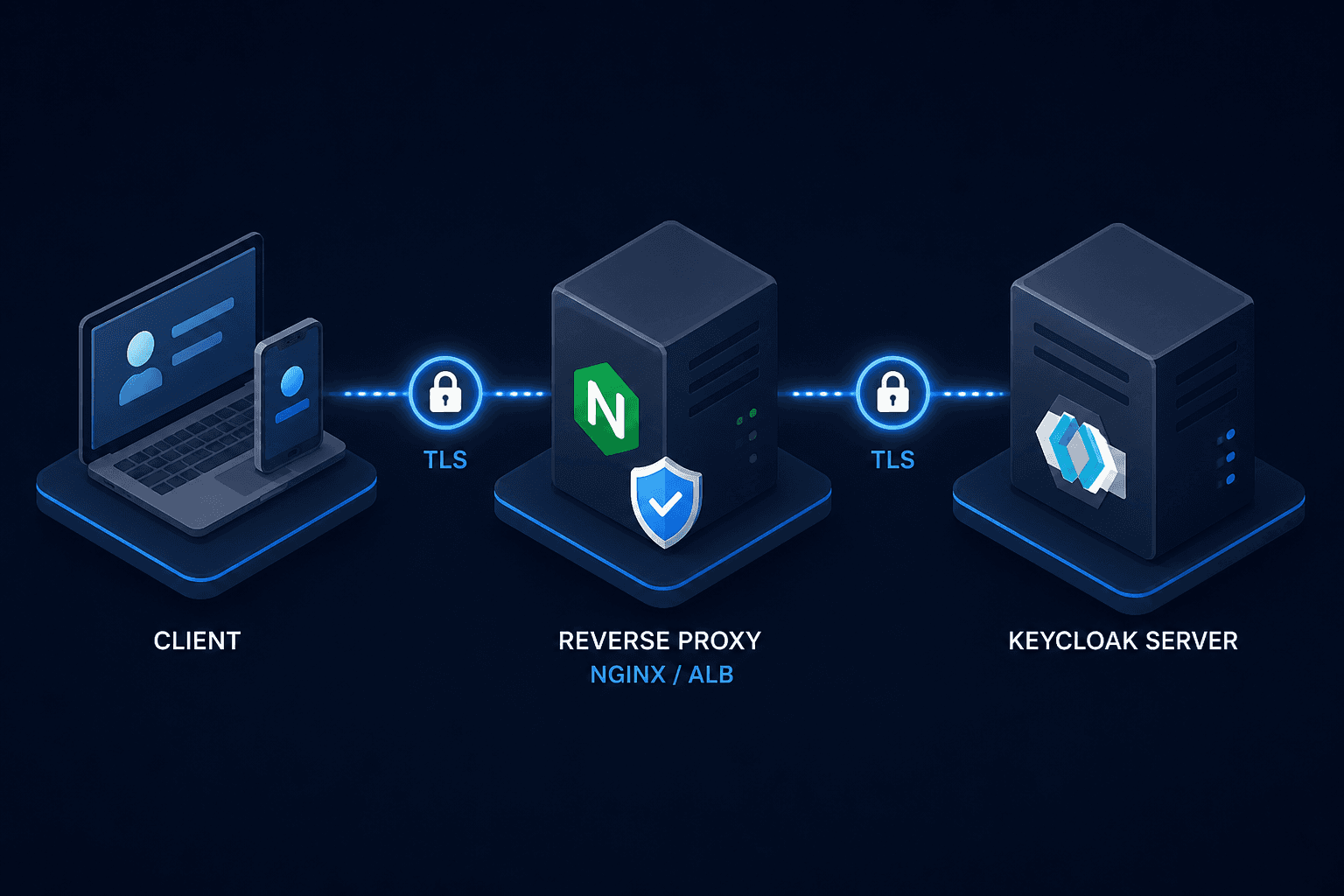
Keycloak Production Mode: Hostname, Proxy, and TLS
Configure Keycloak production mode by setting correct hostnames, proxy headers, and TLS certificates to ensure secure and reliable authentication.
When you spin up Keycloak locally, it works out of the box because the assumption is simple: the server is at localhost, the client is at localhost, and no one else sees the traffic. In production, this assumption collapses. Keycloak generates URLs for OAuth 2.0 authorization codes, OpenID Connect discovery endpoints, and admin console redirects based on its own perceived identity. If that identity is misconfigured, authentication flows break, sessions become invalid, and security vulnerabilities emerge.
This guide details the mechanism-level configuration required for production: resolving hostnames correctly, trusting proxy headers, and managing TLS termination.
The Hostname Resolution Problem
Keycloak does not just store credentials; it actively constructs URLs. When an application redirects a user to Keycloak, Keycloak responds with a redirect URI. Later, it sends a callback URL in the token response. It also publishes these URLs in the .well-known/openid-configuration endpoint, which clients use to discover the authorization and token endpoints.
By default, Keycloak binds to localhost. If you deploy this to a Kubernetes cluster or a VM without configuring the public hostname, Keycloak will generate URLs like http://localhost:8080/auth/realms/myrealm/.... When your browser or API client receives this, it attempts to connect to localhost on the client side, which fails because the Keycloak instance is remote.
Configuring keycloak production mode requires overriding the automatic detection of the request’s host header. The mechanism for fixing this is the KC_HOSTNAME environment variable, which is the primary hostname configuration setting.
# Example Docker Compose environment variable
environment:
  - KC_HOSTNAME=https://auth.example.com
  - KC_HOSTNAME_STRICT=false
Simply setting the hostname is not enough if you are behind a reverse proxy. Keycloak must also understand that the incoming request was originally HTTPS, even if the proxy terminated TLS and sent an HTTP request internally, by trusting specific proxy headers.
Proxy Header Handling
In a typical production architecture, a reverse proxy (NGINX, HAProxy, AWS ALB, or Kubernetes Ingress) terminates TLS and forwards requests to Keycloak over HTTP. Keycloak, by default, treats these internal HTTP requests as plain text. It does not trust the X-Forwarded-Proto or X-Forwarded-Host headers unless explicitly instructed to do so.
If Keycloak does not trust these headers, it generates HTTP URLs for callbacks and cookies. Modern browsers and OIDC clients enforce strict security policies (like Secure flags on cookies and HSTS). An HTTP callback URL will be rejected by the client, causing authentication failures.
To enable proxy support, you must configure Keycloak to trust and parse proxy headers, which covers two mechanisms:
- Header Parsing: Tell Keycloak to parse proxy headers.
- Address Forwarding: Use the forwarded address for URL generation.
environment:
  - KC_PROXY_HEADERS=forwarded
The KC_PROXY_HEADERS=forwarded setting instructs Keycloak to read the Forwarded header (RFC 7239) and use the host and scheme from it to build absolute URLs; use KC_PROXY_HEADERS=xforwarded instead if your proxy sends the legacy X-Forwarded-* headers.
Without this setting, Keycloak might correctly parse the protocol but still use the internal port (e.g., 8080) in URLs, leading to connection refused errors on the client side.
TLS Certificate Integration
A robust tls setup involves either offloaded termination or managed certificates.
Offloaded Termination
In most cloud-native environments, the Ingress Controller or Load Balancer terminates TLS. Keycloak never sees the certificate; it only receives decrypted HTTP traffic from the proxy. In this model, you do not configure kc_https_certificate_file. Instead, you rely on the proxy to handle certificate rotation and renewal. Keycloak’s role is simply to trust the proxy (as described in the previous section).
Managed Certificates
If Keycloak terminates TLS directly (e.g., in a bare-metal deployment or a simple VM), you must provide a valid certificate. Keycloak uses the kc_https_certificate_file environment variable to locate the certificate.
environment:
  - KC_HTTPS_CERTIFICATE_FILE=/path/to/cert.pem
  - KC_HTTPS_CERTIFICATE_KEY_FILE=/path/to/key.pem
For a complete tls setup, ensure you provide a full certificate chain in the PEM file. If you provide only the leaf certificate, Java may fail to validate the trust chain, resulting in handshake failures. Additionally, the private key must not be encrypted with a passphrase that Keycloak cannot access at startup, unless you configure KC_HTTPS_CERTIFICATE_KEY_PASSWORD.
Why Self-Signed Certs Fail in Production
You might be tempted to use a self-signed certificate for internal services. While this works for testing, it breaks in production for two reasons:
- Client Validation: Most OIDC clients (React, Angular, mobile apps, and even server-side SDKs) enforce strict certificate validation. They will reject self-signed certificates unless explicitly configured to trust them, which is a security anti-pattern.
- Browser Security: Modern browsers block mixed content and require valid TLS for sensitive operations. A self-signed certificate triggers browser warnings that users often ignore or block entirely, breaking the user experience.
Summary of Configuration
To deploy Keycloak securely in production, ensure your environment variables include:
environment:
  # 1. Define the public identity
  - KC_HOSTNAME=https://auth.yourcompany.com
  - KC_HOSTNAME_STRICT=false

  # 2. Trust the reverse proxy
  - KC_PROXY_HEADERS=forwarded

  # 3. Optional: If Keycloak terminates TLS
  - KC_HTTPS_CERTIFICATE_FILE=/etc/x509/https/tls.crt
  - KC_HTTPS_CERTIFICATE_KEY_FILE=/etc/x509/https/tls.key
Ensure KC_HTTP_PORT is set if you need to override the default kc_http_port of 8080. This configuration ensures that Keycloak generates correct, secure URLs, respects the proxy’s TLS termination, and presents a valid identity to clients. Misconfiguration at any of these levels leads to subtle, hard-to-debug authentication failures.
Conclusion
Configuring Keycloak for production is not just about securing the database; it is about ensuring the server accurately represents its public identity to the outside world. By correctly setting the hostname, trusting proxy headers via KC_PROXY_HEADERS, and managing TLS certificates appropriately, you prevent common failure modes like broken redirects and invalid sessions. These configurations form the foundation of a stable and secure authentication infrastructure.
Related posts
Keycloak High Availability, Clustering, and Cache Replication
Explore Keycloak high availability through clustering, Infinispan cache replication, and horizontal scaling strategies for platform engineers and SREs.
The End of Static Keys: SSH Certificate Authorities Explained
Implement SSH certificates and centralized key management for platform engineers and SREs to secure infrastructure with short-lived credentials and audit trails.
Securing Keycloak: Hardening Guide for Production
A technical examination of Keycloak security and hardening strategies for production environments, covering brute force mitigation and Content Security Policy implementation.