Keycloak Organizations: Multi-Org Without Multi-Realm
Explore how Keycloak Organizations enables B2B multi-tenancy and organization identity management without the complexity of maintaining multiple realms.
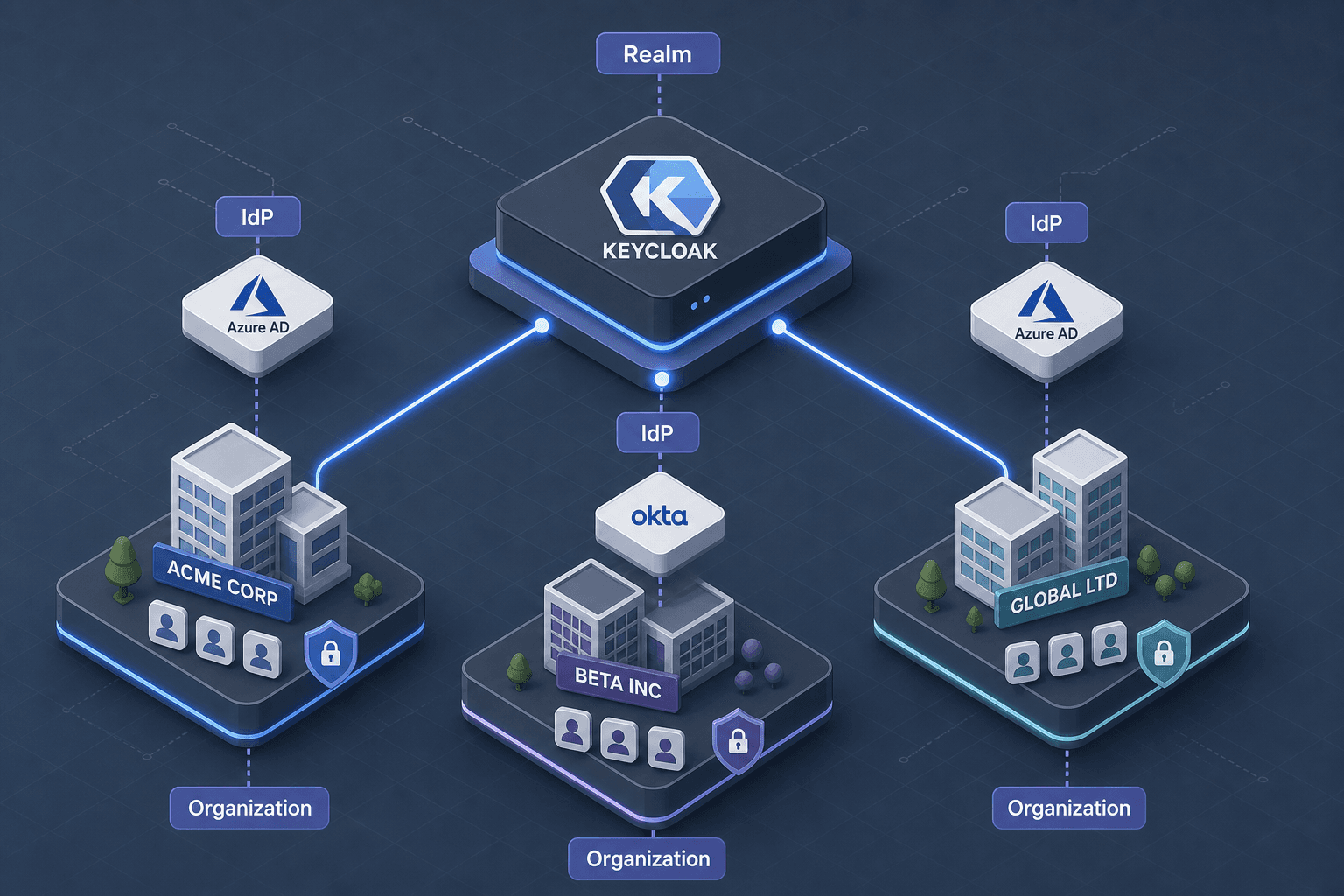
Identity engineers often face a binary choice when building B2B SaaS platforms: manage a single monolithic realm or spawn a new realm for every customer. The latter creates "realm sprawl"—a state where administrative overhead, database fragmentation, and cross-realm federation complexity make the system unmanageable at scale. Keycloak’s Organizations feature disrupts this binary. It enables true multi-tenancy within a single realm, treating organizations not as isolated infrastructure silos, but as runtime attributes attached to users and roles. This architectural shift reduces operational overhead while preserving the isolation required for B2B clients.
The Operational Problem: Realm Sprawl vs. Attribute-Based Isolation
In a traditional multi-realm setup, each customer (tenant) gets their own Keycloak realm. This means:
- Separate Databases: Each realm typically has its own database schema or table prefix, leading to resource fragmentation.
- Separate Admin UIs: Administrators must log into different realms to manage users, clients, and policies.
- Complex Federation: Cross-realm user federation requires complex SAML or OIDC trust relationships, often resulting in "identity islands" where a user cannot easily access resources across tenants.
The Organizations feature solves this by keeping all users, clients, and roles within a single realm. Instead of isolating data at the realm level, it isolates data at the organization level. The mechanism relies on two core data structures:
- Organization: A named entity (e.g., "Acme Corp") with its own metadata.
- Organization Membership: A relationship linking a
Userto anOrganization. A user can belong to multiple organizations, but their access to specific resources is gated by which organization they are acting on behalf of.
This model allows you to manage one set of clients, one set of policies, and one database, while logically separating tenant data through attributes.
Identity Provider Federation: The Organization as a Trust Anchor
In B2B scenarios, users authenticate via their corporate identity provider (IdP), such as Azure AD or Okta. Keycloak Organizations integrates this by allowing you to configure an Organization Identity Provider (Organization IdP) for each tenant.
Here is the mechanism:
- Registration: An admin configures an OIDC or SAML identity provider within Keycloak, labeled as an "Organization Identity Provider."
- Mapping: When a user authenticates via their corporate IdP, Keycloak receives standard OIDC claims (e.g.,
email,name). - Membership Resolution: Keycloak checks if the authenticated user already has an
organization_membershipfor the target organization. If not, it can automatically create one based on Auto Membership rules configured in the Organization settings. This ensures that users are correctly associated with their respective organizations upon login without manual intervention. - Token Injection: The resulting JWT contains an
organizationclaim (or claims) indicating which organization(s) the user belongs to.
By treating the Organization IdP as a trust anchor, you can dynamically route users to the correct organization without manual intervention. This eliminates the need for manual user provisioning per tenant. The organization becomes a dynamic context rather than a static container.
Access Control: Scoping Policies to Organizations
The real power of Organizations lies in how it integrates with Keycloak’s policy enforcement. You can define roles and permissions that are scoped to specific organizations.
Mechanism: Client Scopes and Protocol Mappers
When a user requests access to a resource, Keycloak generates a JWT. To enforce organization-scoped access, you must:
- Add Organization Claims: Configure a Protocol Mapper in the Client Scope to inject the
organizationclaim into the JWT. This claim contains the organization ID(s) associated with the user. - Define Policies: In the realm’s policies, create a policy that checks for the presence of a specific organization ID in the
organizationclaim. - Link to Permissions: Attach this policy to a permission for a specific client or resource.
Access control policies can then be scoped to specific organization memberships, ensuring that users only see data relevant to their current tenant context.
For example, a client scope named b2b-access might include a mapper that outputs:
{
  "organization": {
    "org-acme-corp": {},
    "org-beta-inc": {}
  }
}
A downstream resource server (e.g., a Spring Boot app using Spring Security's OAuth2 Resource Server support) can then inspect this claim. If the user presents a token with org-acme-corp, the app knows to query the database for data associated with "Acme Corp," ensuring row-level security without Keycloak needing to understand the application’s data model.
Opinion: The Trade-off of Shared Realm
While Organizations simplifies administration, it introduces a shared-risk model. A misconfigured policy in a single realm affects all tenants. You must rigorously test policy precedence and ensure that default roles do not leak across organizational boundaries. Always use Client Scopes to isolate the claims injected into tokens, preventing accidental data leakage between tenants.
Migration Strategy: From Multi-Realm to Single-Realm
This migration strategy ensures a smooth transition from multi-realm to single-realm architecture. Migrating from a multi-realm architecture to Organizations requires careful data transformation. The goal is to consolidate users and map their existing realm memberships to organization memberships.
Step 1: Export Users with Metadata
Export users from each legacy realm using the Keycloak Admin CLI or REST API. Ensure the export includes custom attributes that identify the original realm or tenant.
Step 2: Transform Data
Create a script that:
- Creates a new Organization for each legacy realm.
- Imports users into the single realm.
- Assigns each user to the corresponding Organization using the
POST /admin/realms/{realm}/organizations/{org-id}/membersendpoint.
Step 3: Update Clients and Policies
- Consolidate Clients: Move all client definitions into the single realm.
- Rebind Policies: Update existing policies to check for the new
organizationclaim instead of relying on realm-specific roles. - Update Redirect URIs: Ensure all clients have valid redirect URIs for the new single-realm URL.
Step 4: Validate
During the migration process, it is critical to validate that all user attributes are preserved. Test authentication flows for users from each legacy tenant. Verify that:
- Users can still log in via their corporate IdP.
- The
organizationclaim is present in the JWT. - Access to resources is correctly scoped to their original tenant.
Conclusion
Keycloak Organizations transforms multi-tenancy from an infrastructure problem into an application-level concern. By leveraging a single realm, you reduce operational complexity, simplify user lifecycle management, and enable more flexible access control models. For identity engineers, this means less time managing realms and more time building secure, scalable B2B applications. The key is to treat organizations as runtime attributes, injecting them into tokens and policies, rather than trying to isolate them at the infrastructure layer. This migration path allows teams to retain their existing IdP integrations while gaining the benefits of centralized administration.
Related posts
Keycloak Multi-Tenancy: Realms, Orgs, Shared
An examination of Keycloak multi-tenancy strategies, comparing realm-per-tenant, organizations, and shared realm models for architects and identity engineers.
Building Your Own Identity Provider: What It Really Costs
An examination of the hidden costs, maintenance burden, and security risks involved in building a custom identity provider versus buying a solution.
Switching Identity Providers Without Breaking Auth Flows
A technical guide for identity engineers on migrating identity providers using parallel runs and credential migration strategies to maintain auth continuity.
