Switching Identity Providers Without Breaking Auth Flows
A technical guide for identity engineers on migrating identity providers using parallel runs and credential migration strategies to maintain auth continuity.
Migrating an Identity Provider (IdP) is rarely a simple configuration swap. It is a complex state synchronization challenge. When you are switching identity providers, you are not just changing a URL; you are changing the source of truth for user identity. If the application cannot reconcile the new identity token with the existing internal user record, authentication fails, users are locked out, and audit trails break.
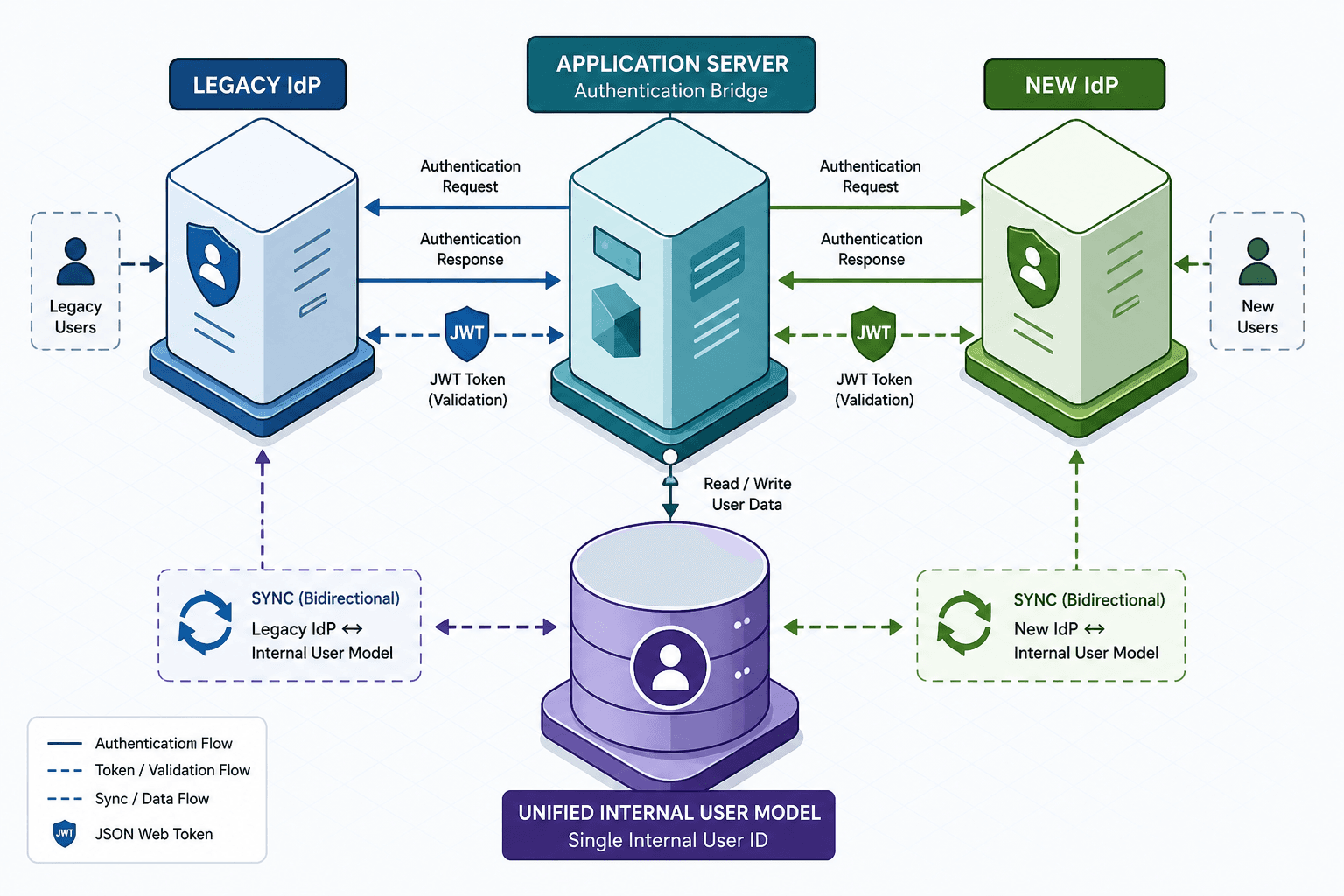
The solution is not a "big bang" cutover. The solution is a parallel run architecture where the application maintains dual-auth capability during a transition period, using a unified internal identity model to bridge the gap.
The Atomic Problem: Session Mismatch
Authentication failures during migration usually stem from a mismatch between the IdP’s session state and the application’s internal state.
Consider a user, Alice. She logs into your application via Provider A (e.g., Okta). Your application creates a session cookie and stores a reference to her user profile in your database. The database key might be her email address or a UUID generated by Provider A’s sub claim.
When you switch to Provider B (e.g., Auth0), Provider B issues a new JWT with a different sub claim and a different signing key. If your application only trusts Provider B’s tokens, it sees Alice’s request as coming from an "unknown" identity because the sub value doesn’t match any existing record in your database. Even if the email is the same, the cryptographic proof of identity has changed.
This is the atomic problem: The application must recognize that two different external identifiers belong to the same internal entity.
The Unified Internal Identity
To solve this, you must decouple your application’s user model from any single IdP’s identifier. You need a canonical internal user object.
{
  "internal_user_id": "uuid-v4-1234-5678",
  "email": "alice@example.com",
  "identity_providers": [
    {
      "provider": "okta",
      "external_sub": "okta_abc123",
      "status": "deprecated"
    },
    {
      "provider": "auth0",
      "external_sub": "auth0_xyz789",
      "status": "active"
    }
  ],
  "created_at": "2023-01-01T00:00:00Z"
}
In this model, internal_user_id is the primary key for your auth logic. The identity_providers array acts as a mapping table. This structure allows your application to accept a login from either IdP, look up the corresponding internal user, and maintain the same session. This approach is foundational for effective credential migration, ensuring that historical identity data remains accessible even as the underlying provider changes.
Parallel Run Architecture
The parallel run strategy involves deploying your application to accept tokens from both IdPs simultaneously. This requires changes to your authentication middleware or gateway.
Step 1: Dual Trust Configuration
Your application’s OIDC/OAuth client configuration must include both providers. When a user attempts to log in, they are presented with a choice or automatically redirected based on previous behavior. However, the critical part is the verification logic.
Your middleware must validate the token signature using the public keys from both IdPs.
def verify_token(token):
    try:
        # Try Provider A first (legacy)
        return decode_jwt(token, provider_a_jwks)
    except InvalidTokenError:
        try:
            # Fallback to Provider B (new)
            return decode_jwt(token, provider_b_jwks)
        except InvalidTokenError:
            raise AuthenticationError("Invalid token from both providers")
Step 2: The Migration Hook
The most important mechanism is the "migration hook." This occurs when a user who previously authenticated with Provider A logs in using Provider B.
- User Alice clicks "Login with Auth0."
- Auth0 returns a JWT with
sub: auth0_xyz789andemail: alice@example.com. - Your app verifies the token and finds no existing
internal_user_idassociated withauth0_xyz789. - Your app queries the database for a user with
email: alice@example.com. - It finds a record associated with
okta_abc123. - Action: Link the new
auth0_xyz789to the existinginternal_user_id. Update theidentity_providersarray.
This ensures that Alice’s session continuity is preserved. She doesn’t need to re-enter credentials or lose her shopping cart, permissions, or history.
Credential Migration Strategies
If you are migrating from a password-based IdP (like LDAP or a legacy database) to an OIDC-based IdP, you face the problem of moving credentials securely. You cannot simply export plaintext passwords.
Passive Migration (Recommended)
The safest method is passive migration on login. Do not attempt to bulk-extract and hash passwords from the old system, as this exposes sensitive data and creates a single point of failure.
Instead, use the "remember me" or "magic link" approach during the transition:
- User enters their email and old password.
- Your backend verifies the old password hash against the legacy database.
- If valid, trigger a one-time passwordless login email to the new IdP.
- User clicks the link, authenticates with the new IdP, and the accounts are linked.
This shifts the security burden to the existing, proven password verification mechanism while allowing the new IdP to take over future sessions.
Active Migration (High Risk)
If you must migrate hashed passwords directly (e.g., from bcrypt to Argon2), you must do so in a secure, isolated environment. Export only the email and hash. Re-hash in memory only when the user logs in. Never store the old hash in the new IdP. This is generally discouraged due to the complexity of handling collisions and the risk of exposing the old database during extraction.
Cutover and Decommissioning
Once you have verified that >95% of users have successfully linked their accounts to the new IdP, you can proceed to cutover.
- Disable Legacy Routes: Remove the login endpoint for Provider A.
- Monitor Errors: Watch for authentication failures. If a user fails to log in, they likely have an unlinked account. Provide a "Contact Support" flow that allows manual account linking.
- Deprecate Old Keys: Rotate and revoke the signing keys for Provider A.
Common Pitfalls
- Ignoring Token Expiration Windows: If the old IdP’s tokens expire before the cutover is complete, users may be locked out if the fallback verification logic is not robust. Ensure JWKS caching is handled correctly to avoid latency spikes during key rotation.
- Email Collision Attacks: If two users exist in different IdPs with the same email but different internal IDs, the migration hook may link the wrong accounts. Implement strict uniqueness checks and require explicit user confirmation if ambiguous matches occur.
- Session Inconsistency: If the application does not invalidate old sessions immediately after linking, a user might hold a session tied to the old IdP’s state while also logging in with the new one, leading to privilege escalation or data leakage. Always enforce session regeneration upon successful migration hook execution.
Practical Takeaways
- Decouple Identity from Provider: Treat the IdP as a transient credential source. Your internal user model should be the single source of truth, storing multiple provider mappings.
- Verify, Don’t Assume: Never assume that a matching email address implies the same user. Always verify the cryptographic signature and resolve the internal ID through explicit lookup logic.
- Graceful Degradation: Design your auth middleware to fail open or provide clear error messages if one IdP is unreachable, ensuring that the migration process itself doesn’t become a single point of failure for availability.
Conclusion
Switching IdPs is not about changing a URL. It is about maintaining the integrity of the user’s session across two different cryptographic identities. By implementing a unified internal user model and a parallel run architecture with automatic account linking, you ensure that the transition is invisible to the user. The key is to treat the migration as a data synchronization problem, solving for identity resolution before you worry about traffic routing.
Related posts
Building Your Own Identity Provider: What It Really Costs
An examination of the hidden costs, maintenance burden, and security risks involved in building a custom identity provider versus buying a solution.
Why Multi-Cloud Identity Fragments
An examination of identity fragmentation across AWS, Azure, and GCP, comparing identity models to understand multi-cloud challenges.
SAML Metadata Exchange and Trust Establishment
A technical examination of SAML metadata exchange, covering trust establishment, entity descriptors, certificate rollover, and metadata refresh mechanisms.
