AWS Service Accounts: The Pattern That Doesn't Exist
Clarifies the misconception of AWS service accounts, explaining how IAM roles and instance profiles replace static credentials for secure application access.
If you come from on-premise infrastructure or other cloud providers, you likely have a mental model of a "service account." In those worlds, a service account is a static identity: a username and a password, or an access key and a secret key, stored in a database or a configuration file. This identity belongs to a non-human user and is used by applications to authenticate against APIs.
In AWS, this pattern does not exist. If you are storing static Access Keys and Secret Keys in your application code or environment variables for an application running on AWS, you are not using AWS best practices—you are fighting the platform’s security model.
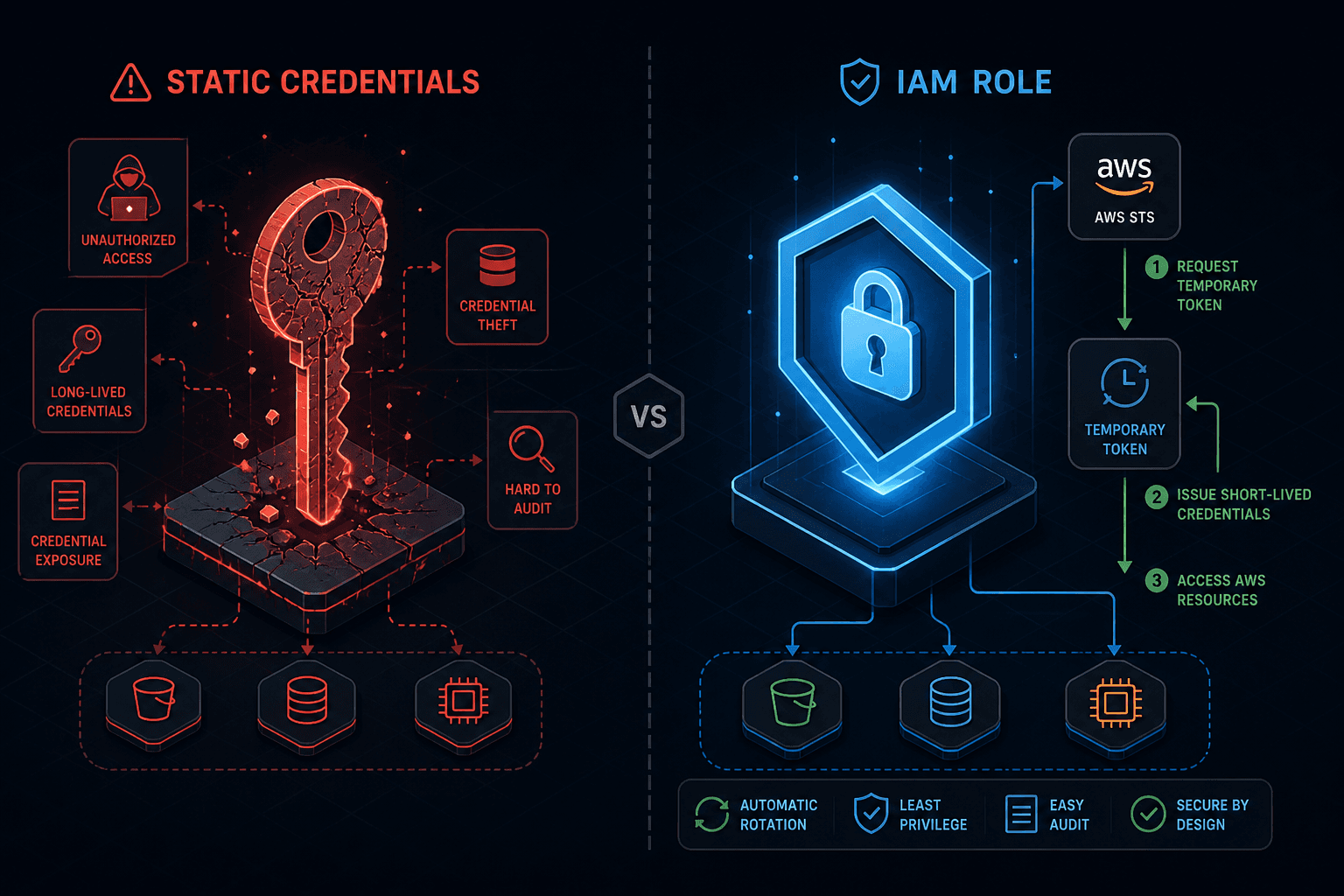
AWS replaces the concept of static service accounts with IAM Roles and temporary credentials. This is not just a semantic difference; it is a fundamental architectural shift that eliminates the need for key rotation and prevents credential leakage from persisting in logs or code repositories.
The Problem with Static Credentials
To understand why an aws service account model fails in AWS, we must look at the failure mode of static credentials. In a traditional setup, an application authenticates using a long-lived key pair.
- The key is generated once.
- The key is stored somewhere (e.g.,
.envfile, database). - The key is used indefinitely until manually rotated.
This creates two primary risks:
- Persistence of Compromise: If a developer accidentally commits the secret key to GitHub, or if a log file captures it, the attacker has access until the key is rotated. Rotation is often manual and infrequent.
- Over-Privileged Access: Because the key is static, the permissions attached to it rarely change. An application might need
s3:GetObjecttoday ands3:PutObjecttomorrow. With static credentials, you either grant broad permissions (security risk) or update the credentials constantly (operational overhead).
AWS designed Identity and Access Management (IAM) to solve these problems by decoupling the identity from the long-lived credentials.
The Mechanism: IAM Roles and Temporary Credentials
In AWS, the primary identity for applications is the iam role. An IAM Role is not a user with a password. It is a set of permissions that can be assumed by a trusted entity.
When an application needs to interact with an AWS service (like Amazon S3 or DynamoDB), it does not log in with a static key. Instead, it requests temporary security credentials.
How AssumeRole Works
The core mechanism is the sts:AssumeRole API call. Here is the flow:
- Trust Policy: An IAM Role has a trust policy that defines who can assume it. For example, an EC2 instance with a specific instance profile, or an IAM User in another account.
- Assumption: The application (or the AWS service running it) calls the Security Token Service (STS)
AssumeRoleAPI. - Validation: STS checks if the caller is trusted according to the role’s trust policy.
- Issuance: If trusted, STS returns a set of temporary credentials:
AccessKeyIdSecretAccessKeySessionToken
These credentials have a short lifespan, typically 15 minutes to 1 hour (configurable up to 12 hours). Once they expire, the application must request new ones. This automatic refresh happens seamlessly in the background for most AWS SDKs.
// Example: Trust Policy for an IAM Role
{
  "Version": "2012-10-17",
  "Statement": [
    {
      "Effect": "Allow",
      "Principal": {
        "Service": "ec2.amazonaws.com"
      },
      "Action": "sts:AssumeRole"
    }
  ]
}
In this example, only EC2 instances can assume this role. If a developer tries to assume it from their laptop CLI without proper configuration, it will fail. This is fine-grained, automated identity binding.
Binding Identity to Compute: Instance Profiles
So, how does an EC2 instance automatically get these temporary credentials without a human typing in a password? The answer is the instance profile, a container for an IAM Role that can be attached to an EC2 instance. It is not a credential itself; it is a reference to a role.
The IMDS Flow
When an EC2 instance launches with an attached instance profile, the following mechanism occurs:
- Boot: The instance starts. The AWS Hypervisor injects metadata about the instance into the instance.
- IMDS Access: The application on the instance queries the Instance Metadata Service (IMDS) at
http://169.254.169.254/latest/meta-data/iam/security-credentials/<role-name>. - Credential Retrieval: IMDS returns the current temporary credentials.
- SDK Usage: When the application uses the AWS SDK (e.g., Boto3 for Python, AWS SDK for JavaScript), the SDK automatically detects the IMDS endpoint and fetches credentials. It caches them and refreshes them before they expire.
There are no static keys on the disk. There are no environment variables containing secrets. The identity is derived from the instance’s hardware/software context. This prevents aws security risks like SSRF when combined with proper configuration.
# Example: Fetching credentials from IMDS (v2 recommended)
TOKEN=$(curl -X PUT "http://169.254.169.254/latest/api/token" -H "X-aws-ec2-metadata-token-ttl-seconds: 21600")
curl -H "X-aws-ec2-metadata-token: $TOKEN" http://169.254.169.254/latest/meta-data/iam/security-credentials/my-role
Note: AWS now recommends IMDSv2, which requires a session token header (X-aws-ec2-metadata-token). This prevents Server-Side Request Forgery (SSRF) attacks where a malicious web app on the instance could otherwise read credentials from IMDSv1 without authentication.
Service Principals: The Pattern Beyond EC2
While EC2 uses Instance Profiles, other AWS services use Service Principals. A Service Principal is a way for an AWS service (like Lambda, ECS, or Step Functions) to assume a role on your behalf.
For example, if you create a Lambda function, you attach an iam role to it. This role has a trust policy that allows the Lambda service principal (lambda.amazonaws.com) to assume it.
When you invoke the Lambda function:
- AWS Lambda service assumes the attached role.
- Lambda gets temporary credentials.
- Lambda executes your code with those credentials.
Your code in Lambda does not need to know about credentials. It just uses the SDK, which finds the credentials provided by the Lambda runtime environment. This is the same mechanism as EC2, but the "caller" is the AWS service itself, not the instance’s local IMDS. This is a core aws security pattern.
Why This Matters: Security and Operational Benefits
Understanding this architecture is critical for aws security best practices.
- No Key Rotation: You never rotate IAM Role credentials because they are temporary and auto-refreshed. You only rotate the permissions if needed.
- Least Privilege by Design: Since roles are assumed by specific entities (instances, services), you can grant minimal permissions to each role. An EC2 instance running a read-only worker only gets
s3:GetObject. A different instance running a write-only processor only getss3:PutObject. - Auditability: CloudTrail logs every
AssumeRoleevent. You can see exactly which instance or user assumed a role, when, and from where. With static credentials, attribution is harder if the key is shared or leaked. - Cross-Account Access: Assuming a role is the standard way to access resources in another AWS account. You don’t share keys between accounts; you grant permission for Account A’s IAM Role to assume Account B’s IAM Role.
Conclusion
The term "service account" is a legacy concept that doesn’t map to AWS. AWS uses IAM Roles bound to compute identities (Instance Profiles, Service Principals) to provide temporary credentials.
This mechanism eliminates the risks associated with static credentials: leakage, rotation overhead, and over-privileged access. For cloud engineers, the shift in mindset is critical: stop thinking about how to store and protect long-lived keys. Start thinking about how to define trust policies and assume roles.
If you find yourself creating IAM Users for applications, you are likely misusing the platform. Create IAM Roles instead. Let AWS handle the credentials. Let your applications assume the identity.
Related posts
AWS Multi-Account IAM Design: Boundaries, Identity, and Permissions
A practical guide to AWS multi-account IAM design, covering Organizations, IAM Identity Center, and permission sets for secure cloud architecture.
S3 ACL vs Bucket Policy vs IAM Policy
Compare S3 ACLs, bucket policies, and IAM policies to secure AWS storage. Learn how block public access and cross-account access work together.
Reading CloudTrail Events: Identity & Athena
A practical guide to reading CloudTrail events, focusing on UserIdentity, SessionContext, and Athena for AWS security investigation.
