S3 ACL vs Bucket Policy vs IAM Policy
Compare S3 ACLs, bucket policies, and IAM policies to secure AWS storage. Learn how block public access and cross-account access work together.
Securing Amazon S3 often feels like navigating a maze of overlapping permissions. Cloud engineers frequently encounter "Access Denied" or "Access Denied (Public)" errors because they misunderstand how three distinct permission systems interact: IAM Policies, Bucket Policies, and Access Control Lists (ACLs).
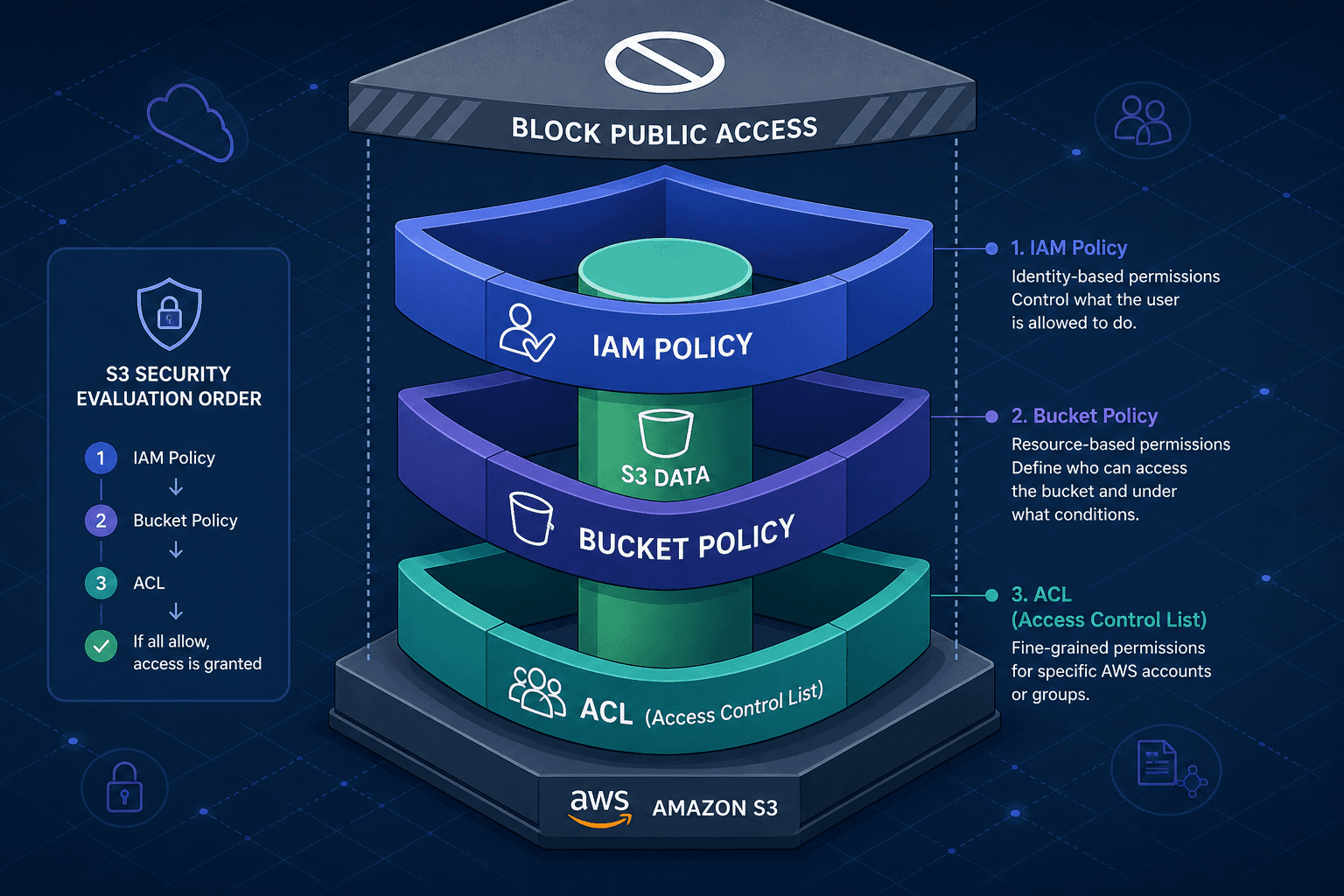
To secure S3 effectively, you must view these not as alternatives, but as layers in a single evaluation engine. IAM policies define what a principal can do. Bucket policies define what a resource allows. ACLs define legacy object-level grants. Finally, Block Public Access (BPA) acts as the hard ceiling that overrides everything else.
The IAM Policy: The Principal’s License
An IAM policy is attached to an identity—a user, group, or role. It answers the question: "Is this person or service allowed to perform action X?"
IAM policies are principal-based. They do not care about the specific resource unless you specify it in the Resource field. However, the primary function of an IAM policy is to grant the permission to call the API.
Consider a developer, alice, who needs to upload a file to my-bucket. Her IAM policy might look like this:
{
  "Version": "2012-10-17",
  "Statement": [
    {
      "Effect": "Allow",
      "Action": "s3:PutObject",
      "Resource": "arn:aws:s3:::my-bucket/*"
    }
  ]
}
This policy grants Alice the capability to write. It does not guarantee she can actually write to my-bucket. If the bucket policy denies her, or if the bucket is private and she has no other way to authenticate, the operation fails. IAM policies are necessary but not sufficient for cross-account access.
The Bucket Policy: The Resource’s Gatekeeper
A bucket policy is attached directly to the S3 bucket. It is a resource-based policy. This is the primary mechanism for controlling access from external accounts, services, or even the public internet.
Unlike IAM policies, which flow down from the principal, bucket policies are evaluated at the resource boundary. They allow you to say: "I allow Bob from Account B to read this bucket, but only if he comes from our corporate IP range."
For cross-account access, the workflow is:
- Alice (Account A) tries to access
my-bucket(Account B). - AWS checks Alice’s IAM policy (from Step 1). If it doesn’t allow
s3:GetObject, access is denied immediately. - AWS checks the bucket policy of
my-bucket. If it explicitly allows Alice’s ARN, access proceeds. If it explicitly denies, access is blocked.
Bucket policies are also where you configure public access. A common mistake is assuming that an IAM policy granting s3:* to * (wildcard) makes a bucket public. It does not. The bucket policy must also allow public principals.
{
  "Version": "2012-10-17",
  "Statement": [
    {
      "Sid": "PublicReadGetObject",
      "Effect": "Allow",
      "Principal": "*",
      "Action": "s3:GetObject",
      "Resource": "arn:aws:s3:::my-bucket/*"
    }
  ]
}
This snippet makes the bucket publicly readable. Without this statement, even if Alice has full IAM permissions, she cannot access the bucket if it’s private.
The ACL: The Legacy Fine-Tuner
Access Control Lists (ACLs) are the oldest permission system in S3. They operate at the object level, not the bucket level. While IAM and bucket policies manage access to the bucket and its objects broadly, ACLs allow you to grant specific read/write permissions to individual users or accounts for specific objects.
ACLs use a simple structure: a grantee (user/account) and a permission (READ, WRITE, FULL_CONTROL).
<AccessControlPolicy>
  <AccessControlList>
    <Grant>
      <Grantee xmlns:xsi="http://www.w3.org/2001/XMLSchema-instance" xsi:type="CanonicalUser">
        <ID>alice-uuid</ID>
      </Grantee>
      <Permission>READ</Permission>
    </Grant>
  </AccessControlList>
</AccessControlPolicy>
ACLs are largely deprecated for new architectures. Why? Because they are cumbersome to manage at scale. If you have 10,000 objects, managing 10,000 ACLs is impractical. Bucket policies are more scalable and support conditions (like IP ranges, date ranges, etc.), which ACLs do not.
However, ACLs still exist. When you create an object in S3, it receives a default ACL of its own (usually private), independent of the bucket’s ACL settings. You can override this per object. Crucially, ACLs are evaluated alongside IAM and bucket policies. For same-account access, an explicit allow from IAM policy is generally sufficient; for cross-account access, the bucket policy or object ACL must also explicitly allow the action. An explicit deny in ANY layer results in denial regardless of any allows elsewhere.
Block Public Access: The Hard Ceiling
AWS introduced Block Public Access (BPA) settings at the bucket and account levels to prevent accidental public exposure. BPA settings override both bucket policies and ACLs.
There are four BPA settings:
- Block new public ACLs (BlockPublicAcls): Prevents new PUT requests from applying public ACLs, though existing public ACLs remain in effect.
- Ignore public ACLs (IgnorePublicAcls): Causes S3 to ignore all public ACLs on the bucket and its objects, whether existing or new.
- Block new public bucket policies (BlockPublicPolicy): Prevents new bucket policies that grant public access from being applied.
- Restrict public and cross-account access (RestrictPublicBuckets): Limits access for buckets with public policies to only AWS service principals and authorized users within the account, blocking public and cross-account access.
When BPA is enabled, it acts as an implicit deny that sits above the policy evaluation logic. Specifically, BPA blocks access from public principals (Principal: *). It does NOT block cross-account access unless the bucket policy grants access to a public principal or wildcard. Even if your bucket policy says Principal: * and Effect: Allow, and your object ACL grants READ to everyone, BPA will block the request if it targets a public principal.
This is critical for compliance. Many organizations enable BPA at the account level to ensure no new bucket can be created with public access. Existing buckets must have BPA manually disabled to restore public access, creating a deliberate friction point that reduces accidental misconfigurations.
How They Work Together: A Worked Scenario
Let’s trace a request to understand the evaluation order.
Scenario: Alice (IAM User in Account A) tries to download report.pdf from secure-bucket (Account B).
- IAM Policy Check: Alice’s IAM policy allows
s3:GetObject. ✅ - Bucket Policy Check:
secure-bucket’s bucket policy explicitly denies access from Account A’s IP range. ❌ - Result: Access Denied. The bucket policy’s explicit deny overrides the IAM allow.
Scenario 2: Same setup, but the bucket policy allows access from Account A.
- IAM Policy Check: Alice’s IAM policy allows
s3:GetObject. ✅ - Bucket Policy Check:
secure-bucket’s bucket policy allows access from Account A. ✅ - ACL Check:
report.pdfhas an ACL that denies Alice’s user ID. ❌ - Result: Access Denied. The object ACL’s explicit deny overrides the bucket policy allow.
Scenario 3: Same setup, but BPA is enabled on the bucket.
- IAM Policy Check: Alice’s IAM policy allows
s3:GetObject. ✅ - Bucket Policy Check:
secure-bucket’s bucket policy allows access from Account A. ✅ - ACL Check:
report.pdfhas an ACL that allows Alice. ✅ - BPA Check: BPA is enabled. ❌
- Result: Access Denied. BPA overrides everything.
Best Practices
- Use IAM Policies for Identity Management: Manage what users and services can do. Keep these granular and principle-based.
- Use Bucket Policies for Resource Control: Use bucket policies to grant cross-account access, restrict access by IP, or enable logging. This is where you define the security boundary of the bucket.
- Avoid ACLs Unless Necessary: Use ACLs only for specific, fine-grained object-level access that cannot be handled by bucket policies. For most use cases, bucket policies are sufficient and easier to manage.
- Enable Block Public Access: Always enable BPA unless you have a specific, documented reason to allow public access. Treat public access as an exception, not the default.
- Audit Regularly: Use AWS Config rules and S3 Access Analyzer to identify buckets with public access or overly permissive policies.
Understanding the interplay between IAM, bucket policies, and ACLs is essential for secure S3 management. By treating them as complementary layers rather than competing systems, you can build secure, resilient storage architectures that resist misconfiguration.
Common Pitfalls
- Assuming IAM Policy Alone Makes a Bucket Public: An IAM policy granting
s3:*to*does not make a bucket public. The bucket policy must also allow public principals. - Forgetting That BPA Overrides Bucket Policies: Even if a bucket policy explicitly allows public access, BPA settings will block it. Always check BPA settings when troubleshooting public access issues.
- Using ACLs for Bulk Access Management: Managing ACLs on thousands of objects is inefficient and error-prone. Use bucket policies instead for bulk access control.
Practical Takeaways
- IAM is Who, Bucket Policy is Where: IAM policies define who can act; bucket policies define where they can act.
- Deny Always Wins: An explicit deny in any layer (IAM, Bucket Policy, or ACL) overrides any allows in other layers.
- BPA is the Final Safety Net: Block Public Access is the last line of defense against accidental public exposure. It overrides both bucket policies and ACLs for public principals.
Conclusion
Understanding S3 security requires moving beyond simple permission checks and understanding the layered evaluation logic of IAM, bucket policies, and ACLs. By leveraging IAM for identity control, bucket policies for resource boundaries, and Block Public Access as a safety net, you can ensure your data remains secure while maintaining the flexibility needed for cross account and public access scenarios.
Related posts
IAM Policy Evaluation Logic, Step by Step
Understand AWS IAM policy evaluation logic, explicit deny rules, and how the policy simulator works to troubleshoot access denied errors.
Least Privilege in Practice
A practical guide to implementing least privilege in AWS using IAM Access Analyzer, policy generation, and condition keys for secure access management.
AWS Service Accounts: The Pattern That Doesn't Exist
Clarifies the misconception of AWS service accounts, explaining how IAM roles and instance profiles replace static credentials for secure application access.
