AWS Multi-Account IAM Design: Boundaries, Identity, and Permissions
A practical guide to AWS multi-account IAM design, covering Organizations, IAM Identity Center, and permission sets for secure cloud architecture.
AWS Multi-Account IAM Design
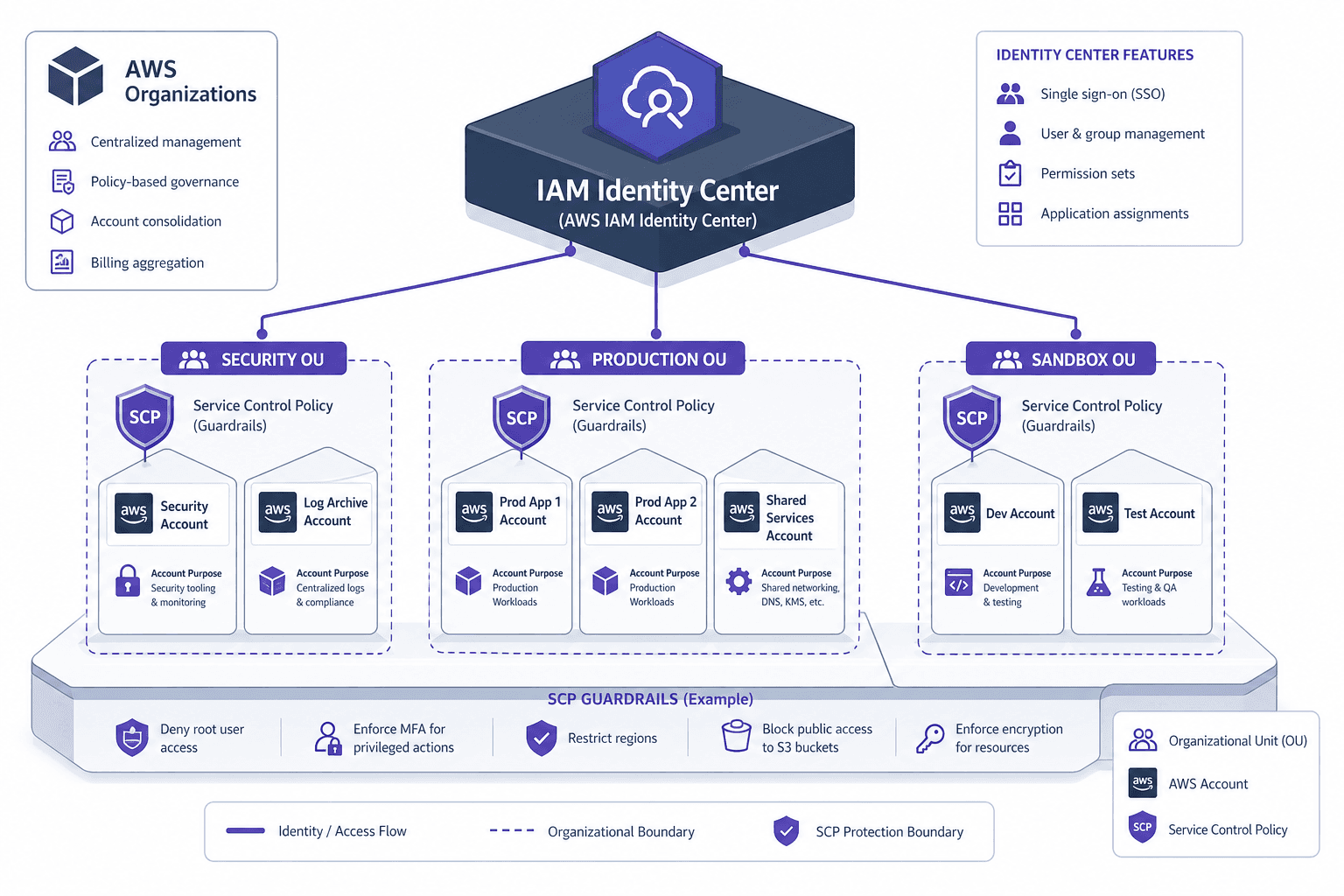
Most organizations hit a breaking point when their IAM policy count exceeds a few thousand statements, or when an audit reveals that a junior developer has AdministratorAccess on a production account because a legacy role was never rotated. The solution is not better policy writing; it is structural isolation. Effective aws multi account strategies require strict boundaries. AWS multi-account IAM design shifts the focus from managing individual user permissions to managing identity boundaries and permission scopes through AWS Organizations and IAM Identity Center.
The Boundary Problem and Organizations
In a single-account model, the root user and IAM users share a flat permission space. If you compromise an IAM user with broad permissions, you compromise the entire account’s data, billing, and network topology. This is the "blast radius" problem.
AWS Organizations solves this by creating a trust relationship between accounts. When you create an organization, AWS generates a Root organizational unit (OU) and an initial "Management Account." You then create child accounts and group them into Organizational Units (OUs). This structure is critical because it allows you to apply Service Control Policies (SCPs) at the OU level. For more details on managing these boundaries, refer to the AWS Organizations User Guide.
SCPs are not permissions; they are permission guards. They explicitly deny actions regardless of what the underlying IAM policies allow. If you attach an SCP to an OU that denies iam:CreateUser, no IAM policy in any account within that OU can override it. This creates a hard ceiling on what is possible, enforcing governance centrally.
// Example SCP: Deny all IAM changes in a sandbox OU
{
  "Version": "2012-10-17",
  "Statement": [
    {
      "Effect": "Deny",
      "Action": "iam:*",
      "Resource": "*"
    }
  ]
}
Identity Centralization with IAM Identity Center
Managing IAM users and access keys across dozens of accounts is operationally unsustainable. AWS IAM Identity Center (formerly AWS Single Sign-On) centralizes identity management. It acts as the bridge between your corporate identity provider (IdP)—such as Azure AD, Okta, or Google Workspace—and your AWS accounts.
The key mechanism here is the separation of identity from permission. In traditional IAM, you attach policies directly to users or groups. In Identity Center, you assign Permission Sets to Groups or Users within specific Accounts or OUs.
- Identity Source: You configure Identity Source as either an Identity Center directory or a Federated IdP. For enterprise environments, Federated IdP is mandatory to leverage existing SSO infrastructure and MFA enforcement.
- Permission Sets: These are collections of IAM managed policies and customer-managed policies. They define what a user can do.
- Assignment: You assign a Permission Set to a Group/User for a specific Account or OU.
This decoupling allows you to update a Permission Set once, and the change propagates to all accounts where that Permission Set is assigned. If you need to restrict access for a team moving from development to production, you simply reassign their group membership in the Identity Center console, rather than hunting down IAM roles across ten different accounts.
Permission Set Mechanics and ABAC
Permission Sets support both IAM Managed Policies and Customer Managed Policies. However, for scalable multi-account design, you should heavily leverage Attribute-Based Access Control (ABAC) via resource tags.
Instead of creating a Permission Set named Dev-Access, you create a Permission Set that allows actions on resources tagged with Environment=Development. This allows you to provision new resources dynamically without updating IAM policies. Identity Center propagates these tags from your IdP attributes. For example, if your corporate directory assigns an employee-type attribute, you can map that to an AWS tag and restrict access based on it.
# Example: Assigning a permission set to a group in an OU
aws sso-admin create-account-assignment \
    --instance-arn arn:aws:sso:::instance/ssoins-xxxxxxxxxxxx \
    --permission-set-arn arn:aws:sso:::permissionSet/ssoins-xxxxxxxxxxxx/ps-xxxxxxxxxxxx \
    --principal-type GROUP \
    --principal-id <group-id> \
    --target-id <account-id> \
    --target-type AWS_ACCOUNT
OU Design Strategies
The structure of your ou design dictates your security posture. There are two primary models:
- Flat OU Structure: All accounts reside in a single OU under the Root. This is simple but lacks granularity for SCPs. You cannot apply different security constraints to different types of accounts without using tags and complex SCP logic.
- Hierarchical OU Structure: Accounts are grouped by function (e.g.,
Security,Sandbox,Production,SharedServices). This allows you to apply strict SCPs to theSecurityOU (preventing even administrators from deleting CloudTrail logs) and more permissive SCPs to theSandboxOU.
For most organizations, a hybrid approach works best. Start with a logical hierarchy:
SecurityOU: Contains the logging and audit accounts. SCPs here should be extremely restrictive.ProductionOU: Contains live workloads. SCPs may restrict region usage or instance types.DevelopmentOU: Contains dev/test accounts. SCPs may allow broader access to save cost.
Break Glass Accounts
No matter how well-designed your IAM architecture, there will be incidents where Identity Center is unavailable, or the IdP integration fails. You need break glass accounts—emergency access accounts that exist outside the standard identity flow.
These accounts should be:
- Isolated: Placed in a separate OU with no Identity Center assignments.
- Secured: Accessed via hardware MFA keys, not passwords.
- Monitored: Any login triggers immediate alerts.
When an incident occurs, engineers log into the Break Glass account, perform the remediation, and then immediately rotate the credentials. For example, during a recent outage where our Azure AD connector failed for 45 minutes, a platform engineer used a break glass account to restore a misconfigured VPC route table. The login was detected via CloudTrail, triggering an automated PagerDuty alert, and the credentials were rotated within 10 minutes of the incident resolution. The existence of these accounts should be audited regularly to ensure they haven’t been co-opted for routine use.
Common Pitfalls
- Using break glass accounts for routine access: Engineers often find it easier to use break glass credentials for day-to-day tasks because they bypass SSO friction. This undermines the security model and makes auditing difficult. Enforce strict monitoring and regular reviews to prevent drift.
- Failing to monitor break glass logins: If you don't alert on break glass logins, you lose visibility into emergency access. Treat break glass logins with the same severity as production incidents.
- Over-relying on flat OU structures: A flat OU structure limits your ability to apply granular SCPs. As your organization grows, the management overhead of tagging and complex SCP logic becomes unmanageable. Invest in a hierarchical structure early.
Practical Takeaways
- SCPs are guardrails, not permissions: Remember that SCPs only restrict what IAM identities can do; they do not grant permissions. Always test SCPs in a non-production environment first.
- Decouple identity from permission: Use Identity Center to manage who can access what, rather than embedding user logic into IAM roles. This makes it easier to onboard and offboard users.
- Design for failure, not just for success: Assume that your primary identity source will fail. Have a robust break glass strategy and test it regularly.
FAQ
Can I use IAM Identity Center with on-prem AD? Yes, IAM Identity Center supports connecting to on-premises Active Directory via AWS Directory Service (AD Connector). You can configure your on-prem AD as an identity source, allowing users to authenticate with their existing credentials while accessing AWS resources.
What is the difference between SCPs and IAM policies? IAM policies grant permissions to AWS identities (users, groups, roles). SCPs act as boundaries for what those permissions can achieve. An SCP can deny actions that IAM policies allow, but it cannot grant permissions that do not exist in the IAM policy.
How do I rotate break glass credentials? Break glass credentials should be rotated immediately after use. Implement automated scripts or manual procedures that generate new credentials and store them securely (e.g., in AWS Secrets Manager or a hardware HSM). Regularly audit these credentials to ensure they have not been used for non-emergency purposes.
Conclusion
Multi-account IAM design is about reducing complexity through isolation. By using Organizations to enforce hard boundaries with SCPs, and IAM Identity Center to centralize identity and decouple permissions from individual accounts, you create a system that scales. The goal is not to prevent all errors, but to limit their impact and ensure that access is always auditable, revocable, and aligned with business function.
Related posts
Implementing AWS IAM Identity Center: From Legacy SSO to Federated Control
A guide to implementing AWS IAM Identity Center for federated access, multi-account management, and SCIM provisioning.
AWS Service Accounts: The Pattern That Doesn't Exist
Clarifies the misconception of AWS service accounts, explaining how IAM roles and instance profiles replace static credentials for secure application access.
S3 ACL vs Bucket Policy vs IAM Policy
Compare S3 ACLs, bucket policies, and IAM policies to secure AWS storage. Learn how block public access and cross-account access work together.
