IAM Policy Evaluation Logic, Step by Step
Understand AWS IAM policy evaluation logic, explicit deny rules, and how the policy simulator works to troubleshoot access denied errors.
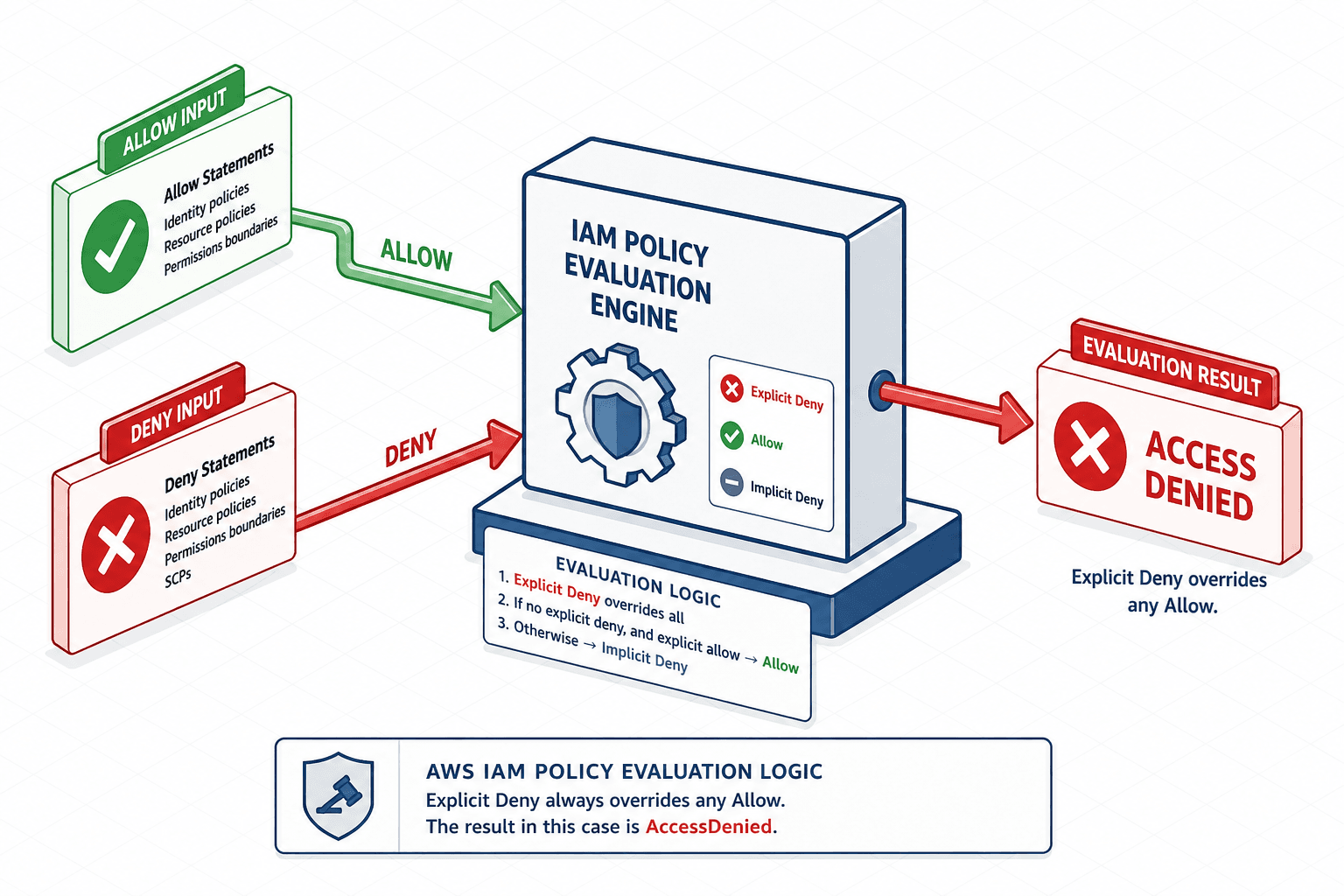
When debugging an AccessDenied error, understanding the underlying iam policy evaluation logic is often more effective than simply searching for missing Allow statements. AWS Identity and Access Management (IAM) does not operate on a simple "allow list" model. It operates on a strict logical evaluation sequence that prioritizes explicit rejections over permissions. Understanding this mechanism is critical for debugging access issues, as the presence of an Allow statement does not guarantee access if another policy explicitly denies it.
This post breaks down the exact steps AWS takes to evaluate an IAM policy, explains the precedence rules, and provides a workflow for troubleshooting using the Policy Simulator.
The Core Mechanism: Four Outcomes
Every IAM policy statement has two key components: Effect (either Allow or Deny) and Action (the API operation or resource pattern). When AWS evaluates a request, it combines all applicable policies (from the identity and the resource) into a single policy document. It then evaluates this combined document against the request.
There are only four possible outcomes for any given action:
- Explicit Allow: A policy statement explicitly grants permission for the action.
- Explicit Deny: A policy statement explicitly denies permission for the action.
- Implicit Deny: No policy statement grants permission for the action. The default state is denial.
- Implicit Allow: This does not exist in IAM. If there is no explicit
Allow, the result is an implicit deny.
The critical rule governing these outcomes is precedence: An explicit Deny always wins. If any policy attached to the user, group, or role (or any resource-based policy) contains an explicit Deny for the requested action, the request is denied, regardless of how many Allow statements exist.
Worked Scenario: The Precedence Trap
Consider a user named Alice. She is a member of the Developers group, which has a policy allowing s3:GetObject on all S3 buckets. Alice also has an individual inline policy attached to her user that denies s3:GetObject on a specific bucket, s3://secure-data.
When Alice attempts to read an object from s3://secure-data, AWS performs the following evaluation:
- Collect Policies: AWS gathers the
Developersgroup policy (Allows3:GetObjecton*) and Alice’s inline policy (Denys3:GetObjectons3://secure-data). - Evaluate Against Request: The request is for
s3:GetObjectons3://secure-data. - Check for Explicit Deny: AWS finds the inline policy statement with
Effect: DenyandResource: s3://secure-data. This matches the request. - Decision: Because an explicit
Denywas found, AWS returnsAccessDenied. TheAllowfrom the group policy is ignored.
This behavior is intentional. It allows administrators to create broad allow policies for groups while selectively denying access for specific sensitive resources using individual user policies or more specific resource-based policies.
Policy Sources and Scoping
IAM policies can come from multiple sources. AWS combines them before evaluation:
- Identity-Based Policies: Attached directly to IAM users, groups, or roles. These control what the identity can do.
- Resource-Based Policies: Attached to AWS resources (e.g., S3 bucket policies, Lambda function policies). These control who can access the resource.
- Permissions Boundaries: An advanced feature that sets the maximum permissions an IAM entity can have. They do not grant permissions; they restrict them.
- Service Control Policies (SCPs): Applied at the organizational level in AWS Organizations. SCPs restrict what actions can be performed, even if the identity has full permissions. SCPs act as an upper bound, not a grant.
For the purpose of troubleshooting AccessDenied errors, focus first on identity-based and resource-based policies. SCPs and boundaries are relevant if the error is due to exceeding maximum permissions, but the core evaluation logic remains the same: explicit denies override allows.
Troubleshooting with Policy Simulator
The AWS Policy Simulator is the primary tool for debugging IAM policy issues. It allows you to simulate the evaluation of policies for a specific user, role, or group against a specific action.
Here is a step-by-step workflow for troubleshooting an AccessDenied error:
- Identify the Failing Action: Note the exact API action from the error message (e.g.,
s3:GetObject). - Open Policy Simulator: Navigate to the IAM console and select "Policy Simulator."
- Select the Entity: Choose the IAM user, group, or role that is experiencing the issue.
- Add the Action: Enter the failing action.
- Run the Simulation: Click "Run simulation."
- Analyze Results: Look at the "Evaluation Result" column. If it says "Explicit Deny," click the link to see which policy statement caused the denial. Check the "Policy Source Type" to identify whether it came from an identity-based policy or a resource-based policy; the Policy Simulator does not evaluate Service Control Policies (SCPs).
- Iterate: If the result is "Implicit Deny," check if the action is correctly spelled and if the resource ARN matches. If it is "Explicit Allow," verify if a resource-based policy is denying access.
For example, if the simulation shows "Implicit Deny," you likely need to add an Allow statement. If the simulator shows an explicit allow but the real request is still denied, the cause is likely an SCP, which the Policy Simulator does not evaluate. Understanding the evaluation logic helps you interpret these results accurately.
Best Practices for Avoiding Confusion
- Use Specific Resources: Always specify the
ResourceARN in your policies. Wildcards (*) are convenient but make it harder to debug because they apply to all resources. - Leverage Conditions: Use
Conditionblocks to add context (e.g., IP address, time of day). This reduces the need for broad denies. - Test Early: Use the Policy Simulator in your CI/CD pipeline or before applying changes to production.
- Document Denies: Keep a record of explicit denies and why they are in place. This helps future engineers understand the security rationale and the underlying evaluation logic.
Conclusion
AWS IAM policy evaluation is a deterministic process governed by a simple but strict rule: explicit denies override explicit allows. By understanding the four possible outcomes and using the Policy Simulator to trace the evaluation path, engineers can efficiently troubleshoot access issues. Remember to check all policy sources—identity-based, resource-based, and organizational—and always validate your assumptions with the simulator before deploying changes.
This understanding forms the foundation for secure and maintainable IAM configurations in AWS.
Related posts
Least Privilege in Practice
A practical guide to implementing least privilege in AWS using IAM Access Analyzer, policy generation, and condition keys for secure access management.
Multi Cloud Identity Management Framework: A Reference Architecture
A reference framework for cross-cloud IAM that addresses multi-cloud identity management, entitlements, and reference architecture for architects.
Reading CloudTrail Events: Identity & Athena
A practical guide to reading CloudTrail events, focusing on UserIdentity, SessionContext, and Athena for AWS security investigation.