Reading CloudTrail Events: Identity & Athena
A practical guide to reading CloudTrail events, focusing on UserIdentity, SessionContext, and Athena for AWS security investigation.
Reading a CloudTrail Event
CloudTrail is often misunderstood as a simple ledger of "who did what." In reality, it is a structured data stream that captures the state of the AWS security boundary at the moment of interaction. For security engineers, the value lies not in the existence of the log, but in the precise interpretation of its nested fields. Specifically, the userIdentity and sessionContext objects contain the mechanistic details required to trace privilege escalation, lateral movement, and unauthorized access.
This guide breaks down the internal structure of a CloudTrail event and demonstrates how to query it using Amazon Athena for effective security investigation. This is Part 2 of the AWS Security Observability series.
The Anatomy of an Event
Every CloudTrail event is a JSON document. While the full schema is extensive, four top-level keys form the foundation of any forensic analysis:
eventVersion: The schema version (e.g., "1.08").eventTime: The timestamp in ISO 8601 format, representing when AWS processed the request.eventSource: The AWS service involved (e.g.,ec2.amazonaws.com).eventName: The specific API call made (e.g.,DescribeInstances).
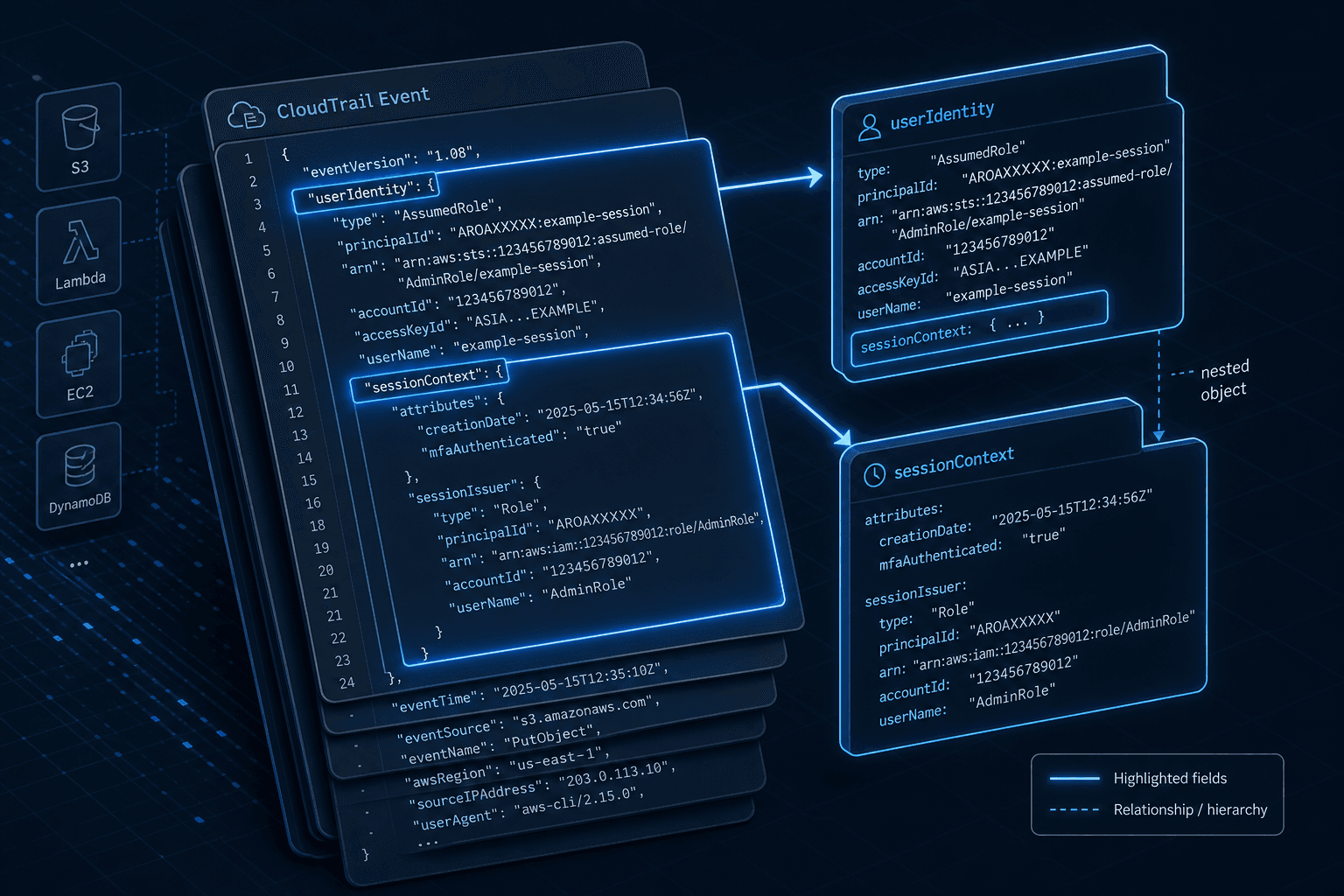
However, the investigative power resides in the userIdentity block. This object describes the principal that initiated the request. It is here that we distinguish between a direct IAM user login and a delegated session.
Consider this simplified excerpt from a CloudTrail event:
{
  "userIdentity": {
    "type": "AssumedRole",
    "principalId": "AROAEXAMPLEID:SessionName",
    "arn": "arn:aws:sts::123456789012:assumed-role/AdminRole/SessionName",
    "accountId": "123456789012",
    "sessionContext": {
      "sessionIssuer": {
        "type": "Role",
        "principalId": "AROAEXAMPLEID",
        "arn": "arn:aws:iam::123456789012:role/AdminRole",
        "accountId": "123456789012"
      },
      "attributes": {
        "mfaAuthenticated": "false",
        "creationDate": "2023-10-27T10:00:00Z"
      }
    }
  }
}
The Identity Chain: Deconstructing Trust
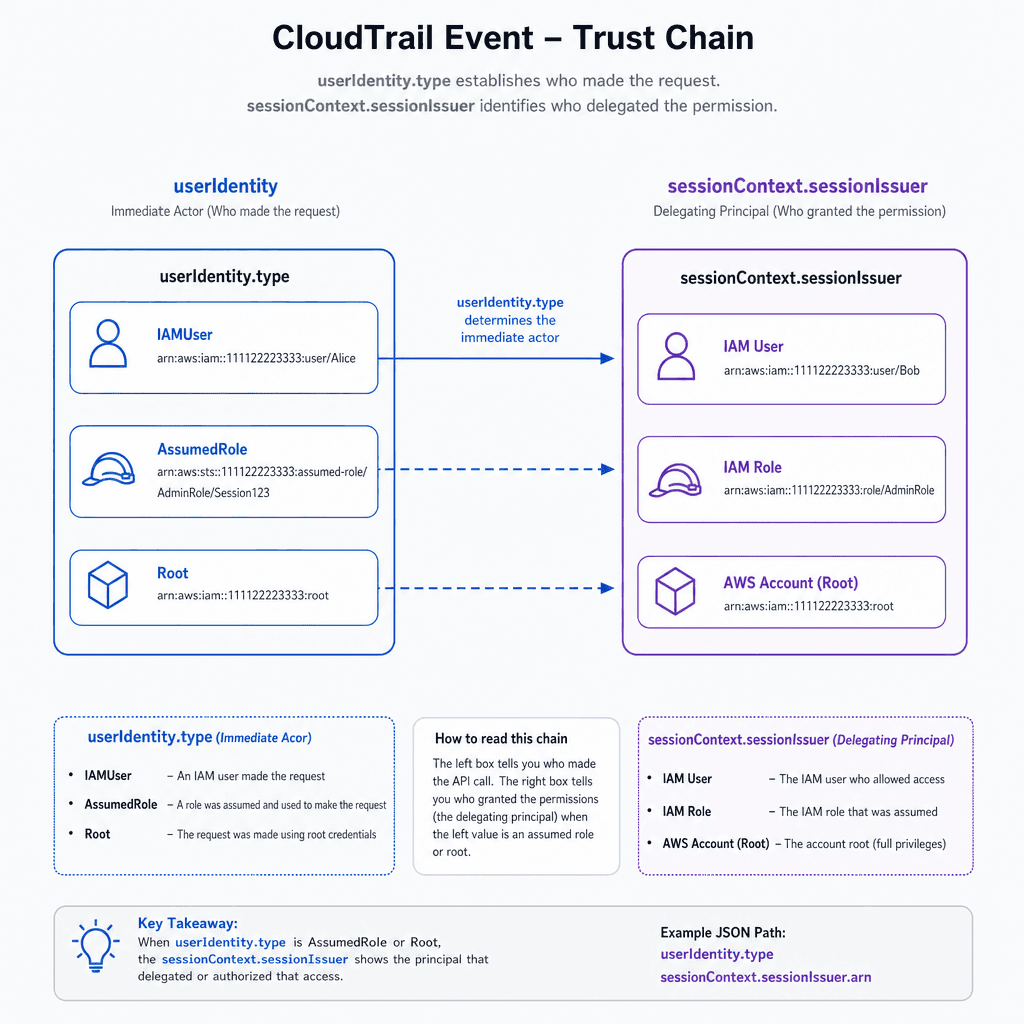
The critical mechanism in CloudTrail is the relationship between userIdentity and sessionContext.sessionIssuer. This structure allows you to reconstruct the chain of trust from the immediate actor back to the root principal. For detailed field definitions, refer to the AWS CloudTrail User Guide.
1. The Immediate Actor (userIdentity)
The userIdentity.type field tells you how the request was authenticated.
IAMUser: The request was made directly by an IAM user using long-term credentials or an MFA-protected console session.AssumedRole: The request was made by a temporary security credential. This is the most common source of lateral movement in cloud environments. When an attacker compromises an IAM role, theuserIdentity.typewill beAssumedRole.Root: The account root user. This is rare and highly privileged.
In the example above, type is AssumedRole. This immediately signals that the actor is not a human logging in directly, but a service or process acting on behalf of a role.
2. The Delegating Principal (sessionContext.sessionIssuer)
When a role is assumed, AWS generates temporary credentials. The sessionContext.sessionIssuer object contains the ARN of the role that was assumed. This is the key to tracing delegation.
sessionIssuer.arn: Identifies the role that granted the temporary credentials. In our example, this isarn:aws:iam::123456789012:role/AdminRole.sessionIssuer.principalId: The unique ID of the role.
By linking userIdentity.arn (the assumed role session) to sessionContext.sessionIssuer.arn (the role definition), you can determine if a role was assumed by another role, a user, or an external identity provider.
Note: When querying in Athena, be aware that
sessionContext.sessionIssuer.accountIdmay benullif the actor is an IAM user rather than an assumed role. Ensure your queries handle potential NULL values to prevent errors in mixed-user/role environments.
3. Authentication Context (sessionContext.attributes)
The sessionContext.attributes object provides additional context about the session's origin.
mfaAuthenticated: A string"true"or"false". If an admin action is performed via an assumed role andmfaAuthenticatedis"false", it may indicate that MFA was not enforced during the initial assumption, which is a security risk.creationDate: When the session was created. This helps correlate events across multiple logs.
Investigative Workflow with Athena
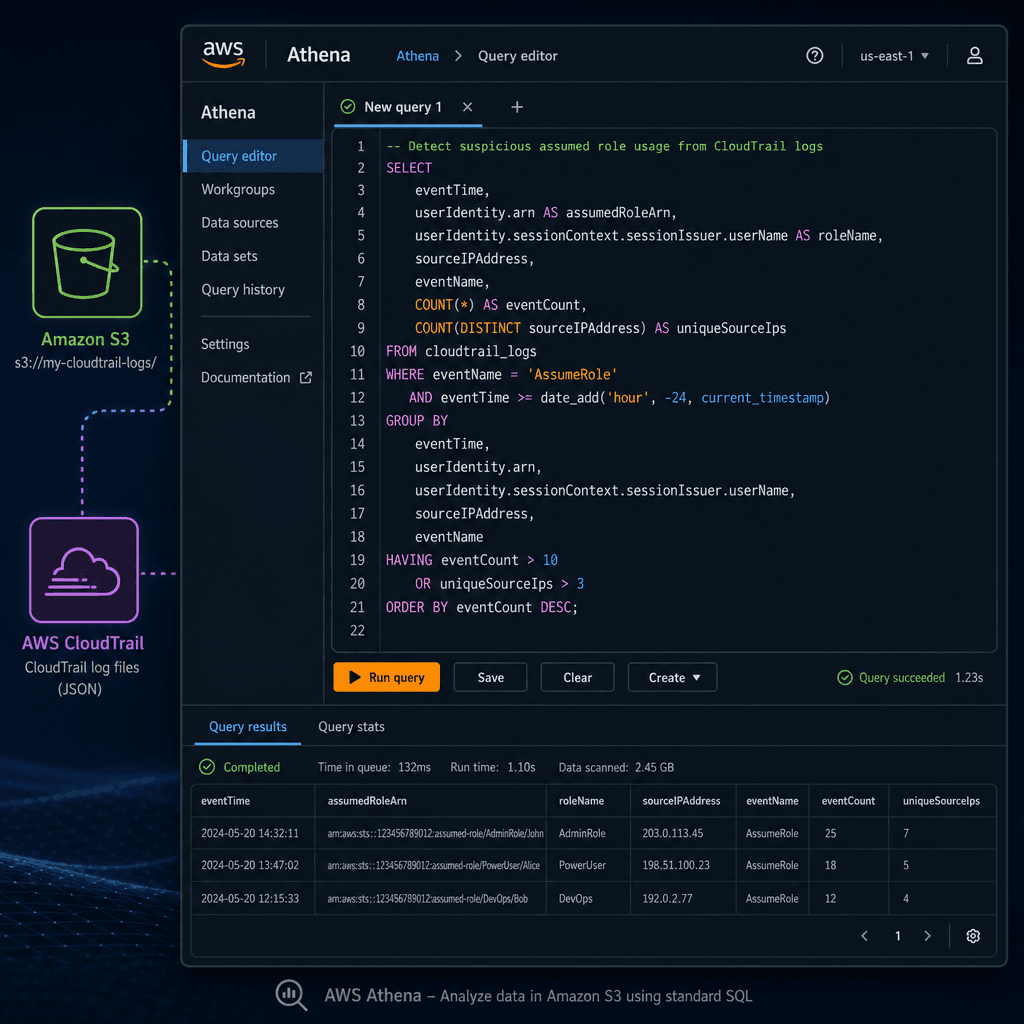
Querying CloudTrail logs directly from Amazon S3 using Amazon Athena is efficient because it avoids the cost and latency of forwarding all logs to a SIEM or Elasticsearch cluster for initial triage.
Prerequisites
- CloudTrail trails configured to deliver logs to an S3 bucket.
- An Athena database and table created for the CloudTrail logs.
Querying for Suspicious Assumed Roles
A common security scenario is detecting when an IAM role is assumed from an unexpected source or without MFA.
Example 1: Finding All Assumed Role Sessions Without MFA
This query identifies all API calls made by assumed roles where MFA was not authenticated during the session creation.
SELECT
    eventTime,
    eventName,
    userIdentity.arn AS actor_arn,
    sessionContext.sessionIssuer.arn AS issuer_arn,
    sessionContext.attributes.mfaAuthenticated
FROM
    cloudtrail_logs
WHERE
    userIdentity.type = 'AssumedRole'
    AND sessionContext.attributes.mfaAuthenticated = 'false'
LIMIT 100;
Mechanism Explanation:
userIdentity.type = 'AssumedRole': Filters for temporary credentials.sessionContext.attributes.mfaAuthenticated = 'false': Checks the session attributes. Note that this field reflects whether MFA was used to assume the role, not necessarily for every subsequent API call. If a role is assumed without MFA, all subsequent actions under that session inherit the lack of MFA verification.
Case Study: Detecting Lateral Movement in a Multi-Account Setup
During a recent incident response engagement, we noticed a spike in AssumeRole events originating from a development account assuming roles in a production account. By running a targeted Athena query, we identified that a CI/CD pipeline role in the dev account had overly permissive trust policies, allowing any IAM user in the dev account to assume it. This role then assumed an admin role in prod.
The query below helped us pinpoint the specific IAM users in the dev account triggering these assumptions:
SELECT
    eventTime,
    eventName,
    userIdentity.arn AS actor_arn,
    sessionContext.sessionIssuer.arn AS issuer_arn,
    sourceIPAddress
FROM
    cloudtrail_logs
WHERE
    userIdentity.type = 'AssumedRole'
    AND sourceIPAddress LIKE '%dev-ip-range%'
LIMIT 50;
This allowed us to immediately revoke the compromised developer credentials and tighten the trust policy, stopping the lateral movement within minutes.
Example 2: Tracing Cross-Account Access
Security teams often need to identify when roles from one AWS account assume roles in another. This is a common pattern in multi-account architectures but can also indicate misconfiguration or compromise.
SELECT
    eventTime,
    eventName,
    userIdentity.accountId AS calling_account,
    recipientAccountId AS resource_account,
    userIdentity.arn AS actor_arn
FROM
    cloudtrail_logs
WHERE
    userIdentity.type = 'AssumedRole'
    AND userIdentity.accountId != recipientAccountId
LIMIT 100;
Mechanism Explanation:
userIdentity.accountId: The account that owns the role used to make the call.recipientAccountId: The account that received the API call, typically the account that owns the resource being accessed.- If these values differ, it indicates cross-account resource access.
Best Practices for Athena Queries
- Use Partition Pruning: Ensure your Athena table is partitioned by
year,month, andday. This significantly reduces the amount of data scanned. - Filter Early: Always include
eventTimeranges in yourWHEREclause to limit the scan window. - Handle Nested Fields: Athena requires dot notation for nested JSON fields (e.g.,
userIdentity.arn). Ensure your table schema correctly maps these nested structures.
Common Pitfalls
- Ignoring Partition Pruning Costs: If your Athena table is not partitioned by date, queries can scan terabytes of data, leading to unexpectedly high costs. Always verify your table schema includes
dtpartitions. - Misinterpreting
mfaAuthenticatedScope: As noted earlier,mfaAuthenticatedindicates whether MFA was used to assume the role, not whether it was used for the specific API call. An attacker who assumes a role without MFA can perform subsequent actions without MFA, even if the role has MFA requirements. Do not assume MFA protection for every action just because the role enforces it. - Null Values in
sessionIssuer: When querying for IAM users,sessionContext.sessionIssuerwill be null. Queries that do not account for this may return incomplete results or throw errors depending on how the data is joined or filtered.
Practical Takeaways
- Focus on the Chain: Always trace from
userIdentityback tosessionContext.sessionIssuerto understand the full delegation path. - Verify MFA Context: Check
mfaAuthenticatedin the context of role assumption, not just individual API calls. - Use Athena for Triage: Leverage Athena for initial investigation due to its cost-effectiveness and flexibility, but ensure proper partitioning to manage costs.
- Monitor Cross-Account Assumptions: Set up alerts for unexpected cross-account role assumptions, especially from non-production accounts.
FAQ
Q: How can I tell if an IAM user assumed a role vs. a role assuming another role?
A: Check the userIdentity.type field. If it is AssumedRole, look at the principalId in the userIdentity block. If the principalId contains a colon (e.g., AROA...:SessionName), it is a session name. To see what assumed it, you would need to look at the preceding event where that session was created, typically an AssumeRole or AssumeRoleWithSAML event.
Q: Why is my Athena query returning no results for mfaAuthenticated = 'false'?
A: Ensure you are filtering for userIdentity.type = 'AssumedRole'. IAM users do not have a sessionContext with mfaAuthenticated in the same way; their authentication context is stored differently. Also, remember that if MFA was used, the value will be "true", not true (boolean).
Q: Can I use Athena to detect brute force attacks?
A: Yes, by filtering for eventName = 'ConsoleLogin' and userIdentity.type = 'IAMUser' with responseElements.ConsoleLogin values like Failure, you can track failed login attempts. Grouping by sourceIPAddress and userIdentity.userName can help identify brute force patterns.
Conclusion
Reading CloudTrail events is not about memorizing API names; it is about understanding the identity chain. By focusing on userIdentity.type and sessionContext.sessionIssuer, you can reconstruct the path of trust from the immediate actor back to the root principal. This mechanistic understanding, combined with Athena queries, enables precise, low-latency security investigations directly on your log data.
Remember: every AssumedRole event is a delegation. Your job is to verify that the delegation was authorized, authenticated, and appropriate for the action taken.
Related posts
IAM Users vs Roles: Static vs Temp Credentials
Compare IAM users and roles in AWS. Learn when to use access keys versus temporary credentials and how trust policies secure your cloud environment.
Migrating Between Parameter Store and Secrets Manager
A practical guide for cloud engineers on migrating from AWS Parameter Store to Secrets Manager, covering IAM policies, cutover strategies, and abstraction layers.
IRSA vs EKS Pod Identity: Architecture, Trust, and Tradeoffs
Compare IRSA and EKS Pod Identity for securing Kubernetes workloads on AWS. Learn how service accounts, trust policies, and STS sessions differ in implementation and best practices.