AWS Security Hub, Config, and Audit Manager Compared
A comparison of AWS Security Hub, Config, and Audit Manager for cloud engineers managing compliance and security conformance.
Cloud engineers often conflate AWS Security Hub, AWS Config, and AWS Audit Manager because they all appear in the context of "security" and "compliance." This conflation is dangerous. If you treat them as interchangeable, you will either have blind spots in your security posture or fail an audit because you cannot prove control effectiveness.
Part 4 of the AWS Security Observability series.
These three services operate at different layers of the security lifecycle. AWS Config is the record-keeper. AWS Security Hub is the aggregator and detector. AWS Audit Manager is the evidence collector. Understanding the mechanism-level data flow between them is the only way to design a compliant architecture.
The Core Mechanism of AWS Config: State Recording
aws config is not a monitoring tool in the traditional sense. It does not alert you when a CPU spike occurs or when a request fails. Instead, it is a persistent record of your infrastructure’s configuration state.
When you create, modify, or delete a resource (like an S3 bucket or an EC2 instance), aws-config records the change. It captures the resource’s attributes—tags, encryption settings, public access blocks—and stores them in a time-series database. This is the "single source of truth" for what your environment is, not just what it was doing.
The power of aws-config lies in its evaluation engine. You define rules. These rules are code snippets (AWS Lambda functions or managed AWS rules) that evaluate resources against a condition. For example, a rule might check if an RDS instance has encryption enabled. If the resource’s recorded state violates the rule, it flags it as non-compliant.
This process is asynchronous and state-based. A resource can be non-compliant today and compliant tomorrow if the underlying configuration changes. aws-config tracks this history. You can see exactly who changed what, when, and from which value to which value. This granularity is essential for forensic analysis but is often overkill for high-level security dashboards.
Opinion: Most teams over-engineer their Config rules. Start with the managed rules provided by AWS. They cover 80% of common compliance requirements (CIS, PCI DSS) without requiring custom Lambda code. Custom rules should be reserved for business-specific logic that AWS standards do not cover.
The Aggregation Layer of Security Hub: Normalization
security-hub is designed to solve the "alert fatigue" problem. AWS has many security services: GuardDuty detects threats, Inspector scans for vulnerabilities, Macie finds sensitive data, and Config checks for misconfigurations. Each service uses its own schema for findings. security-hub ingests these findings and normalizes them into a common format called the AWS Security Finding Format (ASFF).
Security Hub does not primarily generate its own findings. It aggregates them. However, it does drive continuous compliance checks through "Standards." When you enable a standard like CIS AWS Foundations Benchmark, Security Hub automatically enables relevant AWS Config rules and other checks across your account.
The mechanism here is aggregation and correlation. Security Hub takes a finding from GuardDuty about a suspicious IP address and a finding from Config about an open security group. It presents them in a unified dashboard, allowing you to see the full context of a risk. It also provides remediation actions, such as triggering a Systems Manager automation to close the security group.
Security Hub is the "dashboard" layer. It is where you go to get a high-level view of your security posture. It answers the question: "Are we currently secure?" based on aggregated data from multiple sources.
The Evidence Pipeline of Audit Manager: Mapping Controls
If Security Hub tells you if you are compliant, audit-manager tells you how you proved it. Auditors do not care about your dashboard; they care about evidence.
Audit Manager maps your compliance requirements (e.g., PCI DSS, HIPAA, SOC 2) to specific AWS services. It defines "controls" and then automatically collects evidence from those services. The key mechanism here is the "Evidence Collection."
Additionally, conformance packs can be used to automate compliance checks across multiple accounts and regions, which Audit Manager can then report on.
Audit Manager pulls data from:
- AWS Config: To show that resources are configured correctly (e.g., "Show me the last 100 configurations of all S3 buckets to prove encryption was always on").
- AWS Security Hub: To show that security findings have been addressed (e.g., "Show me the closed findings related to high-severity vulnerabilities").
- AWS CloudTrail: To show who made changes (audit logs).
- Other Services: Such as IAM, KMS, and GuardDuty.
audit manager does not "find" issues. It does not scan for misconfigurations. It assumes that Config and Security Hub have already done the work of identifying non-compliance. audit manager’s job is to gather the proof that you have addressed those issues or that your controls are effective.
This distinction is critical. You cannot use Audit Manager to discover security problems. You use it to report on them. The "Automations" feature in Audit Manager links specific findings from Security Hub or Config to evidence collections, creating a direct line of sight from a problem to the proof of remediation.
The Data Flow and Dependency Graph
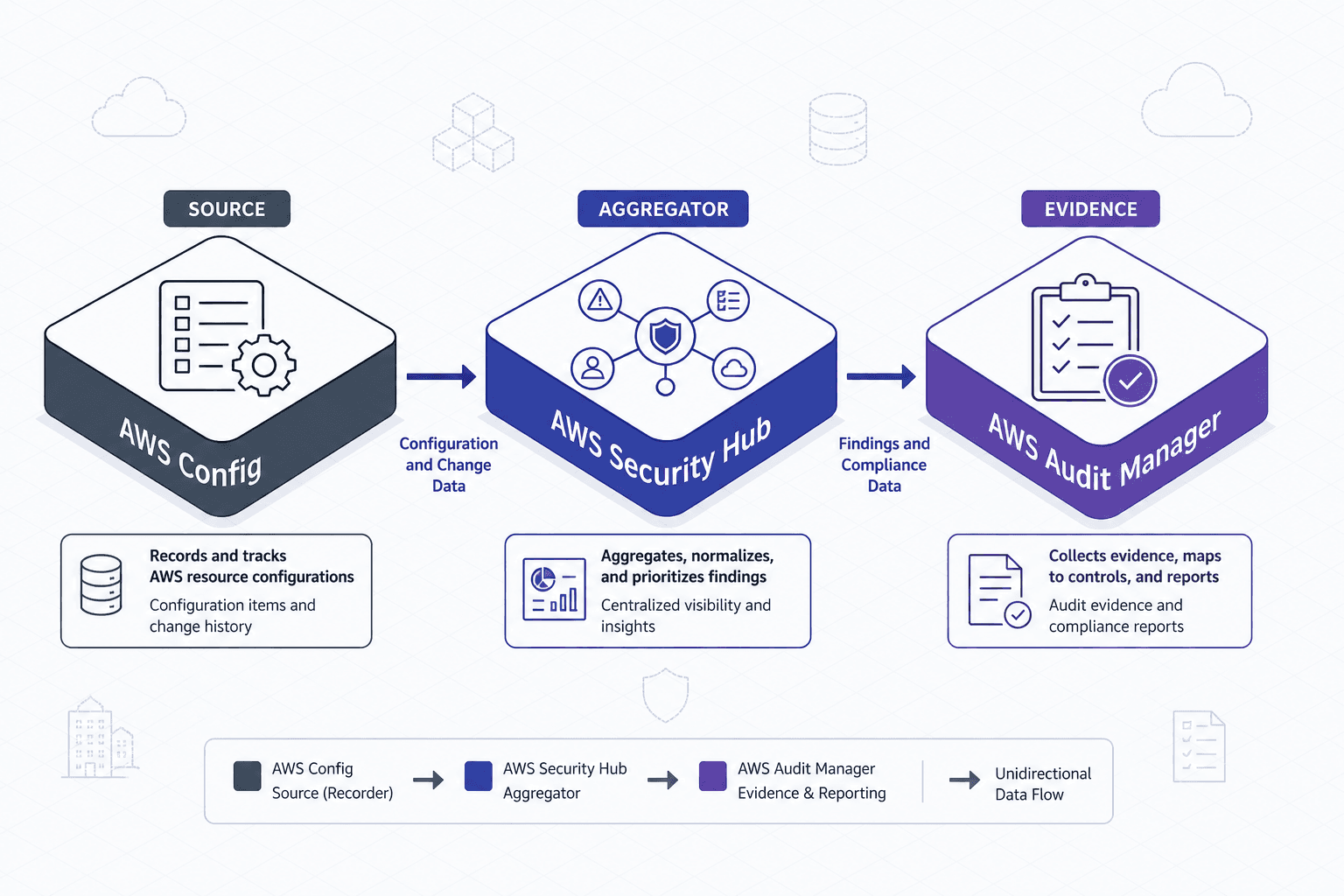
To understand how these services work together, visualize the data flow as a pipeline for this comparison:
- AWS Config records the state of every resource. It evaluates resources against rules and generates compliance status.
- AWS Security Hub ingests findings from Config (as well as GuardDuty, Inspector, etc.). It normalizes these findings and provides a unified view. It also drives the enabling of Config rules via Standards.
- AWS Audit Manager ingests data from both Config and Security Hub. It maps this data to compliance controls and generates reports for auditors.
The direction of trust is unidirectional. Config trusts the infrastructure state. Security Hub trusts the findings from lower-level services. Audit Manager trusts the findings and states from both.
If you disable AWS Config, Security Hub loses its ability to assess configuration compliance, and Audit Manager loses its primary source of evidence for infrastructure controls. If you disable Security Hub, Audit Manager loses access to normalized security findings, making it harder to prove that security incidents were handled.
Opinion: Many organizations skip AWS Config, thinking Security Hub is enough. This is a mistake. Security Hub’s Config integration is limited. If you need deep historical analysis of configuration drift, you must use Config directly. Security Hub is a summary; Config is the raw data.
Conclusion
AWS Config, Security Hub, and Audit Manager are not competitors. They are complementary components of a security observability stack.
- Use AWS Config to know what your environment looks like and to track changes over time.
- Use Security Hub to aggregate security findings and get a unified view of your posture.
- Use Audit Manager to collect evidence and prove compliance to auditors.
By understanding their distinct mechanisms and data dependencies, you can build a system that is not only secure but also auditable. Don’t treat them as a single monolithic tool. Treat them as a pipeline: record, aggregate, and prove.
Related posts
AWS Compliance Automation: Config, Audit Manager, and Security Hub
Overview of AWS compliance automation using Config, Audit Manager, and Security Hub for SOC2 and CIS benchmarks.
AWS Alerting: Fire on Real Threats
Reduce alert fatigue in AWS by configuring EventBridge and GuardDuty to fire only on high-fidelity threats.
CloudTrail, CloudWatch, and GuardDuty: Who Does What
Understand the distinct roles of CloudTrail, CloudWatch, and GuardDuty in AWS security and monitoring architecture.