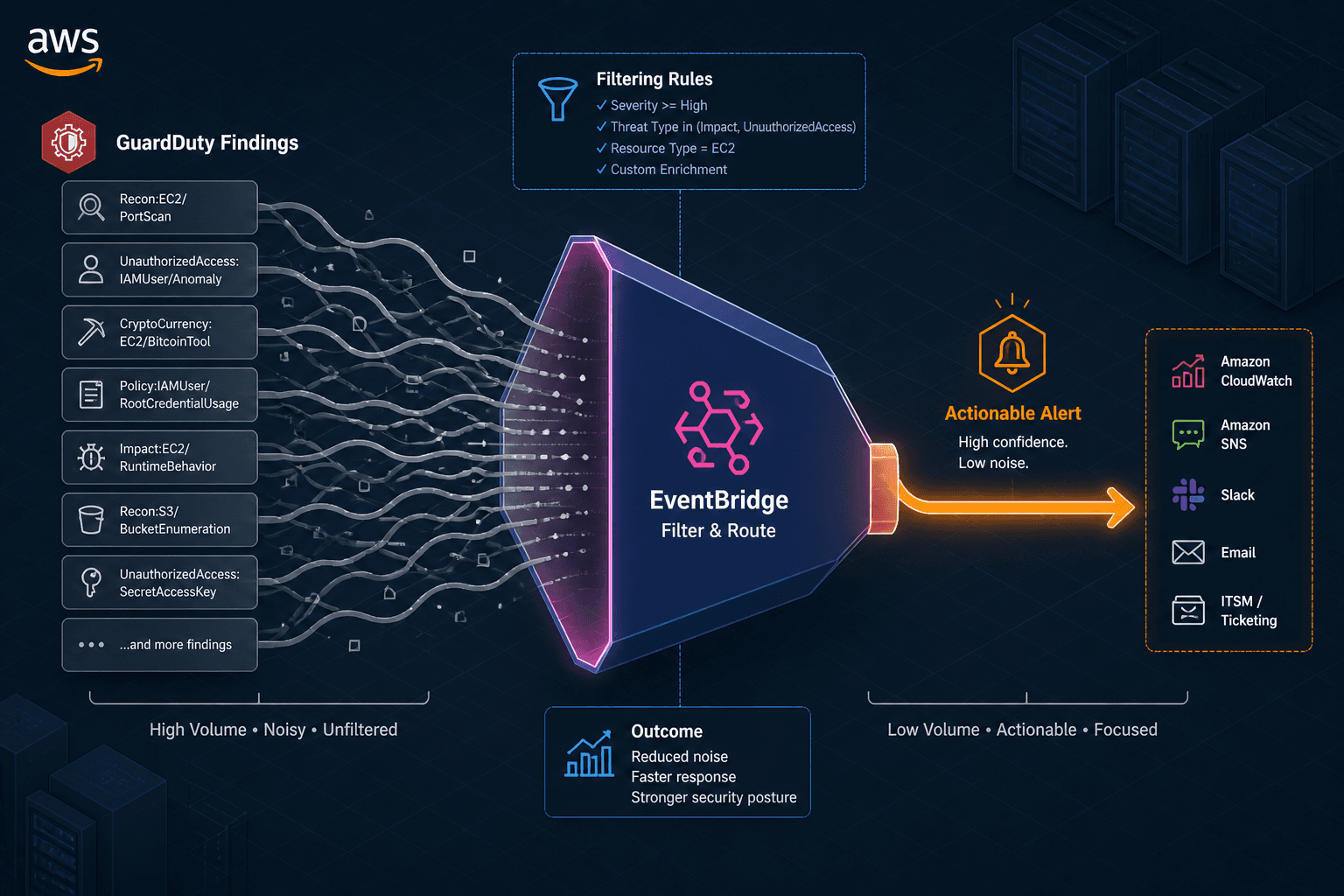
AWS Alerting: Fire on Real Threats
Reduce alert fatigue in AWS by configuring EventBridge and GuardDuty to fire only on high-fidelity threats.
Detections and Alerting That Fire on Real Threats
Part 3 of the AWS Security Observability series.
In AWS security operations, the primary enemy is not the attacker; it is the notification system. When a Security Engineer or SRE receives fifty notifications in an hour, the human brain begins to treat them all as background noise. This phenomenon, known as alert fatigue, leads to delayed response times and missed critical incidents. The goal is not to detect fewer threats, but to ensure that every alert fired represents a high-probability, actionable threat. This requires moving from a "detect everything" architecture to a "filter first" architecture.
The mechanism for reducing noise in AWS relies on two components working in tandem: Amazon GuardDuty for initial threat identification and severity scoring, and Amazon EventBridge for precise routing based on context. By tuning these tools, we can eliminate the majority of false positives and informational noise before they reach human operators.
The Mechanism of Noise: Why Default Alerts Fail
GuardDuty operates by continuously analyzing VPC Flow Logs, DNS logs, and CloudTrail data using machine learning models and known threat intelligence feeds. It generates "Findings" when it detects anomalous behavior.
The problem arises from the definition of "anomalous." In a healthy cloud environment, many activities are statistically unusual but benign. For example:
- A new EC2 instance launching in an unused region.
- An API call from an IP address that has never been seen before.
- DNS queries for newly registered domains (which could be malware C2, but could also be a developer testing a new service).
By default, GuardDuty flags these events. If you send all of these to a Slack channel or PagerDuty, you create noise. The first step in filtering is understanding that GuardDuty assigns a Severity Score (0.1–8.9) and a Finding Type to each event. Not all findings are equal.
GuardDuty Triage: Leveraging Severity and Type
GuardDuty’s severity score is calculated based on the likelihood of compromise. A score of 0.1–3.9 is typically low-confidence or informational. A score of 7.0–8.9 indicates a high likelihood of malicious activity.
To reduce noise, we must stop treating all findings as equal. We should only act on findings with a severity score of 7.0 or higher, or those with specific high-risk finding types. These configurations constitute the core detection rules that define high-fidelity alerts.
Actionable Finding Types
Not all high-severity findings require immediate intervention. Some are "Informational" in nature but flagged for visibility. We should filter out:
Discovery:IAMUser/AnomalousBehavior: Often caused by automated scripts or CI/CD pipelines.Recon:IAMUser/UserPermissions: Common in monitoring tools.Policy:S3/BucketBlockPublicAccessDisabled: Can be a configuration drift issue rather than an active attack.
Conversely, we must prioritize:
Trojan:EC2/DropPoint: Confirmed malware.Recon:EC2/Portscan: Active reconnaissance.CryptoCurrency:EC2/BitcoinTool.B: Resource hijacking.
EventBridge Routing Logic
Once GuardDuty generates a finding, it sends an event to Amazon EventBridge. EventBridge is the central nervous system for this filtering process. We can use EventBridge rules to inspect the incoming event payload and route it accordingly.
It is important to understand that EventBridge rules are additive; there is no concept of a "deny rule" that explicitly blocks traffic. To "silence" low-severity events, one must ensure that no other rule matches them, or explicitly route them to a no-op target. We create an allow rule for high-severity events that matches specific criteria.
Here is a practical example of an EventBridge rule that routes only high-severity findings to a PagerDuty integration, while ignoring everything else. This rule uses the detail.severity field to filter events.
{
  "source": ["aws.guardduty"],
  "detail-type": ["GuardDuty Finding"],
  "detail": {
    "severity": [{"numeric": [">=", 7.0]}]
  }
}
This JSON pattern ensures that only findings with a severity score of 7.0 or higher are processed by the target (e.g., an SNS topic that triggers PagerDuty). All other findings are effectively silenced at the routing layer because no rule matches them.
Adding Context: Region and Account
Noise can also come from non-critical environments. A security scan in a development account is less urgent than one in production. We can refine the EventBridge rule to include the accountId and region fields.
{
  "source": ["aws.guardduty"],
  "detail-type": ["GuardDuty Finding"],
  "detail": {
    "severity": [{"numeric": [">=", 7.0]}],
    "accountId": ["123456789012"], // Production Account ID
    "region": ["us-east-1"]
  }
}
This ensures that SREs are only paged for critical threats in their primary production environment.
External Enrichment and Suppression
Even with severity filtering, some high-severity findings may be false positives. For example, a penetration testing tool might trigger a "PortScan" alert. To suppress these, we need external enrichment.
Using Tags for Suppression
One effective pattern is to tag resources that are known to generate noise. For example, if you have a security scanning instance, tag it with SecurityTool=true. You can then use AWS Lambda to check this tag when a finding is generated. If the resource is tagged, the Lambda function can trigger the ArchiveFindings API to archive the finding or update an Incident Manager item.
Integrating Threat Intelligence
For more advanced filtering, you can integrate GuardDuty with external threat intelligence feeds. If an IP address is known to be part of a trusted CDN (like CloudFront), you can suppress alerts related to that IP. This requires a custom Lambda function that checks the source IP against a allowlist before forwarding the alert.
Conclusion
Reducing alert fatigue is not a one-time configuration task; it is an ongoing process. As your environment changes, new sources of noise will emerge. The key is to establish a runbook for alert tuning. When a false positive is identified, document it, add it to the suppression list, and review the detection rules periodically. Maintaining these rules ensures that your security posture evolves with the threat landscape.
By leveraging GuardDuty’s severity scoring and EventBridge’s flexible routing, you can transform your security observability from a noisy broadcast into a precise signal. This allows SREs and Security Engineers to focus on real threats, not just noise.
Key Takeaways
- Filter by Severity: Only act on findings with a severity score of 7.0 or higher.
- Filter by Type: Ignore informational findings like
Discovery:IAMUser/AnomalousBehaviorunless they are in a critical context. - Filter by Context: Use EventBridge rules to restrict alerts to specific accounts and regions.
- Enrich with Tags: Suppress alerts for known safe behaviors by tagging resources and checking tags in Lambda.
This approach ensures that every alert fired is a high-fidelity threat that requires immediate attention.
Related posts
CloudTrail, CloudWatch, and GuardDuty: Who Does What
Understand the distinct roles of CloudTrail, CloudWatch, and GuardDuty in AWS security and monitoring architecture.
Least Privilege in Practice
A practical guide to implementing least privilege in AWS using IAM Access Analyzer, policy generation, and condition keys for secure access management.
Identity in Serverless Architectures: Authentication Patterns for Lambda and Cloud Functions
An examination of identity management patterns for Lambda and cloud functions, focusing on Cognito authorizers and serverless security.