IAM Users vs Roles: Static vs Temp Credentials
Compare IAM users and roles in AWS. Learn when to use access keys versus temporary credentials and how trust policies secure your cloud environment.
IAM Users vs Roles
In AWS Identity and Access Management (IAM), the distinction between Users and Roles is not merely semantic; it is a fundamental architectural decision that dictates how credentials are managed, how trust is established, and how security incidents are contained. For cloud engineers, understanding this difference is the difference between a secure, scalable infrastructure and a fragile environment prone to credential leakage and lateral movement.
This guide compares IAM Users and IAM Roles, focusing on the mechanisms of credential issuance, the structure of trust policies, and the operational implications of static versus temporary access. As Part 2 of the AWS IAM Deep Dive series, we build on foundational concepts to dissect the specific mechanics of identity delegation.
IAM Users: Static Identities and Long-Term Credentials
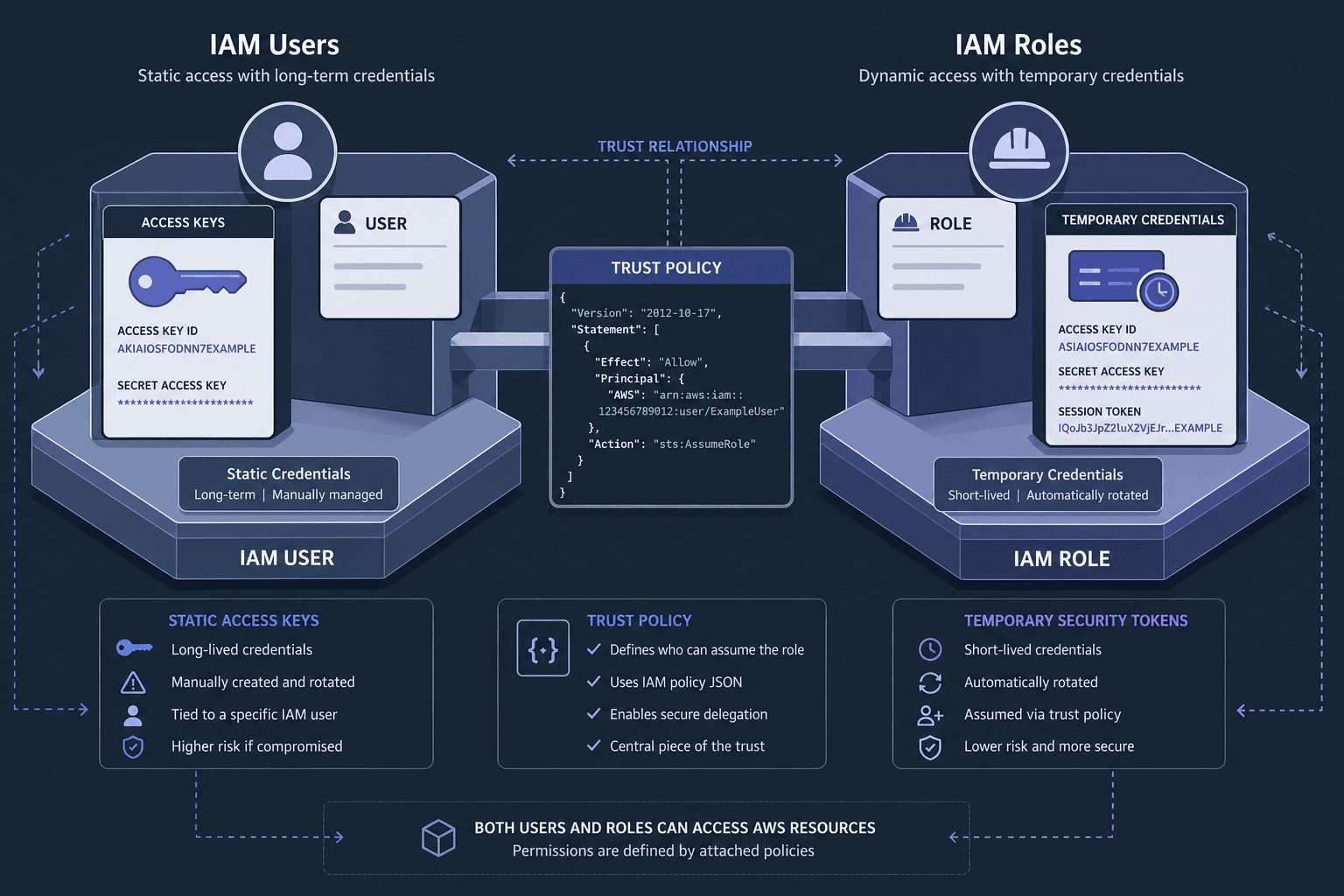
IAM Users are distinct entities that represent a person, service account, or application that interacts with AWS resources. The defining characteristic of an IAM User is the existence of long-term credentials.
When you create an IAM User, you can generate two types of credentials:
- Console Password: For interactive sign-in.
- Access Keys: A pair consisting of an Access Key ID (starting with
AKIA...) and a Secret Access Key.
These access keys are static. They do not expire unless manually rotated or deleted. When an application uses an IAM User, it typically stores these keys in environment variables, configuration files, or source code.
The Mechanism of Static Access
When an application makes an API call using an IAM User’s access keys, AWS Signature Version 4 (SigV4) signs the request using the secret key. AWS validates the signature against the stored secret for that specific user. If valid, AWS checks the user’s attached policies to determine if the action is permitted. For detailed technical specifications on SigV4, refer to the AWS Signature Version 4 Signing Process.
The Critical Risk: Because the keys are static, any compromise of these credentials results in persistent access. If an attacker obtains an IAM User’s access key, they have indefinite access until the key is rotated. This violates the principle of least privilege over time, as the key remains valid regardless of context or duration.
IAM Roles: Dynamic Identities and Temporary Credentials
An IAM Role is an IAM identity that you can create in your account and have specific permissions. However, unlike a User, a Role does not have long-term credentials associated with it. Instead, when a principal (an entity that can make requests) assumes a role, AWS Security Token Service (STS) issues temporary security credentials.
These temporary credentials consist of:
- Access Key ID
- Secret Access Key
- Session Token
These credentials are valid for a limited period, typically ranging from 15 minutes to 12 hours, depending on the role configuration.
The Mechanism of Temporary Access
When a principal assumes a role, it calls the sts:AssumeRole API. STS verifies the request against the role’s Trust Policy. If authorized, STS generates a short-lived session token. This token is used to sign subsequent API requests. For API reference details, see the AssumeRole API Documentation.
The Security Advantage: Because the credentials are temporary, the blast radius of a compromise is limited. If an attacker intercepts a session token, it expires quickly, reducing the window of opportunity for malicious activity. This aligns with the security principle of minimizing the impact of credential theft.
Trust Policies: The Gatekeeper of Roles
The most significant structural difference between Users and Roles lies in their policy models. IAM Users are governed by Access Policies, which define what actions the user can perform. IAM Roles are governed by two types of policies:
- Trust Policy: Defines who can assume the role.
- Access Policy: Defines what the role can do once assumed.
The Trust Policy Mechanism
A Trust Policy is a JSON document that specifies the principals allowed to assume the role. This is where the "trust" relationship is established. For example, an EC2 instance can assume a role only if the role’s trust policy explicitly allows the ec2.amazonaws.com service principal.
{
  "Version": "2012-10-17",
  "Statement": [
    {
      "Effect": "Allow",
      "Principal": {
        "Service": "ec2.amazonaws.com"
      },
      "Action": "sts:AssumeRole"
    }
  ]
}
This mechanism ensures that only authorized entities can obtain temporary credentials. It creates a clear boundary between identity (who you are) and permission (what you can do). In contrast, IAM Users do not have a trust policy; they are inherently trusted identities within the account, and their permissions are defined solely by attached policies. For more on managing trust policies, refer to the IAM User Guide on Role Trust Policies.
Operational Workflow: A Concrete Scenario
Consider a scenario where an application running on an Amazon EC2 instance needs to read objects from an Amazon S3 bucket.
Approach 1: Using an IAM User
- Create an IAM User with permissions to read from the S3 bucket.
- Generate Access Keys for the user.
- Store the Access Key and Secret Key in the EC2 instance’s environment variables or application code.
- The application uses these static keys to sign requests to S3.
Risk: If the EC2 instance is compromised, the attacker gains access to the static keys. These keys work outside the context of the EC2 instance, potentially allowing the attacker to access other AWS services or accounts if the user has broad permissions.
Approach 2: Using an IAM Role
- Create an IAM Role with permissions to read from the S3 bucket.
- Create an Instance Profile and attach the role to it.
- Launch the EC2 instance with the Instance Profile.
- The EC2 instance automatically receives temporary credentials from the Instance Metadata Service (IMDS).
- The application uses these temporary credentials to sign requests to S3.
Benefit: If the EC2 instance is compromised, the attacker gains access only to the temporary credentials associated with the role. These credentials expire quickly and are bound to the EC2 instance context. The attacker cannot easily use these credentials to access other services or accounts without assuming the role again, which is restricted by the trust policy.
Cross-Account Access Scenario
A second common workflow involves cross-account access, where a service in Account A needs to access resources in Account B. Using IAM Users here would require sharing long-term credentials across accounts, creating a massive security risk. Instead, Account B creates a Role with a trust policy that allows sts:AssumeRole from Account A’s principal. Account A’s users or services assume this role to gain temporary access. This eliminates the need to share credentials and ensures that access is granted only via explicit, auditable trust relationships.
Conclusion
The choice between IAM Users and IAM Roles is not arbitrary; it is dictated by the security requirements of your workload.
- Use IAM Users for human identities or long-running services that require persistent access and where credential management is handled externally (e.g., via AWS Secrets Manager).
- Use IAM Roles for AWS services (EC2, Lambda, ECS) and cross-account access, where temporary credentials and strict trust boundaries are essential for security.
By leveraging roles and trust policies, you enforce the principle of least privilege and minimize the impact of credential compromise. This approach transforms IAM from a static access control list into a dynamic, secure, and scalable identity framework.
Understanding these mechanisms is not just about configuring policies; it is about designing a security model that adapts to the dynamic nature of cloud environments. As you move forward in your AWS journey, always prefer roles over users for service-to-service communication, and reserve users for human interaction. This simple rule will significantly enhance the security posture of your cloud infrastructure.
For comprehensive guidance on implementing these patterns, refer to the official IAM Best Practices Documentation. Adhering to these IAM best practices ensures that your use of access keys and temporary credentials remains aligned with AWS security standards, protecting your infrastructure from unauthorized access and data breaches.
Related posts
Reading CloudTrail Events: Identity & Athena
A practical guide to reading CloudTrail events, focusing on UserIdentity, SessionContext, and Athena for AWS security investigation.
Migrating Between Parameter Store and Secrets Manager
A practical guide for cloud engineers on migrating from AWS Parameter Store to Secrets Manager, covering IAM policies, cutover strategies, and abstraction layers.
IRSA vs EKS Pod Identity: Architecture, Trust, and Tradeoffs
Compare IRSA and EKS Pod Identity for securing Kubernetes workloads on AWS. Learn how service accounts, trust policies, and STS sessions differ in implementation and best practices.