AWS STS & AssumeRole: Temp Credentials & External IDs
Learn how AWS STS and AssumeRole provide temporary security credentials, session duration control, and external ID protection for secure access.
STS and AssumeRole
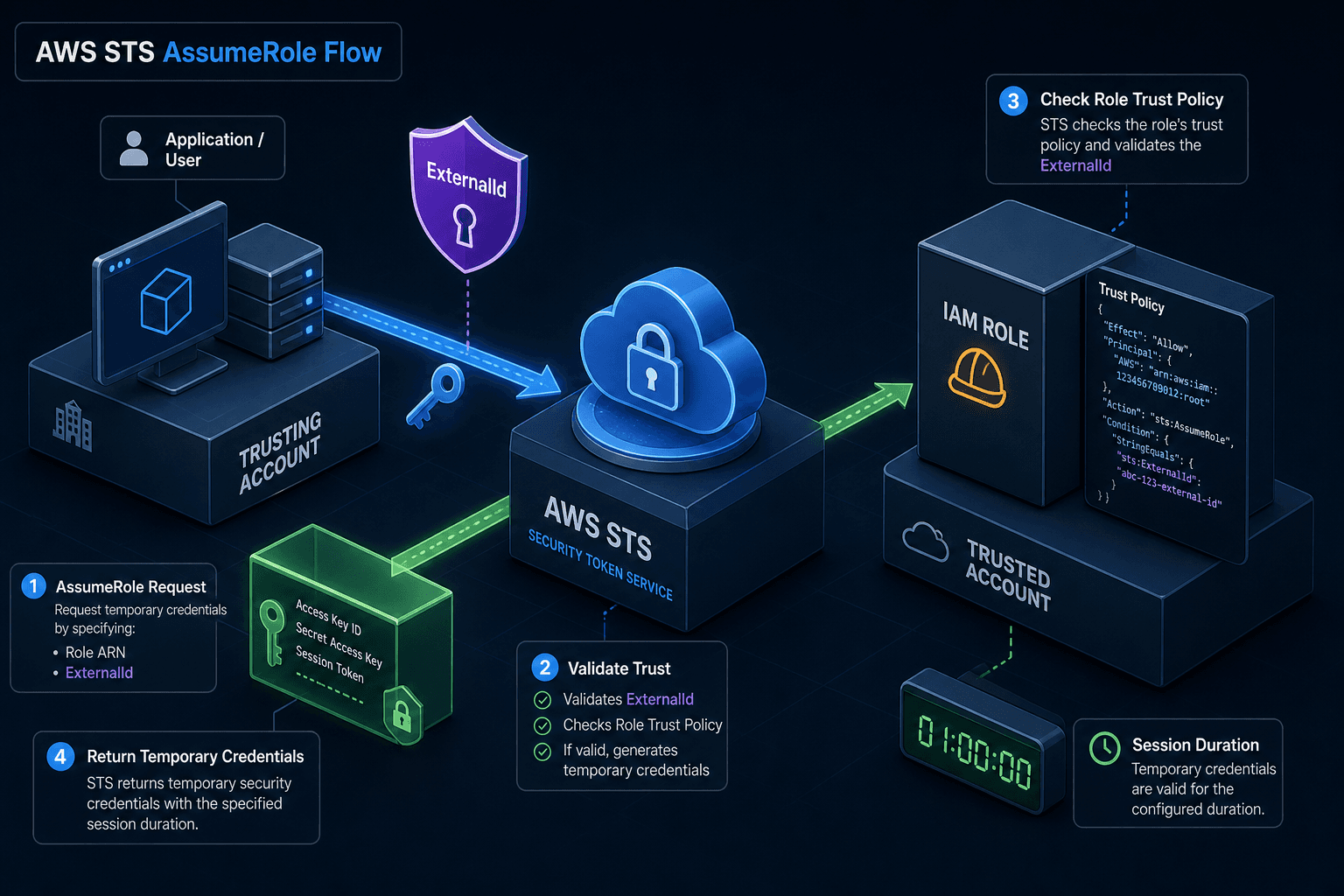
In AWS Identity and Access Management (IAM), long-term static credentials (IAM User Access Keys) are generally discouraged for application access because they are persistent and hard to rotate. The primary mechanism for securing access is AWS Security Token Service (STS) via the AssumeRole API. This API allows an identity to assume a specific IAM role, receiving temporary security credentials that are scoped, time-limited, and conditionally bound.
Understanding AssumeRole requires moving beyond the concept of "getting a key." It is a stateless authentication exchange that establishes a bounded security context. The core value proposition lies in three mechanisms: external ID validation (preventing confused deputy attacks), session duration control (limiting exposure windows), and session tagging (enabling dynamic policy scoping).
The Trust Boundary and External ID
The foundation of AssumeRole is the IAM Role’s Trust Policy. This policy explicitly defines who can call the sts:AssumeRole action. However, simply being allowed by the trust policy is often insufficient for cross-account or federated access. This is where the external id parameter enters the mechanism.
The ExternalId is a unique identifier provided by the trusted account (the one holding the role) to the trusting identity (the caller). It serves as a shared secret between the two parties, specifically designed to prevent the Confused Deputy problem.
Mechanism: Confused Deputy Prevention
Imagine Account A (Trusting) wants to allow Account B (Trusted) to access resources in Account A. Account B creates an IAM User with permissions to call AssumeRole on Account A’s role.
If Account A’s trust policy only checks if the caller is Account B, a malicious actor in Account B could create a malicious application that tricks Account B’s legitimate users into calling AssumeRole on Account A’s behalf. The malicious app would receive valid temporary credentials to access Account A’s resources, appearing as if the legitimate user did it.
By adding an ExternalId to the trust policy:
{
  "Version": "2012-10-17",
  "Statement": [
    {
      "Effect": "Allow",
      "Principal": {
        "AWS": "arn:aws:iam::111122223333:root"
      },
      "Action": "sts:AssumeRole",
      "Condition": {
        "StringEquals": {
          "sts:ExternalId": "unique-external-id-12345"
        }
      }
    }
  ]
}
When Account B’s user calls AssumeRole, they must pass this specific ExternalId. If a malicious actor in Account B tries to assume the role, they do not know the ExternalId (assuming it was securely communicated by Account A). The STS service validates the ExternalId against the trust policy before generating credentials. If it doesn't match, the request is denied. This ensures that the credentials are only issued to entities that possess both the IAM permission and the external secret.
Temporary Credential Lifecycle
When AssumeRole succeeds, STS returns a set of temporary security credentials:
AccessKeyId: Identifies the assumed role.SecretAccessKey: The shared secret for signing requests.SessionToken: A cryptographic token that proves the credentials are temporary and carries additional context (like session tags).
Unlike IAM User keys, these credentials have a fixed lifetime defined by the session duration, controlled by the DurationSeconds parameter in the API call. The minimum duration is 15 minutes (900 seconds), and the default maximum is 1 hour (3,600 seconds) for most roles, though it can be extended up to 12 hours (43,200 seconds) if the role’s maximum session duration is configured accordingly.
Mechanism: Expiration and Rotation
The SessionToken is effectively a digital certificate bound to the specific session context. Every AWS SDK request signed with these credentials includes the SessionToken in the header (e.g., x-amz-security-token). The AWS service receiving the request (e.g., S3, EC2) validates the signature and checks the expiration timestamp embedded in the token.
Once the DurationSeconds window elapses, the token becomes invalid. The application must either:
- Re-call
AssumeRoleto get new credentials. - Use a credential process or OIDC federation that handles rotation automatically.
This forced rotation reduces the blast radius of a compromised credential. If an attacker intercepts a session token, they can only use it for the remaining duration of the session, rather than indefinitely.
Session Tags and Policy Scoping
A powerful but often overlooked feature of AssumeRole is the ability to pass session tags. These are key-value pairs that are attached to the temporary credentials. These tags persist across all subsequent API calls made with those credentials. While session tags handle context, it is important to remember that the initial trust establishment often relies on an external id to ensure the session is initiated by the correct entity, linking the tag context back to a verified identity.
Mechanism: Dynamic Policy Evaluation
Session tags enable dynamic access control without modifying the underlying IAM role’s permissions. For example, an organization might have a role DeveloperRole with broad access to development resources. Instead of creating separate roles for each project, a developer can assume the role with specific tags:
aws sts assume-role \
  --role-arn arn:aws:iam::123456789012:role/DeveloperRole \
  --role-session-name DevSession \
  --tags Key=Project,Value=ProjectAlpha Key=Environment,Value=Dev
The IAM role’s policy can then use these tags in conditions:
{
  "Sid": "AllowProjectSpecificActions",
  "Effect": "Allow",
  "Action": [
    "s3:GetObject",
    "s3:PutObject"
  ],
  "Resource": "arn:aws:s3:::project-alpha-bucket/*",
  "Condition": {
    "StringEquals": {
      "aws:PrincipalTag/Project": "ProjectAlpha"
    }
  }
}
Here, the aws:PrincipalTag/Project variable refers to the tag passed during AssumeRole. If the developer tries to access a ProjectBeta bucket, the condition fails, and access is denied. This allows for fine-grained, context-aware security that adapts to the user’s immediate task without requiring complex inline policies or separate roles.
Conclusion
AssumeRole is the cornerstone of secure AWS access patterns. It shifts the security model from static, long-lived keys to dynamic, short-lived sessions. By leveraging ExternalId for cross-account protection, controlling session duration to limit exposure, and using session tags for granular policy scoping, engineers can build systems that are both flexible and secure. The key takeaway is that security is not just about who you are, but how you authenticate (external id), how long you stay authenticated (session duration), and what context you bring to the session (session tags). Ultimately, this combination ensures that temporary security credentials are issued only when strictly necessary and under precise conditions, minimizing risk while maximizing operational agility.
Related posts
Reading CloudTrail Events: Identity & Athena
A practical guide to reading CloudTrail events, focusing on UserIdentity, SessionContext, and Athena for AWS security investigation.
Migrating Between Parameter Store and Secrets Manager
A practical guide for cloud engineers on migrating from AWS Parameter Store to Secrets Manager, covering IAM policies, cutover strategies, and abstraction layers.
IRSA vs EKS Pod Identity: Architecture, Trust, and Tradeoffs
Compare IRSA and EKS Pod Identity for securing Kubernetes workloads on AWS. Learn how service accounts, trust policies, and STS sessions differ in implementation and best practices.