Axolotl Configs Explained Line by Line
A detailed breakdown of Axolotl YAML configuration files for fine-tuning models with DeepSpeed and custom dataset formats.
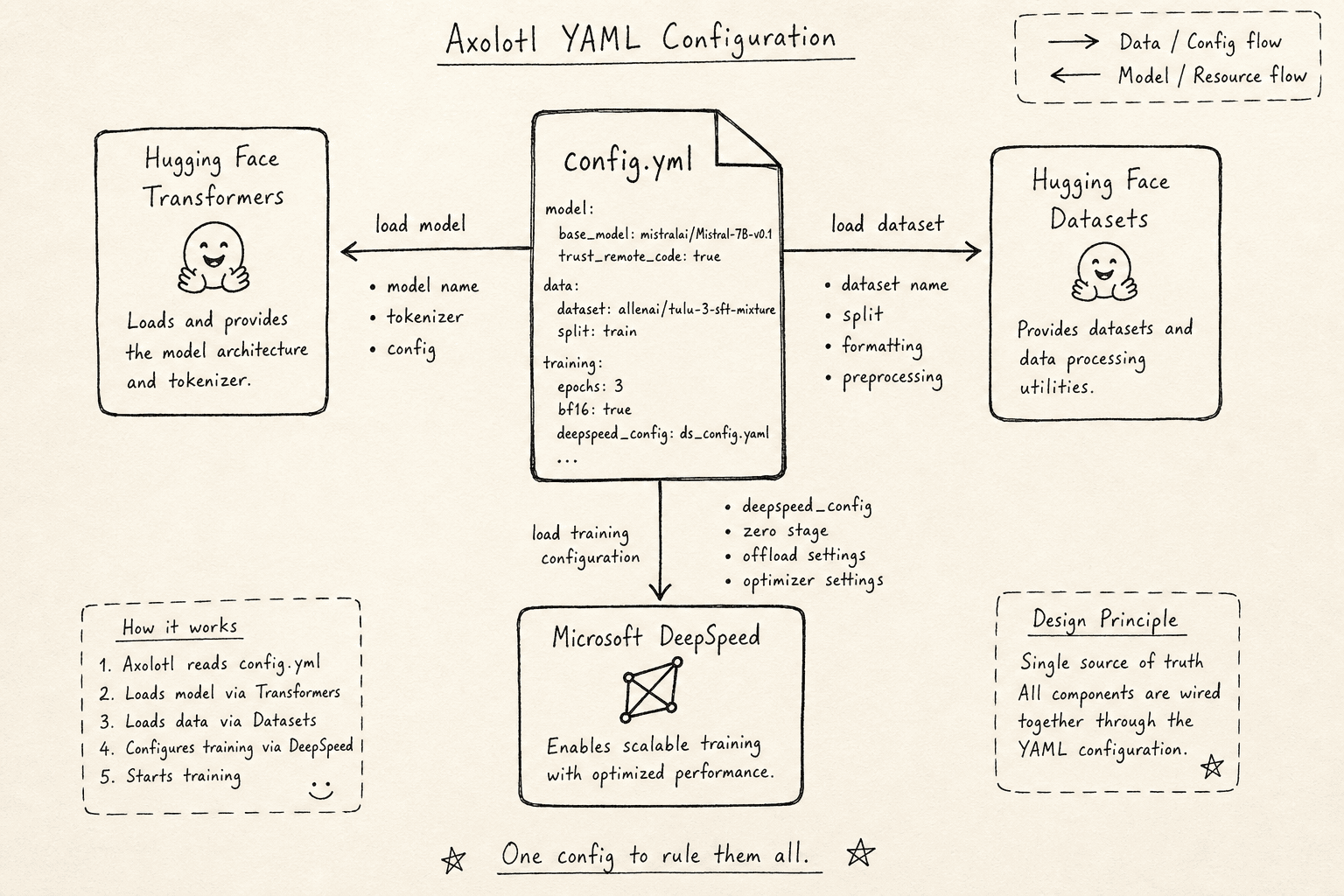
Axolotl is a popular open-source tool for fine-tuning Large Language Models (LLMs). Its configuration file, typically named config.yml, serves as the single source of truth for the entire training job. Rather than writing complex Python scripts to orchestrate data loading, model initialization, and distributed training, you declare your intent in YAML. The yaml config allows you to declare intent without writing Python scripts.
Understanding this file requires looking past the surface-level keys and examining the mechanism by which Axolotl translates these declarations into GPU operations. The configuration bridges three distinct systems: the Hugging Face transformers library, the Hugging Face datasets library, and Microsoft’s DeepSpeed framework.
Model and Tokenizer Resolution
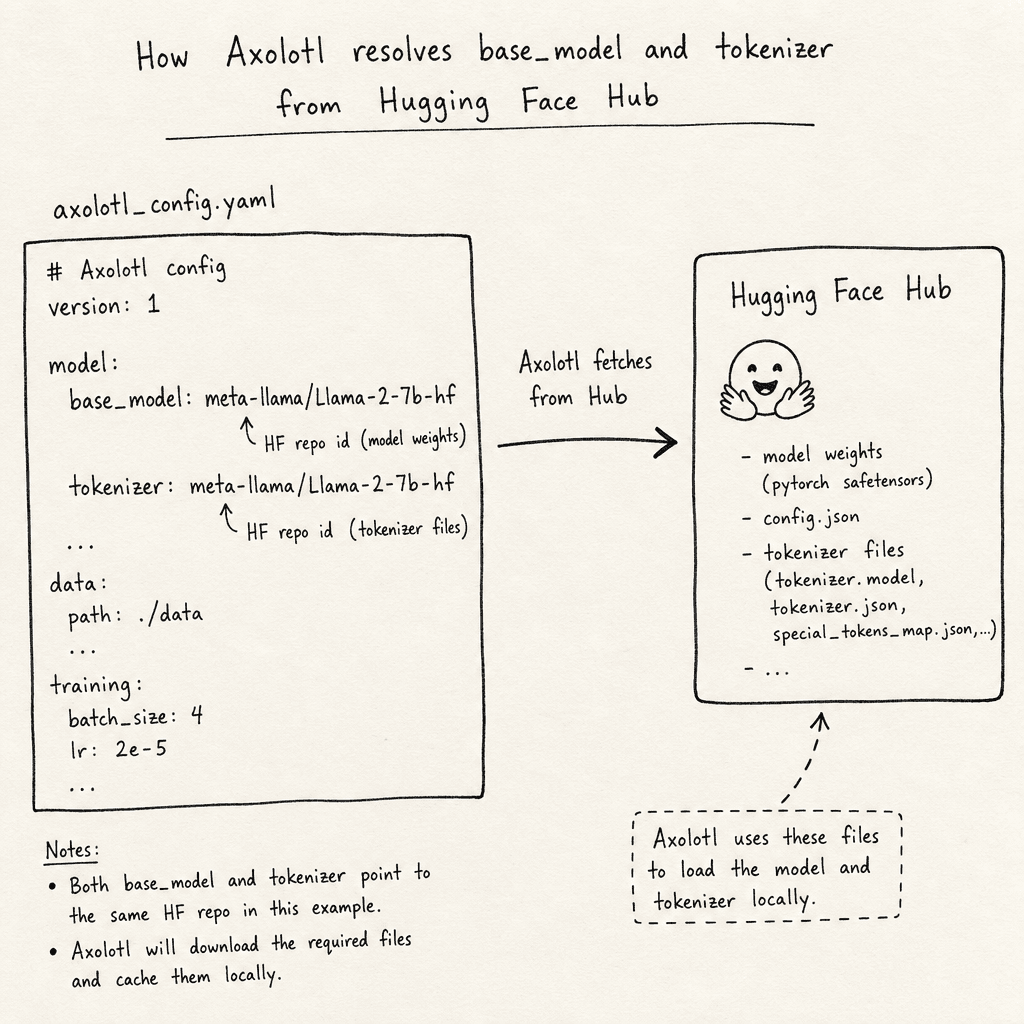
The top of the configuration file defines the artifact being trained.
base_model: meta-llama/Llama-2-7b-hf
tokenizer: meta-llama/Llama-2-7b-hf
The base_model key triggers the model loader. When Axolotl starts, it uses this string to query the Hugging Face Hub. It downloads the model weights and configuration (config.json) if they are not cached locally. The mechanism here is straightforward: the string is treated as a repository ID. If you specify a local path, Axolotl will look for the directory structure locally.
The tokenizer key often mirrors base_model. This ensures that the tokenizer vocabulary and special tokens match the model architecture. In some cases, you might use a different tokenizer (e.g., a custom-trained BPE tokenizer) by specifying a different repo ID or local path. The mechanism ensures that input IDs generated from text match the embedding dimensions expected by the base model.
Core Training Hyperparameters
The next block controls the optimization dynamics. These keys map directly to Hugging Face’s TrainingArguments, forming the core of your yaml config.
learning_rate: 0.0001
num_epochs: 3
micro_batch_size: 4
gradient_accumulation_steps: 4
weight_decay: 0.01
warmup_ratio: 0.1
learning_rate sets the step size for the optimizer (typically AdamW). num_epochs defines the number of full passes over the dataset.
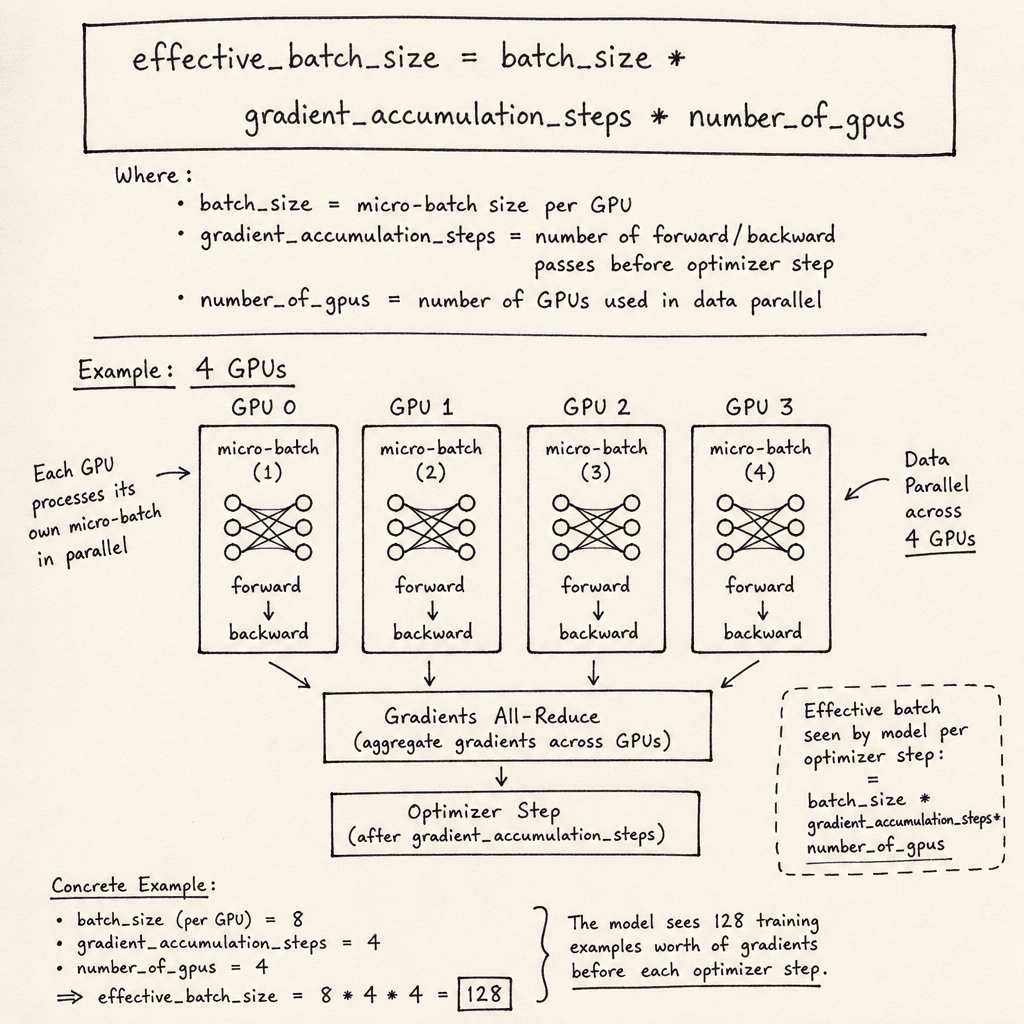
The interaction between micro_batch_size and gradient_accumulation_steps is critical for memory management. The micro_batch_size specified here is the micro-batch size—the number of samples processed per GPU before a backward pass. gradient_accumulation_steps determines how many micro-batches are processed before updating the model weights.
The effective global batch size is calculated as:
effective_batch_size = micro_batch_size * gradient_accumulation_steps * number_of_gpus
For example, with a batch size of 4, accumulation of 4, and 4 GPUs, the effective batch size is 64. The optimizer updates weights once every 4 forward/backward cycles. This mechanism allows training with large effective batch sizes while keeping per-GPU memory usage low.
weight_decay applies L2 regularization to the weight matrices, preventing overfitting by penalizing large weights. warmup_ratio defines the fraction of total training steps used for linear learning rate warmup, stabilizing early training dynamics.
Dataset Formatting and Loading
Axolotl supports various dataset formats. The most common for instruction tuning is the Hugging Face datasets library format. Understanding the correct dataset format is critical for instruction tuning.
datasets:
  - path: timdettmers/openassistant-guanaco
    type: chat
The datasets key accepts a list of dictionaries. Each dictionary specifies a dataset path (repo ID or local path) and a type. The type field tells Axolotl how to interpret the data structure. Common types include completion, chat, and alpaca.
For type: chat, Axolotl expects the dataset to have a specific column structure, typically messages, where each message is a dictionary with role (user, assistant, system) and content. Axolotl then applies a conversation template (defined in the conversation section) to format these messages into a single prompt string.
conversation:
  role_tokens:
    user: "<|start_header_id|>user<|end_header_id|>\n\n"
    assistant: "<|start_header_id|>assistant<|end_header_id|>\n\n"
  role_end_tokens:
    user: "<|eot_id|>"
    assistant: "<|eot_id|>"
This mechanism ensures that the model receives prompts in the exact format it was pre-trained on. If you use a custom dataset, you must ensure the column names match the expected schema or provide a custom column mapping. Each dataset format requires specific column mappings.
The shuffle key, if set to true, shuffles the dataset before training. This is crucial for preventing the model from memorizing the order of the data. However, shuffling is handled efficiently by the datasets library (e.g., via streaming or buffer sampling) and does not typically impose a significant memory burden compared to model weights.
DeepSpeed Integration
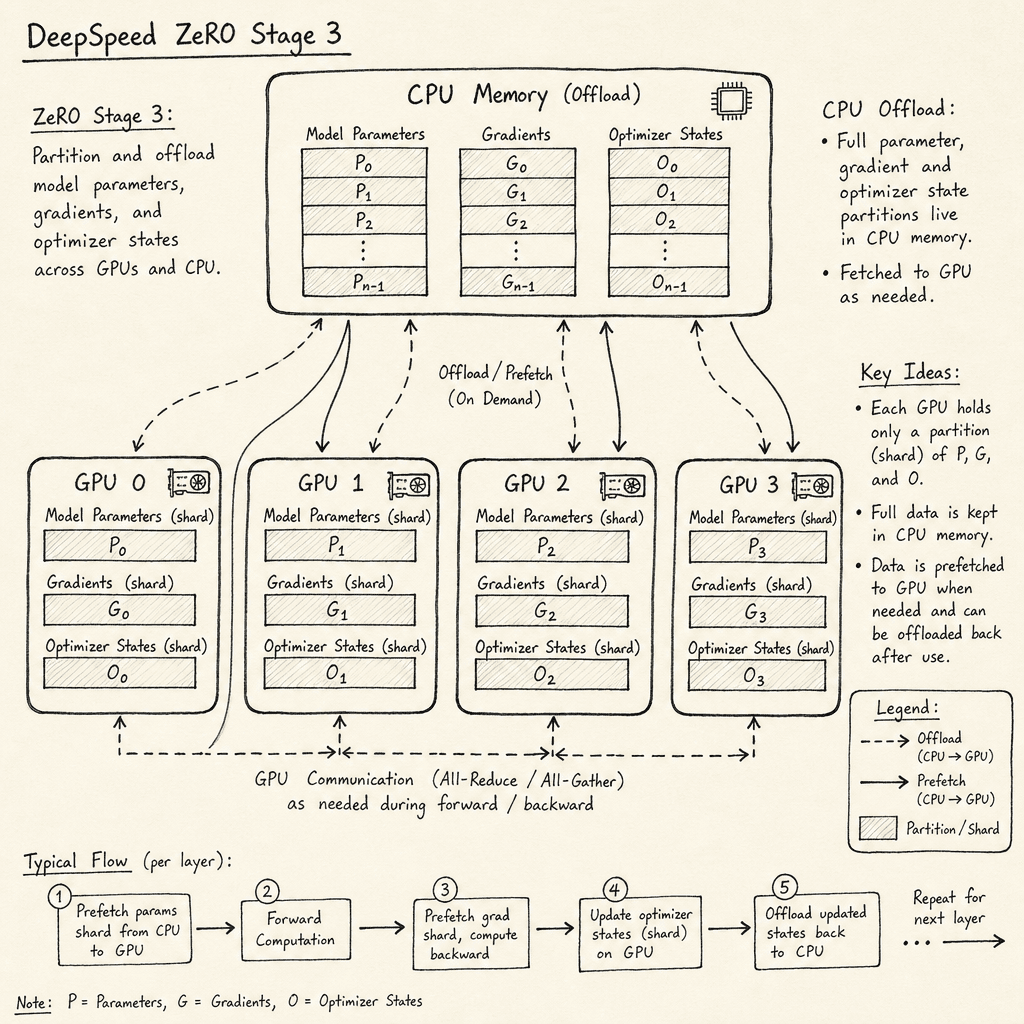
For multi-GPU training, Axolotl integrates with deepspeed via the deepspeed key. The deepspeed integration handles memory partitioning.
deepspeed: deepspeed_zero3.yamlThis key points to a DeepSpeed configuration file. Axolotl automatically injects this configuration into the training loop. The deepspeed_zero3.yaml file typically contains:
{
  "zero_optimization": {
    "stage": 3,
    "offload_optimizer": {
      "device": "cpu",
      "pin_memory": true
    },
    "offload_param": {
      "device": "cpu",
      "pin_memory": true
    }
  },
  "optimizer": {
    "type": "AdamW",
    "params": {
      "lr": "auto",
      "betas": [0.9, 0.999],
      "eps": 1e-8,
      "weight_decay": "auto"
    }
  }
}
ZeRO Stage 3 partitions the model parameters, gradients, and optimizer states across all GPUs. This allows training models that are too large to fit on a single GPU’s memory. The offload_optimizer and offload_param settings move these partitions to CPU memory when not actively used, further reducing GPU VRAM pressure.
The optimizer section's auto values are automatically filled in by the Hugging Face Trainer using the corresponding learning_rate and weight_decay values from the main YAML at runtime. This is precisely what the 'auto' keyword is for: it allows the DeepSpeed JSON config to inherit values from Hugging Face's TrainingArguments without requiring users to duplicate them manually. When configuring deepspeed, ensure the JSON structure matches the expected schema.
System Constraints and Logging
The final section handles system-level optimizations and monitoring.
flash_attention: true
gradient_checkpointing: true
wandb_project: axolotl-finetune
wandb_entity: my-team
flash_attention enables a fused attention implementation (FlashAttention-2) that reduces memory usage and increases speed by avoiding the creation of large intermediate attention matrices. This feature supports Ampere, Ada Lovelace, and Hopper architectures, but not older Volta or Turing GPUs.
gradient_checkpointing implements activation recomputation. Instead of storing all intermediate activations for backpropagation, the model recomputes them during the backward pass. This trades compute for memory, allowing larger batch sizes or model sizes.
wandb_project and wandb_entity configure Weights & Biases logging. These keys create a specific dashboard for tracking metrics like loss, learning rate, and GPU utilization. This mechanism provides real-time visibility into the training process, allowing for early detection of divergence or instability.
Conclusion
The Axolotl YAML configuration is a declarative interface that maps high-level training intent to low-level GPU operations. By understanding the mechanism behind each key—model loading, batch accumulation, dataset templating, and DeepSpeed partitioning—you can effectively fine-tune LLMs without writing custom training loops. The configuration ensures reproducibility and simplifies the complexity of distributed training.
Related posts
Hyperparameters That Actually Matter
A practical examination of key hyperparameters like learning rate, batch size, and epochs for ML engineers fine-tuning LLMs.
Building a Supervised Fine-Tuning Dataset
A practical guide to constructing high-quality SFT datasets for instruction tuning, covering chat templates, loss masking, and data quality standards.
Should You Fine-Tune? A Decision Framework
A decision framework for ML engineers and managers to determine when to fine-tune large language models versus using prompting techniques.
