Streaming Agent Progress to a UI Without Losing Your Mind
A practical guide for full-stack developers on implementing reliable streaming agent progress events, partial rendering, and reconnection logic in modern UIs.
When you connect a frontend to an LLM agent, you aren't just building a chat interface. You are building a system that must handle non-deterministic, asynchronous, and often broken data streams in real-time. The most common failure mode isn't the AI hallucinating; it's the UI crashing because it tried to render a half-formed JSON object or displayed a loading spinner for a request that already failed three minutes ago.
This guide details the mechanism-level approach to handling streaming agent progress. We will move beyond simple "typing indicators" and build a resilient architecture that handles partial renders, network drops, and state reconciliation.
The Mechanism of Partial Rendering
Large Language Models (LLMs) do not output complete thoughts. They generate tokens sequentially. In a typical HTTP/2 or WebSocket stream, these tokens arrive in chunks. If your UI attempts to render every incoming token as a complete unit of state, you will encounter syntax errors, broken HTML structures, and visual flickering.
Consider a scenario where an agent is generating a SQL query. The stream might send:
SELECT * FROM users WHERE id =
If your frontend immediately parses this as a SQL string and attempts to validate it, it fails. If it attempts to render this as a code block with syntax highlighting, the highlighting engine may break because the string is incomplete.
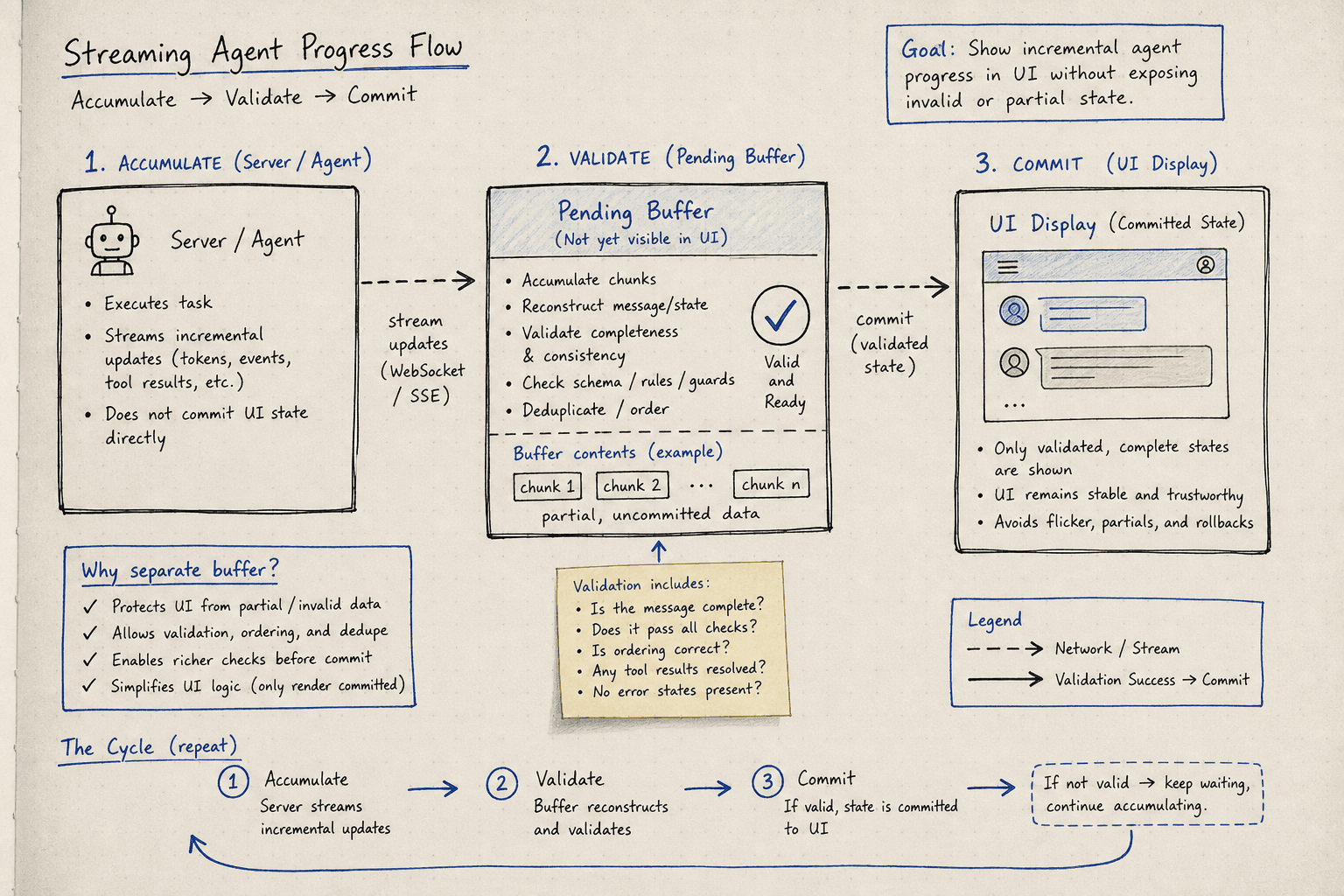
The solution is deferred rendering via a pending buffer.
The Pending Buffer Pattern
To ensure a robust agent ui, we must manage how streaming progress is committed to the DOM. This requires a strict separation between incoming data and rendered state.
Do not update the primary state store (agentState) with every incoming chunk. Instead, maintain a separate pendingRender buffer.
- Accumulate: Append incoming tokens to
pendingRender. - Validate: Only when a complete logical unit (e.g., a full JSON response, a complete markdown block) is received, validate it.
- Commit: If valid, move content from
pendingRendertoagentState.finalOutput. If invalid, discard or mark as error.
For markdown rendering, this is less critical because markdown is generally robust to partial input. However, for structured data (JSON, XML, code), this separation is mandatory.
// Simplified stream handler
let pendingBuffer = "";
const stream = new ReadableStream({
  async start(controller) {
    const response = await fetch("/api/agent/stream", { method: "POST" });
    const reader = response.body.getReader();

    while (true) {
      const { done, value } = await reader.read();
      if (done) break;

      const chunk = new TextDecoder().decode(value);

      // 1. Accumulate into buffer
      pendingBuffer += chunk;

      // 2. Check for completion markers (e.g., closing brace for JSON)
      if (isComplete(pendingBuffer)) {
        try {
          // 3. Validate and Commit
          const parsed = JSON.parse(pendingBuffer);
          updateState(parsed);
          pendingBuffer = ""; // Clear buffer
        } catch (e) {
          // Invalid JSON so far, keep buffering
          console.log("Partial data, waiting...");
        }
      }
    }
  }
});
Reconnection and Idempotency
A resilient agent ui must gracefully handle network instability. Network connections drop. This is not an edge case; it is a feature of the internet. When a WebSocket disconnects, your UI must decide: do we restart the entire agent execution, or do we resume?
Restarting is expensive and breaks user context. Resuming requires idempotency on the server side.
Server-Side State Persistence
The agent must have a unique session_id or request_id. Every progress event and partial result must be associated with this ID.
When the client reconnects:
- The client sends a
resumemessage with the last knownevent_idortoken_index. - The server looks up the agent state.
- If the agent is still running, the server resumes sending events from that index.
- If the agent finished, the server sends the final state.
- If the agent failed, the server sends the error.
Without this, the client has no way to know if the missing events were lost or if the agent is just slow.
Client-Side Reconnection Logic
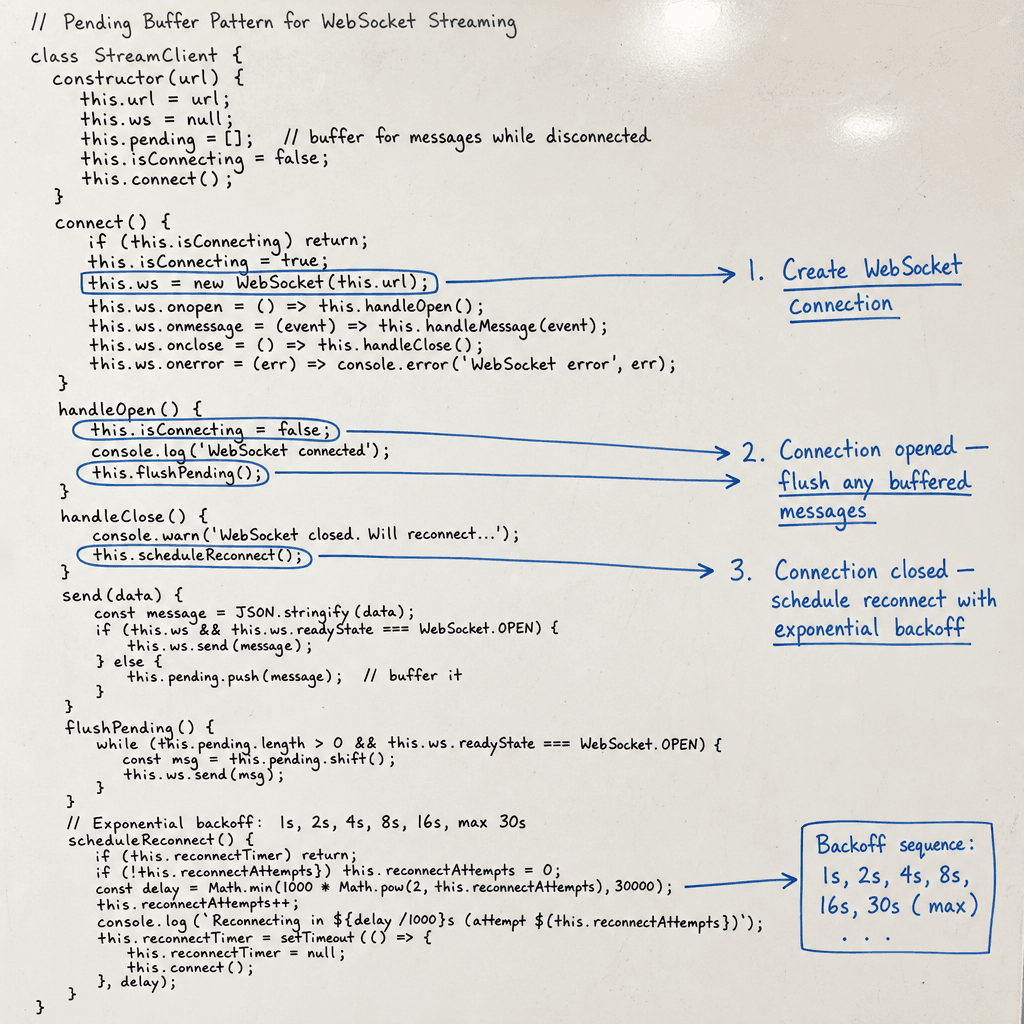
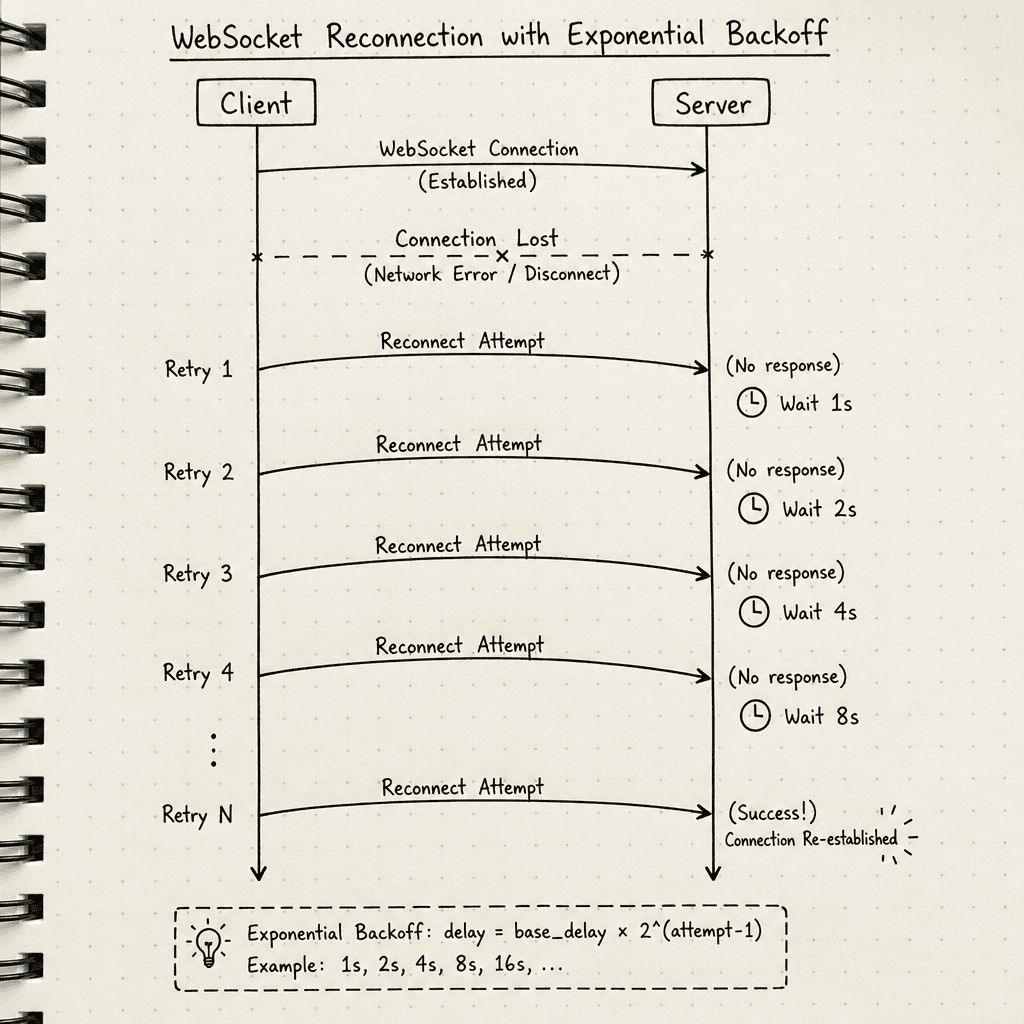
Implement exponential backoff for reconnection attempts. Do not immediately reconnect on every socket close; wait for a stable network state.
let reconnectAttempts = 0;
const maxAttempts = 5;

function connect() {
  const ws = new WebSocket("wss://api.example.com/agent");

  ws.onopen = () => {
    reconnectAttempts = 0; // Reset on success
    // Send last known event ID to resume
    ws.send(JSON.stringify({
      type: "resume",
      lastEventId: lastReceivedEventId
    }));
  };

  ws.onclose = () => {
    if (reconnectAttempts < maxAttempts) {
      const delay = Math.min(1000 * Math.pow(2, reconnectAttempts), 30000);
      setTimeout(connect, delay);
      reconnectAttempts++;
    } else {
      setError("Connection lost. Please refresh.");
    }
  };
}
The Progress Event Schema
To build a responsive agent ui, you need more than just data. You need metadata about the state of the computation. Define a strict schema for streaming progress events.
Recommended Schema
{
  "type": "progress",
  "step": "generating",
  "percent": 0.45,
  "message": "Analyzing logs...",
  "timestamp": 1715623400
}step: Enum of agent phases (e.g.,planning,executing,generating,finalizing). This allows the UI to show different icons or progress bars for different stages.percent: Optional. Useful for long-running tasks.message: Human-readable status. Update the UI's "status text" but do not append this to the main content buffer.
Mapping Events to UI States
step: "planning": Show a skeleton loader. Do not display any content.step: "executing": Show a "working" indicator. If the agent is running tools, show a list of active tools.step: "generating": Start streaming content. This is where the pending buffer logic applies.step: "finalizing": Stop streaming. Run final validations. Show a "complete" checkmark.
By decoupling the progress status from the content, you prevent the UI from showing "Analyzing logs..." inside the actual code block output.
Error Boundaries and Fallbacks
Even with perfect reconnection, errors happen. The agent might run out of tokens, hit a rate limit, or encounter a runtime error in its tool execution. An agent ui must handle these gracefully.
Graceful Degradation
When an error occurs, do not clear the entire conversation. Preserve the last known good state.
- Capture: Store the last valid chunk in
agentState.finalOutput. - Mark: Set
agentState.errorto the specific error message. - Render: Display the partial content with a visual indicator (e.g., a red border or a "Truncated" badge).
- Offer Recovery: Provide a "Retry" button that sends a new request with the same context but potentially different parameters (e.g., higher temperature, simpler prompt).
Handling Malformed JSON
LLMs occasionally output invalid JSON, especially when asked to return structured data. Instead of crashing the parser, implement a fallback:
- Try to parse the JSON.
- If it fails, strip trailing commas or fix common syntax errors using a lightweight library like
jsonrepair. - If repair fails, render the raw text in a code block instead of a structured component.
This ensures the user always sees something, rather than a blank screen or a crash.
Conclusion
Streaming agent ui components require careful management of network reliability, state, and user experience. By separating the pending buffer from the committed state, implementing idempotent reconnection, and defining a strict streaming progress event schema, you can build a UI that feels responsive and resilient.
The key insight is that the UI should never be the source of truth for the agent's output. The UI is a mirror. If the mirror cracks (network drop) or shows a distorted reflection (partial render), the system must repair itself without losing the image it was reflecting.
Focus on the mechanism: buffer, validate, commit. Reconnect, resume, verify. And always, always preserve the last known good state.
Related posts
CORS Configuration That Doesn't Break Your Auth
Learn how to configure CORS in Spring Boot securely, handling preflight requests and allow-credentials without compromising authentication.
Streaming Tokens Over SSE and WebSockets: A Practical Guide
A practical guide to implementing streaming tokens using Server-Sent Events and WebSockets, covering backpressure and reconnection strategies.
Input and Output Guardrails in Practice
Practical implementation of input and output guardrails for AI systems, covering content moderation, classifier tuning, and reducing false positives in streaming data.
