Streaming Tokens Over SSE and WebSockets: A Practical Guide
A practical guide to implementing streaming tokens using Server-Sent Events and WebSockets, covering backpressure and reconnection strategies.
When building real-time interfaces—particularly for Large Language Models (LLMs)—the experience hinges on streaming tokens. Instead of waiting minutes for a full response, users see text appear character by character. This requires a persistent connection between client and server. The two primary transport mechanisms are Server-Sent Events (SSE) and WebSockets. While both achieve low-latency updates, their underlying mechanisms dictate how you handle backpressure and reconnections.
The Mechanism of Streaming
To understand the difference, we must look at the transport layer.
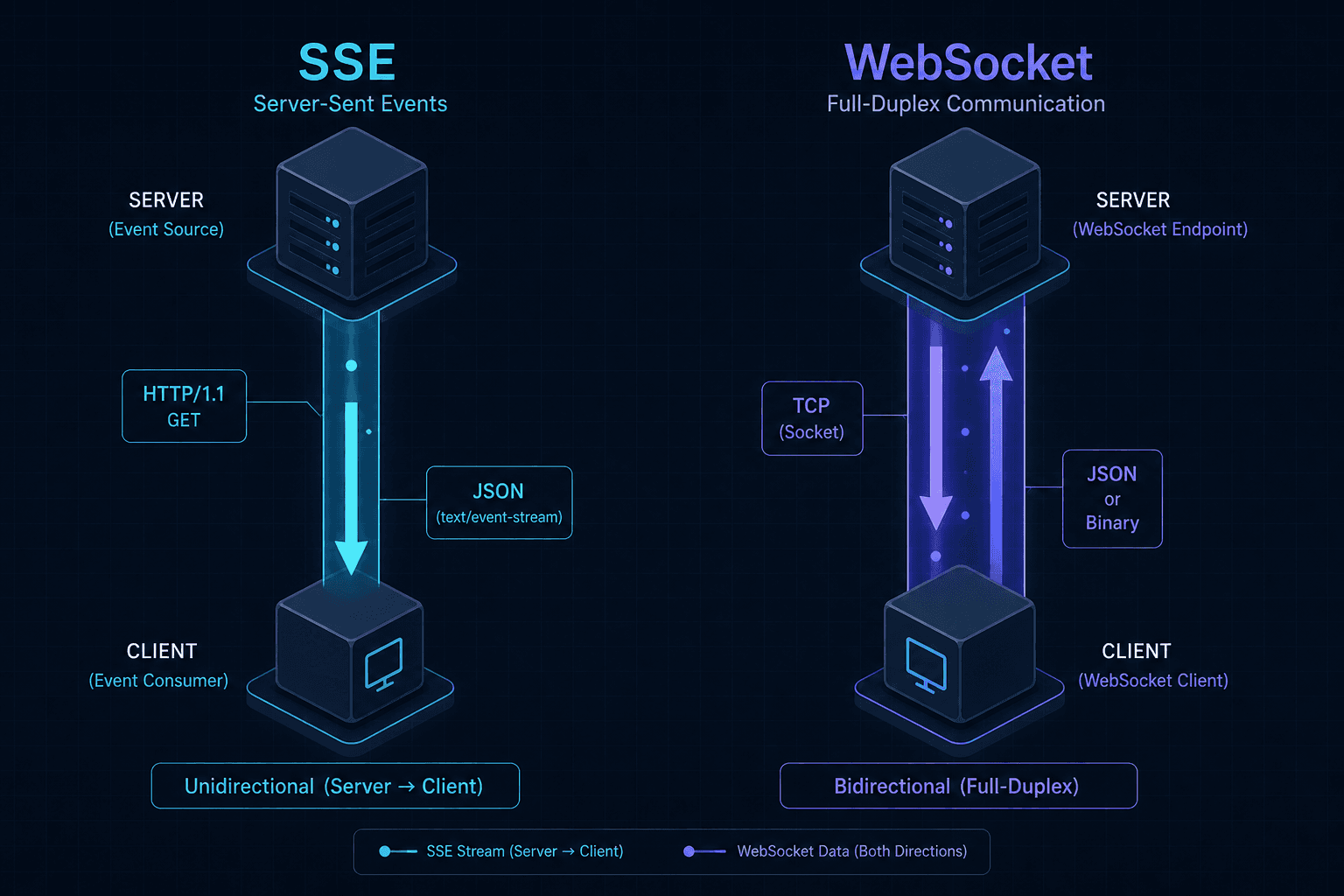
Server-Sent Events (SSE) rely on a persistent HTTP GET request. The server keeps the connection open and sends data in chunks formatted as data: <payload>\n\n. The browser handles the decoding automatically. This is a unidirectional channel: server to client.
WebSockets establish a handshake over HTTP, then upgrade the connection to a persistent TCP socket. Once upgraded, the HTTP headers are discarded, and raw binary or text frames flow bidirectionally.
// SSE: Simple text stream
data: {"token": "Hello"}
data: {"token": " world"}
data: [DONE]

// WebSocket: Binary/Text frames
[TEXT] '{"token": "Hello"}'
[TEXT] '{"token": " world"}'
[TEXT] '[DONE]'
SSE is simpler to implement because it reuses existing HTTP infrastructure (caching, proxies, firewalls). WebSockets require managing a separate protocol state machine. However, WebSockets offer full duplex communication, allowing the client to send messages without waiting for the server to push.
Backpressure in SSE
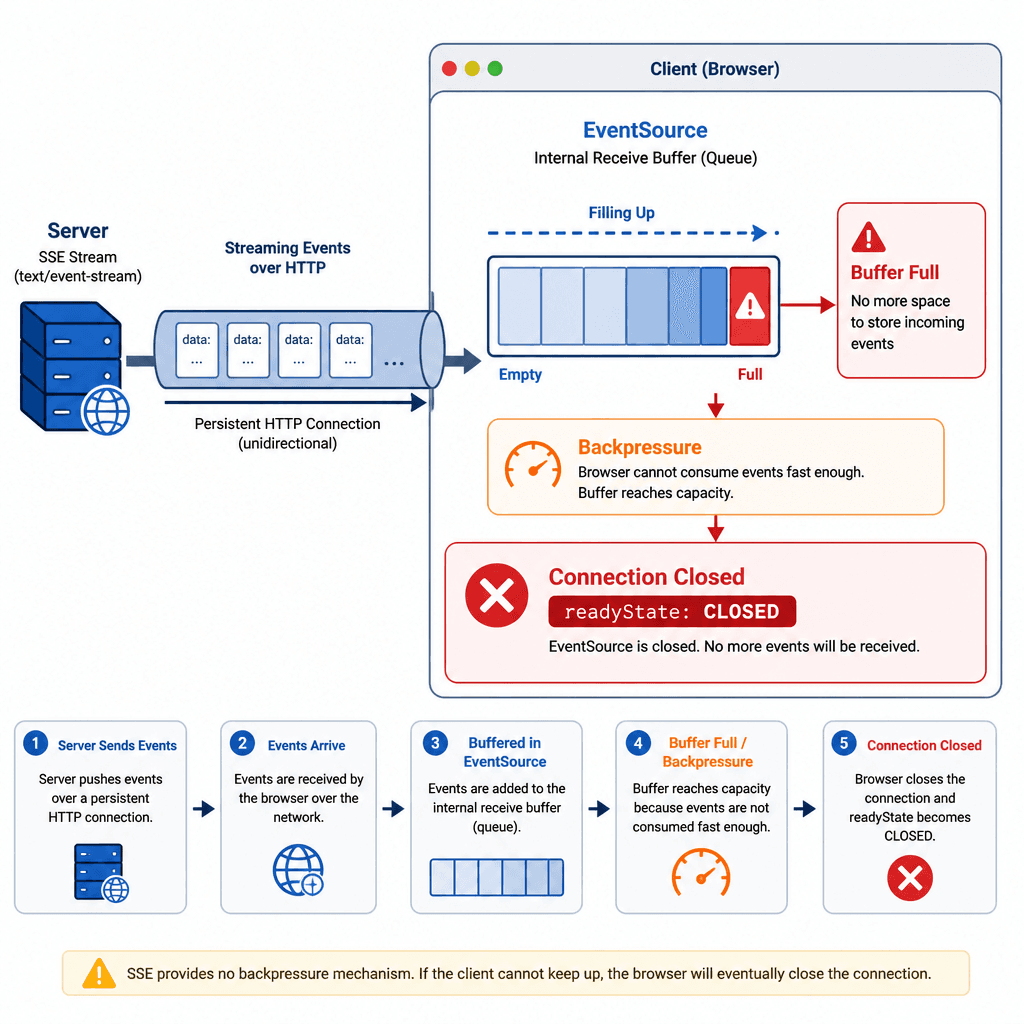
Backpressure occurs when the sender produces data faster than the receiver can process it. In SSE, backpressure is managed implicitly by the browser’s network stack.
When the client’s JavaScript is busy (e.g., rendering a large DOM tree), the browser buffers incoming SSE messages. If the buffer fills up, the browser pauses reading from the socket. The server, unaware of this pause, continues sending data. Eventually, the OS-level TCP buffer fills, and the server’s write operation blocks or fails.
You can detect this state in the client using the readyState property of the EventSource object.
const source = new EventSource('/api/stream');

source.addEventListener('message', (event) => {
  const data = JSON.parse(event.data);
  processToken(data.token); // If this is slow, backpressure builds
});

source.onerror = (error) => {
  if (source.readyState === EventSource.CLOSED) {
    console.log('Connection closed due to backpressure or error');
  }
};
If the client is overwhelmed, the error event fires with readyState set to CLOSED. This is not necessarily a network failure; it is often the browser dropping the connection to prevent memory exhaustion. To mitigate this, ensure your client-side processing is asynchronous and lightweight. If you must perform heavy work, use a Web Worker to process tokens off the main thread.
Explicit Backpressure in WebSockets
WebSockets run over TCP, which provides inherent flow control via TCP window sizes. The server does not send 'regardless of whether the client is ready' at the transport level; the operating system will throttle writes if the client's receive buffer is full. However, WebSockets lack application-level flow control frames (like HTTP/2 WINDOW_UPDATE) as defined in RFC 6455. This means that while the transport layer applies backpressure, the application layer does not. You must implement explicit flow control to prevent memory exhaustion on the client side (buffering too many messages in JavaScript) and to signal the server to throttle generation.
A common pattern is to limit the number of pending messages in the client’s queue. If the queue exceeds a threshold, the client pauses receiving data by ignoring new messages or sending a PAUSE frame.
const ws = new WebSocket('wss://example.com/stream');
const MAX_QUEUE_SIZE = 100;
let messageQueue = [];

ws.onmessage = (event) => {
  if (messageQueue.length >= MAX_QUEUE_SIZE) {
    // Backpressure: Stop processing, signal server to pause
    console.warn('Backpressure applied');
    return;
  }

  messageQueue.push(JSON.parse(event.data));
  processQueue();
};

function processQueue() {
  while (messageQueue.length > 0) {
    const token = messageQueue.shift();
    renderToken(token);
  }
}
On the server side, you should respect pause signals. If the client sends a PAUSE message, the server should buffer tokens locally or drop them if buffering is too expensive. Never send data to a WebSocket client that has not acknowledged receipt or signaled readiness.
Reconnection Strategies
Network instability is inevitable. Both SSE and WebSockets require reconnection logic, but their approaches differ.
SSE Reconnection: The EventSource API automatically retries on connection failure. You can control the delay by sending a retry: field in the SSE data.
retry: 3000
data: {"token": "Hello"}
The browser will wait 3 seconds before reconnecting. Additionally, SSE supports idempotent reconnection via Last-Event-ID (as defined in the WHATWG HTML Living Standard). If the client disconnects and reconnects, it sends the Last-Event-ID header, allowing the server to resume from the last processed event. This is crucial for ensuring no tokens are lost, provided the server maintains state for unacknowledged events. If the server is stateless or the gap is too large, loss still occurs.
// Client automatically sends Last-Event-ID on reconnect
const source = new EventSource('/api/stream');
WebSocket Reconnection: There is no automatic retry. You must implement exponential backoff with jitter manually. Robust implementations should also handle edge cases where onclose may not fire immediately if the tab is suspended, often by implementing a ping/pong heartbeat mechanism.
let retryDelay = 1000;
const maxDelay = 30000;
let ws = null;

function connect() {
  // Prevent multiple concurrent connections
  if (ws && (ws.readyState === WebSocket.CONNECTING || ws.readyState === WebSocket.OPEN)) {
    return;
  }

  ws = new WebSocket('wss://example.com/stream');

  ws.onclose = () => {
    ws = null;
    if (retryDelay < maxDelay) {
      retryDelay *= 2;
    }
    // Add jitter to prevent thundering herd
    const jitter = Math.random() * 1000;
    setTimeout(connect, retryDelay + jitter);
  };

  ws.onerror = (error) => {
    console.error('WebSocket error', error);
    // Handle error gracefully, potentially triggering close/reconnect logic
  };
}

connect();
Without jitter, many clients reconnecting simultaneously can overwhelm the server. Exponential backoff prevents immediate reconnection storms.
Choosing the Right Tool
Use SSE when:
- The stream is unidirectional (server to client).
- You want simple implementation with minimal code.
- You can tolerate occasional data loss on reconnect (unless you implement
Last-Event-IDand the server supports it). - You need easy integration with existing HTTP infrastructure.
Use WebSockets when:
- You need bidirectional communication (client sends commands to server).
- You require strict backpressure control via explicit signaling.
- You need lower latency overhead (no HTTP headers for each message).
- You are building a complex real-time application with multiple channels.
For most LLM chat interfaces, SSE is sufficient due to its simplicity and automatic retry. However, if you need to send user intents (like "stop generation") while the stream is active, WebSockets provide the necessary duplex capability. Always implement backpressure handling and reconnection logic explicitly; relying on defaults will lead to poor user experiences under load.
Conclusion
Implementing streaming tokens requires careful consideration of transport mechanics. SSE offers a simpler, HTTP-native path with implicit backpressure handling, ideal for unidirectional streams. WebSockets provide full duplex control and explicit backpressure management, necessary for complex, bidirectional real-time applications. By understanding these differences, you can build reliable, low-latency interfaces that handle network instability gracefully.
Related posts
Securing Server-Sent Events with OAuth2 Authentication
An examination of securing server-sent events using OAuth2 authentication to ensure real-time data integrity.
Streaming Agent Progress to a UI Without Losing Your Mind
A practical guide for full-stack developers on implementing reliable streaming agent progress events, partial rendering, and reconnection logic in modern UIs.
Function Calling vs Structured Output: Choosing an Interface
A comparison of function calling and structured output for API design, helping backend developers choose the right interface for tool use and JSON mode.
