Securing REST APIs with OAuth 2.0 Resource Server
Learn to secure REST APIs using OAuth 2.0 Resource Server and JWT validation within the Spring Boot framework.
Securing REST APIs with OAuth 2.0 Resource Server in Spring Boot
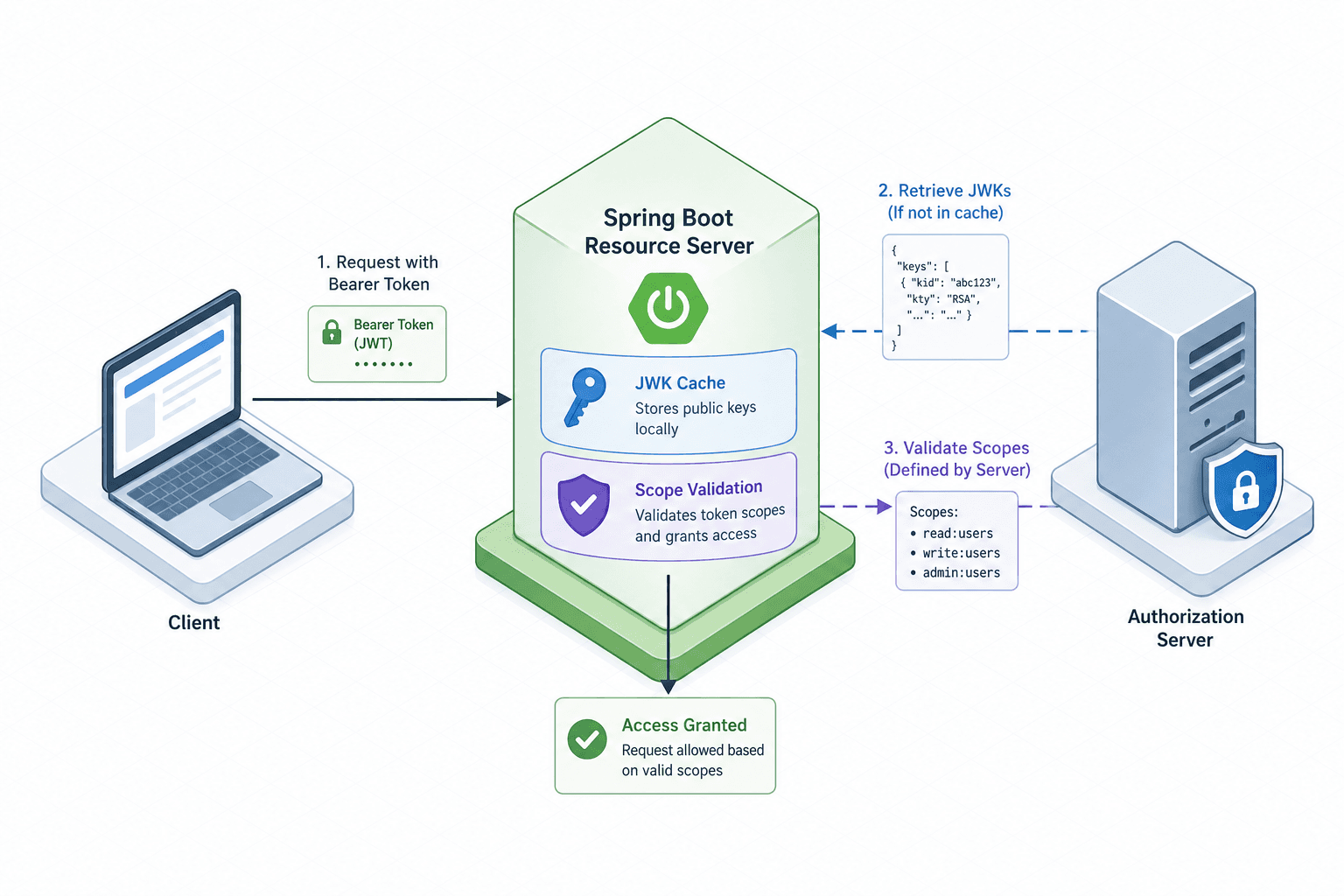
The confusion surrounding API security often stems from conflating the roles of a Client and a Resource Server. In an OAuth 2.0 flow, the Client requests access on behalf of a user, but the Resource Server is the gatekeeper that protects the data. When you build a Spring Boot application as a Resource Server, it validates a JSON Web Token (JWT) issued by a trusted Authorization Server. The mechanism is cryptographic verification: the Resource Server checks the digital signature of the token using a public key, ensuring the token was issued by a specific entity and has not been tampered with.
To implement this, configure Spring Security to treat incoming Authorization: Bearer <token> headers as credentials to be validated against a known key set. The most robust method involves using JSON Web Key Sets (JWKs), where the Resource Server periodically fetches a public key from the Authorization Server's endpoint. This avoids hardcoding keys and allows for key rotation without restarting the API.
Start by adding the necessary dependencies to your pom.xml or build.gradle. You need the spring-boot-starter-oauth2-resource-server and spring-boot-starter-security.
<!-- pom.xml -->
<dependencies>
    <dependency>
        <groupId>org.springframework.boot</groupId>
        <artifactId>spring-boot-starter-oauth2-resource-server</artifactId>
    </dependency>
    <dependency>
        <groupId>org.springframework.boot</groupId>
        <artifactId>spring-boot-starter-web</artifactId>
    </dependency>
</dependencies>
Next, define the configuration in application.properties. The critical property is spring.security.oauth2.resourceserver.jwt.jwk-set-uri. This URL points to the Authorization Server's well-known JWK endpoint (usually /.well-known/jwks.json). Spring Security automatically creates a JwkSource bean that fetches this JSON, parses the public keys, and caches them.
spring.security.oauth2.resourceserver.jwt.jwk-set-uri=https://auth.example.com/.well-known/jwks.jsonIf you are using a custom issuer, you might also need to specify the issuer URI to ensure the token's iss claim matches the expected authority.
spring.security.oauth2.resourceserver.jwt.issuer-uri=https://auth.example.comThis configuration enables the JwtAuthenticationConverter. By default, Spring Security maps the JWT claims to a Jwt object and then to a UserDetails principal. However, for granular access control, you need to extract the scope claim. The JWT standard defines scopes as a space-delimited string in the scope claim. The Resource Server must convert this string into GrantedAuthority objects that Spring Security understands.
Without this conversion, your controller methods cannot check for specific permissions. You achieve this by defining a SecurityFilterChain bean and injecting a custom JwtAuthenticationConverter.
import org.springframework.context.annotation.Bean;
import org.springframework.context.annotation.Configuration;
import org.springframework.security.config.annotation.web.builders.HttpSecurity;
import org.springframework.security.config.annotation.web.configuration.EnableWebSecurity;
import org.springframework.security.oauth2.server.resource.authentication.JwtAuthenticationConverter;
import org.springframework.security.oauth2.server.resource.authentication.JwtGrantedAuthoritiesConverter;
import org.springframework.security.web.SecurityFilterChain;

@Configuration
@EnableWebSecurity
public class SecurityConfig {

    @Bean
    public SecurityFilterChain filterChain(HttpSecurity http) throws Exception {
        http
            .authorizeHttpRequests(auth -> auth
                .requestMatchers("/public/**").permitAll()
                .anyRequest().authenticated()
            )
            .oauth2ResourceServer(oauth2 -> oauth2
                .jwt(jwt -> jwt
                    .jwtAuthenticationConverter(jwtAuthenticationConverter())
                )
            );
        return http.build();
    }

    @Bean
    public JwtAuthenticationConverter jwtAuthenticationConverter() {
        JwtGrantedAuthoritiesConverter grantedAuthoritiesConverter = new JwtGrantedAuthoritiesConverter();
        grantedAuthoritiesConverter.setAuthoritiesClaimName("scope");
        grantedAuthoritiesConverter.setAuthorityPrefix("SCOPE_");

        JwtAuthenticationConverter jwtAuthenticationConverter = new JwtAuthenticationConverter();
        jwtAuthenticationConverter.setJwtGrantedAuthoritiesConverter(grantedAuthoritiesConverter);
        return jwtAuthenticationConverter;
    }
}
Notice the setAuthorityPrefix("SCOPE_"). This transforms a scope claim like read:users into a granted authority named SCOPE_read:users. This naming convention is crucial because Spring Security's expression language uses these prefixed authorities for matching.
Now, consider the mechanism of enforcement at the controller level. When a request arrives, the JwtAuthenticationFilter (automatically added by the starter) extracts the token, validates the signature using the cached JWKs, and populates the SecurityContext. If the signature is invalid or the issuer is unknown, the request is rejected with a 401 Unauthorized immediately, before it reaches your controller logic. This is the first line of defense: cryptographic integrity.
Once the token is valid, the JwtAuthenticationConverter runs, mapping the scopes to authorities. Your controller can then use Spring's @PreAuthorize annotation to enforce scope-based access control. This is where the logical separation of concerns happens. The Resource Server does not care who the user is, only what they are allowed to do based on the token's contents.
import org.springframework.security.access.prepost.PreAuthorize;
import org.springframework.web.bind.annotation.GetMapping;
import org.springframework.web.bind.annotation.RestController;

@RestController
public class UserController {

    @GetMapping("/users")
    @PreAuthorize("hasAuthority('SCOPE_read:users')")
    public String getUsers() {
        return "List of users";
    }

    @GetMapping("/users/admin")
    @PreAuthorize("hasAuthority('SCOPE_write:users')")
    public String adminUsers() {
        return "Admin panel";
    }
}
In this scenario, if a client sends a token with scope: read:users, the request to /users succeeds. However, the request to /users/admin fails with a 403 Forbidden because the SCOPE_write:users authority is missing from the SecurityContext. The mechanism here is a direct mapping of the token's payload to the security context's decision-making engine.
A common point of failure is the handling of expired tokens. The JWT includes an exp (expiration) claim. The JwtDecoder in Spring Security checks this timestamp during the initial validation phase. If the current time exceeds the exp value, the token is considered invalid, and the JwtAuthenticationFilter throws an InvalidJwtAuthenticationException. This prevents the Resource Server from ever processing a stale token, even if the signature is mathematically correct.
Another mechanism to consider is the "introspection" endpoint. While JWKs are preferred for stateless validation, some architectures require the Resource Server to call the Authorization Server's introspection endpoint to validate a token. This is useful if the token is revoked on the server side (e.g., user logs out). To enable this, you would switch the configuration to spring.security.oauth2.resourceserver.introspection-uri instead of the JWK URI. However, this introduces network latency and a dependency on the Authorization Server's availability for every request, which is generally less performant than the JWK caching strategy.
When implementing this, you must also handle CORS (Cross-Origin Resource Sharing) carefully. If your frontend is a separate domain, the browser will block the Authorization header from being sent unless the Resource Server explicitly allows it. You need to configure CORS in your SecurityFilterChain or via a standalone CorsFilter bean to permit the Authorization header.
import org.springframework.web.cors.CorsConfiguration;
import org.springframework.web.cors.UrlBasedCorsConfigurationSource;
import org.springframework.web.filter.CorsFilter;

@Bean
public CorsFilter corsFilter() {
    CorsConfiguration config = new CorsConfiguration();
    config.setAllowCredentials(true);
    config.addAllowedOriginPattern("*"); // Adjust for production
    config.addAllowedHeader("*");
    config.addAllowedMethod("*");

    UrlBasedCorsConfigurationSource source = new UrlBasedCorsConfigurationSource();
    source.registerCorsConfiguration("/**", config);
    return new CorsFilter(source);
}
Note: In production, restrict setAllowedOriginPattern to your specific frontend domains. Allowing all origins (*) with credentials is a security risk.
Finally, ensure that the token is passed correctly in the Authorization header. The standard format is Authorization: Bearer <token>. If the client sends the token in a query parameter or a custom header, Spring Security will not pick it up by default, and the request will fail authentication. The BearerTokenResolver handles this extraction, but it expects the standard Bearer scheme.
The tradeoff here is between statelessness and revocation capability. Using JWKs makes the Resource Server highly scalable and stateless, as it performs all validation locally. However, it means that once a token is issued, it remains valid until expiration, even if the user is revoked from the system. If immediate revocation is required, you must implement a token blacklist or switch to the introspection endpoint, accepting the performance cost.
Common Pitfalls
- Expired Tokens: Failing to handle the
expclaim correctly can lead to accepting stale tokens or rejecting valid ones if system clocks are skewed. Ensure your server time is synchronized. - CORS Misconfiguration: Blocking the
Authorizationheader due to strict CORS policies is a frequent cause of 401 errors in single-page applications. Explicitly allow the header in your configuration. - Scope Prefixing Errors: Forgetting the
SCOPE_prefix in@PreAuthorizeexpressions causes authorization failures even when the scope exists in the token. Always match the prefix defined in yourJwtGrantedAuthoritiesConverter.
Practical Takeaways
- Configure
jwk-set-urifor stateless, high-performance validation using cached public keys. - Use
JwtGrantedAuthoritiesConverterto map JWT scope claims to Spring Security authorities with a consistent prefix. - Always validate the issuer (
iss) claim to ensure the token originated from a trusted Authorization Server.
FAQ
Q: How do I revoke a token immediately? A: With JWK-based validation, you cannot revoke tokens immediately as they are validated locally. You must either implement a token blacklist database or switch to the introspection endpoint, which checks with the Authorization Server for each request.
Q: What is the difference between JWKs and Introspection? A: JWKs allow the Resource Server to validate tokens locally without network calls, offering better performance. Introspection requires a network call to the Authorization Server for every request but supports immediate revocation.
Q: Can I use custom claim names for scopes?
A: Yes, but you must configure setAuthoritiesClaimName in your JwtGrantedAuthoritiesConverter to point to the custom claim key in the JWT payload.
Conclusion
Securing a REST API with OAuth 2.0 in Spring Boot relies on three distinct mechanisms: cryptographic signature validation via JWKs, claim-to-authority mapping for scope enforcement, and the strict parsing of the Bearer token header. By understanding that the Resource Server acts as a passive validator when using JWKs but becomes an active participant when using the introspection endpoint, you can build systems that are both secure and performant. The configuration is declarative, but the underlying flow—fetch keys, validate signature, map scopes, enforce rules—must be explicit in your mental model of the application.
Related posts
Spring Security OAuth2 Resource Server: Securing APIs
Learn how to configure a Spring Security OAuth2 resource server with JWT decoder for API security and token validation.
Spring Security 6 and Spring Boot 3: Migration Guide
A practical walkthrough for migrating applications to Spring Security 6 and Spring Boot 3, covering Jakarta EE transitions and essential security steps.
Spring Security with JWT: Complete Authentication Implementation
A complete guide to implementing Spring Security with JWT, covering authentication, refresh tokens, and JWT filtering strategies.