Shibboleth IdP Configuration for Engineers
A practical guide for identity and platform engineers configuring Shibboleth IdP components like attribute resolvers, filters, and relying parties.
Configuring a Shibboleth Identity Provider (IdP) often feels like navigating a labyrinth of XML files. Engineers frequently encounter issues where attributes exist in the backend directory but never appear in the SAML response, or where the IdP refuses to release data due to misconfigured trust policies. The root cause is usually a misunderstanding of the IdP’s internal architecture.
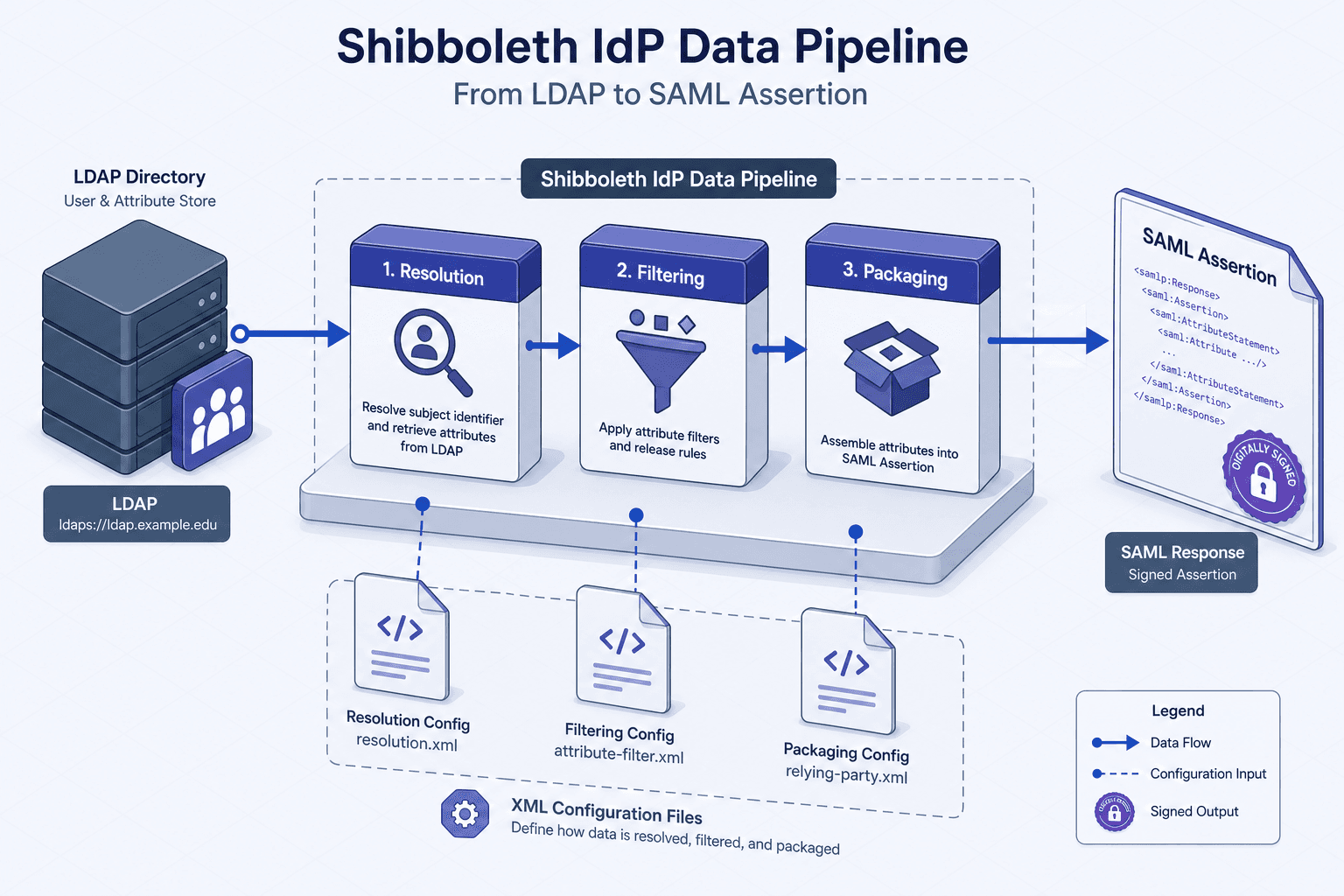
Shibboleth IdP is not a monolithic authentication server; it is a data pipeline. To configure it effectively, you must visualize the flow of identity data through three distinct stages: Resolution, Filtering, and Packaging.
The IdP Data Pipeline
Before touching any XML, understand the mechanism. When a Service Provider (SP) initiates a SAML request, the Shibboleth IdP executes a sequence of handlers:
- Authentication: The user proves their identity (e.g., via password, MFA).
- Attribute Resolution: The IdP queries backend sources (LDAP, SQL, JWT) to fetch raw attribute data.
- Attribute Filtering: The IdP evaluates policy rules to decide which attributes are allowed to be released to the specific SP.
- Response Generation: The IdP packages the allowed attributes into a SAML Assertion, signs it, and returns it to the SP.
If an attribute is missing in the final SAML response, the failure occurred in one of these three stages. Most configuration errors happen in stages 2 and 3.
Stage 1: Attribute Resolution
The resolver.xml file defines how the Shibboleth IdP fetches data. The core concept here is the AttributeDefinition. You do not send LDAP attributes directly; you first map them to internal IdP attribute names.
Consider a scenario where you need to release the user’s email address. Your LDAP directory stores this in the mail attribute. The IdP needs to create an internal attribute named mail (or emailAddress) that holds the value fetched from LDAP.
Here is a typical configuration for an LDAP-based resolver using IdP v4 syntax:
<DataConnector id="myLDAP" xsi:type="LDAPDirectory"
xmlns="urn:mace:shibboleth:2.0:resolver:dc"
ldapURL="ldap://ldap.example.com"
baseDN="ou=people,dc=example,dc=com"
principal="cn=idp,ou=services,dc=example,dc=com"
principalCredential="password">
<!-- The filter to find the user object -->
<FilterTemplate>
<![CDATA[
(&(objectClass=person)(uid=$requestContext.principalName))
]]>
</FilterTemplate>
</DataConnector>
<AttributeDefinition id="mail" xsi:type="Simple"
xmlns="urn:mace:shibboleth:2.0:resolver:ad">
<InputDataConnector ref="myLDAP" attributeNames="mail"/>
</AttributeDefinition>Mechanism Note: The LDAPDirectory DataConnector executes an LDAP search every time an attribute is requested. The FilterTemplate uses $requestContext.principalName to inject the subject’s identifier (usually uid or sAMAccountName) into the search query. This ensures you are fetching attributes for the correct user.
If you are using a database or a JWT-based source, the resolver type changes (e.g., JDBCDirectory or Script), but the principle remains: Define the source, define the mapping, define the internal attribute ID.
Stage 2: Attribute Filtering
This is the most critical security boundary for the Shibboleth IdP. The attribute-filter.xml file controls what data leaves the IdP. It operates on Policy and Rule logic.
A common mistake is assuming that defining an attribute in resolver.xml makes it automatically available. It does not. You must explicitly authorize its release.
Filters are evaluated per Relying Party (SP). The IdP checks the EntityID of the requesting SP against the filter rules.
Basic Release Policy
To release an attribute to a specific SP, you define an AttributeRule with a Release action:
<AttributeFilterPolicy id="releaseMailToExampleSP">
    <!-- Match the SP by its EntityID -->
    <PolicyRequirementRule xsi:type="Requester" value="https://sp.example.com/shibboleth"/>

    <!-- The rule to release the attribute -->
    <AttributeRule attributeID="mail">
        <PermitValueRule xsi:type="ANY"/>
    </AttributeRule>
</AttributeFilterPolicy>
Mechanism Note: The PolicyRequirementRule acts as a gatekeeper. If the requesting SP’s EntityID does not match https://sp.example.com/shibboleth, this entire policy block is skipped. This ensures that even if an attribute is defined in the resolver, it cannot be released to unauthorized parties.
Conditional Release
Sometimes you need to release an attribute only if it has a specific value. For example, release the groupMembership attribute only if the user is in the "admins" group. Use Value rules within the AttributeRule:
<AttributeRule attributeID="groupMembership">
    <PermitValueRule xsi:type="Value" value="admins"/>
</AttributeRule>
This mechanism prevents accidental leakage of sensitive group information to SPs that do not need it.
Stage 3: Response Packaging
The Shibboleth IdP must trust the SP before it can process requests and package the response. This trust is established through Metadata. The relying-party.xml and metadata-providers.xml files manage this trust, enabling the Packaging stage.
Metadata Providers
The IdP does not guess the SP’s capabilities. It reads metadata from a trusted source. This metadata contains the SP’s public keys, endpoints, and supported protocols.
<MetadataProvider id="SPMetadata" xsi:type="ChainingMetadataProvider">
    <MetadataProvider id="LocalSPMetadata" xsi:type="FilesystemMetadataProvider" metadataFile="/opt/shibboleth-idp/metadata/sp-metadata.xml"/>
</MetadataProvider>
Mechanism Note: The IdP validates the XML signature of the metadata document against trusted keys. This prevents MITM attacks where an attacker could inject malicious SP endpoints.
Relying Party Profile Configurations
In relying-party.xml, you define how the IdP behaves when communicating with an SP. Key settings include:
- Signing: Whether the IdP signs the SAML assertion (
signResponses="always"). - Encryption: Whether the IdP encrypts the assertion or nameID (
encryptAssertions="always"). - NameID Format: Which identifier format to use (e.g.,
transient,persistent,emailAddress).
For example, to enforce encryption for all responses to a specific SP:
<RelyingParty id="example-sp" provider="https://sp.example.com/shibboleth">
    <ProfileConfiguration xsi:type="saml:SAML2SSOProfile"
                          signResponses="always"
                          encryptAssertions="always"
                          encryptNameIds="always"/>
</RelyingParty>Opinion: Always enable encryption for assertions containing sensitive attributes (PII). While signing ensures integrity, encryption ensures confidentiality. Without encryption, the SAML response is readable by anyone who intercepts the HTTP POST.
Common Pitfalls and Debugging
- Attribute Missing in SAML Response: Check
resolver.xmlfirst. Is the attribute defined? Then checkattribute-filter.xml. Is there a policy matching the Shibboleth IdP’s SP EntityID that permits the attribute? - Invalid Signature Errors: Verify that the IdP’s private key matches the public key in the metadata. Ensure the
idp.entityIDproperty inconf/idp.propertiesmatches theentityIDin the metadata file. - Slow Performance: LDAP resolvers execute a search per attribute request. If you have many attributes, consider caching or configuring the LDAP
DataConnector'sreturnAttributesto fetch multiple attributes in a single LDAP query.
Conclusion
Shibboleth IdP configuration is an exercise in defining data flows and trust boundaries. By treating the IdP as a pipeline—Resolution → Filtering → Packaging—you can systematically diagnose and resolve configuration issues. Always start with the resolver to ensure data exists, then verify the filter to ensure it is allowed, and finally confirm the relying party configuration to ensure trust is established.
Related posts
Keycloak Zero Trust Configuration
Implement zero trust security in Keycloak using client policies, step-up authentication, token binding, and session evaluation.
Signing and Encrypting SAML Assertions: A Guide
A technical walkthrough on securing SAML assertions through XML signatures and encryption to prevent tampering and ensure data confidentiality.
SAML Assertions, Statements, and the Schema
An examination of SAML 2.0 assertion structure, statement types, and schema validation for developers and identity engineers.
