Setting Up a Test SAML IdP With SimpleSAMLphp
A practical guide to configuring SimpleSAMLphp as a local SAML Identity Provider for testing authentication flows with developers and QA engineers.
Integrating Single Sign-On (SSO) using the Security Assertion Markup Language (SAML) protocol introduces significant complexity during development. Unlike OAuth 2.0 or OpenID Connect, which rely on JSON Web Tokens (JWT) and standard REST endpoints, SAML operates on XML-based assertions exchanged via HTTP Redirects or POSTs. For developers and QA engineers, spinning up a reliable Identity Provider (IdP) is often the bottleneck. Building a custom IdP requires handling XML signatures, certificate management, and attribute mapping manually. SimpleSAMLphp solves this by providing a complete, PHP-based IdP implementation that generates its own metadata and handles the cryptographic signing of assertions out of the box. This guide details how to deploy SimpleSAMLphp using Docker to create a deterministic testing environment for a test saml idp scenario.
The Architecture of Local IdPs
Before deploying the software, it is essential to understand why SimpleSAMLphp is the preferred tool for local testing. A SAML IdP is responsible for authenticating users and issuing signed assertions. In a production environment, this usually involves connecting to an Active Directory or LDAP server. In development, however, you need an IdP that is lightweight, stateless regarding external dependencies, and easy to reset.
SimpleSAMLphp acts as a "metadata generator." It automatically produces a metadata/saml20-idp-hosted.php file that describes its capabilities, supported bindings (Redirect, POST), and public certificates. This metadata is what the Service Provider (SP) consumes to establish trust. By using SimpleSAMLphp, you avoid writing XML parsing logic and certificate rotation mechanisms. Instead, you focus on verifying that your SP correctly parses the SAML Response and maps attributes like email or uid. When configuring a local saml identity provider, it is important to clarify that "stateless" refers to the IdP's lack of persistent external dependencies (like a database) for user credentials, not the HTTP session state required for the SAML Web Browser SSO profile. This distinction ensures that the simplesamlphp setup remains simple while still supporting the stateful nature of the SAML flow.
Docker Deployment Mechanism
The most efficient way to run SimpleSAMLphp locally is via Docker. This ensures that the IdP runs in an isolated environment with predictable network ports and no dependency conflicts with your host machine\u2019s PHP version. This approach is central to saml testing with docker workflows.
Create a docker-compose.yml file in your project root. This configuration mounts two critical volumes: one for the configuration files and one for the metadata output. The simplesamlphp/simplesamlphp image is pre-configured with the necessary Apache and PHP modules.
version: '3.8'

services:
  idp:
    image: simplesamlphp/simplesamlphp:latest
    ports:
      - "8080:8080"
      - "8443:8443"
    volumes:
      - ./config:/var/simplesamlphp/config
      - ./metadata:/var/simplesamlphp/metadata
      - ./certs:/var/simplesamlphp/certs
    networks:
      - saml-test-net

networks:
  saml-test-net:
    driver: bridge
In this setup, we expose port 8080 for HTTP and 8443 for HTTPS. The volumes directive is crucial. By mounting ./config and ./metadata, you ensure that any changes you make to config.php or generated metadata files persist outside the container. This allows you to edit configurations on your host machine and have them reflected immediately in the running IdP. Note that the IdP's entity ID is configured in metadata/saml20-idp-hosted.php and that the SP's entity ID is configured in the Service Provider's own configuration, not passed to the IdP via environment variables.
Configuration & Metadata Injection
Once the container is running (docker-compose up -d), SimpleSAMLphp generates default configurations. The first step in securing and customizing the IdP is configuring the authsources array in config/authsources.php. This file defines where user credentials are validated.
For local testing, the simplest source is the example-userpass backend, which allows you to define static users in the configuration file, which is ideal for QA testing where you need specific user attributes (e.g., a user with admin roles).
<?php
$config = array(
    'example-userpass' => array(
        'exampleauth:UserPass',
        'user:password' => array(
            'uid' => 'testuser',
            'mail' => 'test@example.com',
            'eduPersonAffiliation' => array('user', 'member'),
        ),
    ),
);
Here, we define a single user user with password password. When this user logs in, SimpleSAMLphp will include the specified attributes in the SAML assertion. This mechanism allows you to test how your SP handles attribute mapping without needing a real database. To fully configure simplesamlphp for your needs, you may also need to adjust the authproc filters in config/config.php to transform or filter attributes before they are included in the assertion.
Next, you must obtain the IdP's metadata to configure your Service Provider. SimpleSAMLphp serves this metadata at /saml2/idp/metadata.php. You can retrieve it via curl:
curl https://localhost:8443/saml2/idp/metadata.php -o metadata/saml20-idp-remote.php --insecureThis command downloads an XML metadata document containing the IdP's entity ID, certificate, and endpoint URLs. You then copy this content into your SP's configuration (e.g., metadata/saml20-idp-remote.php in your SP's directory). This step establishes the cryptographic trust: the SP now possesses the IdP's public certificate and can verify the signature on incoming SAML responses.
The Authentication Flow
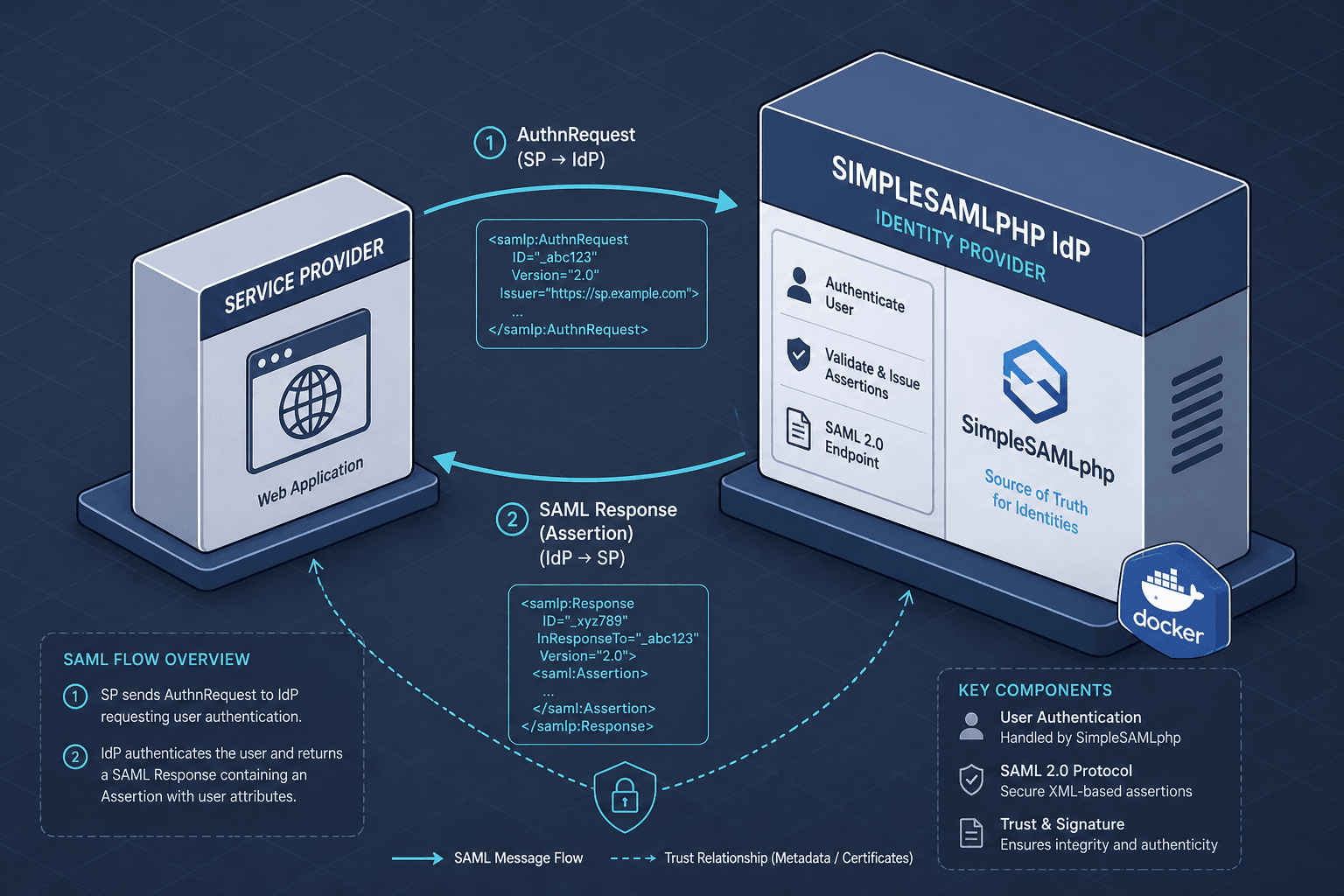
To validate the setup, trigger an SSO request from your Service Provider. The flow proceeds as follows:
- Initiation: The user attempts to access a protected resource on the SP. The SP generates a
AuthnRequestXML and redirects the user's browser to the IdP's Single Sign-On Service (https://localhost:8443/saml2/idp/SSOService.php). - Authentication: The IdP receives the request, checks if the user is already authenticated. If not, it renders an HTML login form (hosted at
https://localhost:8443/module.php/core/loginuserpass.php). The user entersuserandpassword. - Assertion Creation: Upon successful validation against the
example-userpassbackend, SimpleSAMLphp constructs a SAML Assertion. It signs this assertion using the IdP's private key (stored incerts/idp.pem). The assertion includes the attributes defined inauthsources.php. - Response: The IdP returns an HTTP POST response containing the signed SAML Response. The browser forwards this to the SP's Assertion Consumer Service (ACS) endpoint.
- Validation: The SP verifies the signature using the public certificate from the metadata. If valid, it creates a session for the user and redirects them to the originally requested resource.
If the SP fails to validate the signature, the authentication fails. This mechanism ensures that the IdP is the only entity that can issue valid assertions for your domain. When you test saml idp configurations, pay close attention to the Destination and Audience restrictions in the SAML Response to ensure they match your SP's expected values.
Conclusion
SimpleSAMLphp provides a complete, standards-compliant SAML IdP that can be deployed locally in minutes. By leveraging Docker, you isolate the IdP from your development environment, ensuring consistent behavior across different machines. The key to effective testing lies in the authsources.php configuration, which allows you to simulate various user attributes and roles. Once configured, this IdP becomes a reliable partner for your Service Provider, enabling rigorous testing of SSO flows, attribute mapping, and error handling without the overhead of managing external identity infrastructure.
Related posts
Spring Security SAML: A Working Integration
A practical guide to integrating Spring Security SAML with Spring Boot, covering SAML2 relying party configuration, service provider setup, and metadata handling.
CAS vs SAML: Choosing Between Them
A technical comparison of CAS and SAML protocols for identity engineers and architects, covering service tickets, SSO implementation, and migration strategies.
Validating a SAML Assertion Correctly
A technical walkthrough on validating SAML assertions, covering audience restrictions, timestamp checks, and replay prevention for secure identity flows.
