Why Your Agent Loops Forever (and Five Fixes)
Understand why AI agents enter infinite loops and learn five practical fixes for tool failures and debugging.
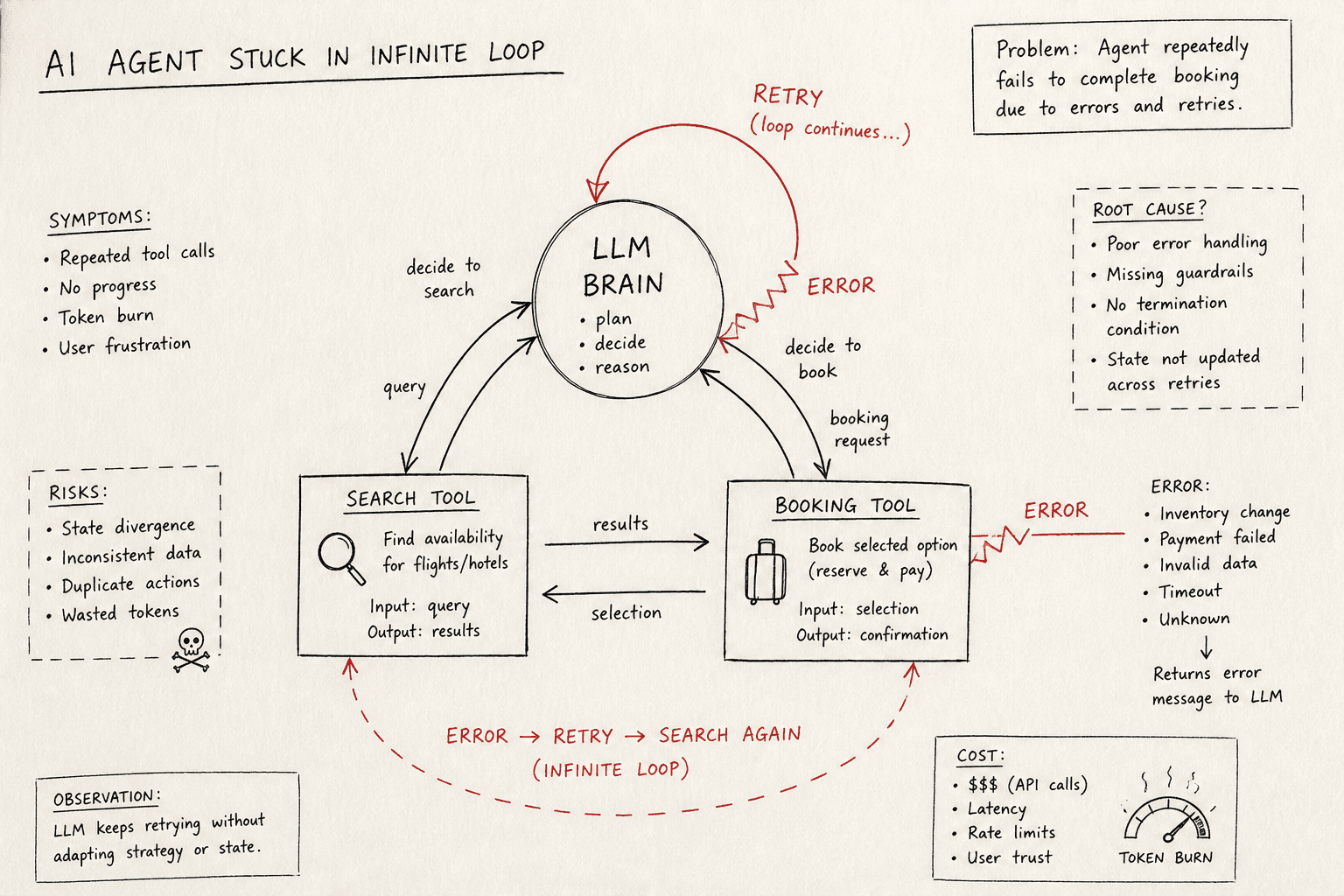
You built an AI agent to book a flight. It called the search API. It got a result. It called the booking API. It got an error. It called the search API again, but with different parameters. It got a result. It called the booking API again. It got an error. And so on.
This is not a glitch in the matrix. This is a predictable failure mode of Large Language Models (LLMs) operating in a closed loop with external tools. The model is doing exactly what it was trained to do: predict the next most likely token based on the context provided. If the context suggests that a tool call is the correct next step, and the tool output doesn’t explicitly signal "stop," the model will continue.
Infinite loops in agent architectures are rarely caused by the model "getting stuck" in a cognitive sense. They are caused by state divergence and repetitive feedback cycles. The agent’s internal state (the conversation history) grows, but the effective state (the information relevant to the decision) remains unchanged or cycles.
Here is the mechanism behind the loop, followed by five practical fixes to break it.
The Mechanism: Why Loops Happen
To fix the problem, you must understand the engine. An agentic loop typically looks like this:
- Input: User query + Conversation History.
- Decision: LLM decides whether to call a tool or respond directly.
- Execution: The code runs the tool.
- Feedback: The tool’s output is appended to the history.
- Repeat: Go to step 2.
The loop becomes infinite when steps 2–4 repeat without advancing the goal state. This happens in two primary ways:
1. The Repeated Failure Loop
The tool fails (e.g., returns 500 Internal Server Error or malformed JSON). The LLM sees the error, interprets it as "I need to try again," and calls the same tool with nearly identical arguments. The tool fails again. The history grows, but the semantic content of the last two turns is identical. The model’s probability distribution for "call tool" remains high.
2. The Oscillation Loop
The agent has two tools: search_flight and book_flight.
- Turn 1: Model calls
search_flight. - Turn 2: Tool returns results.
- Turn 3: Model calls
book_flightwith ID from Turn 1. - Turn 4: Tool fails because the ID is invalid.
- Turn 5: Model realizes it needs to search again. It calls
search_flight. - Turn 6: Tool returns results.
- Turn 7: Model calls
book_flightagain.
The state oscillates between "need data" and "execute action," never reaching a terminal state.
Fix 1: Hard Max Iterations
The most basic defense is a hard limit. No agent should run more than N iterations. This is not a "fix" for the root cause, but a necessary circuit breaker. Without it, your application will consume tokens indefinitely, burning money and time. This is particularly critical when handling tool failure scenarios where retries might otherwise be infinite.
Set a maximum iteration count (e.g., 10–20). If the limit is reached, throw an exception or trigger a fallback.
MAX_ITERATIONS = 10
current_iteration = 0

while current_iteration < MAX_ITERATIONS:
    response = llm.generate(context)
    if response.is_tool_call:
        execute_tool(response.tool_call)
        context.append(response.tool_call_result)
    else:
        return response.final_answer
    current_iteration += 1

raise LoopError("Max iterations exceeded")
This prevents resource exhaustion but leaves the agent in an undefined state. You need deeper fixes.
Fix 2: History Pruning and Cycle Detection
The root cause of the oscillation loop is that the model "remembers" the failed attempt. To break the cycle, you must force the model to forget the repeated pattern. This is essential for preventing an infinite loop caused by repetitive state.
Strategy: Detect repetition in the conversation history and prune it.
Compare the last N turns (e.g., the last 2–3 exchanges). If the tool name and input arguments are identical (or semantically similar via embedding distance), you have detected a cycle. When a cycle is detected, truncate the history to remove the repeating block and inject a system message explaining the failure.
def detect_cycle(history, window=2):
    if len(history) < window * 2:
        return False

    recent_turns = history[-window:]
    # Check if the tool calls are identical
    first_call = recent_turns[0].tool_call
    second_call = recent_turns[1].tool_call

    return first_call.name == second_call.name and \
           first_call.arguments == second_call.arguments

if detect_cycle(history):
    # Prune the last 2 turns and add a warning
    history = history[:-4]  # Remove model response and tool call
    history.append({
        "role": "system",
        "content": "You attempted the same action twice with the same result. Do not repeat this action. Try a different approach or ask for clarification."
    })
This forces the model to generate a new path because the context no longer supports the previous decision.
Fix 3: Tool Output Validation
Many loops stem from poorly formatted tool outputs. If your tool returns JSON that the LLM can’t parse, the model will try again, assuming it just made a mistake. This can easily trigger an infinite loop if the parsing error is not addressed.
Strategy: Validate tool outputs strictly before passing them to the LLM.
Use Pydantic or JSON Schema to validate the tool’s output. If validation fails, return a clear, structured error message to the LLM, not the raw stack trace.
from pydantic import BaseModel, ValidationError

class FlightResult(BaseModel):
    flight_id: str
    price: float
    airline: str

def execute_tool(tool_name, arguments):
    try:
        # Simulate API call
        raw_output = call_external_api(tool_name, arguments)

        # Validate output
        validated_data = FlightResult.parse_raw(raw_output)
        return {"status": "success", "data": validated_data.model_dump()}

    except ValidationError as e:
        # Return a clear error that the LLM can understand
        return {
            "status": "error",
            "message": f"Invalid data format: {str(e)}",
            "hint": "Ensure the API returns valid JSON with 'flight_id', 'price', and 'airline'."
        }
    except Exception as e:
        return {
            "status": "error",
            "message": f"Tool execution failed: {str(e)}"
        }
By providing a clear error message, you give the LLM the information it needs to adjust its strategy, rather than blindly retrying.
Fix 4: Explicit Stop Sequences and Finality Tokens
LLMs don’t inherently know when a task is "done." They only know when to generate the next token. If your prompt doesn’t explicitly define a terminal state, the model may keep generating tool calls. This is a key component of loop detection in production systems.
Strategy: Define a clear "stop" condition in the prompt and use stop sequences.
In your system prompt, specify that the agent must respond directly to the user once the goal is achieved, without calling any more tools. Additionally, configure the LLM API to stop generation when it emits a specific token or sequence. This is particularly useful when handling tool failure cases where the model might otherwise retry endlessly.
prompt = """
You are a flight booking agent.
1. Use 'search_flight' to find options.
2. Use 'book_flight' to confirm a booking.
3. If the booking is successful, respond with: "Booking confirmed for flight {flight_id}."
4. DO NOT call any more tools after step 3.
"""

# Configure the LLM to stop when it emits a specific sequence
llm = ChatOpenAI(
    model="gpt-4",
    stop=["Booking confirmed"]  # Or a custom token like </FINAL_RESPONSE>
)
This reduces the probability of the model continuing to generate tool calls after the task is complete.
Fix 5: Human-in-the-Loop Fallback
No automated detection is perfect. There will be edge cases where the model enters a subtle loop that your heuristics miss. In production, you must have a fallback. Effective debugging requires knowing when to step back and let a human review the context.
Strategy: Route persistent failures to a human or a higher-level orchestrator.
If an agent fails to complete a task after N attempts, or if it enters a detected loop, escalate the issue. This could be as simple as logging the context and notifying a developer, or as complex as handing off the conversation to a human agent with the full context.
if current_iteration == MAX_ITERATIONS:
    log_context(history)
    notify_devops(f"Agent loop detected for user {user_id}")
    return "I'm sorry, I'm having trouble completing this request. A human will assist you shortly."
This ensures that the user experience degrades gracefully rather than hanging indefinitely.
Conclusion
Infinite loops in AI agents are a symptom of poor state management and insufficient guardrails. By implementing hard limits, detecting cycles, validating tool outputs, defining stop conditions, and having a fallback plan, you can build agents that are efficient and safe.
The key is to treat the LLM not as a magical solver, but as a probabilistic engine that needs clear boundaries and structured feedback. Understanding the agent loop is the first step toward mastering these controls.
Related posts
Testing and Debugging Non-Deterministic Agents
A practical guide to testing and debugging non-deterministic AI agents using trajectory replay, mocking, and strategies for flaky tests.
The Tool-Calling Loop, Implemented From Scratch
A technical walkthrough of implementing a tool-calling loop for AI agents from scratch, covering function calling, message history, and the agent loop.
Durable Execution for Agents with Temporal
Explore how Temporal enables durable execution for AI agents, ensuring resilience through checkpointing and replay mechanisms.
