Automating Access Reviews with Keycloak and Spring Boot
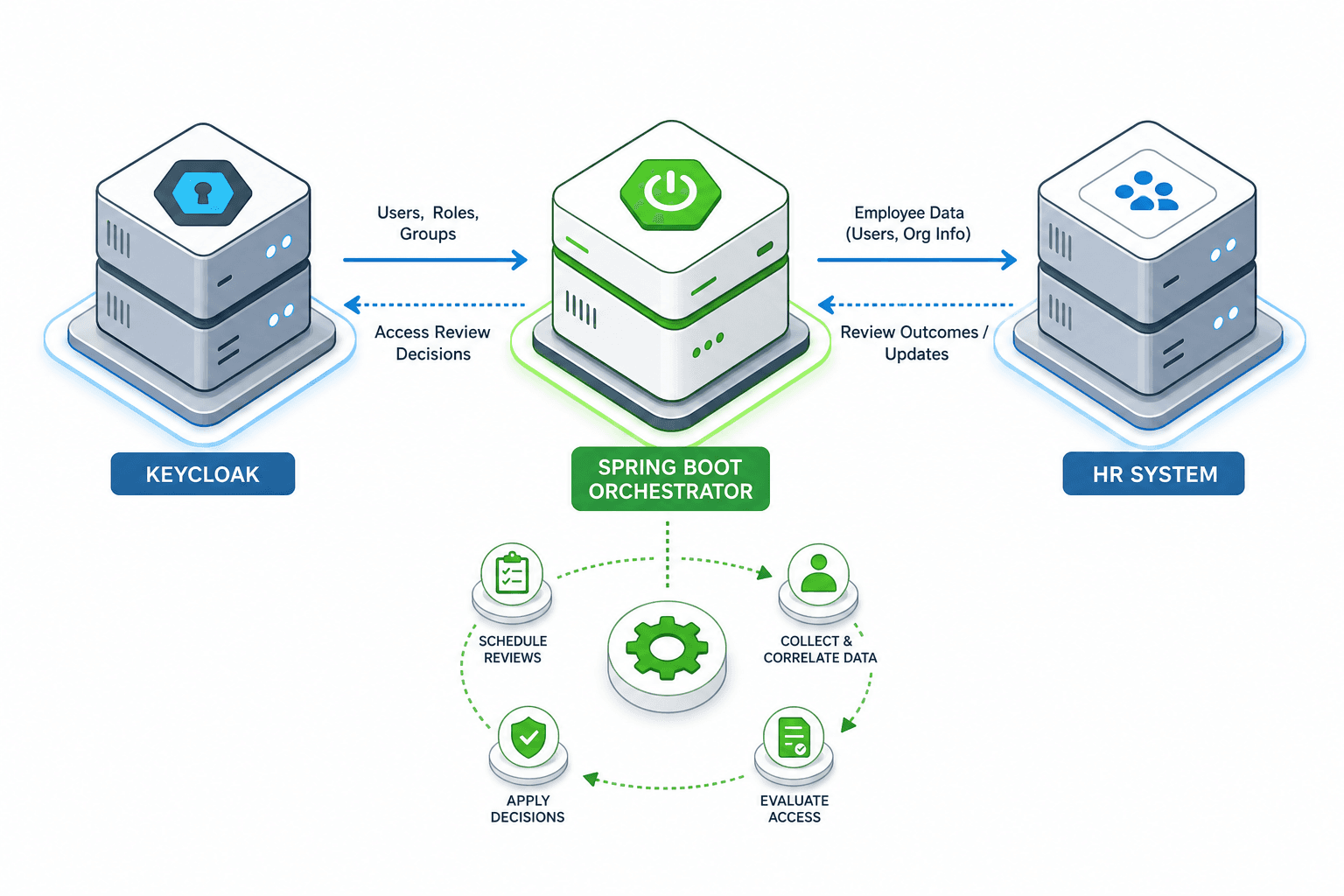
This guide covers automating access reviews using Keycloak and Spring Boot to ensure compliance and streamline identity governance.
Traditional identity governance often relies on manual, periodic spreadsheets or the native Keycloak user interface, which is designed for ad-hoc human review rather than automated compliance pipelines. To achieve true automation, you must bypass the UI and treat Keycloak as a stateful API service, orchestrated by a Spring Boot application that acts as the "certification engine." This architecture shifts the burden of logic from the Identity Provider (IdP) to the application layer, allowing for complex decision trees, audit logging, and integration with existing HR systems.
The Trigger: Listening to State Changes
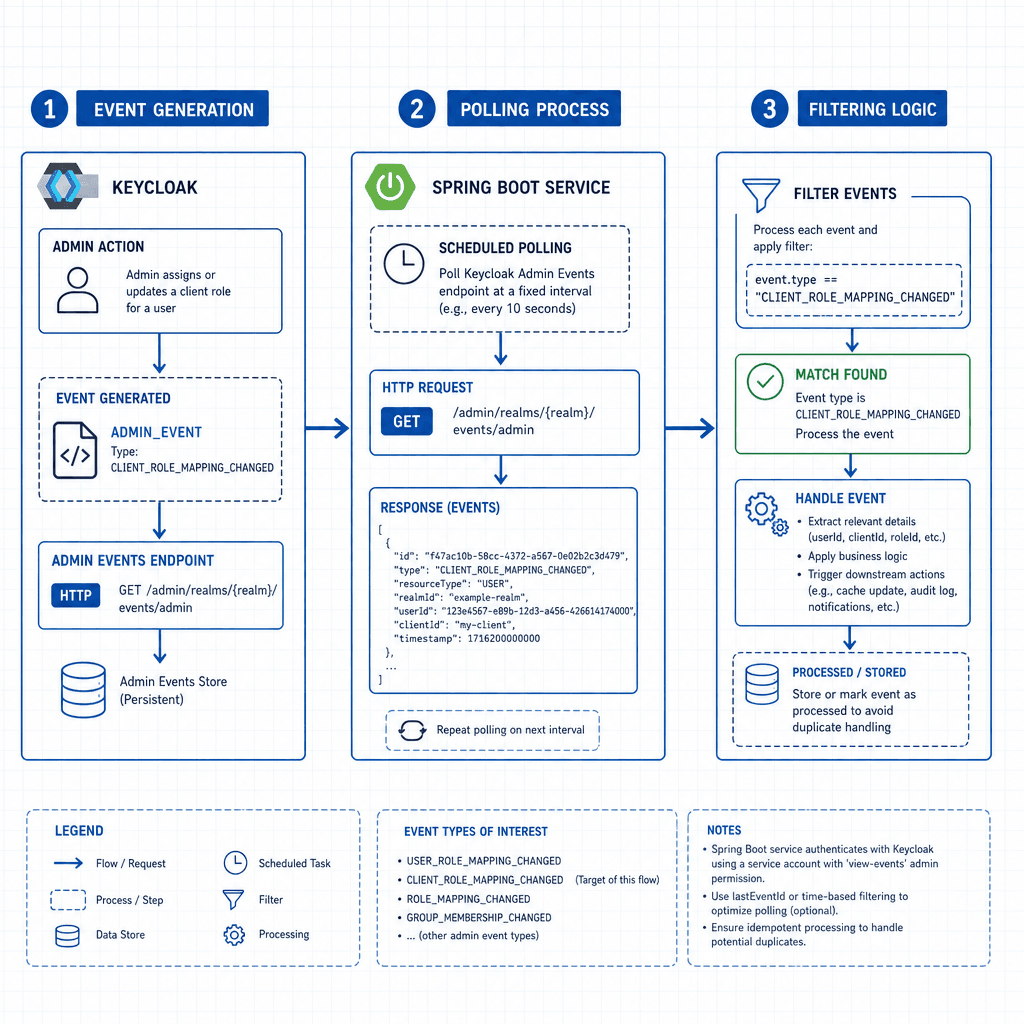
The automation loop begins with a trigger. In Keycloak, the most reliable mechanism for detecting changes in user permissions without polling every second is the Admin Event SPI (Server Plugin Interface). When an administrator or an automated process modifies a user's role mapping, Keycloak generates an ADMIN_EVENT record. However, this event is only emitted if the admin-events feature is explicitly enabled in the realm configuration, as documented in the Keycloak Admin Event Configuration.
Consider a scenario where alice is promoted. An HR system calls the Keycloak Admin API to add alice to the manager role. This action generates an event. Your Spring Boot service requires a polling mechanism to consume these events. While Keycloak supports Webhooks for some events, the most robust pattern for access reviews involves a scheduled job that polls the Admin Event log for specific USER_ROLE_MAPPING_CHANGED events within a defined time window.
You must configure the realm to store these events. Without this, the history is ephemeral. The configuration requires setting admin-events.enabled to true and admin-events.sensitive-events.enabled to true to capture role modifications. Additionally, you must configure admin-events.eventsEnabled to ensure the specific event types are recorded.
# Realm Configuration Example
{
  "adminEvents": {
    "enabled": true,
    "eventsEnabled": true,
    "adminEventsDetailsEnabled": true
  }
}
Once enabled, your Spring Boot service queries the admin/events endpoint. This endpoint returns a stream of JSON objects containing the resourceType, resourcePath, operationType, and representation of the change. The JSON payload typically includes a timestamp, the user performing the action, and the specific details of the modification. For access reviews, you filter for resourceType equal to USER and operationType matching UPDATE or CREATE on the role-mappings path. The event structure is detailed in the Keycloak Admin Event Log documentation.
The State: Snapshotting User Context
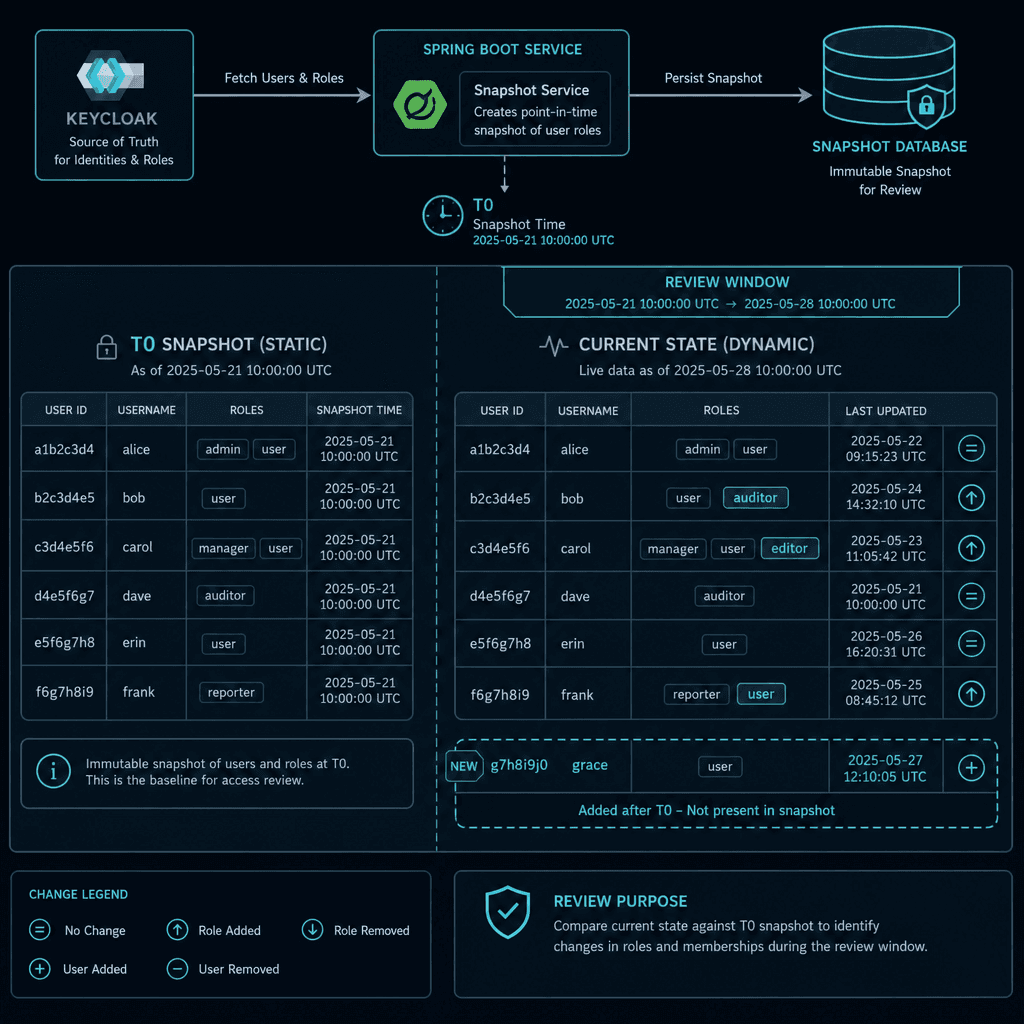
Detecting a change is only half the battle; you need a baseline to compare against. The core mechanism of an access review is the "certification campaign." A campaign is a snapshot of who should have access at a specific point in time.
Your Spring Boot service initializes a campaign by querying the Keycloak Admin Client. You do not want to rely on the IdP to determine who "should" have access; your service must fetch the current state of all users within the target scope. For example, if reviewing the finance department, you query the groups endpoint to retrieve the id of the finance group, then use that ID to list all users in that group.
// Corrected pattern for fetching group members
List<UserRepresentation> users = keycloakAdminClient
    .realm("my-realm")
    .groups()
    .get(groupId)
    .toRepresentation()
    .getMembers();
Crucially, you must also fetch the current role mappings for each user. The Keycloak Admin Client provides users().get(userId).roleMappings(). This creates a static snapshot in your application's memory or a temporary database table. This snapshot represents the "truth" at the moment the review started. If a user is added to the group during the review period, your logic must decide whether to include them. Standard practice is to exclude new additions to avoid "review fatigue" for approvers, focusing only on the state at T0.
The Logic: The Certification Workflow
With the trigger identified and the snapshot taken, the logic layer defines the decision process. In a manual review, a manager sees a list and clicks "Approve" or "Deny." In an automated system, you expose a REST API endpoint that returns this decision matrix to an external workflow engine or a custom dashboard.
Let's define the actors: Alice (User), Bob (Manager), and SpringService (Orchestrator).
- Scoping: The service identifies that
Aliceis in thefinancegroup and holds theviewerrole. - Presentation: The service sends a request to
POST /reviews/campaign/123/decision. The payload includesuserId,currentRoles,requestedAction(e.g., "removeviewer"), andjustification. - Decision:
Bobreviews the request. He observes thatAlicewas moved toengineeringlast week but thefinancerole mapping wasn't cleaned up. He denies the request to remove the role, or approves it if the removal was intended.
The critical mechanism here is the separation of concerns. The Keycloak service manages the state (roles), while Spring Boot manages the policy (who decides what). This allows you to implement complex rules, such as "If a user has been in the group for > 30 days, auto-flag for review." While such logic is possible via Keycloak scripts or custom providers, a Spring Boot orchestrator is often preferred for complex, cross-system logic and audit trail separation, ensuring business rules remain decoupled from the identity platform.
The Execution: Applying the Decision
Once the decision is made, the Spring Boot service executes the change. This is where the Idempotency and Conflict handling become vital. You cannot simply call updateRoleMappings blindly. The user's state might have changed since your snapshot was taken. If Charlie was removed from the group while you were reviewing, and you try to apply a decision based on the old snapshot, Keycloak may reject the update with a 409 CONFLICT error because the underlying resource version has changed.
The execution flow looks like this:
- Validate: Check if the user still exists in the target group (optional but recommended).
- Apply: Call the
roleMappingsendpoint.- To remove:
POST /users/{id}/role-mappings/clients/{clientId}/roleswith the role name in the body, but using theDELETEmethod or specific removal logic. Actually, the standard approach is to fetch the current mappings, subtract the ones to be removed, and PUT the whole set, or use the specific removal endpoint. - The specific API call to remove a role is
DELETE /admin/realms/{realm}/users/{id}/role-mappings/clients/{client_id}/roles/{role_name}.
- To remove:
- Handle Error: If a
409is returned, log the conflict, pause the campaign for that user, and alert the administrator. Do not proceed with the next step until the conflict is resolved.
// Attempting to remove a role
try {
    keycloakAdminClient.realm("my-realm")
        .user(userId)
        .roleMappings()
        .client(clientId)
        .delete(roleName);
} catch (ClientErrorException e) {
    if (e.getResponse().getStatus() == 409) {
        // Handle race condition: User state changed during review
        log.warn("Conflict detected for user {} during access review", userId);
    }
}
Conclusion
Automating access reviews transforms identity governance from a reactive, manual chore into a proactive, auditable pipeline. By leveraging Keycloak's Admin Event SPI for triggers, the Admin Client for state retrieval, and Spring Boot for the orchestration logic, you create a system that is resilient to race conditions and fully compliant with audit requirements. The mechanism relies on the strict separation of the "source of truth" (Keycloak) and the "decision engine" (Spring Boot), ensuring that every change is deliberate, documented, and reversible. This approach does not just save time; it eliminates the human error inherent in manual spreadsheet-based reviews.
Common Pitfalls
Implementing this architecture introduces specific risks that must be anticipated. First, missing the admin-events.enabled configuration in the realm is a common oversight; without it, the event log remains empty, and the polling mechanism will never detect changes. Second, race conditions often occur between the snapshot creation and the execution phase; if a user's role changes naturally between these two points, the automated decision might be based on stale data, leading to conflicts or incorrect access grants. Third, using the wrong event type is critical; CLIENT_ROLE_MAPPING_CHANGED applies to client-specific roles, while USER_ROLE_MAPPING_CHANGED applies to realm-level roles, and confusing the two can lead to missed updates or false positives in your review logs.
Practical Takeaways
To successfully deploy this solution, keep these architectural decisions in mind:
- Separation of Concerns: Keep the identity state management in Keycloak and the business logic/policy enforcement in Spring Boot to maintain a clean architecture.
- Polling vs. Webhooks: While webhooks exist, a scheduled polling mechanism against the Admin Event log is generally more robust for high-volume, batch-style access reviews due to its simplicity and reliability.
- Snapshot Isolation: Always establish a strict baseline (snapshot) at the start of a campaign to ensure that decisions are made against a consistent view of the system state.
FAQ
Can I use Keycloak scripts instead of Spring Boot? Yes, you can use Keycloak scripts or custom SPIs to handle logic, but they are often harder to maintain, debug, and integrate with external HR systems compared to a dedicated Spring Boot application.
How do I handle 409 conflicts during execution? When a 409 Conflict occurs, it indicates the user's state changed after your snapshot. You should pause the specific user's review, alert an administrator, and re-fetch the current state before retrying the action.
Is the Admin Event log persistent?
By default, Keycloak stores events in memory or a temporary database depending on the configuration. To ensure persistence across restarts, you must configure the admin-events to write to a persistent storage backend, such as a database or file system, as described in the realm configuration.
Related posts
Building a Self-Service Password Reset with Spring Boot and Keycloak
A walkthrough of implementing password recovery and self-service identity flows using Spring Boot and Keycloak required actions.
Implementing Risk-Based Authentication with Keycloak and Spring Boot
A technical walkthrough on implementing risk-based authentication using Keycloak and Spring Boot, covering adaptive authentication and risk scoring strategies.
Implementing OIDC Authentication in Spring Boot with Keycloak
A walkthrough for implementing OIDC authentication in Spring Boot using Keycloak, covering setup and configuration.