Building a Self-Service Password Reset with Spring Boot and Keycloak
A walkthrough of implementing password recovery and self-service identity flows using Spring Boot and Keycloak required actions.
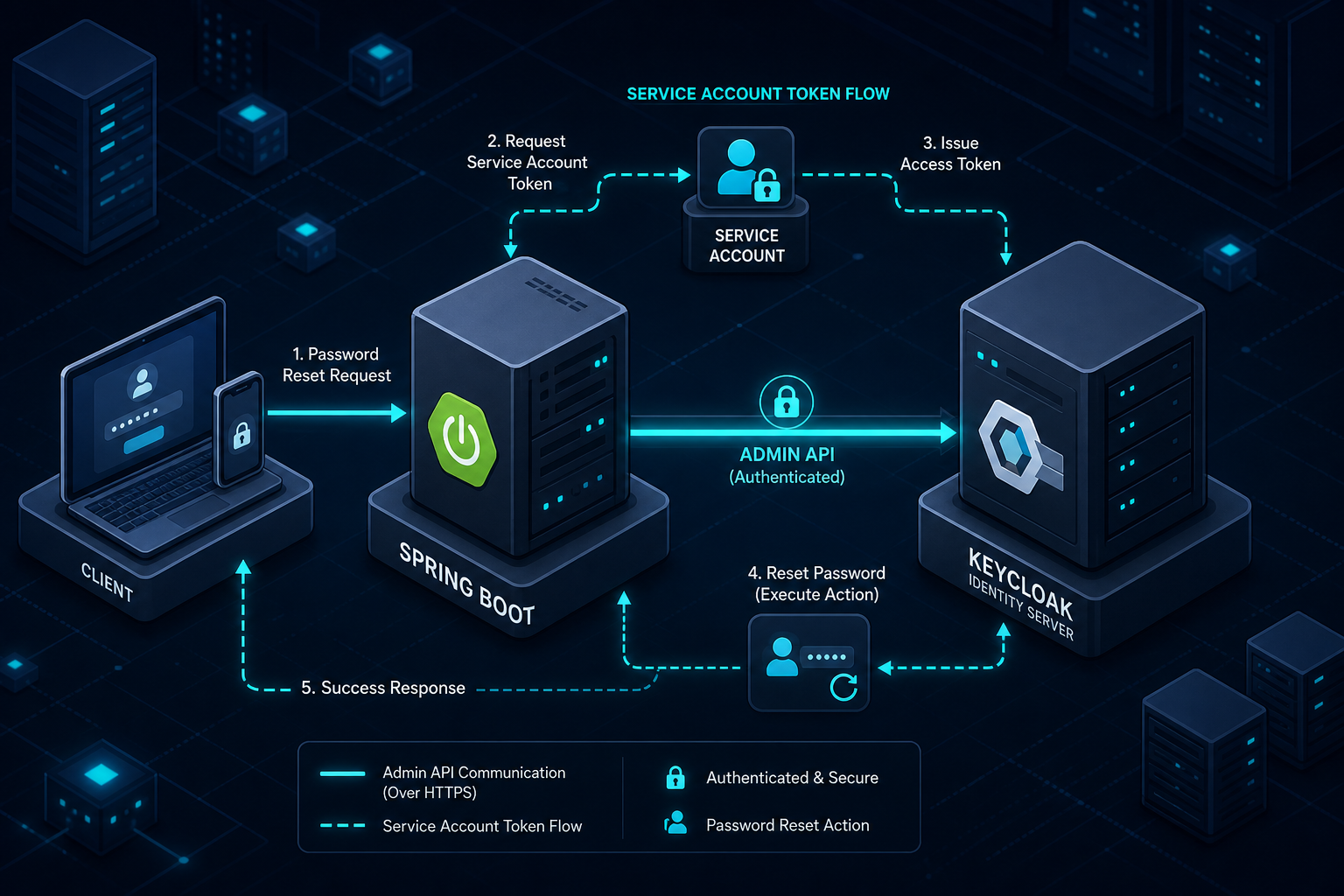
Implementing secure self-service password resets in Spring Boot requires bypassing standard authentication flows to trigger Keycloak's "Required Action" mechanism directly via the Admin REST API, rather than relying on client-side redirects which fail when the user is unauthenticated. This approach decouples the reset logic from the browser session, allowing the application to programmatically enforce a password change even when the user has forgotten their credentials.
The Mechanism of Failure: Why Client-Side Redirects Don't Work
The standard mental model for password recovery involves a user clicking "Forgot Password," receiving an email with a token, and clicking a link that redirects them to a reset form. In a standard Spring Security setup, this works fine because the user is not currently authenticated. However, in an environment using Keycloak as the identity provider, this flow introduces a critical mechanism failure: you cannot initiate a password change flow if the user has no active session. Keycloak does not expose a public endpoint that accepts a token and changes a password directly from the client browser without first establishing a trusted context.
If you attempt to redirect an unauthenticated user to Keycloak's standard login page to perform a reset, Keycloak will simply reject the request or require the user to authenticate first. Since the user has forgotten their password, they cannot authenticate. This creates a deadlock. The solution is to decouple the password reset logic from the client-side redirect flow and instead use a server-side bridge. This bridge leverages Keycloak's Admin REST API to programmatically enforce a password change, treating the reset as a "Required Action" that must be completed before the user can access the application.
When a user loses access to their account, they lack a valid Access Token and Refresh Token. In the OAuth2/OIDC protocol, these tokens are the keys that prove identity to the resource server. Keycloak's standard "Forgot Password" flow relies on the user being able to navigate to a login page where they can verify their identity via email. However, if the user is already locked out or the system requires a specific "Required Action" (like updating a password after a breach), the standard flow assumes a valid session exists to display the reset form.
Without a session, the browser cannot send the necessary cookies or tokens to Keycloak. If you try to call Keycloak's login endpoint directly from a Spring Boot application without a user context, you are essentially trying to authenticate a user who doesn't exist in the current session. The mechanism fails because Keycloak requires a valid session_id to process a password change request initiated by the user.
To bypass this, we must stop thinking of the password reset as a user-initiated action and start treating it as an administrative event triggered by the application. The application (Spring Boot) becomes the trusted entity that verifies the user's identity (via the email address) and then instructs Keycloak to force a password change.
The Server-Side Bridge: Using the Admin REST API
The core mechanism here is the Keycloak Admin REST API. Unlike the public client-facing endpoints, this API requires a service account with administrative privileges. This service account acts as the "backend identity" for your Spring Boot application. It allows the application to perform actions on behalf of users without needing their credentials.
In this architecture, the Spring Boot application does not talk to Keycloak as a client trying to log in. Instead, it talks to Keycloak as an administrator. The workflow is:
- User submits their email address in the Spring Boot application.
- Spring Boot queries Keycloak (using the Admin API) to find the user ID associated with that email.
- Spring Boot generates a temporary, cryptographically strong password.
- Spring Boot calls the Keycloak Admin API to update the user's password and mark the
required_actionasUPDATE_PASSWORD. - Spring Boot sends an email to the user with the temporary password and a link to log in.
This approach works because the Admin API does not require a user session; it requires a service account token. The service account token is obtained by the Spring Boot application at startup or on demand using the Client Credentials grant type.
Configuration: Service Account Setup
First, you must configure a client in the Keycloak realm specifically for your Spring Boot application. This client should be of type "Confidential" and have the "Service Accounts Enabled" option turned on. This generates a client secret and a client ID that the application will use to request an access token from Keycloak's token endpoint.
# Example cURL command to get the service account token
curl -X POST http://keycloak.example.com/realms/my-realm/protocol/openid-connect/token \
  -d "grant_type=client_credentials" \
  -d "client_id=spring-boot-reset-service" \
  -d "client_secret=your-service-account-secret" \
  -d "scope=openid"
The response contains an access_token. This token is used in the Authorization: Bearer <token> header for all subsequent Admin API calls.
The Required Action Flow: Forcing the Change
Once the service account token is obtained, the Spring Boot application can invoke the reset logic. It is crucial to distinguish between setting the password and enforcing the "Required Action." While Keycloak offers a resetPassword endpoint, it is often better to explicitly update the user's credentials and then trigger the action via the update method to ensure full control over the temporary flag and required_actions list.
The specific API sequence involves two distinct steps:
- Update the user's password and set the
temporaryflag. - Explicitly add the
UPDATE_PASSWORDaction to the user'srequiredActionslist.
When the user logs in with the temporary password, Keycloak detects this flag and interrupts the standard authentication flow. Instead of granting access, Keycloak redirects the user to the "Update Password" form.
Here is the mechanism in action within a Spring Boot controller:
@RestController
@RequestMapping("/api/auth")
public class PasswordResetController {

    private final KeycloakAdminClient keycloakAdminClient;
    private final UserRepository userRepository;

    @PostMapping("/reset-request")
    public ResponseEntity<Void> requestReset(@RequestBody EmailRequest request) {
        // 1. Find user by email
        UserRepresentation user = userRepository.findByEmail(request.getEmail())
            .orElseThrow(() -> new UserNotFoundException("User not found"));

        // 2. Generate temporary password
        String tempPassword = generateSecurePassword();

        // 3. Update user: Set password, mark as temporary, and enforce UPDATE_PASSWORD action
        UserRepresentation updatePayload = new UserRepresentation();
        updatePayload.setPassword(tempPassword);
        updatePayload.setTemporary(true);
        updatePayload.setRequiredActions(Collections.singletonList(RequiredAction.UPDATE_PASSWORD));

        keycloakAdminClient.users()
            .get(user.getId())
            .update(updatePayload);

        // 4. Send email with temporary password
        emailService.sendResetEmail(user.getEmail(), tempPassword);

        return ResponseEntity.ok().build();
    }
}
The update method in the Keycloak Admin client library performs the HTTP PUT request to the /users/{id} endpoint. By setting setTemporary(true) and adding UPDATE_PASSWORD to the requiredActions list, we ensure that the next login attempt with the temporary password triggers the forced password change form.
When the user receives the email and attempts to log in with the temporary password, the Keycloak authentication flow is intercepted. The Required Action mechanism triggers. Keycloak sees that the user has a pending UPDATE_PASSWORD action and redirects the browser to the Keycloak login page's "Update Password" form. The user enters a new, permanent password, and Keycloak clears the required_action flag.
Implementation Details and Security Tradeoffs
Implementing this pattern requires careful handling of the service account credentials. The service account token has broad permissions within the Keycloak realm. If an attacker compromises the Spring Boot application, they could potentially lock out users or reset passwords for any user in the realm. Therefore, the service account should be scoped tightly.
You can create a custom role in Keycloak for the service account that only allows the update-password action. While Keycloak's built-in roles are often broad, you can restrict the client's access by configuring the "Service Account Roles" in the Keycloak console to include only the specific roles needed for the reset operation. This limits the blast radius of a potential breach.
Another critical security consideration is the transmission of the temporary password. Sending a temporary password via email is a common practice, but it exposes the user to the risk of email interception. A more secure alternative, though slightly more complex, is to generate a one-time reset link that contains a short-lived, signed token. However, generating such a link requires Keycloak's built-in "Forgot Password" flow, which we established earlier is difficult to trigger without a session.
For a pure self-service flow where the user is completely locked out, the temporary password method is the most reliable mechanism. To mitigate the risk, the temporary password should have a very short expiration time (e.g., 15 minutes) enforced by Keycloak's policy settings, and the user should be forced to change it immediately upon first use.
Code Example: The Reset Service
The actual service layer in Spring Boot should encapsulate the logic for generating the password and calling the API.
@Service
public class PasswordResetService {

    private final KeycloakAdminClient keycloakAdminClient;
    private final UserRepository userRepository;
    private final EmailService emailService;

    public void initiateReset(String email) {
        UserRepresentation user = userRepository.findByEmail(email)
            .orElseThrow(() -> new UserNotFoundException("User not found"));

        String tempPassword = generateSecurePassword();

        // Update password and force change on next login
        UserRepresentation updatePayload = new UserRepresentation();
        updatePayload.setPassword(tempPassword);
        updatePayload.setTemporary(true);
        updatePayload.setRequiredActions(Collections.singletonList(RequiredAction.UPDATE_PASSWORD));

        keycloakAdminClient.users().get(user.getId()).update(updatePayload);

        emailService.sendResetEmail(email, tempPassword);
    }

    private String generateSecurePassword() {
        // Use a cryptographically secure random generator
        SecureRandom random = new SecureRandom();
        byte[] bytes = new byte[16];
        random.nextBytes(bytes);
        return Base64.getEncoder().encodeToString(bytes);
    }
}
This implementation ensures that the password reset logic is entirely server-side, bypassing the need for a user session. It leverages Keycloak's native "Required Action" feature to enforce the password change, ensuring that the user cannot access the application until they have updated their credentials.
Conclusion
Building a self-service password reset with Spring Boot and Keycloak requires shifting the perspective from client-side redirects to server-side administrative actions. By using the Keycloak Admin REST API with a service account, you can bypass the session dependency that blocks standard flows. The mechanism relies on setting the temporary flag and the UPDATE_PASSWORD required action, forcing the user to change their password immediately upon the next login attempt. This approach provides a secure and automated identity management flow that works even when the user has no access to their account.
Common Pitfalls
When implementing this server-side bridge, several risks must be managed carefully. First, service account credential leakage is a critical threat; if the client secret is exposed, an attacker gains administrative control over the realm. Second, sending temporary passwords via email exposes users to interception risks; ensure your email channel is secured (e.g., TLS) and consider rate-limiting reset requests to prevent abuse. Finally, email delivery failures can leave users stranded; implement a robust retry mechanism or fallback communication channel for high-priority accounts.
Practical Takeaways
- Server-Side Bridge Necessity: Standard client-side flows fail when users are locked out; a server-side Admin API bridge is required to enforce resets without a session.
- Service Account Scoping: Limit the service account's permissions strictly to the
update-passwordaction to minimize the blast radius of a compromise. - Temporary Password Security: Treat temporary passwords as highly sensitive data with short lifespans, forcing immediate changes upon first use.
FAQ
Can I use the standard Forgot Password flow? The standard flow works well for users who can access their email but cannot log in. However, it fails for locked-out scenarios where the system requires programmatic enforcement of a password change without an existing session.
How secure is sending a temporary password? Sending a temporary password is less secure than a one-time link due to email interception risks. It is mitigated by short expiration times and forcing an immediate password change, but it should be used only when the user is completely locked out.
What if the user doesn't have email access? If the user cannot access the registered email, the server-side bridge cannot initiate the reset. In this case, manual intervention by an administrator or a secondary verification method (like MFA backup codes) is required.
Related posts
Implementing WebAuthn in Keycloak: Passkey Authentication Setup
A walkthrough for configuring WebAuthn and passkeys within Keycloak to enable passwordless authentication using FIDO2 standards.
Keycloak Architecture Deep Dive: Internal Components and Data Flow
An examination of Keycloak architecture, internal components, SPI extensions, themes, and the core data model for advanced developers.
Implementing OIDC Authentication in Spring Boot with Keycloak
A walkthrough for implementing OIDC authentication in Spring Boot using Keycloak, covering setup and configuration.