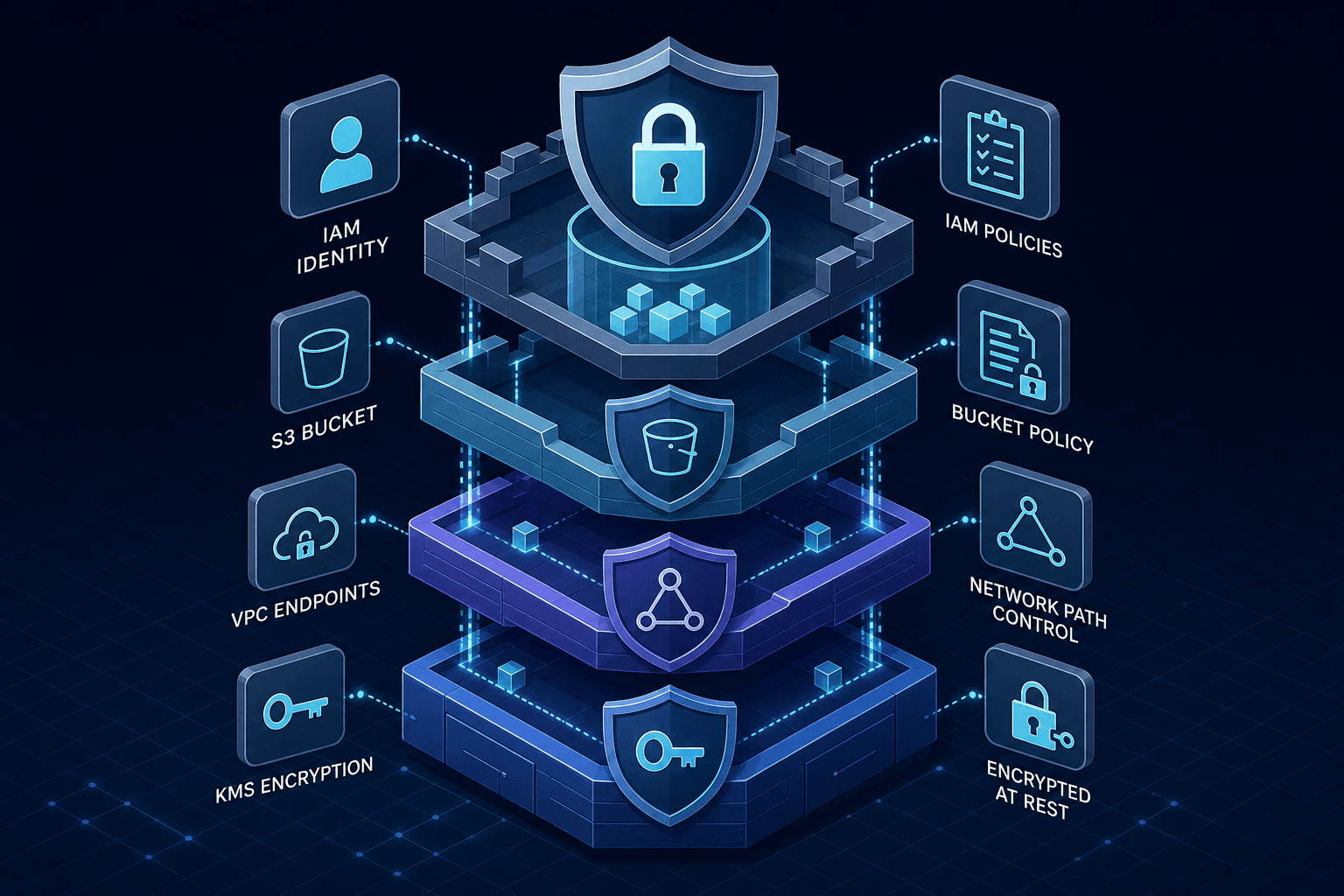
AWS S3 Bucket Policies and IAM: Securing Data Access
An examination of AWS S3 security strategies including bucket policies, IAM access control, VPC endpoints, and encryption for data protection.
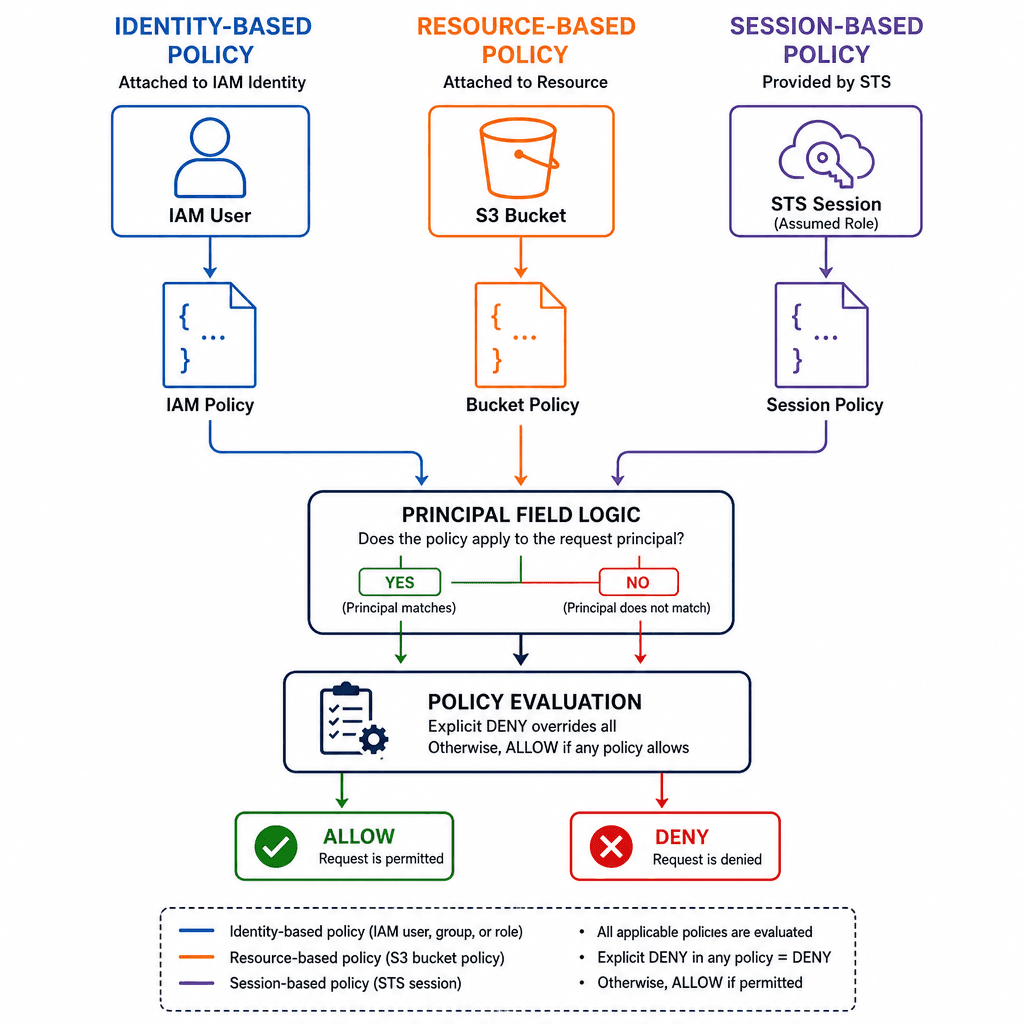
When a request hits Amazon S3, the system does not perform a simple binary check of "is this user allowed?". Instead, it executes a complex logical evaluation across a hierarchy of policy types. A common misconception is that attaching a permission to a user automatically grants access to a specific bucket; in reality, the core mechanism is the Policy Evaluation Logic, which defaults to an explicit deny for all actions unless every single policy in the chain explicitly allows the request.
Consider a scenario where alice, an IAM user, attempts to read data/reports/2023.pdf from the company-data-bucket. The request arrives at the S3 service endpoint, triggering a sequential evaluation against three distinct layers of policy before returning the object or a 403 Forbidden error.
First, S3 evaluates Identity-based policies attached to the principal making the request. If Alice has a policy allowing s3:GetObject on arn:aws:s3:::company-data-bucket/*, this constitutes a potential allow. However, if this policy is missing or restrictive, the request is denied immediately.
Second, S3 checks Resource-based policies, specifically the Bucket Policy attached to company-data-bucket. This is where many engineering teams encounter friction. A bucket policy can explicitly deny a user even if their IAM policy says "allow". This is the Explicit Deny rule. If the bucket policy contains a statement with "Effect": "Deny" for Alice, the request is terminated there, regardless of her IAM permissions.
Third, S3 evaluates Session policies. If Alice is accessing the bucket via an assumed role (e.g., aws sts assume-role), the session policy attached to that role acts as a maximum boundary. Even if the role's trust policy and the bucket policy allow everything, the session policy can slice off permissions to create a tighter security perimeter.
The logic flow is deterministic: Deny if any policy denies. Allow only if all policies allow. If no policy matches (neither allow nor deny), the default is Deny.
Identity-Based Policies and the Principal Mismatch
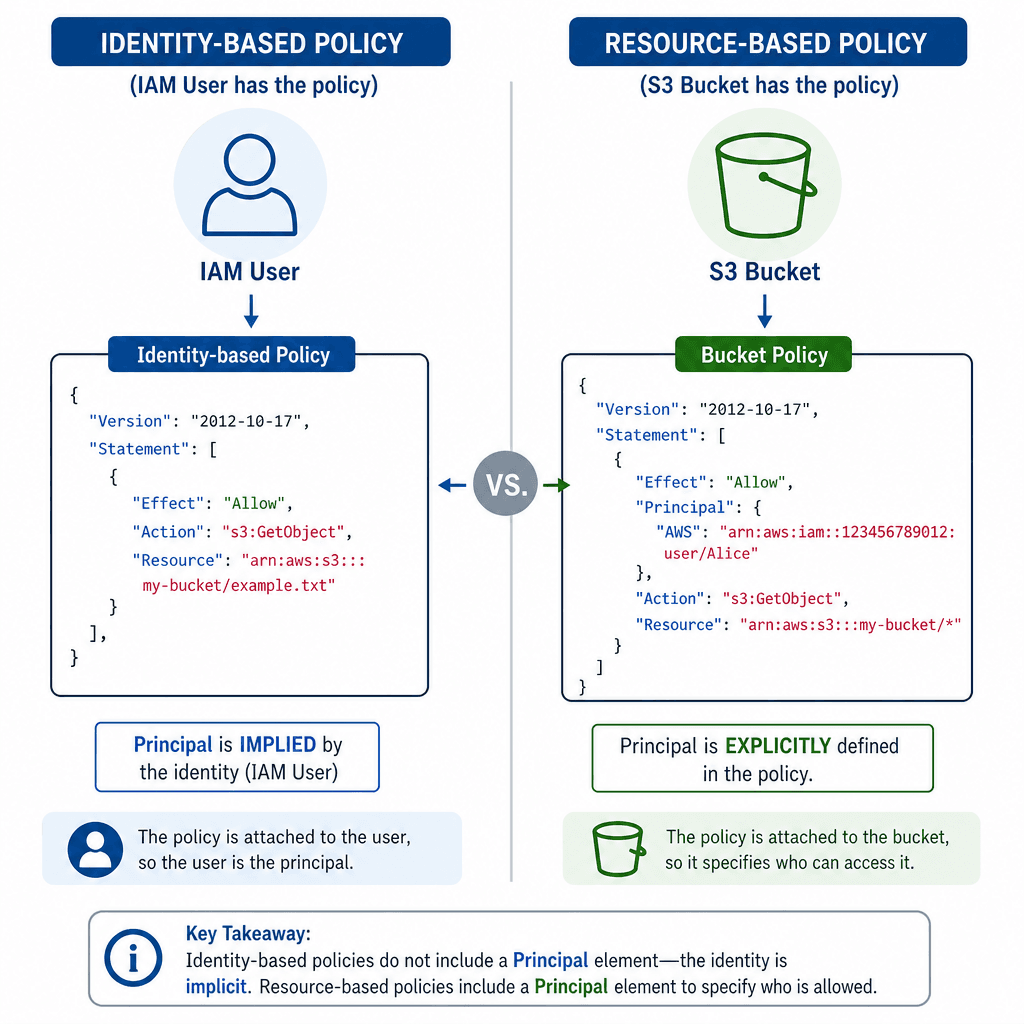
Identity-based policies are attached to the user, group, or role. They define what the identity can do. In the context of S3, the Principal field in an identity-based policy refers to the AWS account ID or the specific IAM user/role ARN, though it is often implicit when the policy is attached directly to the entity.
Let's look at a concrete configuration. Suppose we have a developer, dev-user, who needs to upload files to a specific folder. We create an IAM policy attached to dev-user:
{
  "Version": "2012-10-17",
  "Statement": [
    {
      "Sid": "AllowUploadToDevFolder",
      "Effect": "Allow",
      "Action": "s3:PutObject",
      "Resource": "arn:aws:s3:::my-secure-bucket/dev-folder/*",
      "Condition": {
        "StringEquals": {
          "aws:RequestTag/Project": "Alpha"
        }
      }
    }
  ]
}
This policy allows dev-user to put objects into the dev-folder. Notice the Resource ARN. It must match the bucket structure exactly. If the policy specifies my-secure-bucket but the bucket is named my-secure-bucket-prod, the evaluation fails because the resource ARN does not match.
However, there is a common confusion regarding the Principal field. In an Identity-based policy, the Principal is implicit or refers to the entity the policy is attached to. You rarely write Principal in a standard IAM user policy because the policy is the permission for that user.
Contrast this with a Bucket Policy. In a bucket policy, the Principal field is explicit and defines who can access the bucket. If you want to allow dev-user to access the bucket directly via a bucket policy (bypassing their IAM policy for some reason), you must define the principal in the bucket policy:
{
  "Version": "2012-10-17",
  "Statement": [
    {
      "Sid": "AllowDevUserRead",
      "Effect": "Allow",
      "Principal": {
        "AWS": "arn:aws:iam::123456789012:user/dev-user"
      },
      "Action": "s3:GetObject",
      "Resource": "arn:aws:s3:::my-secure-bucket/dev-folder/*"
    }
  ]
}
Here, 123456789012 is the AWS Account ID. If you omit the account ID or use a wildcard * for the principal, you open the bucket to the entire world (or the entire AWS account), which is a critical security misconfiguration.
Resource-Based Policies and the Deny Mechanism
Bucket policies are powerful because they live on the resource itself, not the user. This is essential for scenarios where you cannot modify the user's IAM policies, such as granting cross-account access or restricting access to a specific network.
The most dangerous aspect of bucket policies is the Explicit Deny. Let's say dev-user has full s3:* permissions in their IAM policy. You want to prevent them from deleting the prod-data folder. You do not edit their IAM policy. Instead, you add a Deny statement to the bucket policy:
{
  "Version": "2012-10-17",
  "Statement": [
    {
      "Sid": "PreventDeleteOnProd",
      "Effect": "Deny",
      "Principal": {
        "AWS": "arn:aws:iam::123456789012:user/dev-user"
      },
      "Action": "s3:DeleteObject",
      "Resource": "arn:aws:s3:::my-secure-bucket/prod-data/*"
    }
  ]
}
Even though the IAM policy says "Allow Delete," the bucket policy says "Deny Delete." The evaluation logic dictates that the Deny wins. This is the mechanism that enforces the "Least Privilege" principle at the resource level.
A frequent error is attempting to "double-wrap" permissions. Engineers often try to restrict a user via both IAM and Bucket Policy, but they forget that the conditions must align perfectly. For example, if the IAM policy allows access only from IP 10.0.0.0/8 and the bucket policy allows access only from IP 192.168.1.0/24, the user will never be able to access the bucket because there is no intersection of allowed conditions.
VPC Endpoints: Routing Without the Public Internet
Security is not just about who can access the data, but how the traffic travels. By default, S3 traffic goes over the public internet. Even if your bucket policy restricts access to specific IPs, the traffic still traverses the public AWS infrastructure, exposing it to potential interception or DDoS attacks.
To fix this, AWS provides Gateway VPC Endpoints. This is not a proxy; it is a routing mechanism. When you create a Gateway VPC Endpoint for S3, AWS adds a route to your VPC's route tables that directs traffic destined for the S3 bucket prefix directly to the S3 service, bypassing the Internet Gateway entirely.
Consider the artifact route-table-internal. When a request originates from an EC2 instance in subnet-internal (CIDR 10.0.1.0/24), the packet is routed to the VPC Endpoint ID vpce-12345. The traffic never leaves the AWS private network.
To enforce this at the policy level, you use the aws:SourceVpce condition key. This ensures that even if someone knows the bucket name, they cannot access it from the public internet or a different VPC. It is crucial to understand that without an explicit Allow statement, the default behavior is a Deny. The following policy represents an explicit allow that restricts access via conditions; without this statement, access is denied by default.
{
  "Version": "2012-10-17",
  "Statement": [
    {
      "Sid": "AllowOnlyViaVpcEndpoint",
      "Effect": "Allow",
      "Principal": "*",
      "Action": "s3:GetObject",
      "Resource": "arn:aws:s3:::my-secure-bucket/*",
      "Condition": {
        "StringEquals": {
          "aws:SourceVpce": "vpce-12345"
        }
      }
    }
  ]
}
In this scenario, the Principal is * (anyone), but the Condition restricts the request to the specific VPC Endpoint ID. If a request comes from the public internet, the aws:SourceVpce condition is not met, and the request is denied.
Encryption and the KMS Key Policy
Encryption at rest in S3 is mandatory for compliance, but it introduces a second layer of authorization. When you use Server-Side Encryption with AWS KMS (SSE-KMS), S3 does not just check the bucket policy; it also checks the KMS Key Policy.
The mechanism here is a dual-authorization check. The request must pass the S3 bucket policy and the KMS key policy. If the KMS key policy denies the request, S3 will return a 400 Bad Request or 403 Forbidden, even if the bucket policy allows it. This dual check is a common point of failure. For instance, an engineer might configure the S3 bucket to allow s3:GetObject for a user but fail to update the KMS key policy to allow kms:Decrypt for that same user. In this case, the user can see the object metadata but cannot retrieve the content.
When alice requests an object encrypted with KMS key key-abc, S3 invokes the KMS Decrypt API. KMS evaluates the key policy against the requesting principal (Alice) to determine if the decryption is authorized.
If the KMS key policy is overly restrictive, Alice fails. A common pattern is to use a KMS key policy that allows the S3 service principal to use the key, but restricts the actual user permissions to the IAM policy.
{
  "Version": "2012-10-17",
  "Statement": [
    {
      "Sid": "AllowS3ToUseKey",
      "Effect": "Allow",
      "Principal": {
        "Service": "s3.amazonaws.com"
      },
      "Action": "kms:Encrypt",
      "Resource": "arn:aws:kms:us-east-1:123456789012:key/key-abc"
    },
    {
      "Sid": "AllowAliceToDecrypt",
      "Effect": "Allow",
      "Principal": {
        "AWS": "arn:aws:iam::123456789012:user/alice"
      },
      "Action": "kms:Decrypt",
      "Resource": "arn:aws:kms:us-east-1:123456789012:key/key-abc"
    }
  ]
}
Note the distinction: The S3 service needs Encrypt permission to write new objects. Alice needs Decrypt permission to read them. If you only grant Encrypt to Alice, she can upload (and S3 encrypts it), but she cannot read it back. This is a subtle but critical mechanism in SSE-KMS.
For data in transit, you must enforce TLS 1.2. This is done via a condition key aws:SecureTransport. If you set this to true, any request over HTTP (port 80) is rejected, forcing HTTPS (port 443).
{
  "Condition": {
    "Bool": {
      "aws:SecureTransport": "false"
    },
    "Sid": "DenyInsecureTransport"
  }
}
Common Pitfalls
Misconfiguring S3 security often stems from a misunderstanding of the evaluation logic. Below are three frequent errors that lead to data exposure or unavailability.
- Missing KMS Decrypt Permissions: Administrators often grant S3 access in IAM policies but forget to update the KMS key policy to allow the specific user or role to perform
kms:Decrypt. The result is a successful S3 request that fails at the decryption step with a403 Forbiddenerror. - Overly Permissive Principal Wildcards: Using
"Principal": "*"in bucket policies without strictConditionkeys (likeaws:SourceVpceor IP restrictions) effectively opens the bucket to the entire internet, negating the security of the bucket policy itself. - Conflicting Condition Keys: Applying restrictive IP conditions in both IAM and Bucket policies where the ranges do not overlap results in a "double lockout." Neither policy can satisfy the intersection of allowed conditions, denying access to legitimate users.
Practical Takeaways
To ensure your S3 environment remains secure, apply these actionable steps:
- Audit Key Policies: Regularly review KMS key policies alongside S3 bucket policies to ensure
kms:Decryptpermissions align with IAM user access. - Enforce VPC Constraints: Use
aws:SourceVpceconditions in bucket policies to ensure traffic originates only from trusted VPC endpoints, preventing public internet access. - Implement Explicit Denies: Use explicit
Denystatements in bucket policies for high-risk actions (likeDeleteObjecton production buckets) to override broad IAM permissions.
FAQ
Q: Can an IAM policy override a Bucket Policy Deny? A: No. An explicit Deny in a Bucket Policy (or any policy) always overrides an Allow in an IAM policy. The evaluation logic prioritizes Deny statements above all else.
Q: Why do I get a 403 Forbidden error even though my IAM policy allows S3 access? A: This usually indicates a failure in the KMS key policy or a mismatch in condition keys (e.g., IP address or VPC Endpoint ID). S3 requires authorization from both the bucket policy and the KMS key policy for encrypted objects.
Q: Is it safe to use Principal: "*" in a bucket policy?
A: Only if you strictly limit the scope using Condition keys such as aws:SourceVpce or aws:SourceIp. Without these conditions, Principal: "*" grants access to anyone on the internet.
Related posts
Implementing Dynamic Authorization with Cedar Policy Language (AWS)
A technical overview of implementing dynamic authorization using Cedar policy language and AWS Verified Permissions with ABAC.
IAM for Data Lakes: Securing Big Data
An examination of identity and access management strategies for data lakes, covering Apache Ranger, Lake Formation, and column-level security.
AWS Compliance Automation: Config, Audit Manager, and Security Hub
Overview of AWS compliance automation using Config, Audit Manager, and Security Hub for SOC2 and CIS benchmarks.