How Browser Cookies Work in SSO: A Technical Deep Dive
An examination of how browser cookies function within Single Sign-On systems, covering SameSite attributes, third-party cookie limitations, and cross-domain security.
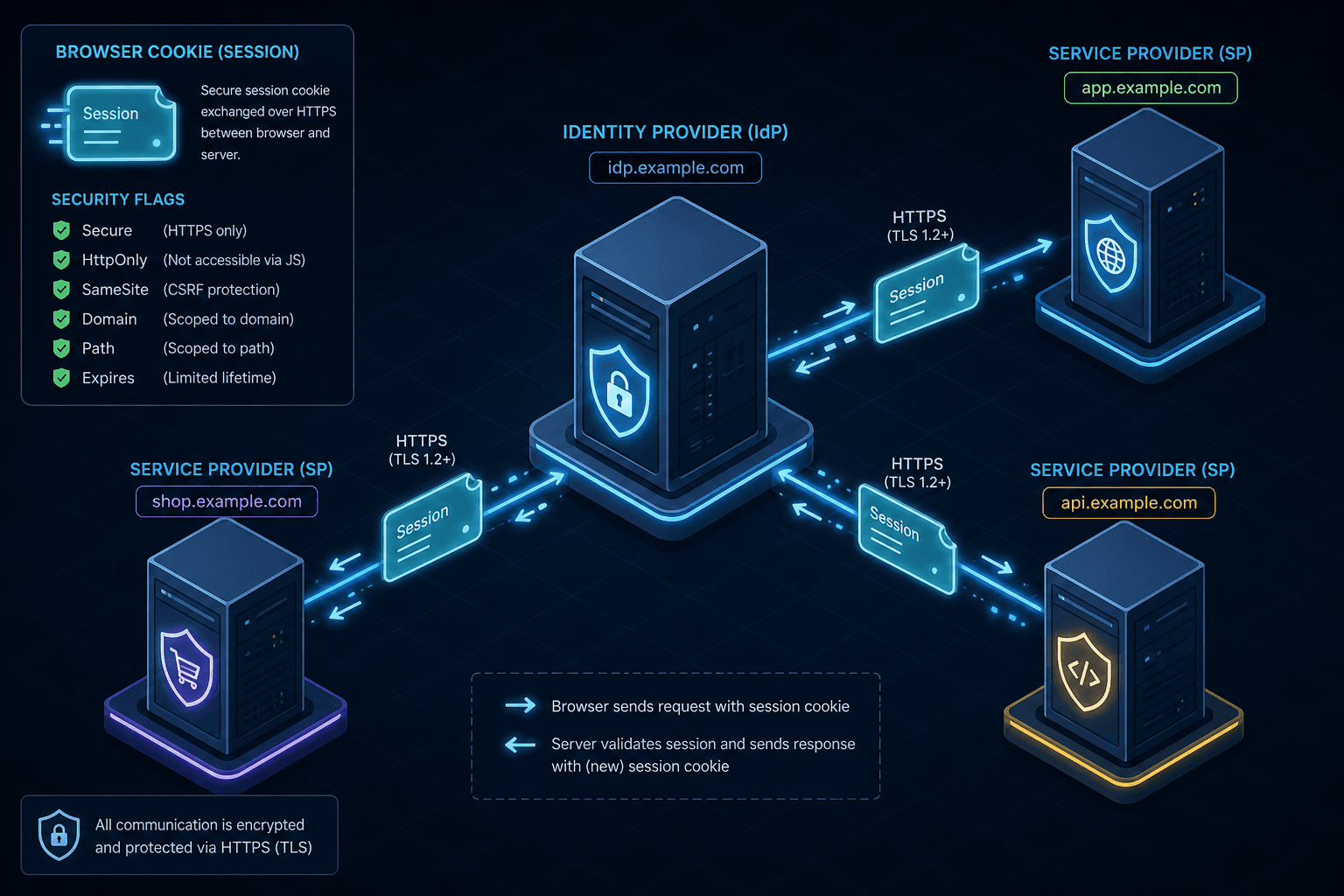
Single Sign-On (SSO) relies on the browser's ability to maintain state across multiple distinct web applications. When a user logs into an Identity Provider (IdP) like Auth0 or Okta, the system issues a session token stored in a browser cookie. The complexity arises when the user attempts to access a Service Provider (SP) like Jira or Salesforce hosted on a different domain. The browser must decide whether to include that session cookie in the HTTP request headers. This decision is not based on trust alone but on a rigid set of rules defined by the HTTP specification and enforced by browser security models. Historically, cookie handling was permissive, leading to widespread Cross-Site Request Forgery (CSRF) vulnerabilities that compromised user sessions across the web. Modern architectures now enforce strict scoping and attribute requirements to mitigate these risks while maintaining seamless authentication flows.
The Mechanics of Domain Scoping and the Cookie Jar
The fundamental mechanism governing cookie visibility is domain scoping. When a server sets a cookie, it attaches a Domain attribute. If a server at sso.example.com sets a cookie without specifying a domain, the browser restricts access to sso.example.com only. To enable SSO across app1.example.com and app2.example.com, the IdP must explicitly set the Domain attribute to .example.com (note the leading dot, which signifies a shared parent domain).
Consider a scenario where Alice logs into sso.example.com. The server responds with a Set-Cookie header:
Set-Cookie: session_id=abc123; Domain=.example.com; Path=/; Secure; SameSite=NoneThe browser stores this in its cookie jar associated with the pattern *.example.com. Later, when Alice navigates to app1.example.com, the browser checks the cookie jar. It sees a matching pattern for the current host and includes session_id=abc123 in the Cookie header automatically. However, if the SP is on a completely different top-level domain, such as app1.other-company.com, the browser will not send the cookie because the Domain attribute does not match the current host.
This scoping is the first line of defense. It prevents evil.com from reading a session cookie set by bank.com simply because both might share a generic IP address or be on the same network. The browser enforces this at the network layer, ensuring that the cookie is only attached to requests where the origin matches the scope defined by the server.
The SameSite Attribute Evolution
The introduction of the SameSite attribute in RFC 6265 (updated by RFC 6265bis draft and finalized in RFC 9835) fundamentally changed how browsers handle cookies in cross-site contexts. Before this standard, cookies were sent with every request, regardless of whether the request was initiated by a site the user was currently viewing or a site embedded within it (like an iframe). This behavior allowed attackers to craft malicious links that, when clicked by a logged-in user, would trigger a request to the target site, carrying the user's session cookie and performing unauthorized actions (CSRF).
The SameSite attribute dictates whether the browser sends the cookie on cross-site requests. There are three modes: Strict, Lax, and None.
- Strict: The browser never sends the cookie on any cross-site request. If Alice is on
sso.example.comand clicks a link toapp1.example.com(assuming they are treated as cross-site due to domain differences in strict configurations), the cookie is dropped. This breaks most SSO flows that rely on redirects. - Lax: The browser sends the cookie on top-level navigations (like clicking a link) but blocks it on sub-resource requests (like images or iframes). This was the default for years, allowing some SSO flows to work while mitigating certain CSRF vectors.
- None: The browser sends the cookie on all cross-site requests. This is required for modern cross-domain SSO where the IdP and SP are on different top-level domains.
However, a critical constraint exists: if SameSite=None is set, the Secure flag must also be present. If a cookie is marked SameSite=None but lacks Secure, modern browsers (Chrome 80+, Firefox, Safari) will reject it entirely. Specifically, starting with Chrome 80, the browser enforces that SameSite=None cookies must have the Secure flag set, per Chromium bug 982402 and the updated RFC 6265bis draft. This forces the industry to move away from HTTP for authentication flows.
Consider the flow: Alice is at app1.example.com and needs to authenticate. She is redirected to login.auth-provider.com. The IdP sets the session cookie. For this cookie to be sent back to app1.example.com after the redirect, it must be marked SameSite=None; Secure. Without these flags, the browser treats the subsequent request from app1 to the IdP as a cross-site request without permission, dropping the cookie and failing the SSO handshake.
The Third-Party Cookie Ban and Cross-Origin Resource Sharing
The landscape has shifted further with the deprecation of third-party cookies. In a traditional SSO architecture, the IdP often relied on setting a cookie that the SP could read, or vice versa, assuming the browser would allow this cross-domain access. This legacy setup typically involved unrelated top-level domains (e.g., idp.com and app.com) where cookies were previously allowed as third-party. Modern browsers now classify cookies set during a third-party context (e.g., a cookie set while the user is on app1.com but the cookie is intended for auth-provider.com) as "third-party" and restrict their usage.
Conversely, the modern pattern described in Section 2 utilizes shared parent domains (e.g., *.example.com). In this configuration, the cookies remain first-party relative to the parent domain, avoiding the third-party classification entirely. This distinction is critical: the third-party ban targets cross-origin interactions between unrelated domains, not the shared-domain SSO patterns used in corporate intranets or tightly coupled ecosystems.
When a browser encounters a cookie set in a third-party context, it checks the SameSite attribute. If SameSite=None is not present, or if the browser's privacy settings block third-party cookies entirely, the cookie is not stored or sent. This breaks the "redirect-based" SSO model where the IdP sets a cookie that the SP reads, or where the IdP relies on a shared third-party cookie for tracking user sessions across the web.
To survive this, architectures are shifting toward top-level domain isolation or using window.postMessage for token exchange instead of relying on shared cookies. For example, if app1.com and app2.com share no common parent domain, they cannot share a cookie via the Domain attribute. The only way to bridge them is through a first-party context. The user might log in to a first-party IdP (e.g., auth.company.com), which sets a first-party cookie. Then, using a secure channel like postMessage, the IdP passes a short-lived token to the SP, which creates its own first-party session cookie. This bypasses the third-party cookie restrictions because the SP is setting its own cookie in a first-party context, not reading one from a third party.
The Secure and HttpOnly Flags in Authentication Contexts
Even with correct scoping and SameSite attributes, the content of the cookie must be protected from client-side scripts. The HttpOnly flag is the mechanism that prevents JavaScript from accessing the cookie. If a cookie lacks this flag, an attacker who successfully executes a Cross-Site Scripting (XSS) attack on the SP can read the session ID via document.cookie. With HttpOnly, the browser excludes the cookie from the JavaScript object, rendering XSS attacks ineffective against session hijacking.
The Secure flag ensures the cookie is only transmitted over HTTPS. Without this, a man-in-the-middle attacker on a public Wi-Fi network could intercept the cookie in plaintext. In an SSO environment, the session cookie is the key to the kingdom; if stolen, the attacker gains access to all applications the user is authorized for.
Combining these flags creates a comprehensive defense-in-depth strategy. The Secure flag ensures transport safety, HttpOnly ensures client-side isolation, and SameSite ensures cross-site integrity. A typical secure SSO cookie configuration looks like this:
Set-Cookie: sso_session=xyz789; Domain=.example.com; Path=/; Secure; HttpOnly; SameSite=NoneThis configuration tells the browser: "Store this for *.example.com, send it over HTTPS only, do not let JavaScript read it, and send it even on cross-site requests because we explicitly allow it." The tradeoff here is the reliance on HTTPS everywhere; if the IdP or SP ever serves content over HTTP, this configuration will fail, breaking the SSO flow. This rigidity is a feature, not a bug, as it forces the entire ecosystem to operate securely.
Conclusion
The mechanics of browser cookies in SSO are a balance between usability and security. The browser acts as a gatekeeper, enforcing strict rules on when a stateful token can be transmitted. By understanding the interplay between domain scoping, SameSite policies, and the deprecation of third-party cookies, architects can design SSO systems that remain functional without compromising user security. The shift from permissive cookie handling to strict, attribute-driven policies reflects a broader industry trend: moving from implicit trust to explicit, verified consent for data transmission across domain boundaries.
Common Pitfalls
- Missing Secure Flag on SameSite=None: Setting
SameSite=Nonewithout theSecureflag is a critical error that causes browsers to reject the cookie entirely, breaking SSO flows on HTTPS-only sites. - Incorrect Domain Attribute Scope: Failing to set the
Domainattribute to the parent domain (e.g., omitting the leading dot or using the wrong subdomain) prevents the cookie from being shared across related applications, forcing users to re-authenticate. - Ignoring HttpOnly: Leaving the
HttpOnlyflag unset exposes session tokens to JavaScript, making the application vulnerable to XSS attacks that can hijack user sessions without their knowledge.
Practical Takeaways
- First-Party is Default: Design SSO flows to operate within a shared parent domain whenever possible to avoid third-party cookie restrictions entirely.
- Explicit Permissions: Never rely on browser defaults for cross-site cookies; always explicitly configure
SameSite=NoneandSecuretogether for cross-domain authentication. - Defense in Depth: Combine transport security (
Secure), client isolation (HttpOnly), and scope control (SameSite) to create a resilient authentication layer.
FAQ
Q: Can I use SameSite=Lax for cross-domain SSO?
A: Generally, no. SameSite=Lax blocks cookies on cross-site sub-resource requests and may block them on cross-site redirects depending on the browser's specific implementation of the navigation initiator. For reliable cross-domain SSO where the IdP and SP are on different top-level domains, SameSite=None is required.
Q: Why are third-party cookies being deprecated? A: Third-party cookies are being deprecated because they enable pervasive user tracking across the web without explicit consent. Browsers are blocking them to enhance user privacy and reduce the risk of cross-site tracking and profiling.
Q: Does SameSite=None bypass CSRF protection?
A: SameSite=None allows cookies to be sent on cross-site requests, which reintroduces the risk of CSRF if other protections are not in place. However, modern SSO implementations often rely on additional CSRF tokens or the fact that the session is tied to a specific user context to mitigate this, provided the Secure flag is also enforced.
Related posts
OpenID Connect Frontend and Backend Integration Guide
A walkthrough of OpenID Connect integration for frontend and backend systems, covering Angular and Spring Boot implementations.
Session Management Security: Cookies, Tokens, and Best Practices
An examination of session management security focusing on cookie attributes like HttpOnly and SameSite, JWT session handling, and defenses against session fixation.
RFC 9700: The Mandatory Guardrails for OAuth 2.0
An examination of RFC 9700, detailing OAuth 2.0 security best current practices, including mitigation of mix-up attacks and redirect URI validation.