Cookies, Sessions, and SameSite
A technical overview of cookies, sessions, and SameSite attributes for web developers and backend engineers.
Web security often feels like a game of hide-and-seek between the browser and the server. To secure a web application, you must understand the mechanics of how identity is transmitted, stored, and validated. This article breaks down the interplay between cookies, sessions, and the SameSite attribute, providing a mechanism-level view for backend engineers. We will examine how a session cookie functions as the primary token for identity and how samesite policies mitigate cross-origin threats.
The Cookie Mechanism: Transport, Not Storage
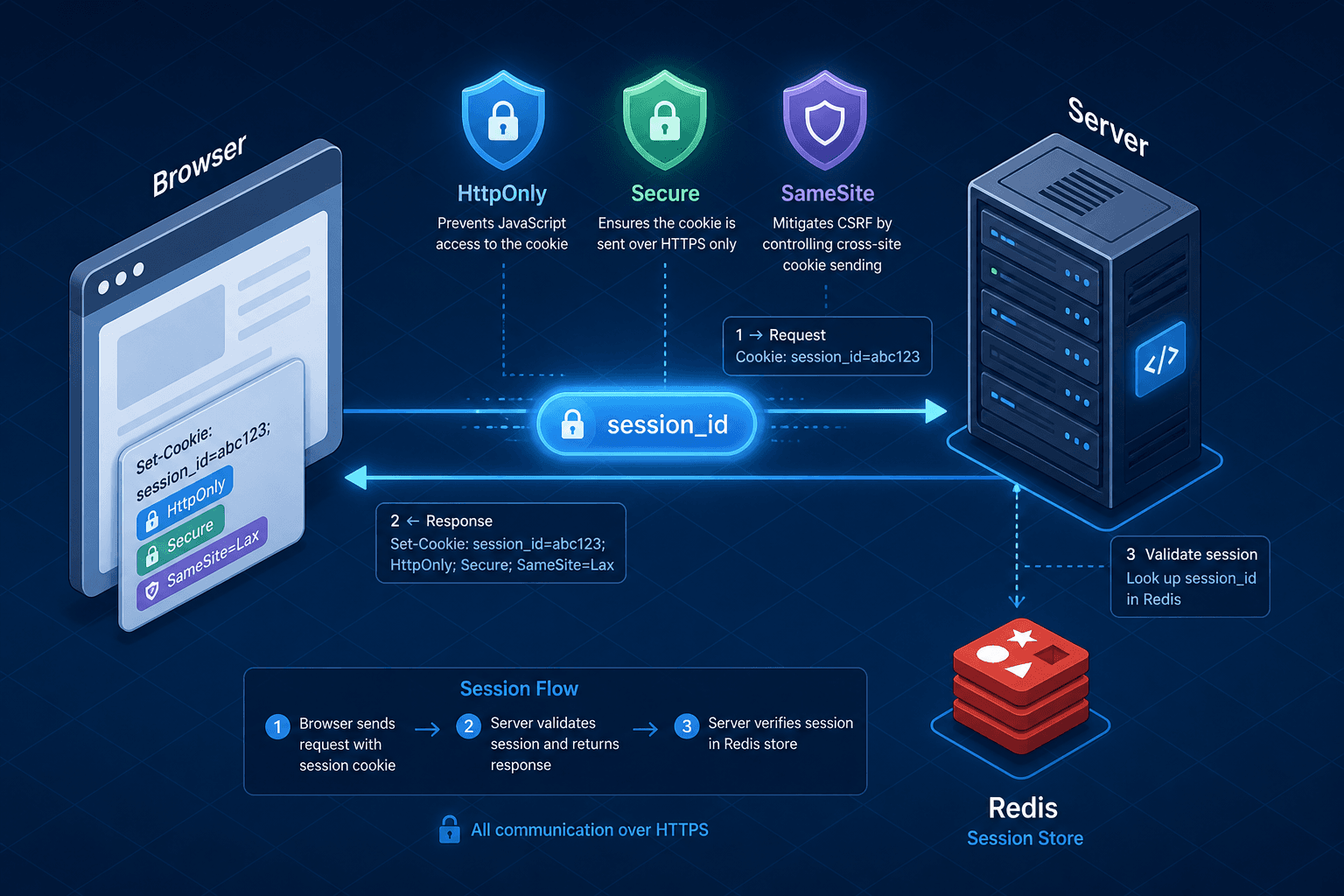
A cookie is not a persistent identity card; it is a transient piece of data stored in the browser’s memory or disk, attached automatically to HTTP requests. When a server responds with a Set-Cookie header, the browser stores the key-value pair. On subsequent requests to the same domain, the browser attaches these values in the Cookie header.
HTTP/1.1 200 OK
Set-Cookie: session_id=abc123; Path=/; HttpOnly; Secure; SameSite=Lax
Two attributes are critical for securing this transport mechanism:
HttpOnly: This flag prevents client-side JavaScript from accessing the cookie value viadocument.cookie. If an attacker exploits a Cross-Site Scripting (XSS) vulnerability, they cannot steal the session ID directly from the DOM. This is the first line of defense against session hijacking via script injection.Secure: This flag instructs the browser to only send the cookie over encrypted HTTPS connections. Without it, cookies may be transmitted in plaintext over HTTP, exposing them to man-in-the-middle attacks on public Wi-Fi or compromised networks.
Sessions: Server-Side State
A common misconception is that cookies store user sessions. They do not. A session cookie typically contains only a Session ID—a random, cryptographically secure string (e.g., session_id=abc123). The actual session data (user ID, permissions, cart contents) resides on the server.
The server uses the Session ID from the incoming Cookie header to look up the corresponding data in a backend store, such as Redis, a relational database, or an in-memory cache.
// Pseudocode: Server-side session validation
app.get('/dashboard', (req, res) => {
  const sessionId = req.cookies.session_id;

  if (!sessionId) {
    return res.status(401).send('Unauthorized');
  }

  const userData = await redis.get(`session:${sessionId}`);

  if (!userData) {
    return res.status(401).send('Invalid Session');
  }

  // Render dashboard with userData
});
This separation is crucial. If the client could store sensitive state, XSS could expose it. By keeping state on the server, you limit the blast radius of an XSS attack to the theft of the session ID only, not the entire user profile.
SameSite: Controlling Cross-Origin Requests
The SameSite attribute controls whether cookies are sent with cross-site requests. This is the primary defense against Cross-Site Request Forgery (CSRF), where an attacker tricks a user’s browser into performing an action on a trusted site while the user is authenticated.
When a user clicks a link from attacker.com to bank.com, the browser checks the SameSite attribute to determine if the session cookie should be included in the request headers.
1. SameSite=Strict
The cookie is never sent with cross-site requests. If a user navigates from google.com to bank.com, the session_id cookie is not included. This provides maximum security but breaks user experience (e.g., clicking a login link from an email will fail because the session cookie is missing).
2. SameSite=Lax (Default)
The cookie is sent only with top-level navigations and GET requests. If a user clicks a link from attacker.com to bank.com (a top-level navigation), the cookie is sent. However, if attacker.com tries to load an image or submit a form from bank.com (a sub-request), the cookie is not sent. This balances security and usability.
3. SameSite=None
The cookie is sent with all cross-site requests. Crucially, modern browsers require SameSite=None to also include the Secure flag. If you set SameSite=None without Secure, most browsers will reject the cookie entirely. This attribute is necessary for legitimate cross-site use cases, such as embedded widgets or SSO flows, but it increases the attack surface for CSRF if not paired with other defenses.
Practical Implementation
For most backend applications, the following configuration provides a strong security baseline:
Set-Cookie: session_id=xyz789; Path=/; HttpOnly; Secure; SameSite=LaxHttpOnly: Prevents XSS-based theft.Secure: Prevents MITM interception.SameSite=Lax: Mitigates CSRF while allowing normal navigation.
Beyond these flags, managing cookie expiration is vital. A session cookie typically expires when the browser closes, which is suitable for temporary contexts but may frustrate users expecting "remember me" functionality. For persistent sessions, you must set an explicit Max-Age or Expires attribute. Additionally, the Path attribute restricts where the cookie is sent. Using Path=/ makes the cookie available to all paths on the domain, which is standard for session cookies. However, if your application has distinct services (e.g., /api vs /app), scoping the path can reduce the attack surface by ensuring the cookie is only sent where necessary.
If your application requires cross-site requests (e.g., an iframe widget), use:
Set-Cookie: widget_token=abc123; Path=/; HttpOnly; Secure; SameSite=NoneNote that SameSite=None requires Secure. You cannot use insecure HTTP with SameSite=None.
Conclusion
Cookies are transport mechanisms, not storage. Sessions live on the server. SameSite controls when those transport mechanisms are allowed to cross domain boundaries. By combining HttpOnly, Secure, and appropriate SameSite values, you create an effective defense layer that protects user sessions from both XSS and CSRF attacks.
Understanding these mechanics allows you to configure your backend correctly, rather than relying on default behaviors that may not align with your security requirements. Always verify your session cookie settings in production, as misconfigured cookies are a leading cause of web application vulnerabilities.
Related posts
Session Management Security: Cookies, Tokens, and Best Practices
An examination of session management security focusing on cookie attributes like HttpOnly and SameSite, JWT session handling, and defenses against session fixation.
Content Security Policy and Security Headers in Keycloak
Implement Content Security Policy and security headers in Keycloak to prevent clickjacking and enhance authentication security for frontend developers.
The Keycloak Service Provider Interface, Explained
A technical examination of the Keycloak Service Provider Interface (SPI), covering custom providers, provider factories, and extension strategies for Java developers.