Implementing Enterprise SSO with Azure AD, Okta, and Keycloak
A technical examination of implementing enterprise SSO using Azure AD, Okta, and Keycloak for secure identity management.
Enterprise Single Sign-On (SSO) is frequently misunderstood as a mere convenience feature that remembers credentials. In reality, it is a complex mechanism of distributed trust where authentication state is transferred via signed cryptographic assertions. When integrating Azure AD, Okta, and Keycloak, you are not simply connecting three tools; you are constructing a federation chain where one entity vouches for another. The core mechanism driving this ecosystem is the exchange of tokens—typically SAML 2.0 or OpenID Connect (OIDC)—that prove a user's identity without ever transmitting their password across application boundaries.
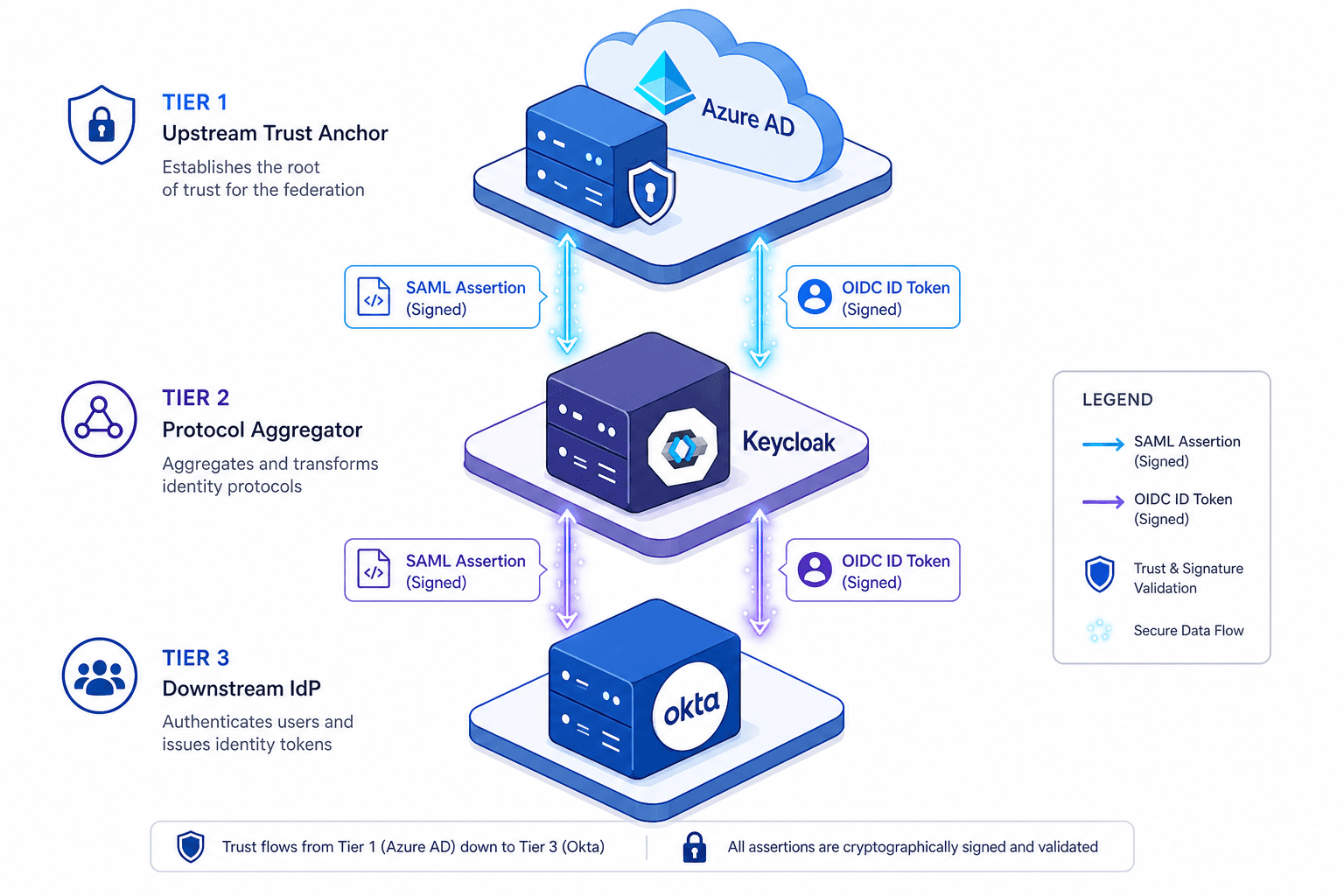
Consider an enterprise architecture where Azure AD serves as the authoritative source of truth for employee identities. The application layer might consist of a legacy HR portal that only speaks SAML, and a modern analytics dashboard requiring OIDC. Okta could act as the primary IdP for external partners, while Keycloak sits in the middle, aggregating these disparate protocols to serve a unified interface. This setup requires a precise understanding of the trust boundaries established between these systems.
The Trust Anchor: Establishing the Hierarchy
The first step in any SSO implementation is defining the trust anchor. In a mixed environment, Azure AD often functions as the upstream IdP. If you configure Okta to trust Azure AD, Okta becomes a Service Provider (SP) relative to Azure AD, or an IdP relative to its own downstream consumers.
When configuring Azure AD as the IdP for a downstream system like Keycloak, you must export the Federation Metadata XML. This file contains the public key and endpoint URLs. The receiving system (Keycloak) uses this public key to verify the digital signature of incoming SAML assertions. Without this key exchange, the assertion is just unsigned text.
// Keycloak Configuration JSON (Admin Console / Standalone)
{
  "providers": [
    {
      "className": "org.keycloak.protocol.saml.SamlIdentityProvider",
      "config": {
        "alias": "azure-ad-provider",
        "displayName": "Azure AD",
        "syncMode": "FORCE",
        "metadataUrl": "https://login.microsoftonline.com/{tenant-id}/federationmetadata/2007-06/federationmetadata.xml",
        "singleLogoutServiceUrl": "https://login.microsoftonline.com/{tenant-id}/samlp",
        "validateSignature": true
      }
    }
  ]
}
In this setup, Azure AD signs the assertion with its private key. Keycloak validates it against the public key embedded in the metadata. If the signature fails, the entire authentication attempt is rejected at the protocol level before any user data is processed.
The Assertion Exchange: A SAML 2.0 Walkthrough
To understand the data flow, imagine a user attempting to access the legacy HR portal. The portal is the Service Provider (SP). The user initiates a login request. The SP redirects the user's browser to Keycloak with a SAML AuthnRequest.
Keycloak detects that the user is not authenticated. It checks its internal configuration and sees that Azure AD is the configured IdP for this tenant. Keycloak constructs a new SAML AuthnRequest and redirects the browser to Azure AD.
Azure AD presents the login form. Upon successful credential verification, Azure AD generates a SAML Response. This response contains the Assertion, which includes the Subject (the user's NameID), Conditions (validity window), and AuthnStatement (proof of authentication method). Crucially, Azure AD signs the entire Assertion element.
Keycloak receives this response. It performs three critical checks:
- Signature Verification: It decrypts the signature using the Azure AD public key fetched from the metadata.
- Audience Restriction: It verifies that the
AudienceURI in the assertion matches theEntityIDof Keycloak. If the assertion is meant for a different IdP, it is discarded. - Condition Validation: It checks the
NotBeforeandNotOnOrAftertimestamps to prevent replay attacks.
Once verified, Keycloak does not forward the raw SAML assertion to the HR portal. Instead, it creates a local session and generates a new SAML assertion signed with its own key. In this architecture, Keycloak functions as an Identity Proxy, acting as the IdP of record for the HR portal. This requires the HR portal to trust Keycloak's metadata rather than Azure AD's directly. This "proxy" pattern ensures the HR portal never sees the Azure AD signature, only Keycloak's endorsement.
Protocol Interoperability: Claim Transformation
A common failure point in enterprise SSO is the mismatch between claim schemas. Azure AD uses a proprietary claim structure, often mapping attributes to http://schemas.xmlsoap.org/ws/2005/05/identity/claims/emailaddress. Okta and Keycloak, however, often expect standard OIDC claims or specific SAML attributes like email or givenName.
Keycloak solves this via the "Mapper" configuration. When an assertion arrives from Azure AD, Keycloak applies transformation rules to map the incoming attributes to the expected schema for the downstream application.
For example, if the legacy HR portal expects the attribute employeeID but Azure AD provides onPremisesExtensionAttribute_employeeId, you must configure a script or a built-in mapper in Keycloak to perform this translation.
// Keycloak Script Mapper Example (JavaScript)
function transform(context, script) {
  var output = {};
  // Access attributes from the context
  var attributes = context.getSource().getAttributes();

  // Map Azure AD specific claim to standard SAML attribute
  if (attributes['onPremisesExtensionAttribute_employeeId']) {
    output['employeeID'] = attributes['onPremisesExtensionAttribute_employeeId'];
  }
  // Map email to standard format
  output['email'] = attributes['mail'];
  return output;
}
This layer is opinionated but necessary. Relying on the IdP to send exactly what the SP needs is rarely viable in a heterogeneous environment. Keycloak acts as the adapter, normalizing the data stream.
Security Posture and Operational Risks
Implementing SSO introduces specific attack vectors that surface only under load. The most critical is the handling of certificates. Azure AD rotates its signing certificates periodically. If Keycloak caches the metadata indefinitely, it may continue to trust an expired key, or conversely, fail to trust a new one.
The mechanism for handling this is the metadataCacheDuration. In production environments, this should be set to a short interval (e.g., 1 hour) to ensure rapid propagation of key rotations. If you set this too high, you risk a denial of service during a rotation event.
Another subtle risk lies in the RelayState parameter. This parameter is passed through the SAML flow to allow the application to redirect the user to a specific page after login. However, if not validated, it can be exploited for Open Redirect vulnerabilities. The SP must validate that the RelayState matches a whitelist of allowed URLs before executing the redirect.
<!-- SAML Response Snippet with RelayState -->
<samlp:Response Destination="https://hr-portal.example.com/saml/validate"
                ID="id-12345" InResponseTo="req-67890"
                IssueInstant="2023-10-27T10:00:00Z" Version="2.0">
  <RelayState>https://hr-portal.example.com/dashboard?dept=engineering</RelayState>
  <!-- Assertion follows... -->
</samlp:Response>
Finally, consider the security of the transport layer. While SAML assertions are signed, the transport binding matters. Assertions should always be transmitted over HTTPS, and the signature should be verified regardless of transport encryption. Additionally, for sensitive environments, assertions should be encrypted using <EncryptionMethod> to protect the payload in transit.
Common Pitfalls
- Metadata Caching Duration Risks: Setting
metadataCacheDurationtoo high can lead to extended downtime during certificate rotation events. Azure AD rotates keys periodically; if your IdP cache does not refresh within this window, valid users will be locked out until the cache expires. - RelayState Validation Requirements: Failing to validate the
RelayStateparameter is a critical vulnerability. Attackers can manipulate this parameter to redirect users to malicious sites after a successful login. Always enforce a strict whitelist of allowed redirect URLs on the Service Provider side. - Certificate Rotation Handling: Assuming static keys is a common error. Enterprise environments must implement automated metadata fetching or short cache intervals. Manual intervention to update the federation metadata XML on Keycloak or Okta during a rotation event creates a single point of failure.
Conclusion
Building enterprise SSO with Azure AD, Okta, and Keycloak requires moving beyond configuration checklists. It demands a thorough understanding of how cryptographic assertions are generated, validated, and transformed across trust boundaries. Azure AD provides the identity, Keycloak handles the protocol translation, and Okta acts as a federated IdP for partners in the federation chain. The security of the entire system rests on the integrity of the signature verification and the strictness of the claim mapping rules. When these mechanisms are aligned, the result is a unified experience where the user logs in once and gains access to the entire ecosystem without exposing credentials.
Practical Takeaways
- Trust Boundaries are Explicit: Never assume implicit trust. Every hop in the chain (Azure AD -> Keycloak -> HR Portal) requires explicit metadata exchange and signature verification.
- Assertion Re-signing is Standard: Keycloak does not merely pass through assertions; it acts as a proxy by validating upstream signatures and issuing its own signed assertions to downstream SPs.
- Claim Normalization is Mandatory: Do not rely on IdP schemas matching SP schemas. Use Keycloak mappers to actively transform and normalize claims before they reach the application.
FAQ
Q: Should I use SAML or OIDC for this architecture? A: It depends on your legacy requirements. SAML 2.0 is robust for legacy enterprise applications and HR portals, while OIDC is preferred for modern web and mobile applications. Keycloak excels at translating between these two protocols.
Q: What is the specific role of Keycloak in this chain? A: Keycloak acts as a protocol adapter and identity proxy. It sits between upstream providers (like Azure AD) and downstream consumers, handling the heavy lifting of protocol translation, claim mapping, and re-signing assertions.
Q: How do I handle certificate rotation without downtime? A: Configure your IdP to fetch metadata URLs dynamically with a short cache duration (e.g., 1 hour) rather than caching the XML file indefinitely. This ensures that when Azure AD rotates its signing key, your infrastructure picks up the new metadata quickly.
Related posts
Spring Security SAML Extension: Enterprise SSO Integration
This guide covers enterprise SSO integration using Spring Security SAML, SAML service provider setup, and Spring SAML migration strategies.
Implementing WebAuthn in Keycloak: Passkey Authentication Setup
A walkthrough for configuring WebAuthn and passkeys within Keycloak to enable passwordless authentication using FIDO2 standards.
Building a Self-Service Password Reset with Spring Boot and Keycloak
A walkthrough of implementing password recovery and self-service identity flows using Spring Boot and Keycloak required actions.