LDAP vs Active Directory vs Cloud Directory: Directory Services Compared
A technical comparison of LDAP, Active Directory, and cloud directory services to help teams choose the right identity management solution.
The Protocol, The Implementation, The Service
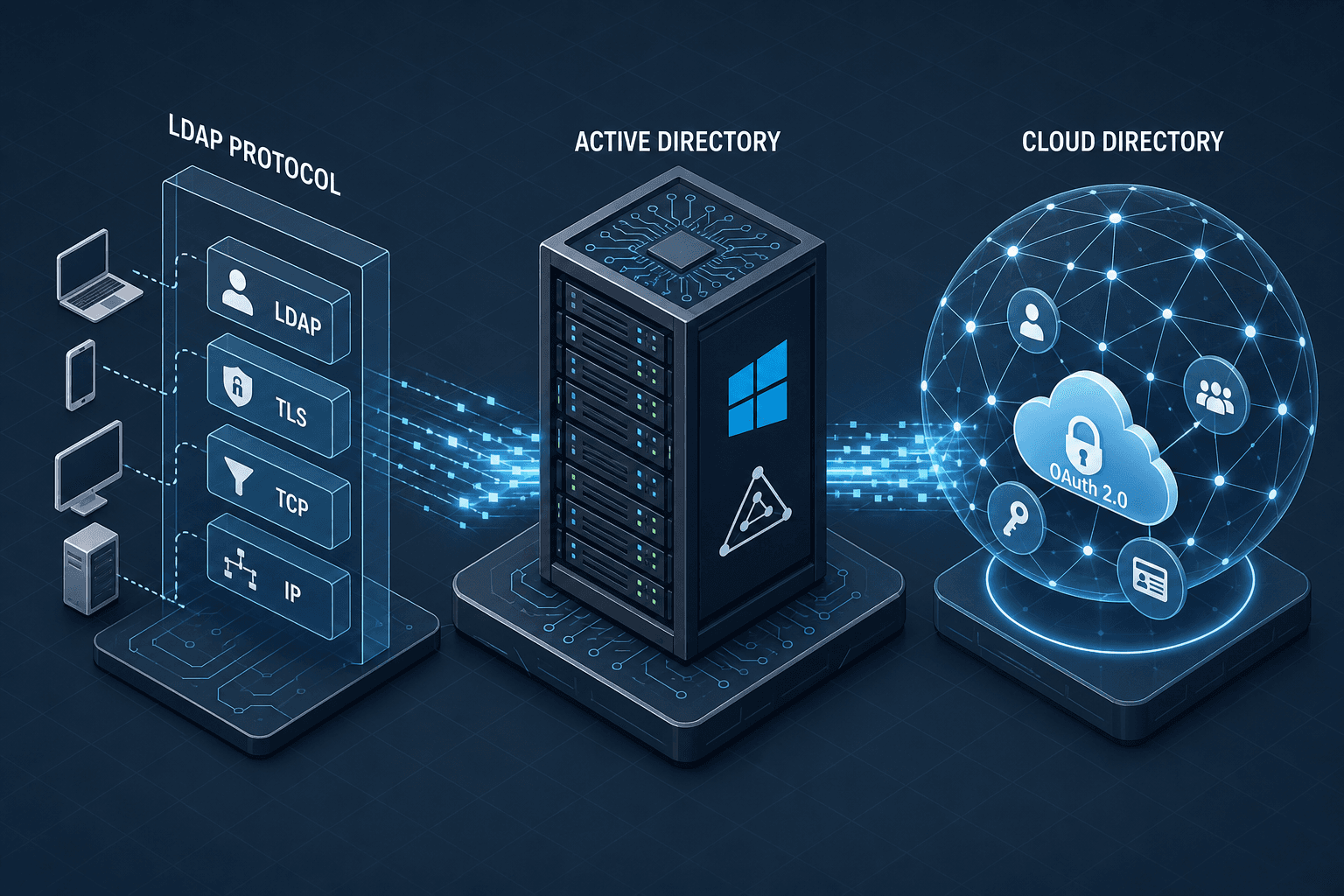
To distinguish between LDAP, Active Directory, and Cloud Directory, one must separate the transport mechanism from the data model and finally from the service boundary. LDAP (Lightweight Directory Access Protocol) is not a database; it is an application-layer protocol defined in RFC 4511 that specifies how a client requests data and how a server responds. Active Directory (AD) is a Microsoft product that implements this protocol but adds a proprietary data schema, a global catalog, and a Kerberos-based authentication engine. Cloud Directory services, such as Azure Active Directory (now Entra ID) or AWS IAM Identity Center, are managed platforms that often expose LDAP-compatible endpoints for legacy compatibility but primarily operate on web standards like OAuth 2.0 and OIDC.
When an engineering team selects a solution, they are not choosing between three competing products. They are choosing between a protocol (LDAP), a monolithic on-premises infrastructure (AD), and a distributed identity-as-a-service model (Cloud Directory).
The Mechanism of LDAP: Bind and Search
In a pure LDAP environment, the interaction is strictly request-response over TCP. Consider a client application named auth_client attempting to authenticate a user alice against a server ldap.example.com. The mechanism begins with a Bind operation. The client sends a message containing the distinguished name (DN) cn=alice,ou=users,dc=example,dc=com and a credential, typically a password.
If the server is configured for simple bind, it retrieves the stored password hash (often NTLM or SHA-1 depending on configuration) from the backend database, compares it against the provided credential, and returns a success or failure result. If the server uses SASL (Simple Authentication and Security Layer), the mechanism shifts to a challenge-response exchange. For example, GSSAPI uses a challenge-response exchange to authenticate without transmitting the password. However, PLAIN SASL transmits credentials directly (over TLS) and is NOT a challenge-response mechanism.
Once bound, the client issues a Search operation. This is where the data model matters. The client specifies a base DN, a scope (one-level, whole-subtree), and a filter. For example: (uid=alice). The server traverses its internal B-Tree index structure to locate entries matching the filter. Crucially, LDAP does not define how the server stores these entries internally; it could be Berkeley DB, JDBM, or a custom file system. The protocol only defines the wire format.
This mechanism is deterministic and low-latency because the client talks directly to the directory server. However, it lacks state management for session tokens. If auth_client needs to access a resource later, it must re-bind or rely on a separate application-layer session management. There is no native concept of "federated" access here; the trust is strictly between the client and the LDAP server.
# Example LDAP Search Filter
(uid=alice)(objectClass=person)
Active Directory: The Monolith Extension
Active Directory takes the LDAP protocol and wraps it in a complex infrastructure designed for Windows environments. The critical mechanism that distinguishes AD from a generic LDAP server is the Global Catalog (GC) and the Kerberos Key Distribution Center (KDC).
In an AD domain, users do not simply bind to a server; they authenticate via Kerberos. When alice logs into her workstation, her client requests a Ticket Granting Ticket (TGT) from the KDC (a domain controller). The KDC verifies alice's credentials using the NTLM hash stored in the Active Directory database (the ntds.dit file). Upon verification, the KDC encrypts a TGT with the client's secret key and sends it back.
The mechanism here involves DNS SRV records. The client does not hardcode the server IP. Instead, it queries _ldap._tcp.dc._msdcs.<domain> in DNS to locate a Domain Controller. This allows load balancing and failover. Once the client has the TGT, it can request Service Tickets (ST) for specific resources (like a file server or application) without re-entering credentials.
Furthermore, AD introduces the Global Catalog. In a multi-domain forest, a user's account might reside in Domain A, but they need to access a group in Domain B. A standard LDAP query to Domain A would not find the group members in Domain B unless a referral was followed. The GC holds a partial replica of every object in the forest, allowing a single query to resolve cross-domain attributes. This creates a dependency on the AD replication topology, which uses multi-master replication to propagate changes across all Domain Controllers.
The tradeoff is complexity. AD requires DNS, DHCP, and precise time synchronization (Kerberos fails if clocks drift more than 5 minutes). It is a heavy, on-premises infrastructure that assumes a high degree of network control.
Cloud Directory: The Decoupled Model
Cloud Directory services, such as Azure AD (Entra ID), fundamentally change the data flow. The primary mechanism is not LDAP bind, but token issuance via OAuth 2.0 and OpenID Connect (OIDC).
In a cloud scenario, alice attempts to access a SaaS application like Salesforce. Her browser redirects to the identity provider (IdP). The IdP presents a login form. Upon successful authentication (which might involve MFA, conditional access policies, or password-less sign-in), the IdP does not return a session cookie to the application. Instead, it generates a JSON Web Token (JWT). This token contains claims about alice (her email, groups, roles) signed by the IdP's private key.
The application receives this token and validates the signature using the IdP's public key. This mechanism decouples the authentication from the authorization. The application trusts the token because it trusts the IdP, not because it verified the password itself.
Cloud directories often expose an LDAP-compatible endpoint for legacy applications that cannot be easily refactored to use OIDC. However, this is a translation layer. When a legacy app sends an LDAP bind, the cloud service intercepts it, maps the credentials to an OIDC flow, and issues a token. This adds latency and abstraction overhead compared to native LDAP.
The data model in the cloud is also different. Cloud directories are designed for scalability and multi-tenancy. They do not rely on a Global Catalog as a distinct storage component; instead, they replace the Global Catalog's function (cross-domain resolution) with global search capabilities inherent in their distributed architecture. Trust is established via federation metadata (XML files describing endpoints and keys) rather than DNS SRV records pointing to physical servers.
The Hybrid Mechanism and Data Flow
Most modern enterprises do not choose one or the other; they implement a hybrid model. The mechanism here is synchronization, typically achieved via tools like Microsoft's AD Connect.
In this setup, the on-premises Active Directory remains the "source of truth" for user accounts and passwords. AD Connect runs a connector service that polls the on-premises AD database. When a user is created or a password is changed, the connector captures the change.
Crucially, AD Connect does not sync the raw password hash to the cloud. It syncs a derived hash or uses a secure channel to ensure the cloud never sees the plaintext password. Instead, it syncs the identity attributes (UPN, email, department) and creates a corresponding object in the cloud tenant linked to the on-prem source object.
The authentication flow in a hybrid scenario depends on the user's location and the application's requirements.
- On-Prem Application: The user authenticates directly against the on-prem AD using Kerberos or LDAP. The data flow is local, low latency, and fast.
- Cloud Application: The user authenticates against the cloud directory. The cloud directory validates the credentials by checking them against the synchronized salted hash value (if password hash sync is enabled) or by redirecting the user to the on-prem AD for authentication (Pass-through Authentication).
This creates a split-brain scenario for trust. If the on-prem AD goes down, users can still authenticate to cloud apps if the cloud holds the password hash. If the internet connection is lost, cloud apps become inaccessible even if the local network is up. This is a fundamental architectural difference from the monolithic AD model where the network is assumed to be stable and internal.
{
  "tokenType": "Bearer",
  "claims": {
    "email": "alice@example.com",
    "groups": ["Developers", "Admins"]
  }
}
Choosing the Right Architecture
The decision matrix relies on the specific constraints of the application ecosystem. If your infrastructure is 100% on-premises and relies heavily on legacy Windows applications that require Kerberos delegation, Active Directory is the only viable option. The mechanism of Kerberos ticket chaining is deeply integrated into Windows networking and cannot be easily emulated by a cloud-only directory.
If your stack is entirely cloud-native, using microservices, containers, and SaaS applications, Cloud Directory is superior. The mechanism of JWTs allows stateless scaling. You do not need to manage domain controllers, DNS zones, or replication traffic. The tradeoff is that you lose the ability to perform complex, granular LDAP queries across a complex on-premises hierarchy without a translation layer.
LDAP remains relevant as a protocol, not a product. You might run an open-source LDAP server (like OpenLDAP or 389 Directory Server) for specific use cases, such as storing non-human identities (service accounts) or for a specific legacy application that cannot talk to AD or cloud. However, for general identity management, LDAP is the wire, AD is the engine, and Cloud Directory is the service.
The confusion often arises when teams treat "Active Directory" as synonymous with "LDAP." They are not. AD speaks LDAP, but it speaks much more. Similarly, treating "Cloud Directory" as just "LDAP in the cloud" is a dangerous misconception. The cloud model relies on token-based trust, which requires a different security posture, different API patterns, and a different approach to incident response.
Ultimately, the mechanism dictates the architecture. If you need real-time, low-latency authentication for a tightly coupled network, the on-prem AD mechanism is necessary. If you need global accessibility, integration with third-party SaaS, and automated provisioning, the cloud token mechanism is required. The hybrid model attempts to bridge both, accepting the latency and complexity of synchronization to preserve the benefits of the legacy on-premises trust while enabling cloud access.
Common Pitfalls
When architecting identity solutions, teams frequently encounter predictable errors that compromise security or performance.
- Assuming LDAP Compatibility Equals Feature Parity: Many organizations assume that enabling an LDAP endpoint on a Cloud Directory service provides full feature parity with on-premises AD. This is incorrect. The LDAP interface is often a thin translation layer that supports basic bind and search operations but lacks support for complex AD-specific extensions, specific attribute types, or advanced Kerberos delegation scenarios. Relying on this endpoint for critical legacy applications without rigorous testing can lead to silent failures.
- Ignoring Latency in Hybrid Setups: In a hybrid model, the synchronization delay between the on-premises source and the cloud tenant introduces a window of inconsistency. If a user is deleted on-premises, there may be a delay before the cloud directory reflects this change. During this window, the user might still have access to cloud resources. Teams often underestimate the impact of this "eventual consistency" on security compliance and access revocation speed.
- Misinterpreting Trust Boundaries: A common error is assuming that a hybrid setup creates a single, unified trust domain. In reality, the trust is split. The on-premises AD trusts the local KDC, while the cloud directory trusts the federation metadata or the synced hash. If the synchronization agent is compromised, or if the network link is intercepted, the trust boundary is breached. Teams often fail to segment these trust relationships, leading to a false sense of security.
Practical Takeaways
To navigate these complexities, apply these mental models when selecting a directory service:
- Protocol vs. Product: Remember that LDAP is a language, not a speaker. Active Directory is a speaker that uses that language, and Cloud Directory is a translator that speaks multiple languages. Do not confuse the grammar (protocol) with the speaker (implementation).
- Token vs. Session: If your architecture is distributed and stateless, prioritize token-based flows (OAuth/OIDC). If your architecture is tightly coupled and stateful, session-based flows (Kerberos/LDAP) are more efficient.
- Source of Truth: Always identify the single source of truth for identities. In a hybrid model, this is almost always the on-premises AD, but the cloud must be treated as a dependent consumer, not a peer. Changes must flow unidirectionally to avoid conflicts.
FAQ
Q: Can I replace Active Directory entirely with Azure AD? A: Not if you rely on legacy Windows services that require Kerberos delegation or complex on-premises network integration. Azure AD can handle the identity layer, but you will likely need a hybrid setup or specific Azure services (like Azure Virtual Desktop) to replace the infrastructure layer.
Q: Is LDAP secure enough for modern applications? A: LDAP itself is secure when used with TLS (LDAPS) and strong authentication. However, the lack of native token-based federation makes it less suitable for modern web and mobile applications compared to OIDC. It remains excellent for internal infrastructure access.
Q: How do I handle password resets in a hybrid environment? A: With Password Hash Sync (PHS), users can reset passwords in the cloud, and the change syncs back to on-premises. With Pass-through Authentication (PTA), the password reset must occur on-premises, and the change is verified in real-time. Choose the method based on your network reliability and security requirements.
Conclusion
Selecting the appropriate directory service requires a clear understanding of whether the requirement is local protocol control, legacy domain integration, or modern federated access. LDAP provides the foundational wire format, Active Directory offers a monolithic on-premises implementation with deep Windows integration, and Cloud Directory delivers a scalable, token-based service model. The hybrid approach attempts to reconcile these distinct mechanisms, though it introduces architectural complexity regarding trust boundaries and data flow latency. By aligning the chosen mechanism with the specific constraints of the application ecosystem, engineering teams can ensure a secure and efficient identity management strategy.
Related posts
Building a Self-Service Password Reset with Spring Boot and Keycloak
A walkthrough of implementing password recovery and self-service identity flows using Spring Boot and Keycloak required actions.
Implementing Enterprise SSO with Azure AD, Okta, and Keycloak
A technical examination of implementing enterprise SSO using Azure AD, Okta, and Keycloak for secure identity management.
Building an Identity-Aware API Gateway with Kong and OIDC
A guide to configuring Kong Gateway with OpenID Connect for secure API authentication using JWT tokens.