Migrating From BCryptPasswordEncoder to Argon2PasswordEncoder
A technical walkthrough for Java developers on migrating from BCryptPasswordEncoder to Argon2PasswordEncoder in Spring Security for improved password hashing security.
Password hashing is a static problem in a dynamic threat landscape. For years, BCryptPasswordEncoder has been the default in Spring Security because it is computationally expensive enough to deter brute-force attacks while being fast enough for legitimate authentication. However, hardware acceleration (GPUs and ASICs) has eroded BCrypt’s cost advantage. Argon2, the winner of the Password Hashing Competition, introduces memory-hardness, making it significantly more resistant to parallelized hardware attacks.
In Spring Security 5.0+ and 6.x, migrating to Argon2PasswordEncoder is not just a drop-in replacement. It is a stateful migration problem. You cannot simply swap the encoder bean and expect old users to log in. You must implement a strategy that accepts legacy BCrypt hashes, verifies them, and transparently re-hashes them to Argon2 upon the next successful login.
The Mechanism: DelegatingPasswordEncoder
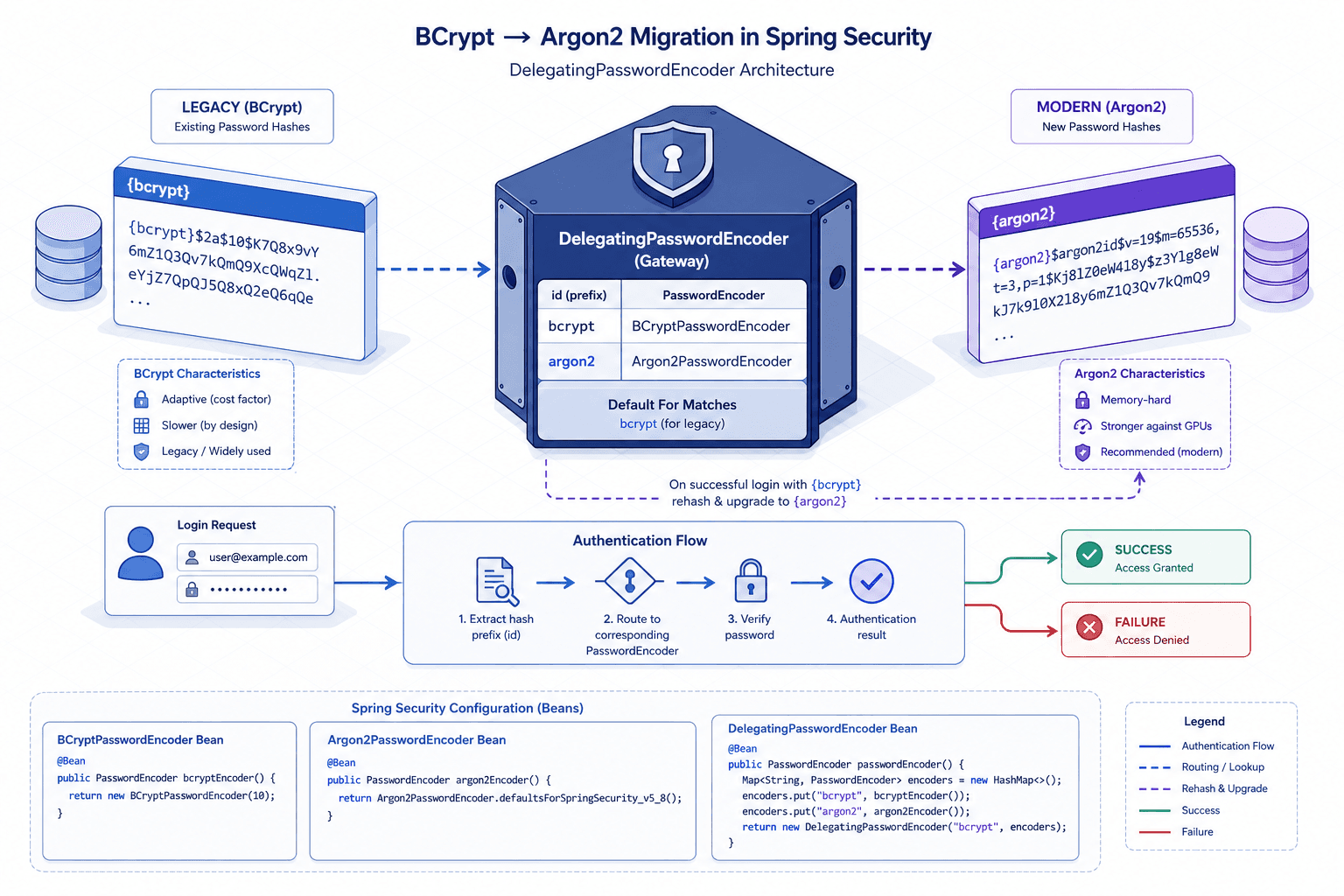
Spring Security solves the multi-algorithm problem with DelegatingPasswordEncoder. This class does not hash passwords itself; it delegates hashing and verification to other PasswordEncoder instances based on an identifier prefix in the stored hash.
Critical Requirement: DelegatingPasswordEncoder must be the primary PasswordEncoder bean registered in your Spring context. If you register a specific encoder (like BCryptPasswordEncoder) as the main bean, the prefix parsing logic will not be triggered automatically, and new hashes will not carry the {id} prefix. This breaks the delegation mechanism required for migration.
When you store a password, Spring Security writes it in the format {id}encodedPassword. For example:
{bcrypt}$2a$10$dXJ3SW6G7P50lGmQkkg7T.L1q4...
The DelegatingPasswordEncoder parses the {bcrypt} prefix, looks up the corresponding encoder (in this case, the BCrypt encoder), and verifies the remainder. If you configure Argon2 as the default encoder, any new passwords will be stored as {argon2}$argon2id$v=19$m=....
This mechanism is critical for migration. It allows your application to recognize two distinct formats in the database simultaneously without throwing exceptions.
Implementation: Configuring the Encoders
To begin the migration, you need to instantiate the Argon2 encoder. Argon2 has three variants: Argon2i, Argon2d, and Argon2id. Argon2id is generally recommended for password hashing as it provides resistance against both side-channel attacks and GPU-based brute-force attacks.
Here is the concrete configuration for a Spring Boot application. Note that we must explicitly construct the DelegatingPasswordEncoder to ensure it is the primary bean and correctly maps legacy encoders.
import org.springframework.context.annotation.Bean;
import org.springframework.context.annotation.Configuration;
import org.springframework.security.crypto.argon2.Argon2PasswordEncoder;
import org.springframework.security.crypto.password.DelegatingPasswordEncoder;
import org.springframework.security.crypto.password.PasswordEncoder;

import java.util.HashMap;
import java.util.Map;

@Configuration
public class SecurityConfig {

    @Bean
    public PasswordEncoder passwordEncoder() {
        // 1. Configure Argon2 with secure defaults
        // Memory: 64MB, Iterations: 3, Parallelism: 1
        // These values may need adjustment based on your server's resources.
        Argon2PasswordEncoder argon2Encoder = new Argon2PasswordEncoder(
                16,    // salt length
                32,    // hash length
                1,     // parallelism
                65536, // memory (KB)
                3      // iterations
        );

        // 2. Map the old BCrypt encoder so it can still verify old hashes,
        // and register the Argon2 encoder under its own id
        Map<String, PasswordEncoder> encoders = new HashMap<>();
        encoders.put("argon2", argon2Encoder);
        encoders.put("bcrypt", new org.springframework.security.crypto.bcrypt.BCryptPasswordEncoder());

        // 3. Create the delegating encoder
        // The first argument is the default ID for new hashes ("argon2")
        // The second argument maps IDs to their specific encoder implementations
        DelegatingPasswordEncoder delegatingEncoder =
            new DelegatingPasswordEncoder("argon2", encoders);

        return delegatingEncoder;
    }
}
This configuration ensures that:
- New passwords are hashed with Argon2 and stored as
{argon2}.... - Old passwords stored as
{bcrypt}...are still verified correctly via the map lookup. - Any password stored without an ID (legacy raw BCrypt strings) will fail verification unless you have a fallback, which is why migrating away from raw strings is crucial.
The Migration Workflow: Silent Re-hashing
The most common mistake developers make is attempting to re-hash all passwords in the database at once. This causes massive latency spikes and potential timeouts. Instead, you should use a "lazy re-hash" strategy.
You do not need to write custom logic for this if you use Spring Security’s UserDetailsService correctly. However, Spring Security’s default DaoAuthenticationProvider does not automatically update the hash after verification. You must intercept the authentication process.
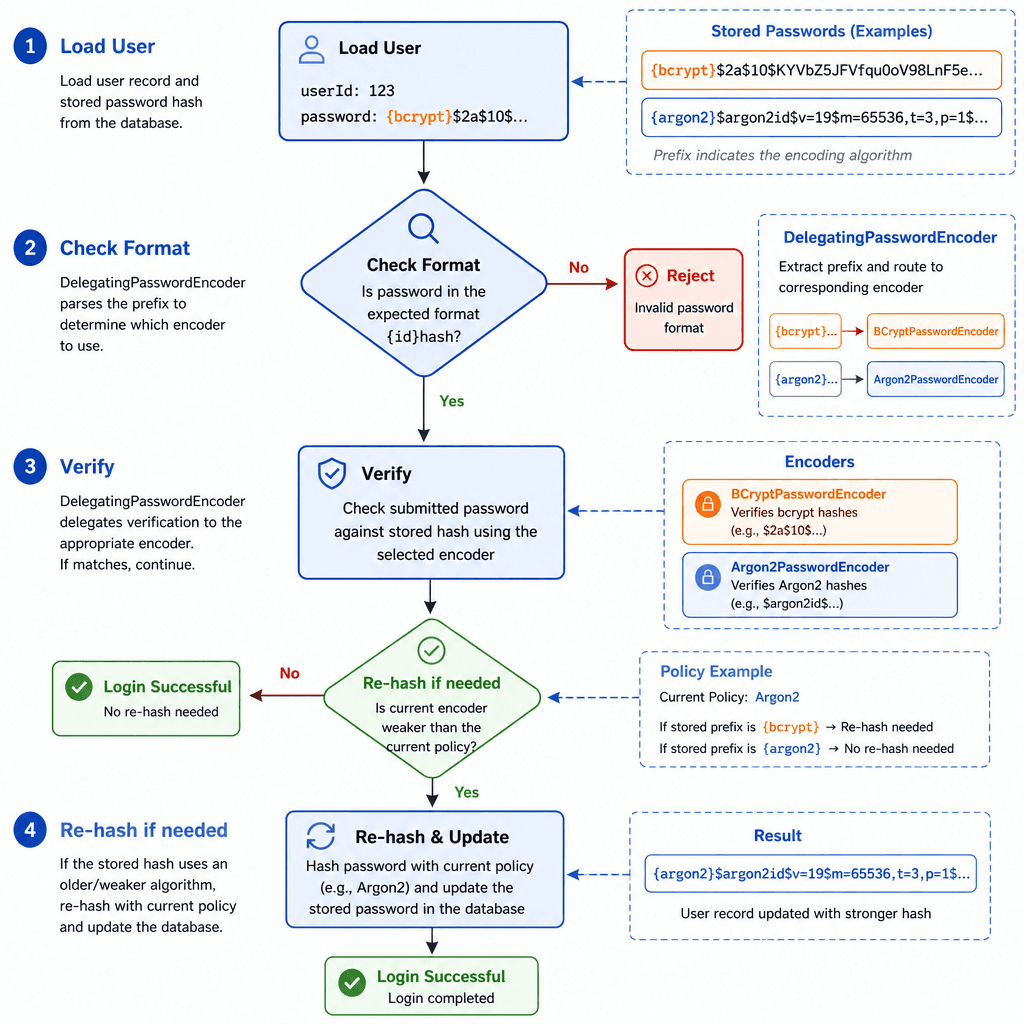
The cleanest way to do this is by creating a custom UserDetailsService or by using an AuthenticationSuccessHandler that updates the password if it needs re-hashing. Here is a conceptual flow for a custom UserDetailsRepository:
- Load User: Retrieve the user and their current hashed password from the database.
- Check Format: Check if the hash starts with
{bcrypt}. - Verify: Use the
PasswordEncoder.matches(rawPassword, encodedPassword)method. Because ofDelegatingPasswordEncoder, this works seamlessly for both BCrypt and Argon2 hashes. - Re-hash if Needed: If
matchesreturnstrueAND the stored hash is still BCrypt:- Generate a new Argon2 hash from the
rawPassword. - Save the new hash to the database.
- Return the user details.
- Generate a new Argon2 hash from the
This ensures that every time a user logs in, if they are still on an old BCrypt hash, they are silently upgraded to Argon2. Over time, the database migrates itself.
Parameter Selection and Tradeoffs
Argon2 parameters are not one-size-fits-all. The three key parameters are:
- Memory (KB): The amount of memory used. Default 65536 (64MB) is a strong starting point.
- Iterations (Time Cost): Number of passes. Default 3.
- Parallelism (Threads): Number of threads. Default 1.
Increasing these values makes the hash slower and more secure, but also increases CPU and memory load per authentication request. If your application is high-throughput, you might need to lower the memory cost slightly to maintain acceptable latency. However, do not go below 32MB of memory, as this reduces resistance to GPU attacks significantly.
Compare this to BCrypt, which uses a single "cost factor" (usually 10-12). BCrypt is CPU-bound, meaning attackers can use GPUs to test billions of hashes per second. Argon2’s memory-hardness means attackers need expensive memory bandwidth, which GPUs do not have in abundance compared to CPUs. This shifts the economic cost of attacking your password database.
Common Pitfalls
- Missing Bean Registration: Failing to register
DelegatingPasswordEncoderas the primaryPasswordEncoderbean. If you only defineBCryptPasswordEncoderas a bean, Spring will use it directly, ignoring the{id}prefix entirely. - Incorrect Map Keys: Using the wrong ID string in the
encodersmap. The key must exactly match the prefix inside the stored hash (e.g.,"bcrypt"matches{bcrypt}...). Mismatches here causeBadCredentialsExceptionfor legacy users. - Ignoring Legacy Raw Hashes: If your database contains pre-Spring Security 5 hashes that lack the
{bcrypt}prefix,DelegatingPasswordEncodercannot identify them. You must either clean these up beforehand or provide a fallback encoder in the map for an empty key or a specific legacy ID.
Practical Takeaways
- Adopt Lazy Re-hashing: Never perform bulk re-hashing in production. Use the login event to upgrade hashes on-the-fly to avoid service disruption.
- Standardize on Argon2id: Use the
Argon2idvariant for password hashing. It offers the best balance of resistance to side-channel attacks and brute-force attacks. - Monitor Latency: Argon2 is heavier than BCrypt. Monitor p95 authentication latency after deployment. If latency spikes, reduce the memory cost (e.g., from 64MB to 32MB) while maintaining sufficient iterations.
FAQ
Q: Can I use BCryptPasswordEncoder alongside Argon2PasswordEncoder without DelegatingPasswordEncoder?
A: No. Without DelegatingPasswordEncoder, the framework cannot distinguish between a BCrypt hash and an Argon2 hash stored in the database. You would need to manually parse the string and route it to the correct encoder, which defeats the purpose of using Spring Security's abstraction.
Q: What happens if I change the Argon2 parameters (memory/iterations) after migration has started? A: The next time a user logs in, their password will be re-hashed with the new parameters. This is safe and expected. However, changing parameters frequently can cause performance instability. It is best to finalize parameters before enabling the migration workflow.
Q: Does Argon2PasswordEncoder support salt configuration?
A: No. Argon2PasswordEncoder generates a random salt automatically for every hash. This is a security best practice, as manual salt management often leads to weak implementations.
Related posts
Spring Security Password Encoding: BCrypt, Argon2, and PBKDF2
An examination of password encoding strategies in Spring Security using BCrypt, Argon2, and PBKDF2 to ensure secure password storage.
BCrypt vs Argon2 vs scrypt vs PBKDF2: Comparison
A technical comparison of BCrypt, Argon2, scrypt, and PBKDF2 for secure password storage, analyzing parameters and performance for backend developers.
Spring Security SAML: A Working Integration
A practical guide to integrating Spring Security SAML with Spring Boot, covering SAML2 relying party configuration, service provider setup, and metadata handling.
