Privileged Access Management: Securing Administrative Accounts
An examination of Privileged Access Management (PAM) strategies for securing administrative accounts, covering session recording and credential vaulting.
Privileged Access Management: Securing Administrative Accounts
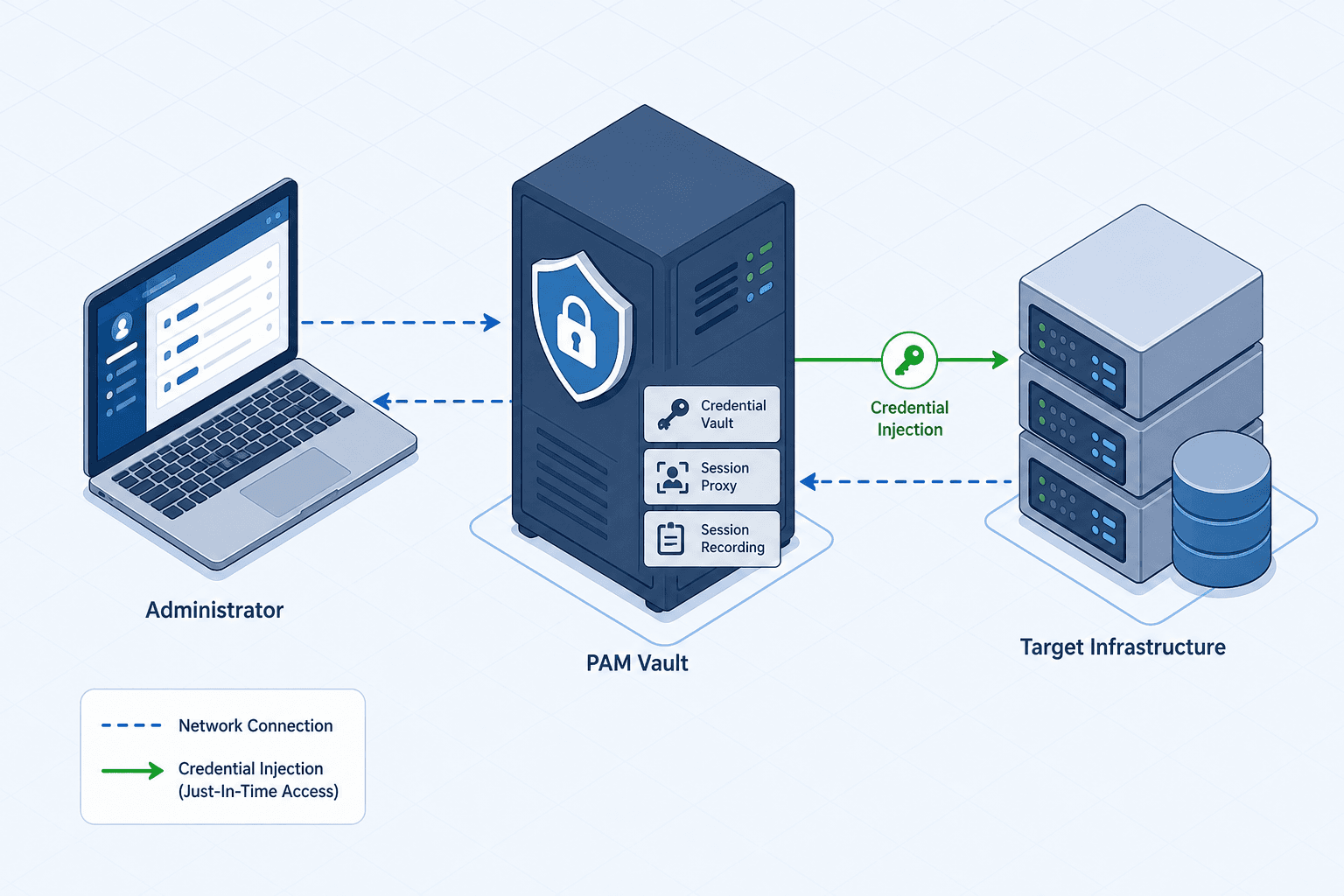
The fundamental vulnerability in most enterprise breaches is not the perimeter firewall, but the administrative account itself. When a user with domain administrator rights logs into a workstation, that credential is often cached in memory or stored in configuration files, creating a persistent target for attackers. Privileged Access Management (PAM) solves this by decoupling the identity from the credential. Instead of a human knowing the password, the PAM system holds the password and injects it into the application session only when necessary. This mechanism ensures the credential never touches the endpoint, effectively neutralizing the risk of credential dumping tools.
Privileged Access Management: The Credential Vault: Isolating Secrets
In a traditional environment, an administrator might store a root password in a text file or memorize it. In a PAM architecture, this password is encrypted and stored in a centralized vault. The vault does not simply act as a database; it acts as an authentication broker. When an administrator attempts to access a critical server, the PAM client intercepts the request.
Consider an administrator named Alex who needs to access a database server named DB-PROD-01. Alex does not know the sa account password. Alex opens the PAM client, requests access to DB-PROD-01, and authenticates using their own corporate credentials. The PAM server validates Alex's identity and policy permissions. If approved, the vault retrieves the encrypted sa password, decrypts it in its own secure memory, and injects the credentials directly into the database connection string or RDP session.
This process prevents the password from ever being written to Alex's local clipboard, browser history, or local disk. To clarify the mechanism, we must distinguish between two common PAM models. In a Session Proxy model, the vault holds the static secret and injects it dynamically into the session without changing the target account's password. However, in a Password Changer model, often associated with vendors like CyberArk, the vault generates a unique, dynamic password specifically for the duration of that session. The vault rotates the password on the target account immediately before the session terminates (or just prior to termination) to ensure the credential was never static. This dynamic rotation is a core requirement for high-security environments, as it limits the window of opportunity for credential theft.

Session Recording: The Digital Black Box
Once access is granted, the PAM system continues to act as a gatekeeper through session recording. This is not merely a video file of the screen; it is a deep-level interception of the protocol stream. When Alex connects via RDP or SSH, the connection terminates at the PAM proxy, not the target server. The PAM server establishes a second connection to the target server using the vaulted credentials.
All keystrokes, mouse movements, and screen updates are captured in real-time. For SSH sessions, the PAM records the command-line interface (CLI) output and input. For RDP, it captures the graphical rendering stream. This creates a forensic artifact that allows security teams to replay exactly what happened during a session. If a database query deletes a table, the recording shows the exact command typed, the timestamp, and the user who issued it.
This mechanism addresses the "insider threat" problem. An administrator with legitimate access might accidentally run a destructive command or maliciously exfiltrate data. Without session recording, the only evidence is the audit log, which often lacks context. With PAM recording, the security operations center (SOC) can review the video to see if the action was authorized. The recording is stored in an immutable storage bucket, preventing the administrator from deleting the evidence after the fact. This level of visibility is standard in regulated industries and is considered a best practice for mitigating high-risk access.
Just-In-Time and Break-Glass Procedures
A common misconception is that PAM should block all access to administrative accounts permanently. This is operationally impossible. Critical systems require immediate access during outages. PAM addresses this through "Just-In-Time" (JIT) provisioning. Instead of granting permanent admin rights, users are granted time-bound access. If Alex needs to fix a server, the PAM grants access for 30 minutes. Once the timer expires, the session is terminated, and the privilege is revoked.
However, what happens if the PAM server itself goes offline, or a critical patch must be applied immediately? This is where "break-glass" procedures come into play. These are emergency accounts designed to bypass standard PAM controls.
The mechanism for break-glass involves a specific workflow. The emergency account credentials are stored in a separate, highly restricted vault, often with physical security requirements (e.g., a safe). When an incident occurs, an authorized incident commander must approve the use of the break-glass account. The approval triggers an alert to the entire security team. Once the credentials are released, the user logs in with elevated privileges. Crucially, every action taken with a break-glass account is subject to the highest level of scrutiny. Even in emergency scenarios, the session is routed through the PAM proxy to ensure session recording is maintained, or an agent-based recording mechanism captures the activity if direct login is required. The session recording is flagged as "emergency," and an automated ticket is opened immediately in the ITSM system.
This tradeoff acknowledges that availability is a security requirement. Breaking the rule of "least privilege" is acceptable only when the cost of downtime exceeds the risk of the breach, provided that the breach is monitored with maximum intensity. This approach ensures that emergency access does not become a permanent backdoor.
The Dependency Chain
Implementing PAM introduces a new dependency chain. The organization now relies entirely on the PAM infrastructure for its ability to manage critical assets. If the PAM server is compromised, the attacker gains access to every vaulted credential. Therefore, the security of the PAM server itself must be superior to the security of the assets it protects. This usually involves placing the PAM server in an isolated management network, securing it with hardware security modules (HSM), and restricting administrative access to the PAM console to a small group of privileged users.
The mechanism of trust shifts from the individual user to the platform. The administrator no longer trusts themselves to keep secrets; they trust the PAM platform to enforce the policy. This architectural shift is the core of modern privileged access management. By removing the credential from the human and enforcing behavioral telemetry, organizations can detect and stop threats that traditional perimeter defenses miss.
In summary, securing administrative accounts requires more than strong passwords. It requires a system that vaults those secrets, records every interaction, and manages emergency access with strict oversight. This layered approach transforms the administrative account from a liability into a controlled, auditable asset.
Conclusion
Privileged Access Management represents a paradigm shift from perimeter-based security to identity-centric control. By isolating credentials within a vault, recording session telemetry, and enforcing strict Just-In-Time and break-glass workflows, organizations can significantly reduce the attack surface associated with administrative accounts. As threats evolve, the reliance on PAM infrastructure becomes not just a best practice, but a critical necessity for maintaining the integrity of enterprise systems.
Common Pitfalls
- Single Point of Failure: Failing to implement high availability for the PAM server can result in a complete lockout of administrative access, halting operations during a crisis.
- Over-Reliance on Automation: Automating password changes without testing compatibility can break critical applications or services that rely on static credentials.
- Neglecting Break-Glass Hygiene: Emergency accounts often become "zombie" accounts with active credentials that are never rotated or audited, creating a permanent backdoor.
Practical Takeaways
- Least Privilege is Dynamic: Treat administrative access as a temporary resource that is requested, used, and revoked, rather than a permanent status.
- Assume Breach: Design your PAM architecture assuming that the endpoint is already compromised; the vault and proxy must be the only trusted elements.
- Audit Everything: If an action cannot be recorded and reviewed, it should not be permitted in a high-security environment.
FAQ
Q: Does PAM replace the need for Multi-Factor Authentication (MFA)? A: No. PAM and MFA are complementary. PAM manages the secrets and sessions, while MFA verifies the identity of the user requesting access. Most robust implementations require MFA to unlock a PAM session.
Q: Can PAM work with cloud-native environments? A: Yes. Modern PAM solutions extend to cloud workloads, managing secrets in cloud vaults (like AWS Secrets Manager or Azure Key Vault) and proxying connections to cloud resources just as they do on-premises.
Q: How long should break-glass credentials be valid? A: Break-glass credentials should ideally be valid only for the duration of the emergency or a very short window (e.g., 24 hours) before they are automatically rotated or disabled to prevent long-term exposure.
Call to Action
Don't let administrative accounts remain your organization's weakest link. Start by auditing your current rotation policy to identify static credentials, then review your break-glass procedures to ensure they are truly emergency-only.
Related posts
RFC 8693: Token Exchange, Delegation, and Impersonation
RFC 8693 defines token exchange, delegation, and impersonation mechanisms for OAuth 2.0, enabling secure identity propagation across service boundaries.
Implementing Conditional Access Policies with Keycloak and ForgeRock
A technical examination of implementing conditional access policies using Keycloak and ForgeRock for context-aware access control.
Building Resilient Multi-Region IAM with Keycloak and AWS Global Accelerator
This guide covers designing a resilient multi-region IAM architecture using Keycloak and AWS Global Accelerator for high availability and disaster recovery.