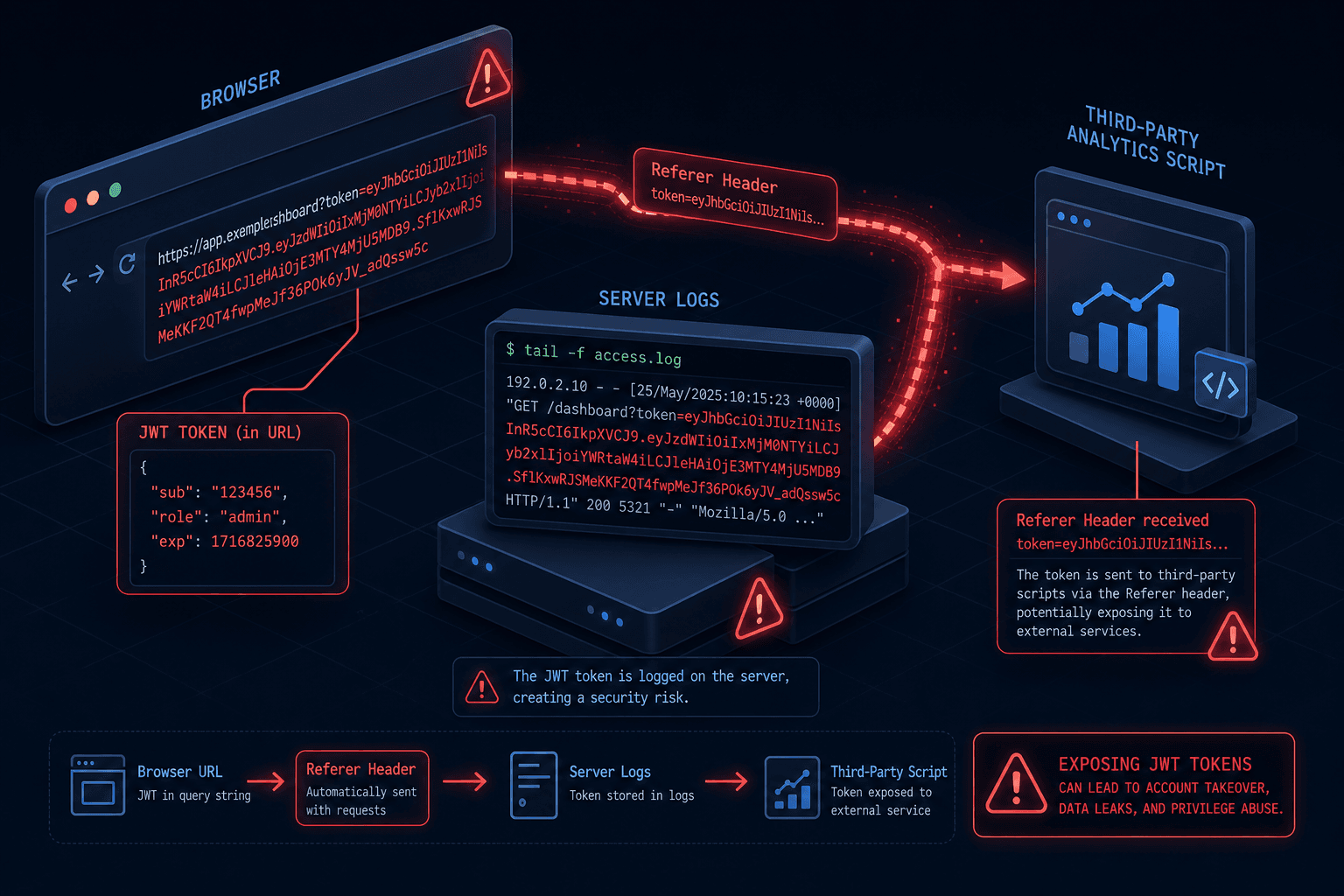
Security Considerations for Identity Tokens in URL Parameters
An examination of security risks when placing identity tokens like JWT or SAML in URL parameters, covering token leakage and referrer header exposure.
The Invisible Leak: Why Identity Tokens in URLs Are a Catastrophic Failure
When an authentication system hands over a JWT or SAML assertion inside a URL query parameter, it assumes the browser treats that string as a transient instruction. It does not. The browser treats the URL as a persistent artifact that gets logged, bookmarked, and shared. The mechanism of failure is not a bug in the token itself; it is a feature of the HTTP protocol and the browser's navigation model. Placing a secret in the URL effectively publishes it to every intermediary that sees the request, including the user's own browser history and any third-party script loaded on the destination page.
The Anatomy of the Referer Header
The most immediate and dangerous leakage vector is the HTTP Referer header (historically misspelled, but retained). When a browser receives a response containing a token in the URL, it stores that URL. If the user clicks a link on that page, or if the page automatically loads an image or script from a different origin, the browser sends the full URL of the current page—including the token in the query string—to the new destination.
Consider a scenario involving "Alice," a user logging into a legacy SAML application. The Identity Provider (IdP) redirects Alice to the Service Provider (SP) with a SAML assertion in the URL: https://sp.example.com/callback?SAMLResponse=...&SigAlg=....
Alice is now logged in. The SP page displays a dashboard. Embedded in this dashboard is a Google Analytics script hosted at https://www.google-analytics.com/collect. This script makes a POST request to update user metrics. To perform this cross-origin request, the browser includes the Referer header. The header value is https://sp.example.com/dashboard?SAMLResponse=...&SigAlg=....
The analytics provider receives the full SAML assertion. They now possess a valid credential to impersonate Alice. This happens automatically. The developer did not explicitly send the token; the browser's HTTP client did.
This behavior is defined by the HTTP specification (RFC 9110) regarding the Referer header, which dictates that the header contains the URI of the referring page. The browser has no concept of "sensitive data" in a URL; it simply serializes the current location.
The History and Log Persistence Vector
Even if you mitigate the Referer header, the token remains exposed in two other critical storage mechanisms: the browser's history database and the server's access logs.
When a user navigates to a URL containing a token, the browser records this entry in its local history. A malicious actor with physical access to the user's device, or a compromised browser extension with permission to read history, can extract the token. This is not theoretical; extensions like those designed for "clipboard managers" or "history viewers" often have broad access permissions.
Furthermore, the token is written to the web server's access logs. Every web server (Nginx, Apache, IIS) logs the full request line by default. A log entry looks like:
192.168.1.5 - - [10/Oct/2023:13:55:36 +0000] "GET /callback?token=eyJhbGciOiJIUzI1NiIsInR5cCI6..." HTTP/1.1" 200 1234 "-" "Mozilla/5.0..."
If an attacker compromises the server or gains access to the log aggregation pipeline (e.g., Splunk, ELK), the token is immediately exposed. Unlike a cookie stored in memory or a database, the URL is never encrypted at rest in the log file unless specific log scrubbing configurations are applied, which are rarely the default.
Referrer-Policy Limitations and the Same-Origin Flaw
Developers often attempt to fix this by setting the Referrer-Policy meta tag or HTTP header to no-referrer or strict-origin-when-cross-origin.
strict-origin-when-cross-origin sends the full URL only when the destination is the same origin. It sends only the origin (scheme + host + port) when navigating to a different origin.
While this prevents the token from leaking to third-party analytics scripts on different domains, it fails to prevent leakage within the same domain. If the SP page redirects to a sub-page (e.g., /dashboard/settings) or loads a sub-resource, the full URL with the token is still sent. Moreover, if the user manually shares the link or bookmarks it, the token travels with them.
The fundamental flaw is that the token is part of the document's location, not just the document's content. As long as the token is in the URL, the browser's security model cannot distinguish it from a public path segment.
Architectural Remediation: Moving Tokens Out of the URL
To secure the flow, you must decouple the token from the URL. The standard remediation strategy involves using a short-lived, single-use code in the URL, which is then exchanged for a long-lived token stored in a secure cookie or transmitted via a non-URL channel. This approach directly addresses the core authentication vulnerability inherent in exposing secrets via query strings.
The Authorization Code Flow (OAuth 2.0)
In the OAuth 2.0 Authorization Code flow, the URL contains only a code parameter. This code is a random, opaque string with no intrinsic value.
- Redirect: The IdP redirects to the Client with
?code=xyz123. - Exchange: The Client's backend server performs a server-to-server POST request to the IdP, sending the
codeand itsclient_secret. - Token Delivery: The IdP returns an Access Token (which may be a JWT, SAML assertion, or opaque string) to the backend server over the HTTPS connection, as defined in RFC 6749 Section 4.1.3.
- Storage: The backend server stores the Access Token in an
httpOnly,Securecookie.
Because the Access Token is never returned to the browser in the URL, it never appears in the Referer header, browser history, or server logs. The httpOnly flag ensures that client-side JavaScript cannot read the cookie, mitigating XSS risks. The Secure flag ensures the cookie is only sent over encrypted connections. Implementing this pattern is the gold standard for URL parameter security.
The Post Message API
For Single Page Applications (SPAs) where server-side redirects are complex, the window.postMessage API provides a mechanism to transfer tokens securely between windows or iframes without using the URL.
// In the parent window (Service Provider)
window.addEventListener('message', (event) => {
  // Verify the origin of the message
  if (event.origin !== 'https://idp.example.com') return;

  const token = event.data.token;
  // Store token in memory, never in localStorage or URL
  // localStorage is unsuitable for sensitive tokens due to XSS risks.
  sessionStorage.setItem('auth_token', token);
});

// In the IdP popup window
window.opener.postMessage({ token: 'jwt_payload_here' }, 'https://sp.example.com');
This mechanism bypasses the URL entirely. The token is transferred via the browser's internal IPC (Inter-Process Communication) channel, which is not logged by the network stack or the history database. Note that while sessionStorage is safer than localStorage regarding persistence across tabs, it is still accessible to client-side scripts and should be avoided if httpOnly cookies are an option.
Conclusion
Placing identity tokens in URL parameters is a design anti-pattern that violates the principle of least surprise for security engineers. The browser's native behavior—logging the URL, sending it in the Referer header, and storing it in history—guarantees that the token will eventually leak. The only robust solution is to treat the URL as a public channel and the token as a private secret, utilizing server-side exchanges or post-message flows to bridge the two.
The cost of implementing a proper authorization code flow or post-message exchange is negligible compared to the cost of a token leakage incident. Security is not about hiding the token in a complex parameter name; it is about removing it from the path where the browser naturally exposes data.
Common Pitfalls
- Relying on Obfuscation: Attempting to hide tokens by encoding them in Base64 or URL-encoding them within the query string. This provides zero security as decoding is trivial and the token still leaks via logs and history.
- Mixing Token Types: Using SAML assertions (which are large XML blobs) in URLs instead of short-lived authorization codes. The size increases the risk of truncation in proxies and makes the leakage payload significantly larger.
- Assuming HTTPS is Enough: While HTTPS encrypts traffic in transit, it does not prevent leakage at rest in browser history, server logs, or the
Refererheader sent to third-party origins.
Practical Takeaways
- The URL is Public: Treat every character in a URL as potentially visible to anyone who has access to the user's device or server logs. Never place secrets there.
- Short-Lived Codes Only: If a URL must be used for handshakes, ensure it carries only a temporary, single-use authorization code, not the final identity token.
- Defense in Depth: Combine
Referrer-Policyheaders with architectural changes. Relying solely on headers is insufficient against same-origin navigation or user error.
FAQ
Q: Can I use localStorage if I clear it on logout?
A: No. localStorage is accessible to any JavaScript running on the page. If your application is vulnerable to Cross-Site Scripting (XSS), an attacker can steal the token immediately, regardless of logout logic. Use httpOnly cookies instead.
Q: Does Referrer-Policy: no-referrer solve the problem?
A: It prevents leakage to third-party origins but does not stop leakage to your own sub-pages or sub-resources. Furthermore, it does not prevent the token from being stored in browser history or server logs.
Q: Are there any scenarios where putting a token in a URL is acceptable?
A: Generally, no. Even for stateless APIs, the token should be passed in the Authorization header. If a URL must be shared for debugging, ensure the token is expired or stripped before sharing.
Related posts
Understanding and Implementing CWE-287: Improper Authentication
An examination of CWE-287 improper authentication vulnerabilities, covering OWASP guidelines and essential security fixes for robust authentication systems.
OAuth 2.1: What Changed and Where the Draft Stands
An examination of OAuth 2.1 changes, IETF draft status, and migration strategies for backend developers and architects.
OncePerRequestFilter: The Right Base Class for JWT
Learn why OncePerRequestFilter is the correct base class for JWT authentication in Spring Security, handling async dispatches and avoiding duplicate processing.