acr_values and amr: Requesting Authentication Strength
Explore how acr_values and amr claims define authentication strength in OpenID Connect, enabling step-up authentication and MFA enforcement.
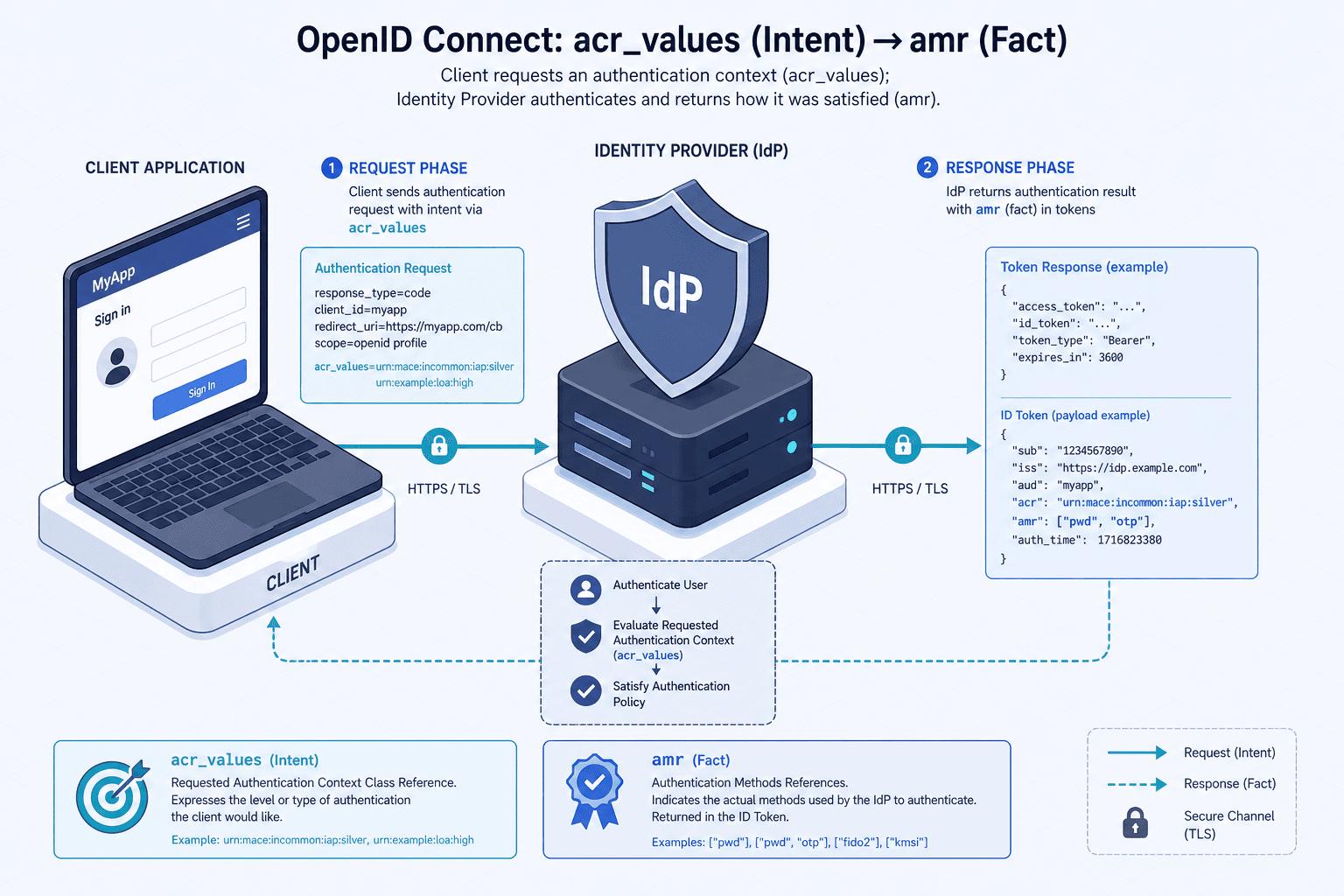
In OpenID Connect (OIDC), authentication is not a binary state. You do not simply log in or you do not. You log in with a certain level of confidence that the entity on the other end is who they claim to be. This confidence is quantified by Authentication Context Class References (ACR). The mechanism for controlling this confidence lies in two specific fields: acr_values in the request and amr in the response. Misunderstanding their relationship leads to security vulnerabilities where clients assume MFA was performed when it was not.
The Request: Defining Intent with acr_values
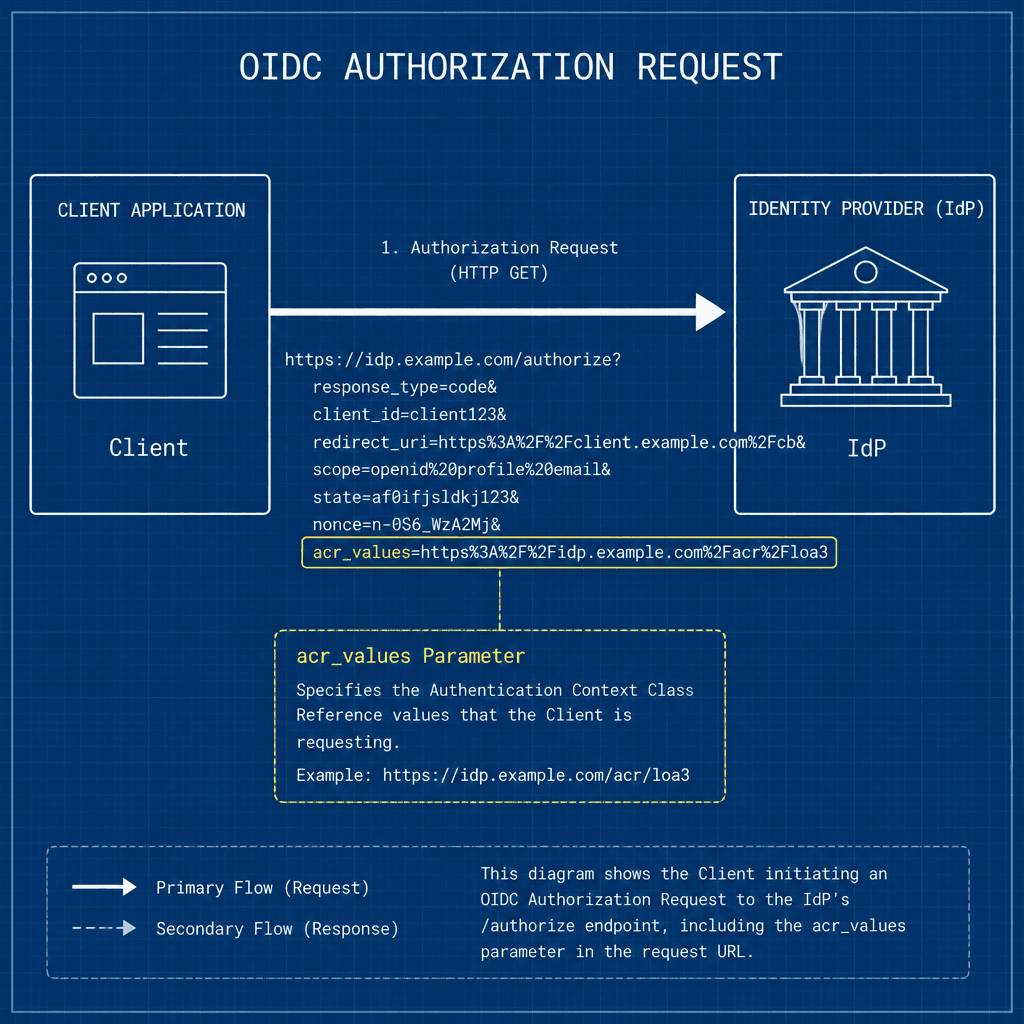
When your application initiates an OIDC flow, it sends an authorization request to the Identity Provider (IdP). This is typically a redirect to the IdP’s /authorize endpoint. Among the parameters, you include acr_values.
acr_values is a space-separated list of strings. Each string represents an Authentication Context Class Reference. These are identifiers defined by the IdP (or standardized by standards bodies) that describe the required authentication context.
Consider a scenario where your application handles both casual browsing and financial transactions.
- Low Sensitivity: For a blog post, you request
acr_values=urn:oid:2.16.840.1.101.3.7:2016:1(Example IdP-specific URN). This might map to "email and password only." - High Sensitivity: For a bank transfer, you request
acr_values=urn:oid:2.16.840.1.101.3.7:2016:2(Example IdP-specific URN). This maps to "email, password, AND hardware token."
Crucially, acr_values is a request. It is the client telling the IdP: "I require this level of assurance." The IdP may comply, but the client must not assume compliance until verified. If the user is already logged in with low assurance, the IdP might simply return the existing session if the policy allows, or it might challenge the user for additional factors. The mechanism here is negotiation.
The Response: Asserting Fact with amr
Once the user authenticates, the IdP returns an ID Token. This is a signed JWT. Inside this token, under the amr (Authentication Methods References) claim, the IdP asserts what actually happened.
amr is an array of strings. The order matters. The first element is the primary authentication method. Subsequent elements represent additional methods used to strengthen the session.
If the IdP honored your high-sensitivity request, the amr array might look like this:
{
  "amr": ["pwd", "hwk"]
}
Here, pwd indicates a password was used, and hwk (Hardware Key) indicates a second factor was presented.
If the IdP could not meet the request (e.g., the user only has a phone number for MFA, but you requested a hardware token), the amr array might contain only:
{
  "amr": ["pwd"]
}
Or, if the IdP supports multiple ways to satisfy a single acr_value, it might return:
{
  "amr": ["pwd", "sms"]
}
The Step-Up Mechanism
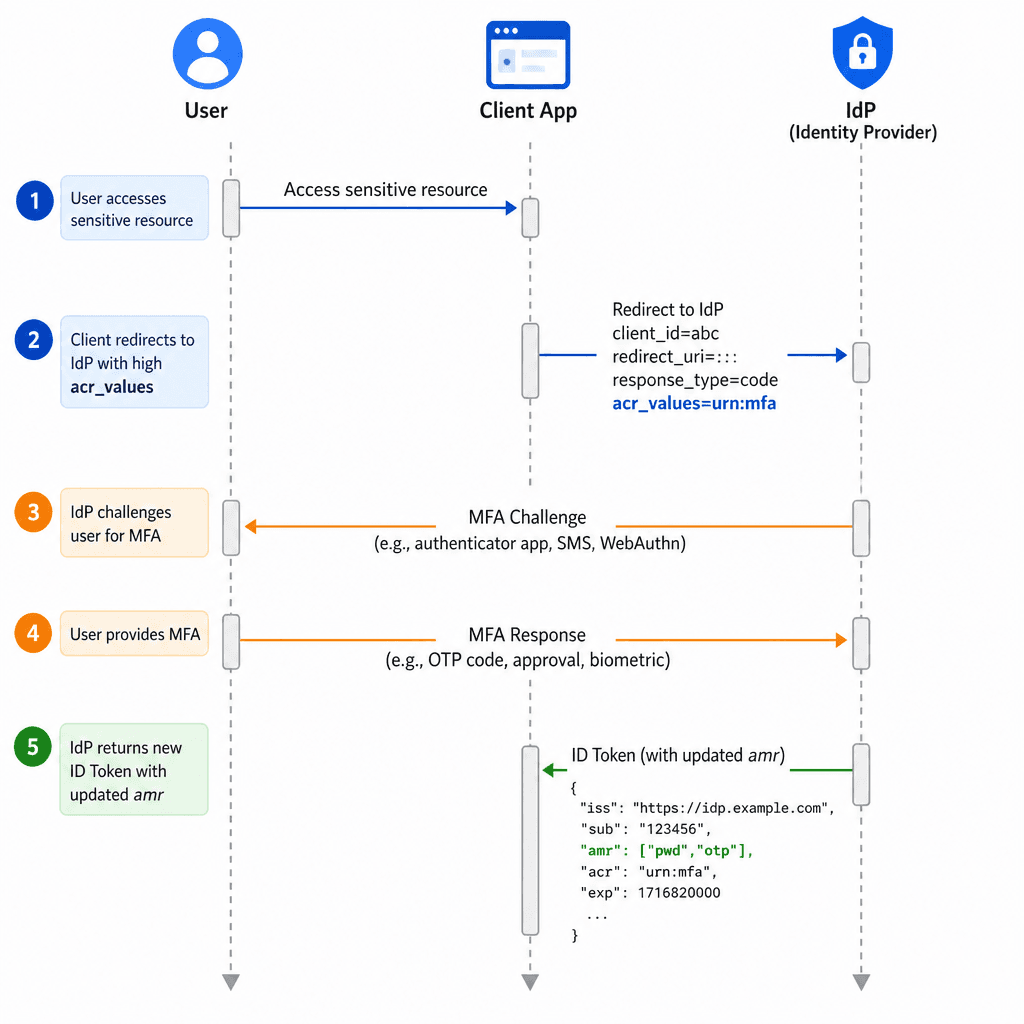
The most common pattern for leveraging these claims is step up authentication. This occurs when a user is already authenticated but attempts to access a resource requiring higher assurance.
Scenario: Alice’s Bank Transfer
- Initial Login: Alice logs into her banking app using email and password. The IdP issues an ID Token with
acr_values=urn:oid:...:1andamr=["pwd"]. The session is established. - Sensitive Action: Alice clicks "Transfer $5,000." Your backend detects this requires high assurance.
- Step-Up Request: Your backend redirects Alice to the IdP’s
/authorizeendpoint again. This time, you send:acr_values=urn:oid:...:2(High Assurance)prompt=none(if supported and pre-configured) or rely on the existing session.
- IdP Evaluation: The IdP sees the existing session has
amr=["pwd"]. It compares this against the requestedacr_values=urn:oid:...:2. The current assurance is insufficient. - Challenge: The IdP challenges Alice. Since she doesn't have a hardware token, it falls back to SMS. Alice enters the code.
- New Token: The IdP issues a new ID Token. The
amrclaim is updated to["pwd", "sms"]. If the IdP supports theacrclaim, it may also be present to reflect the highest context achieved.
Validation Logic: Trusting the Claim
The security boundary lies in your backend’s validation logic. You cannot trust the acr_values you sent; you must trust the amr claim you received.
When your backend receives the ID Token, it must perform the following check:
- Parse the Token: Extract the
amrarray. - Map to Context: Translate
amrvalues into an assurance level (e.g.,pwd= Level 1,pwd+sms= Level 2). - Compare: Check if the achieved assurance level meets the requirement for the resource being accessed.
If the resource requires Level 2, and the amr array contains only pwd, the request must be rejected. The client must not proceed.
Example Validation Pseudocode
def check_authentication_strength(amr_claim, required_acr):
    # Map amr values to assurance levels
    assurance_level = calculate_assurance_level(amr_claim)

    # Check against required level
    if assurance_level >= required_acr.level:
        return True
    else:
        return False

# Usage
if not check_authentication_strength(id_token.amr, required_acr="high"):
    raise PermissionError("Insufficient authentication strength")
Key Considerations
- IdP Specificity:
acr_valuesare often IdP-specific. While there are standard OIDs (like those from NIST or ISO), many IdPs use custom URNs. You must consult your IdP’s documentation to know which strings correspond to which mechanisms. - Ordering: The order of elements in the
amrarray is significant. The first element is the primary method. Subsequent elements are additional. Some IdPs may allow reordering, but the standard implies a chronological or primary-first sequence. - Security: Never rely solely on
acr_valuesin the request. Always validateamrin the response. In backend development, validating theamrclaim is critical. Theamrclaim is cryptographically signed by the IdP, preventing clients or third parties from altering it without detection, provided the signing key remains secret. (OIDC Core Spec)
Conclusion
acr_values and amr form a complete mechanism for authentication strength in OIDC. acr_values define the intent, allowing clients to request specific security properties. amr provides the factual record, allowing clients to verify that those properties were met. By implementing strict validation of the amr claim against the required assurance level, you enable effective step-up authentication and MFA enforcement without compromising the user experience.
This separation of intent and fact ensures that your application’s security posture is determined by the IdP’s actual authentication actions, not by your initial request.
Related posts
OpenID Connect Guide: Extending OAuth 2.0 for Identity Verification
An examination of OpenID Connect (OIDC) and how it extends OAuth 2.0 to handle identity verification using ID tokens and discovery protocols.
SAML 2.0 in One Diagram
A visual walkthrough of the SAML 2.0 Single Sign-On flow, covering bindings, profiles, and how it compares to OIDC.
Multi-Factor Authentication with OIDC: Implementing MFA
An examination of implementing multi-factor authentication using OIDC, covering Keycloak, WebAuthn, TOTP, and step-up authentication via ACR.
