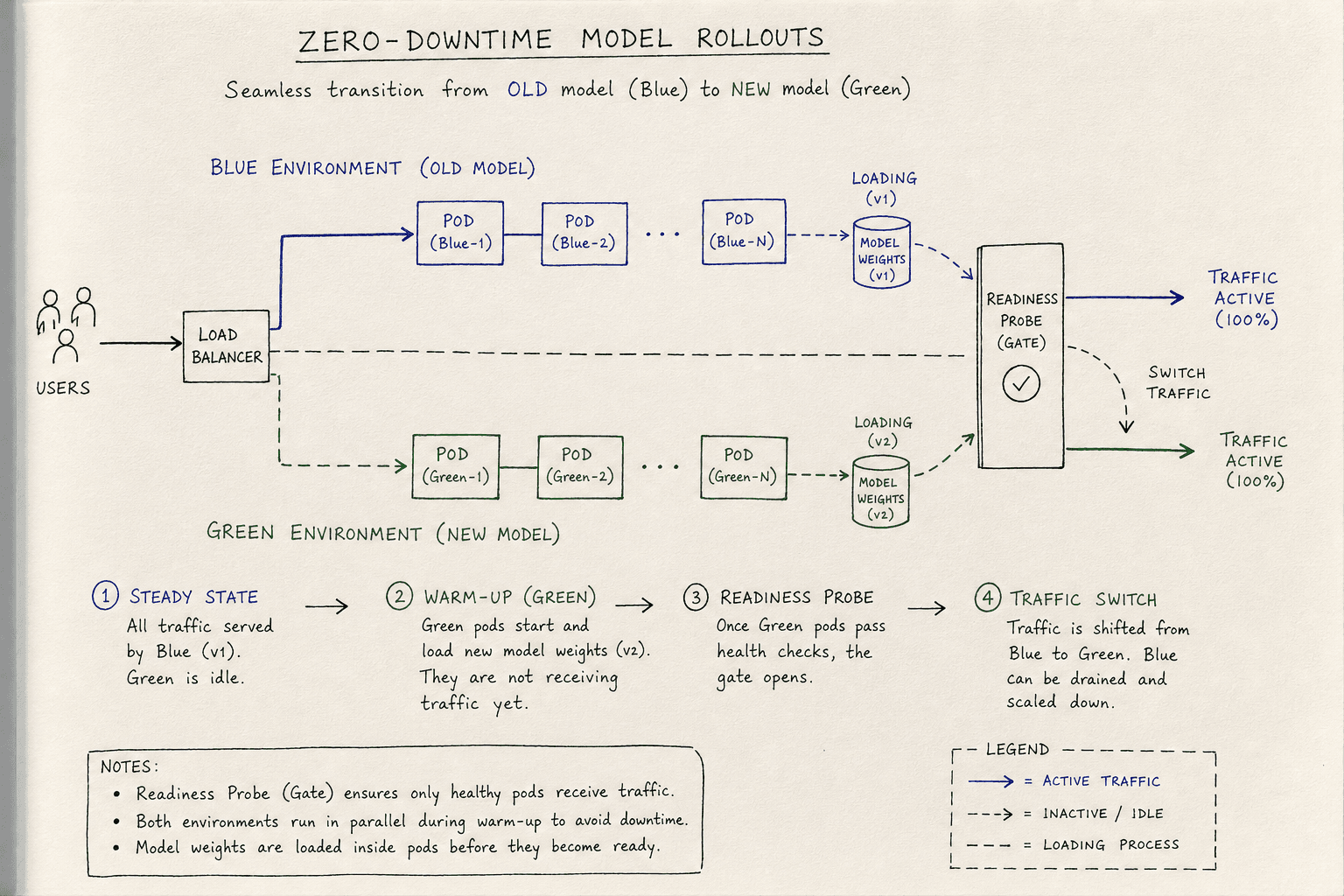
Zero-Downtime Model Rollouts: Strategies for Continuous ML Availability
Explore strategies for zero-downtime model rollouts, including blue-green deployments, rolling updates, and readiness probes to ensure continuous availability.
Zero-Downtime Model Rollouts
Deploying a machine learning model is fundamentally different from deploying a stateless web application. In a standard web service, a new binary can replace an old one in milliseconds because the logic is compiled and ready to execute immediately. In machine learning, the "binary" is often a multi-gigabyte file containing weights that must be deserialized, loaded into GPU memory, and initialized before the first inference can succeed. If you route traffic to a pod that is still loading its model, you get a 503 Service Unavailable error. To achieve zero downtime, you must manage the gap between "the process is running" and "the model is ready to serve."
This article explores the mechanisms behind blue-green deployments, rolling updates, and readiness probes, specifically tailored for the latency and resource constraints of ML serving.
The Synchronization Problem: Warmth as a State
In traditional DevOps, a deployment is considered "live" when the container starts. In MLOps, a container is only live when its model is warmed up. This introduces a synchronization problem: the orchestrator (e.g., Kubernetes) sees the pod as healthy, but the application inside is still initializing. As noted in Kubernetes documentation on probes, relying solely on liveness checks without readiness gates often leads to premature traffic routing.
If you use a simple health check, the load balancer may send traffic to the new instance before it has finished loading the model weights. This results in failed requests during the rollout window. The solution is to decouple the process lifecycle from the model lifecycle. The process can be "up," but the model can be in a "loading" state. Traffic must only be routed when the model is fully warmed and verified.
Blue-Green Deployments with Traffic Splitting
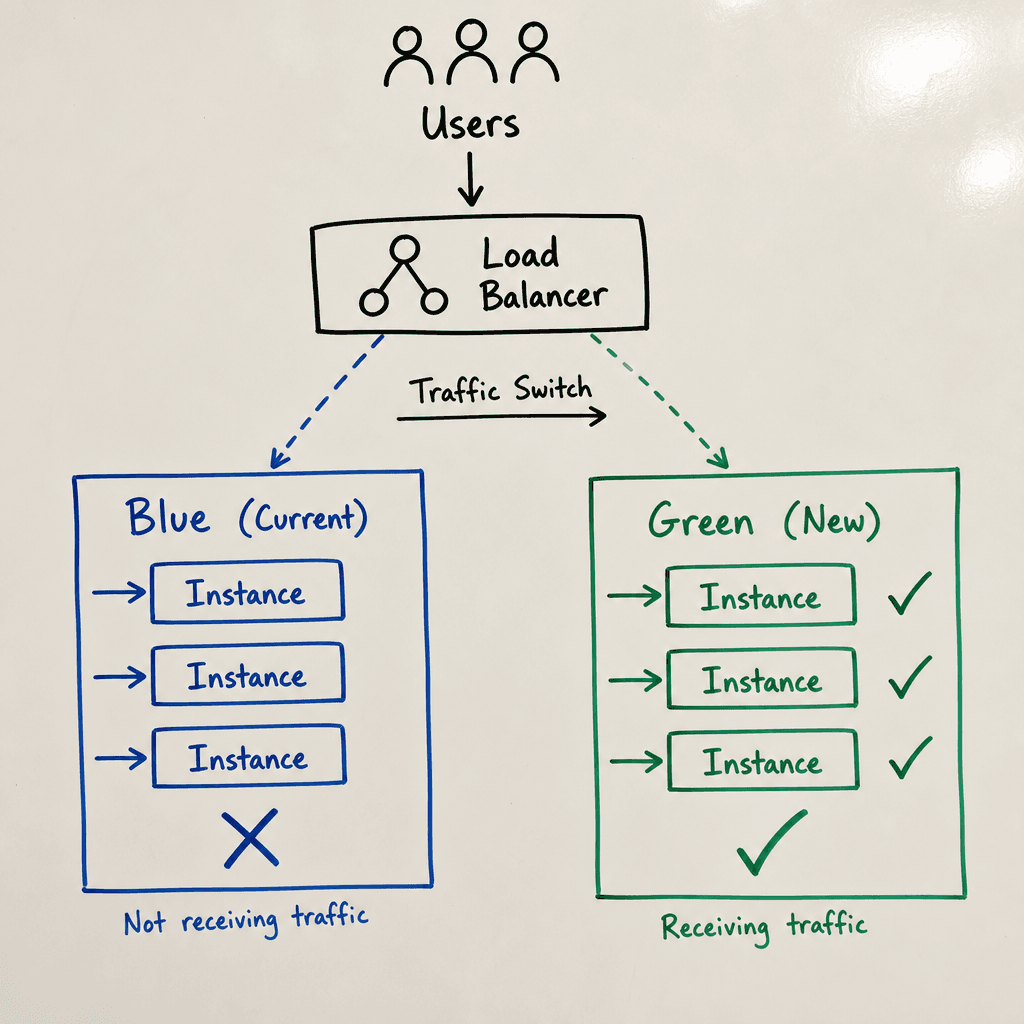
Blue-green deployment is the safest strategy for zero-downtime rollouts because it maintains two identical environments: Blue (current live version) and Green (new version). Traffic is routed to one environment at a time.
The Mechanism
- Provisioning: You deploy the new model version to the Green environment. This environment exists alongside Blue but receives no user traffic.
- Verification: You run automated tests against Green using synthetic traffic or canary requests.
- Cutover: You update the load balancer or service mesh configuration to route 100% of traffic from Blue to Green.
In a Kubernetes context, this is often achieved by updating the Service selector or using a service mesh like Istio.
# Istio VirtualService example for traffic shifting
apiVersion: networking.istio.io/v1alpha3
kind: VirtualService
metadata:
  name: model-service
spec:
  hosts:
  - model-service
  http:
  - route:
    - destination:
        host: model-service
        subset: v1  # Old version (Blue)
      weight: 90
    - destination:
        host: model-service
        subset: v2  # New version (Green)
      weight: 10
By adjusting the weight, you can perform a gradual shift. However, true blue green strategy implies an atomic switch. Once Green is verified, you set v2 weight to 100 and v1 to 0. If issues arise, you instantly revert traffic to Blue without redeploying code.
Why It Works for ML
Blue-green ensures that the old model remains fully available until the new model is completely warmed and tested. There is no overlap of versions serving live traffic, which simplifies debugging. If the new model fails, the rollback is instantaneous: change the traffic rule back to Blue. In one notable instance, a major e-commerce platform experienced a state mismatch where the new model expected a different input schema than the old one; because they used blue-green, they reverted the traffic rule in seconds, avoiding a complete service outage while they fixed the schema compatibility.
Rolling Updates with Connection Draining
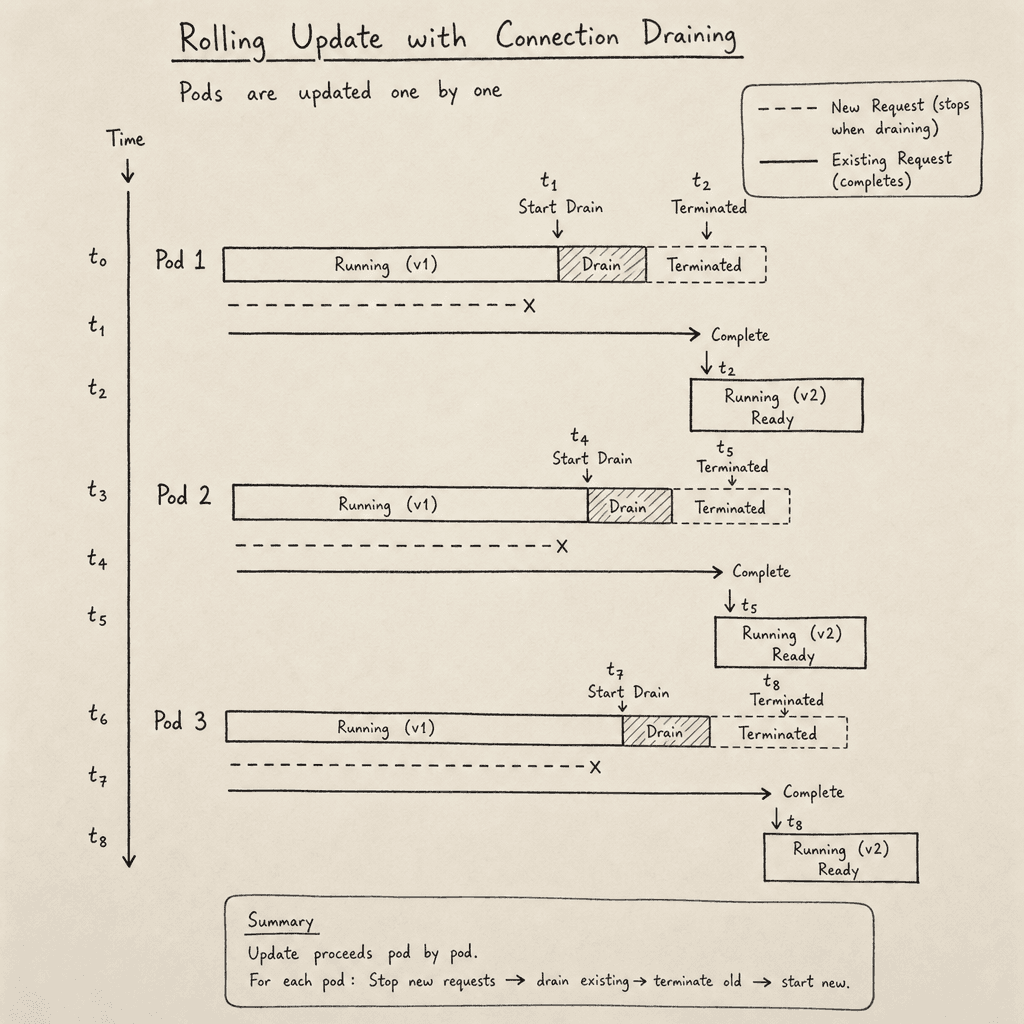
Rolling updates replace instances one by one (or in batches) rather than swapping entire environments. This is more resource-efficient than blue-green, as it doesn’t require double the compute capacity during the rollout. However, it requires careful handling of active connections. A rolling update strategy minimizes resource usage but demands precise tuning of timing parameters.
The Mechanism
- Update: The orchestrator creates a new pod with the new model version.
- Readiness Check: The new pod must pass all readiness checks before being added to the service endpoint list.
- Drainage: The old pod is marked for termination. The orchestrator stops sending new requests to it but allows existing requests to complete.
- Termination: Once the old pod’s active requests reach zero, it is terminated.
The critical component here is connection draining. When a pod is scaled down, the load balancer must wait for the drainGracePeriod to expire before removing it from the backend pool. During this period, the load balancer stops routing new traffic to the pod.
# Kubernetes PodDisruptionBudget to ensure minimum availability
apiVersion: policy/v1
kind: PodDisruptionBudget
metadata:
  name: model-pdb
spec:
  minAvailable: 1
  selector:
    matchLabels:
      app: model-server
Why It Works for ML
Rolling updates minimize resource spikes. However, if the new model takes 30 seconds to load, the old pods must remain active during that window. If the old pods are terminated too early, requests will fail. The orchestrator must coordinate the termination of old pods with the readiness of new ones. In practice, we have seen cases where connection draining failed because the load balancer's health check interval was shorter than the drain grace period, causing the balancer to mark the draining pod as "unhealthy" and remove it prematurely. Tuning the drainGracePeriod to exceed the maximum model load time is essential.
Readiness Probes: The Gatekeeper
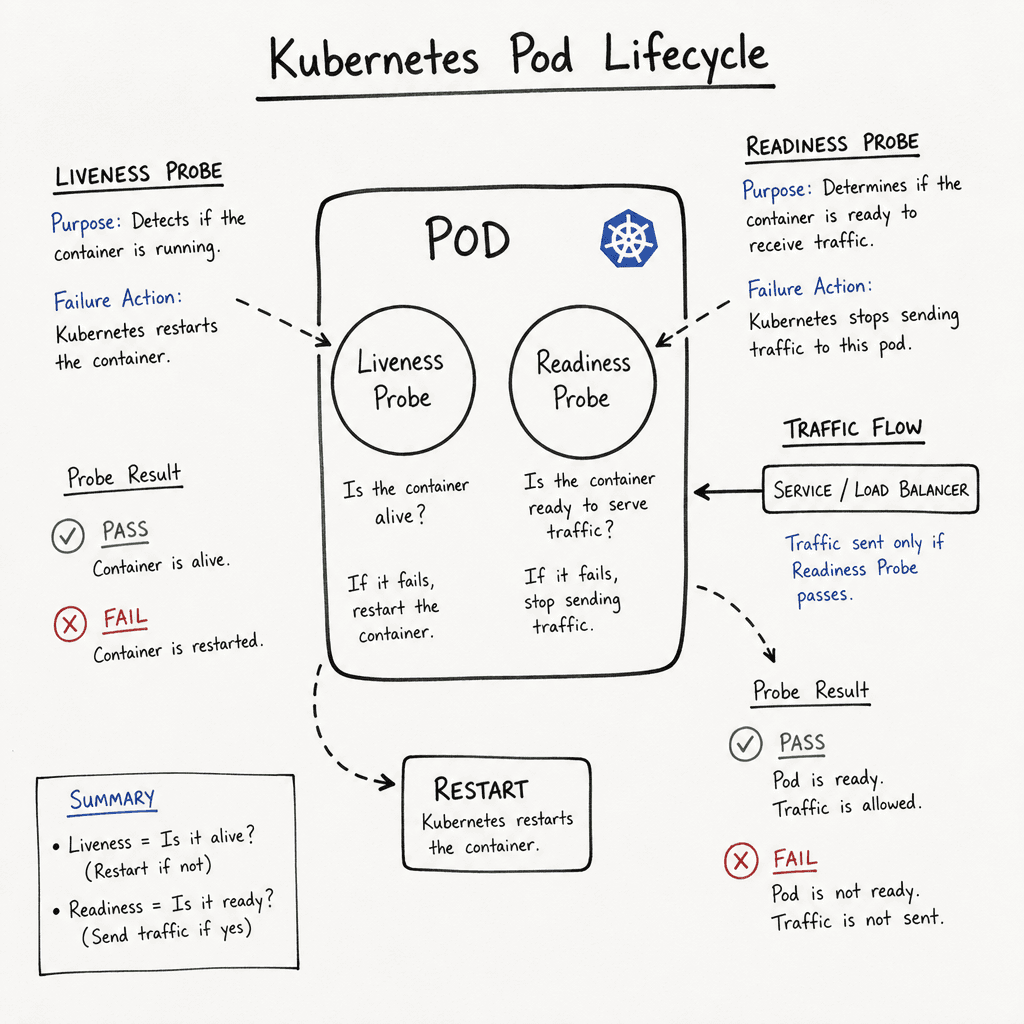
The most common cause of downtime during model rollouts is misconfigured health checks. Kubernetes distinguishes between liveness and readiness probes. Understanding their mechanisms is essential for zero-downtime deployments.
Liveness vs. Readiness
- Liveness Probe: Asks, "Is the process alive?" If this fails, the container is restarted. This is suitable for checking if the Python process is running.
- Readiness Probe: Asks, "Is the application ready to serve traffic?" If this fails, the pod is removed from the service endpoints, but the container is not restarted.
For ML models, the readiness probe must perform a warm-up check. A single readiness probe instance is sufficient to gate traffic for the entire pod.
Implementing a Warm-Up Readiness Probe
A readiness probe should not just ping an HTTP endpoint; it should simulate an inference or check internal state.
# Example readiness endpoint in a FastAPI app
from fastapi.responses import JSONResponse

@app.get("/ready")
def readiness():
    if not model.is_loaded:
        return JSONResponse(content={"status": "loading", "ready": False}, status_code=503)

    # Optional: Perform a quick test inference
    try:
        result = model.predict(random_input())
        return {"status": "ready", "ready": True}
    except Exception:
        return JSONResponse(content={"status": "error", "ready": False}, status_code=503)
In Kubernetes, you configure the probe with appropriate initialDelaySeconds and periodSeconds.
readinessProbe:
  httpGet:
    path: /ready
    port: 8080
  initialDelaySeconds: 60  # Wait for model loading
  periodSeconds: 5
  failureThreshold: 3
The Mechanism of Removal
When the readiness probe fails, Kubernetes removes the pod’s IP from the Endpoints object. The load balancer immediately stops sending traffic to that IP. This is the key to zero downtime: the orchestrator ensures that no traffic is sent to a pod that is still loading its model.
Choosing the Right Strategy
The choice between blue-green and rolling updates depends on your infrastructure and risk tolerance.
- Use Blue-Green when you have sufficient compute resources and need the fastest possible rollback. It is ideal for large model swaps where the new model might be significantly different in size or architecture. The rollback here is simply reversing the traffic split.
- Use Rolling Updates when resources are constrained. It is more efficient but requires careful tuning of readiness probes and drain periods. The rollback here involves stopping the rollout and potentially scaling up previous versions or re-running the update with adjusted parameters.
Conclusion
Zero-downtime model rollouts are not about avoiding restarts; they are about managing the transition of traffic. By using readiness probes to gate traffic entry and either blue-green or rolling update strategies to manage version coexistence, you can ensure that users never see a failed inference due to deployment timing. Achieving true zero downtime requires treating model loading as a distinct phase that must complete before the service is considered ready, ensuring seamless continuity for the end user.
Related posts
Shadow Traffic for LLM Deployments
Explore how shadow traffic and traffic mirroring enable safe comparison of candidate LLM models in production without impacting user experience.
Should You Fine-Tune? A Decision Framework
A decision framework for ML engineers and managers to determine when to fine-tune large language models versus using prompting techniques.
Online Evals: A/B Tests, Canaries, and Guarded Rollouts
Learn how to implement online evaluations using A/B tests, canary releases, and guardrail metrics to safely deploy LLM features.
