Kubernetes GPU Management: Beyond Passthrough
Explore Kubernetes GPU scheduling, MIG, and time slicing to optimize resource sharing for platform engineers and SREs.
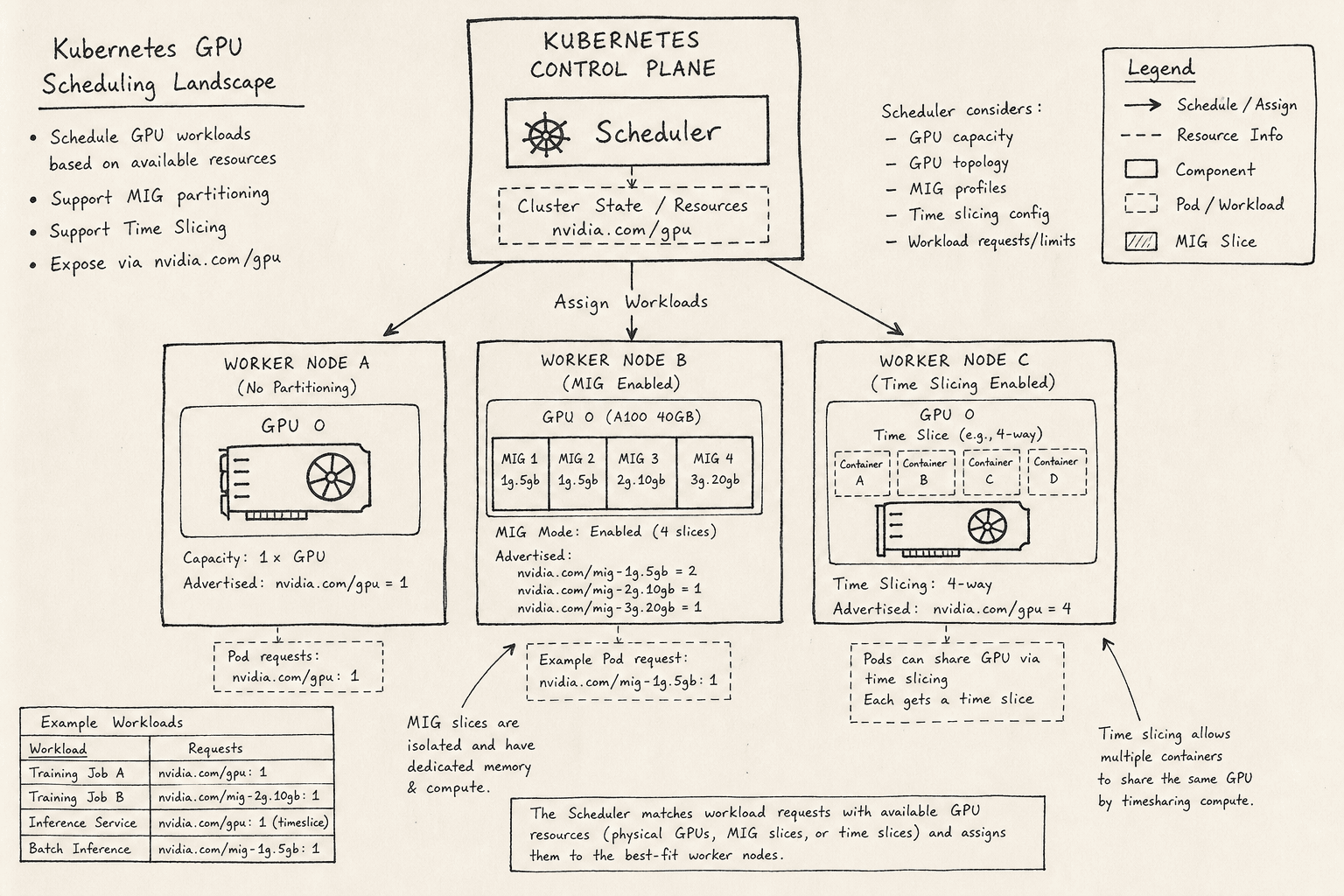
Managing GPU workloads in Kubernetes is fundamentally different from managing CPU or memory. While CPU and memory are abstracted as fungible, shareable pools, GPUs have historically been treated as atomic, non-shareable hardware devices. This distinction forces platform engineers and SREs to navigate a complex landscape of scheduling constraints, hardware partitioning, and software-level time sharing. As organizations move from prototyping LLMs to serving them at scale, the ability to efficiently share GPU resources via Multi-Instance GPU (MIG) and time slicing becomes critical for cost optimization. However, these optimizations introduce significant operational complexity that must be understood at the mechanism level.
The Hardware Abstraction Layer
To understand GPU scheduling, one must first understand how Kubernetes interacts with the GPU hardware. Unlike CPUs, which the kernel schedules automatically via the scheduler, GPUs require explicit device drivers to expose their capabilities to the container runtime.
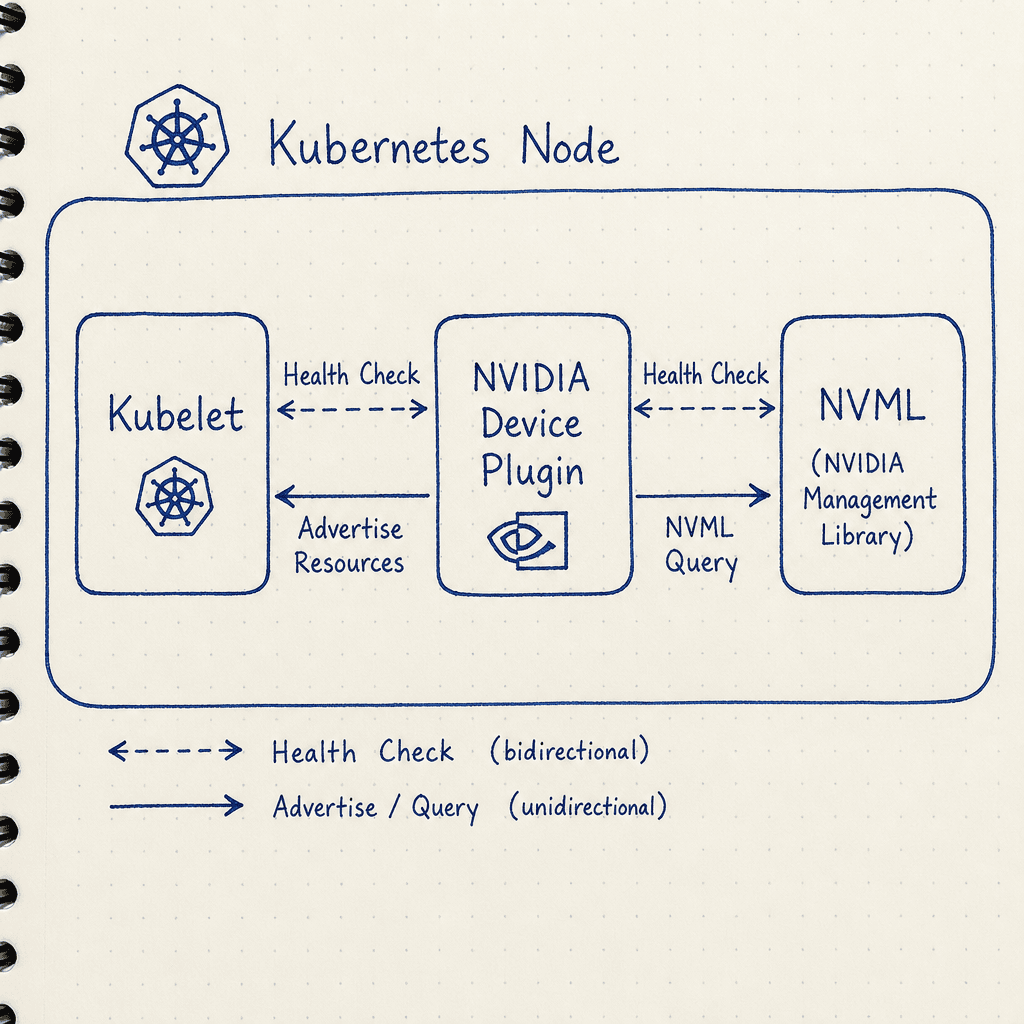
The primary mechanism for this exposure is the NVIDIA Device Plugin. This is a specialized Kubernetes controller that runs on each node. It performs two critical functions: it monitors the health of GPU devices by querying the NVIDIA Management Library (NVML) and it advertises these devices to the kubelet as allocatable resources, as described in the Kubernetes Device Plugin documentation and NVIDIA Device Plugin documentation. When a pod requests nvidia.com/gpu, the kubelet ensures that the container is launched with the appropriate environment variables and volume mounts that allow the container’s NVIDIA Container Toolkit to access the device driver.
This architecture means that GPU resources are not managed by the central Kubernetes scheduler in the same way CPU cores are. Instead, the scheduler makes placement decisions based on resource requests, but the actual binding of the device happens at the node level via the device plugin. This creates a "soft" constraint; if a node has a GPU but the device plugin is misconfigured or the driver is mismatched, the scheduler may place a pod there, only for the container to fail to start.
Scheduling Mechanics and the Atomicity Problem
By default, Kubernetes treats a GPU as an atomic unit. If a pod requests 1 GPU, the scheduler looks for a node with at least one free GPU. The scheduler can distinguish between different GPU types (e.g., Tesla T4 vs. A100) using node labels and pod selectors, but it cannot split a single GPU instance across multiple pods. This leads to the "atomicity problem": if you have a workload that only needs 10% of the GPU's memory or compute capacity, you still consume 100% of the device object. The rest sits idle, leading to poor utilization rates in clusters running mixed workloads.
To mitigate this, engineers often use node pools with specific taints and tolerations to segregate GPU workloads from CPU-heavy services. However, this segregation does not solve the sharing problem. It only isolates the resource. To share resources, we must look at two distinct mechanisms provided by NVIDIA and supported by Kubernetes: MIG and Time Slicing.
MIG: Hardware-Level Partitioning
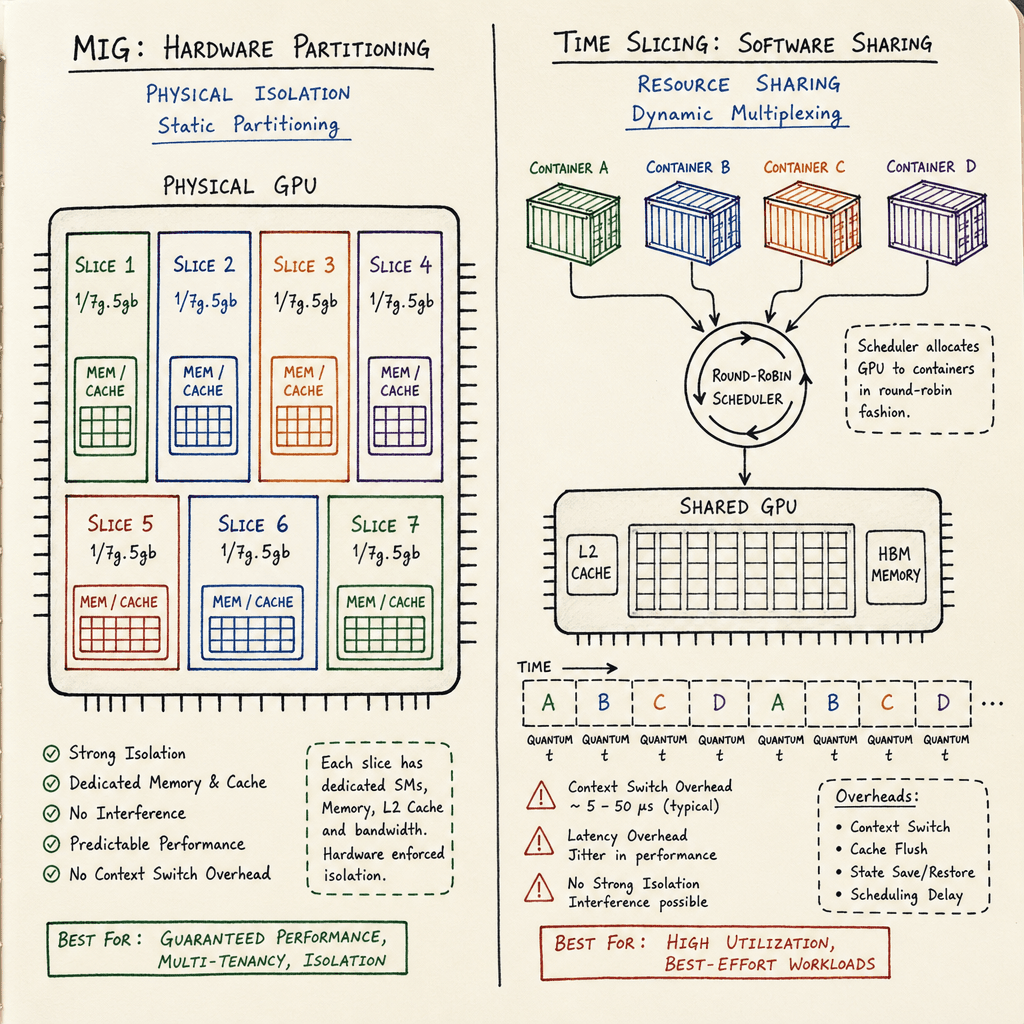
Multi-Instance GPU (MIG) is a hardware feature available on data center GPUs like the A100, H100, and A30. MIG allows a single physical GPU to be partitioned into multiple, isolated instances. Each instance, or "slice," has its own dedicated compute, memory, and cache resources. Crucially, MIG provides hardware-level isolation, meaning that one instance cannot affect the performance of another through cache contention or memory bandwidth saturation.
In Kubernetes, MIG changes the resource model. Instead of requesting nvidia.com/gpu: 1, you request specific MIG profiles. For example, an A100 can be configured to create seven 1/7th MIG slices. A pod might request nvidia.com/mig-1g.5gb to claim one such slice.
The mechanism here is rigid. The GPU must be partitioned before workloads are scheduled. If you partition an A100 into seven 1/7th slices, you cannot dynamically reassign those slices to a different configuration without migrating all workloads off the node and re-partitioning the GPU. This lack of flexibility is the primary drawback of MIG. It is best suited for stable, long-running workloads with predictable resource requirements, such as batch processing jobs or stable inference endpoints.
Configuration of MIG in Kubernetes involves two steps: configuring the GPU on the node (via nvidia-smi or the MIG Manager daemonset) and ensuring the Kubernetes node labels reflect the available MIG profiles. The NVIDIA Device Plugin then exposes these profiles as distinct resource types. If the node labels do not match the MIG profiles requested by the pods, the scheduler will fail to place the pod, resulting in a "Unschedulable" status.
Time Slicing: Software-Level Sharing
Time slicing offers a different approach to sharing. Instead of partitioning the hardware, time slicing uses the GPU driver to rapidly switch execution contexts between multiple containers. This is a software-level mechanism that does not require hardware partitioning.
In a time-sliced configuration, multiple pods can share a single physical GPU. The GPU driver allocates small time quanta to each pod, switching contexts thousands of times per second. From the application's perspective, it appears to have exclusive access to the GPU, but in reality, it is sharing the compute resources.
Time slicing is more flexible than MIG because it does not require pre-partitioning the GPU. You can dynamically add or remove pods sharing a GPU without restarting the node or reconfiguring the hardware. However, this flexibility comes at a cost: latency and performance variability. Because the GPU is switching contexts, there is overhead associated with saving and restoring state. For latency-sensitive applications, such as real-time interactive inference, time slicing can introduce unacceptable jitter. It is better suited for throughput-oriented batch jobs where slight variations in completion time are acceptable.
In Kubernetes, time slicing is enabled by configuring the NVIDIA Device Plugin to report multiple GPU instances. This is typically done via plugin configuration maps that specify the number of time-sliced replicas per GPU. When a pod requests nvidia.com/gpu: 1, the device plugin maps that request to an available time slice on a shared physical GPU.
Operational Implications and Monitoring
The introduction of MIG and time slicing significantly increases the operational complexity of GPU clusters. Monitoring becomes challenging because standard metrics (like nvidia.com/gpu_utilization) aggregate usage across all slices or time slices. An SRE looking at a dashboard might see 50% GPU utilization and assume there is room for more workloads, when in reality, the remaining capacity is fragmented across multiple MIG slices or time slices that cannot accommodate the new workload's size.
To address this, teams must implement granular monitoring. For MIG, this means tracking utilization per slice. For time slicing, it means monitoring context switch rates and latency. Tools like Prometheus with the NVIDIA DCGM Exporter are essential, but they require custom dashboards and alerting rules to provide visibility into slice-level metrics.
Furthermore, debugging issues in shared GPU environments is harder. If a pod is experiencing slow performance, it could be due to a hardware fault, a driver bug, or contention with other pods sharing the GPU. In a MIG environment, you can isolate the issue to a specific slice. In a time-sliced environment, you must analyze the timing of context switches to determine if contention is the culprit.
Conclusion
Kubernetes GPU management has evolved from simple passthrough to sophisticated sharing mechanisms. MIG offers hardware-level isolation and high performance but lacks flexibility. Time slicing offers dynamic sharing but introduces latency and complexity. Platform engineers must choose the right tool based on their workload characteristics: MIG for stable, high-performance batch jobs, and time slicing for flexible, throughput-oriented workloads. Regardless of the approach, successful implementation requires a deep understanding of the underlying mechanisms, robust monitoring, and careful scheduling configuration. The goal is not just to run GPUs in Kubernetes, but to run them efficiently.
Common Pitfalls
- MIG Partitioning Rigidity: Assuming MIG slices can be resized or reassigned dynamically. In reality, changing MIG profiles requires migrating all workloads off the node and restarting the GPU driver, causing downtime.
- Time Slicing Latency for Interactive Apps: Using time slicing for low-latency, interactive inference workloads. The context-switching overhead can introduce jitter that violates strict SLA requirements for real-time applications.
- Monitoring Fragmentation: Relying on aggregate GPU utilization metrics. High aggregate usage can mask the fact that specific MIG slices or time slices are saturated, leading to "Unschedulable" pods despite apparent available capacity.
Practical Takeaways
- Use MIG for stable, long-running workloads with predictable resource needs where hardware isolation and maximum performance per slice are critical.
- Use Time Slicing for flexible, bursty, or throughput-oriented workloads where dynamic sharing is preferred and slight latency variations are acceptable.
- Implement Granular Monitoring: Standard cluster-level metrics are insufficient. Deploy tools like Prometheus with NVIDIA DCGM Exporter to monitor utilization at the slice or time-slice level.
FAQ
Can MIG slices be resized dynamically? No. MIG profiles are configured at the hardware level on the GPU. Changing the partitioning scheme (e.g., from 1/2 to 1/7) requires all workloads on that GPU to be migrated off, the GPU to be reset, and the new profile to be applied. This is not a dynamic operation.
Is time slicing suitable for latency-sensitive inference? Generally, no. Time slicing introduces context-switching overhead, which can cause latency jitter. For real-time interactive inference where response time consistency is critical, MIG or dedicated GPU passthrough is recommended over time slicing.
How does the scheduler handle mixed MIG and time-sliced nodes?
The scheduler treats MIG profiles and time-sliced virtual devices as distinct resource types. A node can have both MIG slices and time-sliced GPUs available simultaneously. The scheduler places pods based on the specific resource requests (nvidia.com/mig vs nvidia.com/gpu) and available capacity for those specific types, ensuring that MIG requests do not collide with time-sliced requests on the same physical hardware.
Related posts
Unsloth: Fine-Tuning 2x Faster on One GPU
Learn how Unsloth accelerates fine-tuning by 2x using Triton kernels and LoRA, enabling efficient model training on a single GPU.
Cold Starts in Serverless GPU Inference and How to Kill Them
Explore strategies to eliminate cold start latency in serverless GPU inference, covering weight loading, snapshots, and model streaming techniques.
Chunked Prefill: Smoothing Out Your Tail Latency
An examination of how chunked prefill reduces tail latency and head-of-line blocking for ML engineers and SREs optimizing inference throughput.
