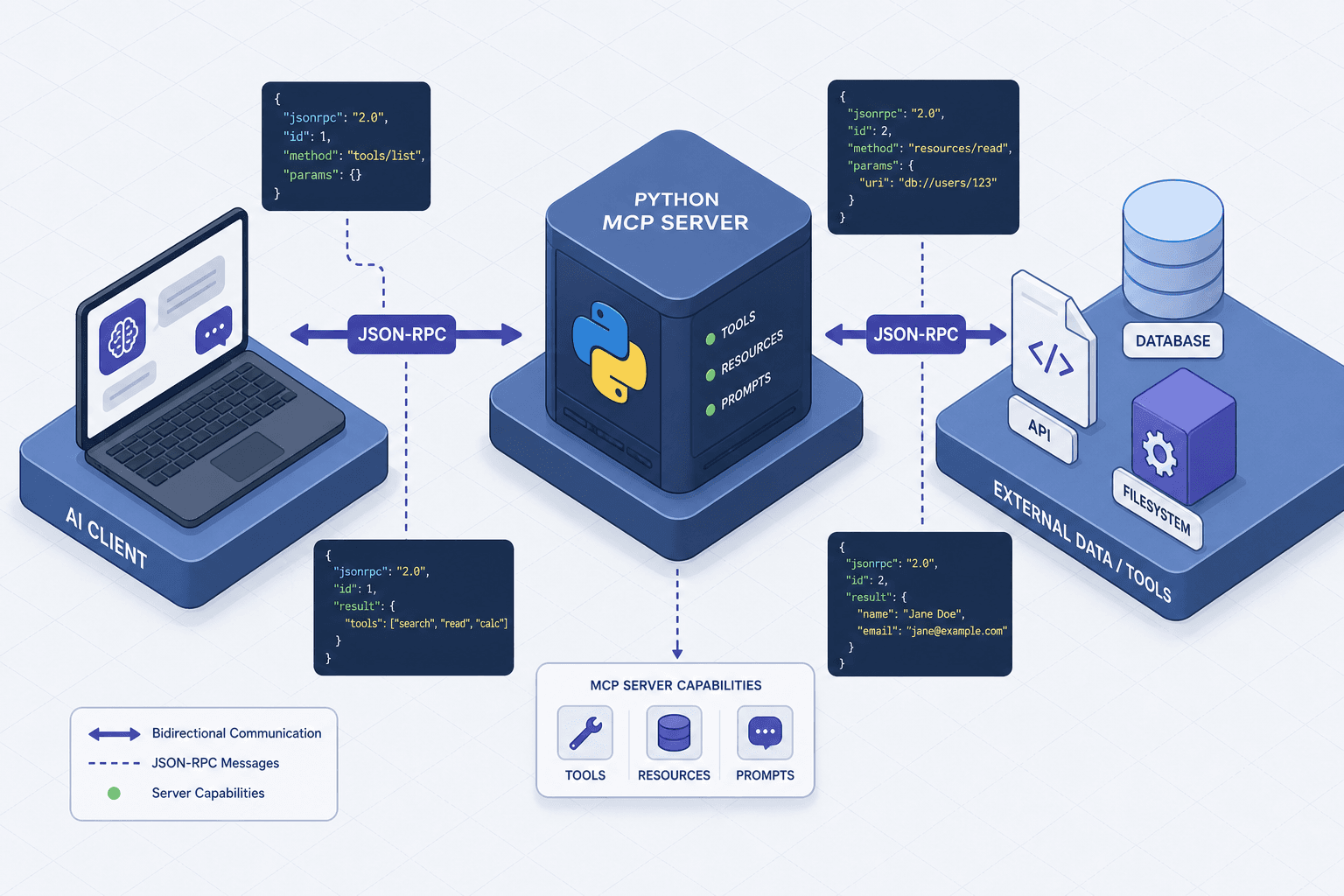
Building Your First MCP Server in Python
A step-by-step tutorial on creating a Model Context Protocol server using Python and FastMCP, covering tool definition and SDK integration.
Part 1 of the MCP in Depth series
The Model Context Protocol (MCP) represents a structural shift in how Large Language Models (LLMs) interact with external data. Instead of hardcoding API integrations into an application, MCP standardizes the connection between an AI model and its context (data, tools, and resources) through a universal transport layer. For Python developers, this means building a server that speaks a specific JSON-RPC dialect, rather than maintaining a unique REST adapter for every data source.
This tutorial walks through building a compliant MCP server using the official Python SDK and the fastmcp abstraction. We will focus on the mechanism of tool registration, where Python functions are exposed as callable actions to an AI client.
The Mechanism of MCP
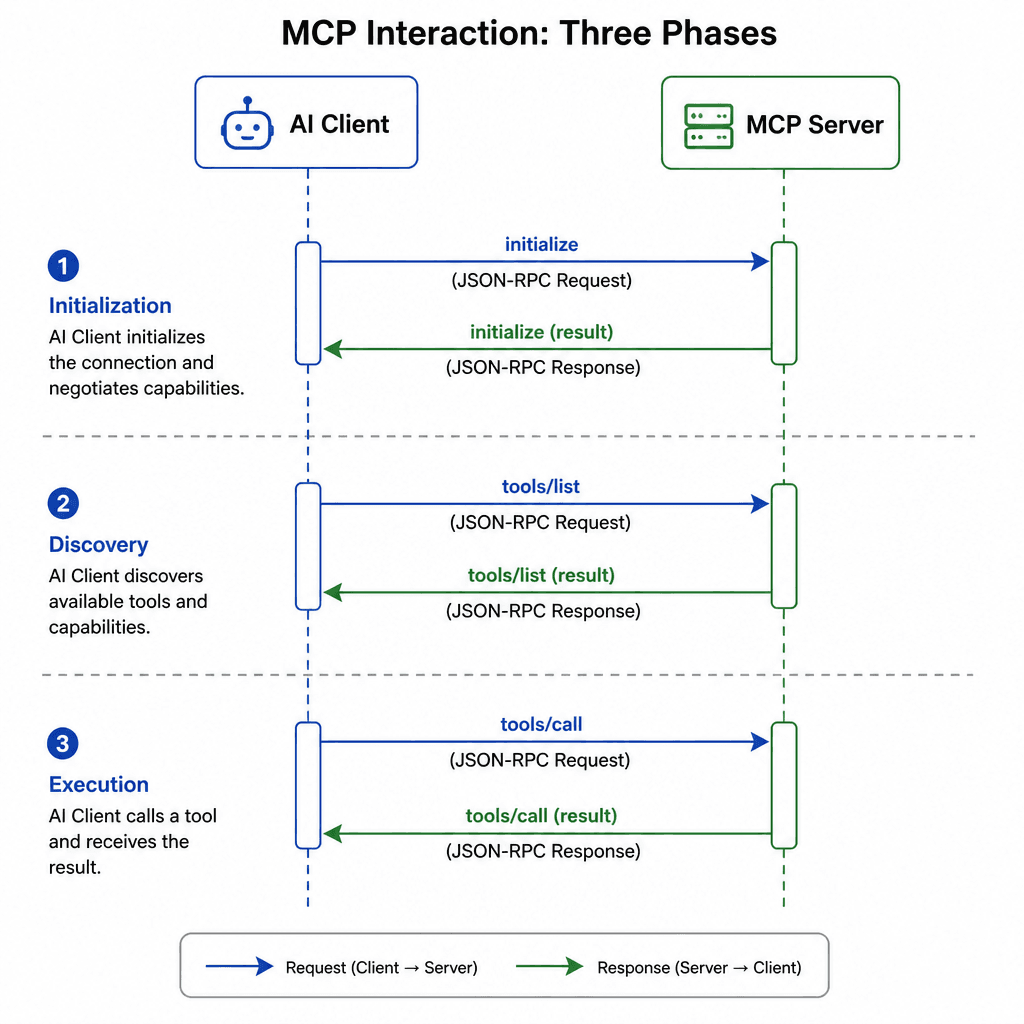
Before writing code, it is critical to understand the data flow. An MCP server is a stateless process regarding protocol interactions, meaning it does not maintain session state between requests. However, the server process itself maintains state during its runtime, such as registered tool definitions and configuration settings. It listens for JSON-RPC 2.0 messages and responds to requests without holding conversations.
The interaction follows three distinct phases:
- Initialization: The client sends an
initializerequest. The server responds with its capabilities, typically structured as{"capabilities": {"tools": {"listChanged": false}}}. - Discovery: The client asks, "What tools do you have?" The server returns a list of tool names and their JSON schemas.
- Execution: The client calls a specific tool by name with arguments. The server executes the Python function and returns the result or an error.
This decoupling allows an AI client (like a chatbot) to dynamically discover and use tools without prior configuration of their endpoints.
Setting Up the Environment
We will use the official mcp Python package, which includes the fastmcp module for simplified tool definition. Ensure you have Python 3.10+ installed.
Create a virtual environment and install the SDK:
python -m venv .venv
source .venv/bin/activate  # On Windows: .venv\Scripts\activate
pip install mcp
The mcp package provides the core transport layer (stdio, SSE, HTTP) and the fastmcp abstraction layer, providing the decorator-based syntax that mirrors Python’s native function definition style.
Defining the Server and Tools
In MCP, a "Tool" is simply a function that takes structured arguments and returns a result. The SDK automatically serializes Python type hints into JSON Schema definitions, which the AI model uses to understand what arguments to pass.
Create a file named server.py:
from mcp.server.fastmcp import FastMCP

# Create the MCP server instance
mcp = FastMCP("MyFirstServer")

@mcp.tool()
def add_numbers(a: int, b: int) -> int:
    """Add two integers together.

    Args:
        a: The first integer.
        b: The second integer.

    Returns:
        The sum of a and b.
    """
    return a + b

@mcp.tool()
def get_weather(city: str) -> str:
    """Get the current weather for a given city.

    Args:
        city: The name of the city.

    Returns:
        A string describing the weather.
    """
    # In a real scenario, this would call an external API
    return f"The weather in {city} is sunny."
How Type Hints Become Schemas
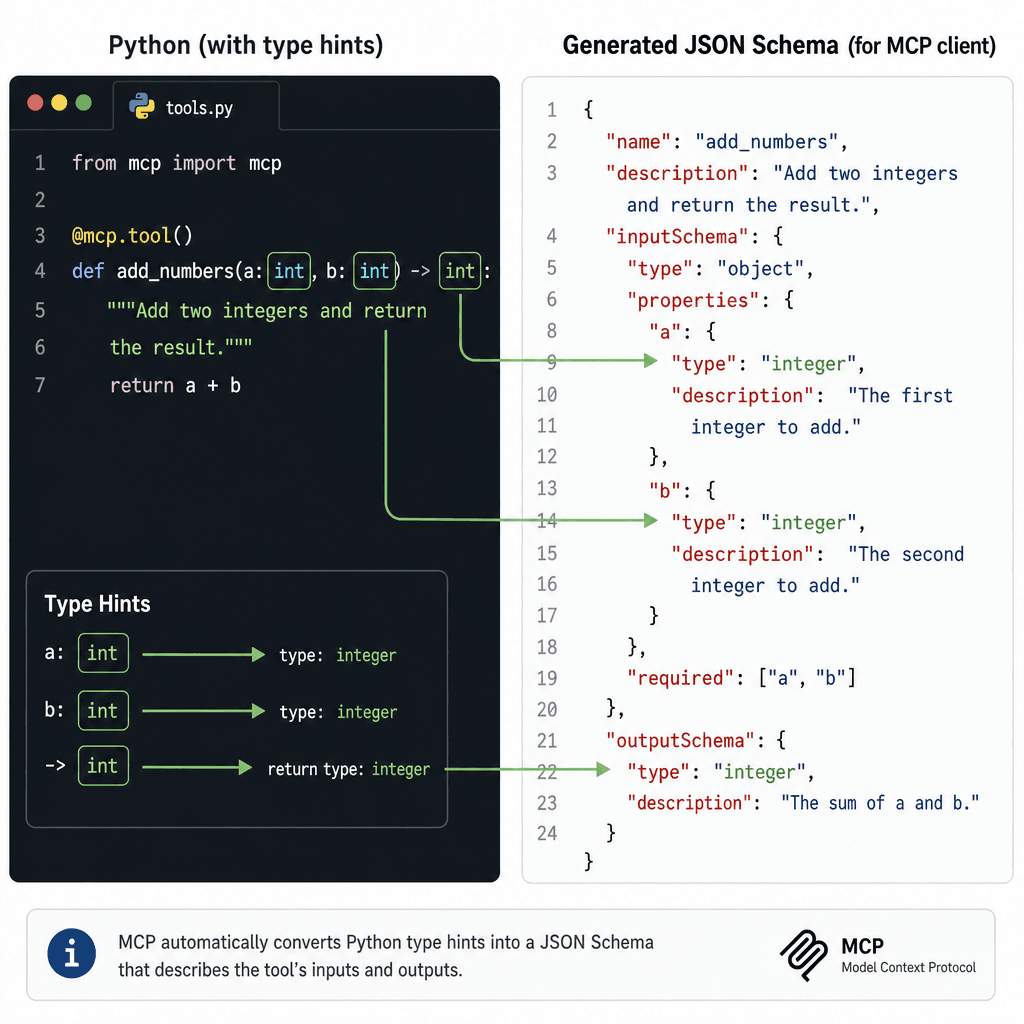
When the client queries for tools, the SDK inspects the add_numbers function. It sees:
ais anintbis anint- The return type is
int
It generates the following JSON structure for the client. The SDK maps Python types to JSON Schema types as follows: str becomes string, int and float become number (or integer), bool becomes boolean, and collections like list become array.
{
  "name": "add_numbers",
  "description": "Add two integers together.",
  "inputSchema": {
    "type": "object",
    "properties": {
      "a": { "type": "integer", "description": "The first integer." },
      "b": { "type": "integer", "description": "The second integer." }
    },
    "required": ["a", "b"]
  }
}
This schema is what the LLM uses to decide whether to call add_numbers(1, 2) or add_numbers("one", "two"). The SDK handles this serialization automatically, ensuring the client always receives valid type information.
Running the Server
MCP servers typically run over stdio (standard input/output) for local development. This allows the server to communicate directly with the host process via pipes.
Run the server using the MCP CLI:
mcp dev server.pyThe mcp dev command starts the server and opens a temporary UI or logs to the console, allowing you to test interactions immediately. You should see output similar to:
INFO:     Started server process [12345]
INFO:     Waiting for application startup.
INFO:     Application startup complete.
INFO:     MCP Server 'MyFirstServer' running on stdio
If you are integrating this into a larger application, you can run it programmatically:
if __name__ == "__main__":
    mcp.run()
Connecting to an AI Client
The power of MCP is realized when an AI client connects to your server. While we won’t build a full client here, the integration pattern is straightforward.
Most MCP-compatible clients (like Claude Desktop, Cursor, or custom Python clients using mcp.Client) require you to specify the server’s command and arguments. For example, in a client configuration file:
{
  "mcpServers": {
    "my-first-server": {
      "command": "python",
      "args": ["server.py"]
    }
  }
}
When the client starts, it:
- Spawns the Python process.
- Sends the
initializeJSON-RPC message. - Reads the server’s response, including the list of tools (
add_numbers,get_weather). - Passes the tool list to the LLM.
- When the LLM decides to use a tool, the client sends a
tools/callrequest to the server. - The server executes the Python function and returns the result via stdout.
Key Considerations for Production
- Error Handling: If your tool raises an exception, the SDK catches it and returns a structured error message to the client. Always wrap tool logic in try-except blocks to provide meaningful feedback.
- Security: MCP servers execute arbitrary code. Never expose tools that perform destructive actions (e.g.,
DELETErequests) without explicit user confirmation mechanisms handled by the client. - Transport: While
stdiois ideal for local dev, production servers often use HTTP or SSE (Server-Sent Events) for remote access. ThefastmcpSDK supports these transports via additional configuration.
Common Pitfalls
When building your first MCP server, watch out for these common errors:
- Unhandled Exceptions: If a tool crashes without catching exceptions, the client may receive a generic error or timeout. Always ensure your tool functions handle potential failures gracefully.
- Transport Misconfiguration: Running a server designed for
stdioin an environment expecting HTTP connections will fail. Ensure your transport layer matches the client's expectations. - Unsafe Tool Exposure: Accidentally exposing tools that modify data or delete resources can lead to security vulnerabilities. Always implement permission checks or confirmation steps in the client layer.
Practical Takeaways
MCP offers significant benefits for AI integration:
- Decoupling: Separate your AI logic from your data sources.
- Standardization: Use a single protocol for all tools, regardless of the underlying technology.
- Ease of Integration: Python developers can leverage familiar decorators and type hints to build compliant servers quickly.
By following these practices, you can build robust, scalable MCP servers that enhance your AI applications.
FAQ
Is MCP only for Python? No, MCP is language-agnostic. While we focused on Python here, there are SDKs for TypeScript, Java, and other languages.
How does MCP differ from REST? REST is a general-purpose architectural style for networked applications. MCP is specifically designed for LLM interactions, providing standardized tools, resources, and prompts that AI models can discover and use dynamically.
Can I use MCP with existing APIs? Yes, you can wrap existing REST or gRPC APIs as MCP tools, allowing LLMs to interact with them through the MCP interface.
Conclusion
Building an MCP server in Python is primarily about defining well-documented functions and letting the SDK handle the protocol details. By leveraging type hints and decorators, you create a self-documenting API that AI clients can discover and use dynamically. This approach reduces the complexity of AI integration, shifting the focus from network plumbing to data logic.
As you expand your server, consider adding Resources (static data files) and Prompts (templated interactions) to provide a richer context for your AI models. The foundation laid here—tool registration and JSON-RPC compliance—is reusable across all MCP-compatible frameworks.
Implement the provided server.py snippet and test it with a client to see the MCP interaction in action.
Related posts
Building an MCP Server for Your Internal API
A practical guide to building an MCP server that wraps your internal REST API, enabling secure tool design for backend developers and platform engineers.
Function Calling vs Structured Output: Choosing an Interface
A comparison of function calling and structured output for API design, helping backend developers choose the right interface for tool use and JSON mode.
Run Your First Open-Weights Model Locally with Ollama
A quickstart guide for developers new to local LLMs on how to run open-weights models locally using Ollama on your laptop.
