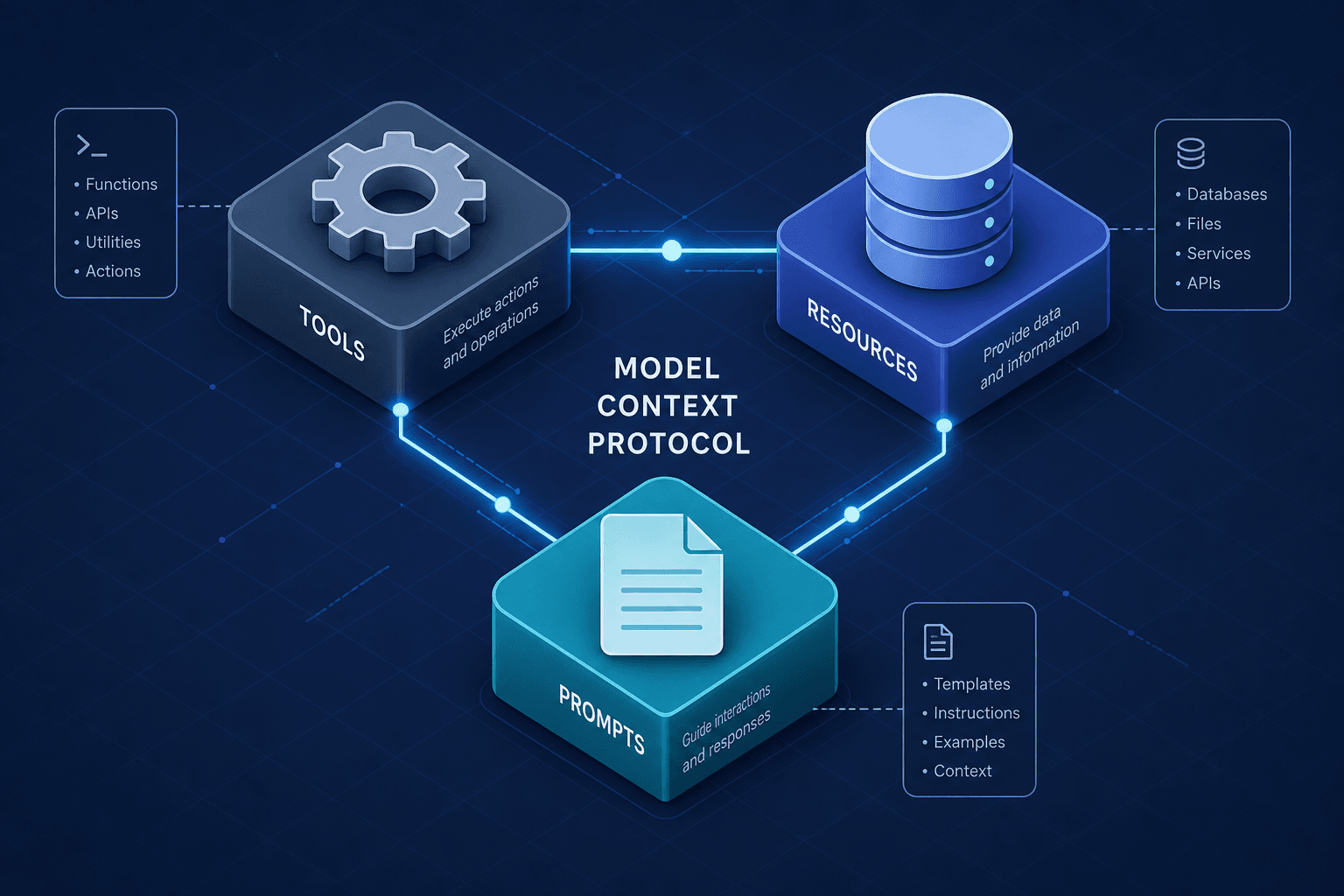
Tools, Resources, and Prompts: The Three MCP Primitives
An examination of the three core Model Context Protocol primitives: tools, resources, and prompts, and how they enable structured AI integration.
Integrating Large Language Models (LLMs) into backend systems has historically been an exercise in managing ambiguity. Developers often hand-wire HTTP endpoints to handle unpredictable JSON payloads, hoping the model doesn’t hallucinate a schema that breaks the database. The Model Context Protocol (MCP) resolves this by enforcing a strict architectural contract. It reduces the complexity of AI integration to three deterministic primitives: Tools, Resources, and Prompts.
As Part 2 of the MCP in Depth series, this guide examines how these primitives shift AI from a "black box" to a composable system. For backend developers, these are not just API endpoints; they are the fundamental units of interaction between a client (the AI application) and a server (the data source or service). Understanding the mechanism of each primitive is essential for building systems that are secure, observable, and composable.
Tools: Deterministic Actions
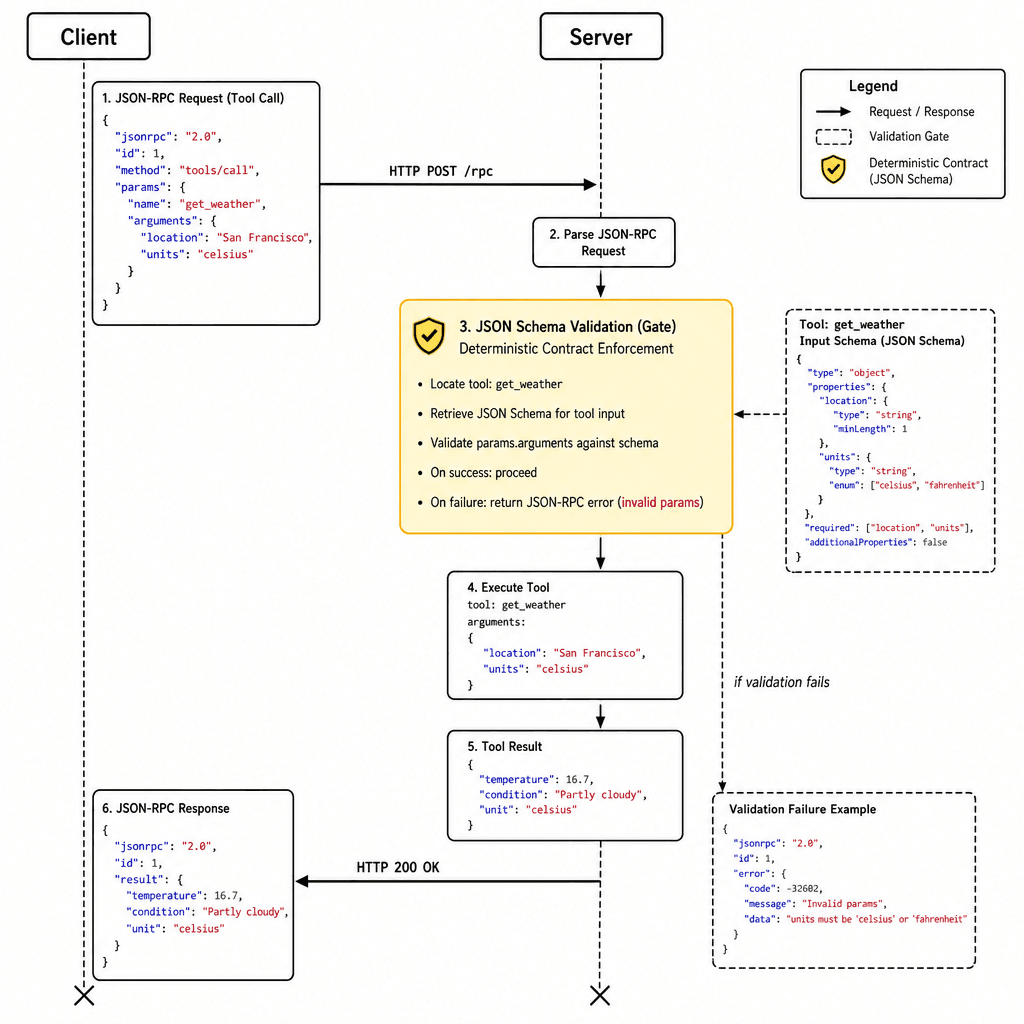
A Tool in MCP is an executable function that the LLM can invoke. Unlike a generic REST endpoint where the client decides when and how to call it, a Tool is exposed as a capability. The client presents the list of available tools to the LLM, which then decides if it needs to call one to complete a user request.
The mechanism here is JSON-RPC 2.0 over a transport layer (stdio or HTTP). The critical component is the JSON Schema definition. When a server defines a tool, it must provide a strict schema describing the required inputs. This schema is not optional metadata; it is the contract that the LLM must adhere to.
Consider a backend developer building a ticketing system. Instead of writing a custom parser for natural language requests like "Create a high-priority bug for auth failure," the developer exposes a create_ticket tool.
{
  "name": "create_ticket",
  "description": "Creates a new support ticket",
  "inputSchema": {
    "type": "object",
    "properties": {
      "title": { "type": "string", "description": "Ticket title" },
      "priority": {
        "type": "string",
        "enum": ["low", "medium", "high"],
        "description": "Priority level"
      }
    },
    "required": ["title", "priority"]
  }
}
When the client sends this definition to the LLM, the model generates a structured JSON object that matches this schema. The client then validates this JSON against the schema before executing the underlying code. If the model outputs "priority": "urgent", the client rejects it immediately, preventing invalid state changes. This shifts error handling from the LLM’s probabilistic output to the client’s deterministic validation layer.
Resources: Structured Data Access
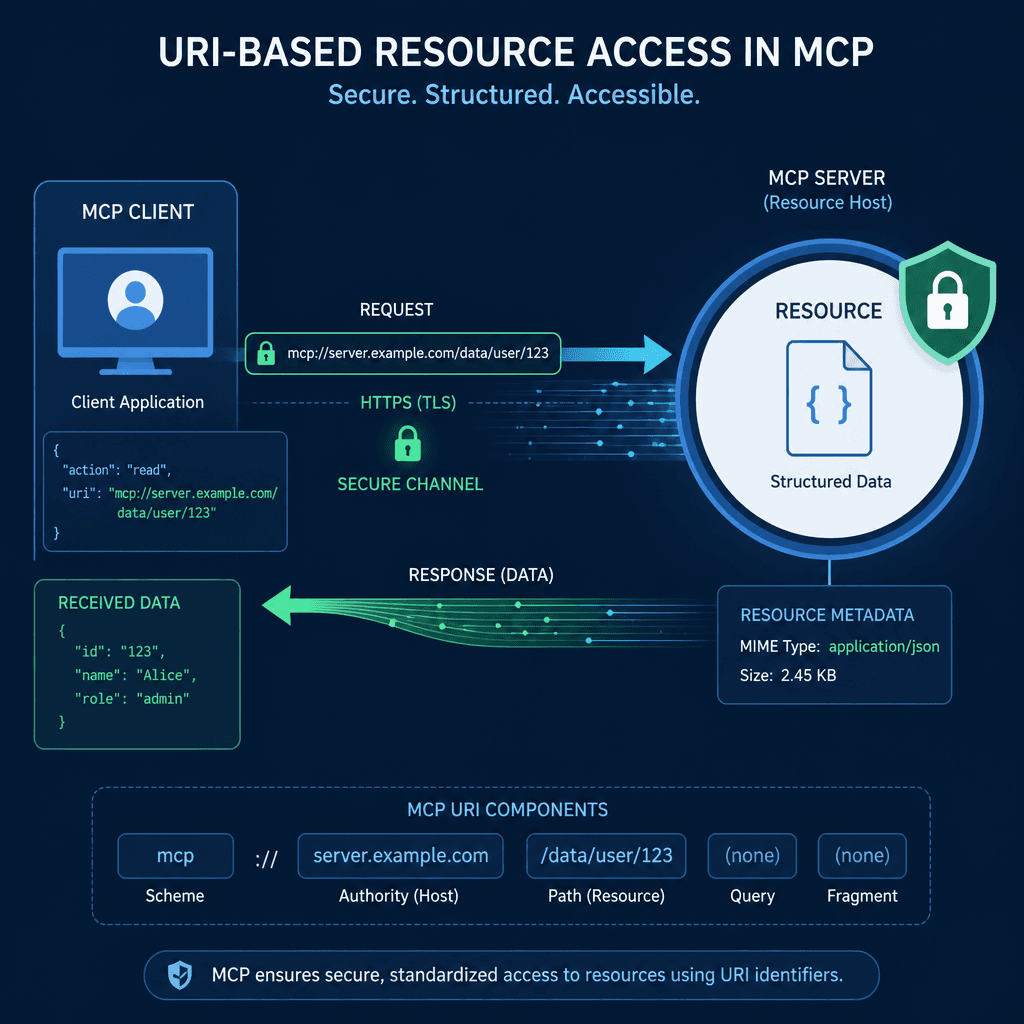
While Tools change state, Resources provide context. In traditional integrations, an LLM might need to read a file or query a database to answer a question. Without MCP, the developer must manually inject this data into the prompt, often leading to token bloat or incomplete context.
MCP treats data as first-class citizens using a URI-based addressing scheme. A Resource is identified by a unique URI and associated with a MIME type. The client can list available resources, read them, and subscribe to updates.
The mechanism relies on URI templates and content negotiation. When a client requests a resource, it specifies the URI. The server returns the content, optionally with metadata like last modified timestamps. This allows the client to cache data efficiently, reducing latency and API calls.
For example, a server might expose a log file as a resource:
mcp://logs/application-2023-10-27.logWhen an LLM needs to debug an issue, the client can fetch this resource and inject its content into the prompt. Crucially, the LLM doesn’t just get raw text; it gets structured data that the client can parse. If the resource is a JSON database record, the client can extract specific fields before passing them to the model, allowing the client to filter PII before passing it to the model.
Prompts: Structured Message Templates
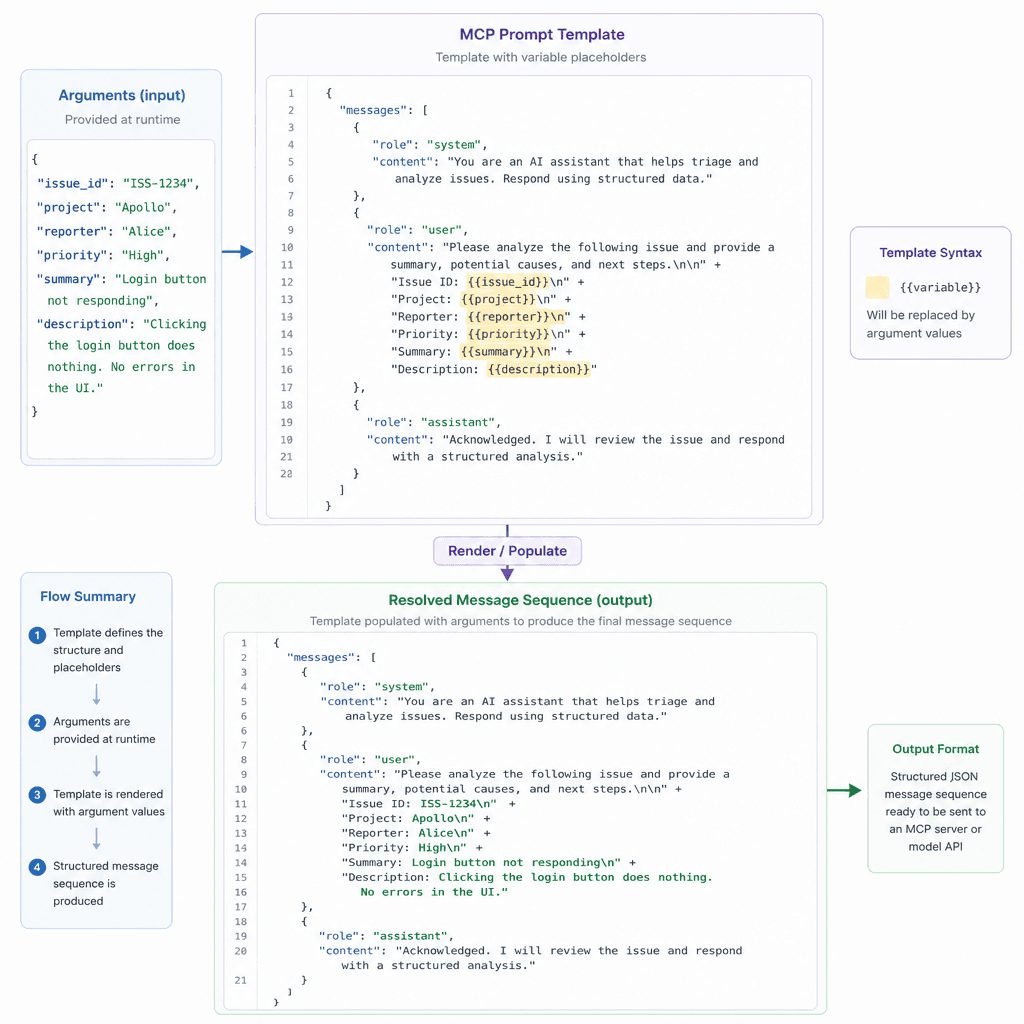
Prompts are often misunderstood as simple string templates. In MCP, a Prompt is a structured definition that combines a message template with optional arguments and resource references. This allows servers to define complex, multi-turn interactions that are consistent across all clients.
The mechanism involves template variables and argument resolution. When a client requests a prompt, it provides arguments. The server resolves these arguments, potentially fetching related resources, and returns a fully formed message sequence. This offloads the "prompt engineering" burden to the server, ensuring that every client uses the same optimized context structure.
Consider a summarize_issue prompt. The server defines it with a template that expects an issue ID. When the client calls this prompt, the server might automatically attach the latest comments and code changes as resources.
{
  "name": "summarize_issue",
  "arguments": [
    {
      "name": "issue_id",
      "description": "ID of the GitHub issue",
      "required": true
    }
  ],
  "messages": [
    {
      "role": "user",
      "content": {
        "type": "text",
        "text": "Summarize the following issue: {{issue_id}}"
      }
    }
  ]
}
This approach ensures that the LLM always receives the same context structure, regardless of who is using the application. It also enables caching at the server level. If the same prompt arguments are requested repeatedly, the server can return the cached message sequence, improving performance.
Composability and Trust
The true power of MCP lies in the interplay between these primitives. A single interaction might involve a Prompt that references a Resource, which is then used to inform a Tool call. For instance, a user asks, "Summarize the errors in the last log file and create a ticket if there are more than 5."
- The client invokes the
summarize_issuePrompt with arguments. - The server resolves the prompt, fetching the
mcp://logs/latest.logResource. - The LLM analyzes the log content.
- If the threshold is met, the client invokes the
create_ticketTool with the summary as input.
This composability creates a clear data flow: Prompts define the intent, Resources provide the context, and Tools execute the action. From a security perspective, this separation allows for fine-grained permission control. The client can request read-only access to Resources, while restricting Tool execution to specific, pre-approved actions. This is a significant improvement over traditional integrations where the LLM often has broad, unstructured access to APIs.
Conclusion
By adopting these three primitives, backend developers can move beyond fragile, ad-hoc integrations. They build systems where the LLM is a transparent actor within a well-defined protocol, enabling robust, secure, and maintainable AI applications. Understanding Tools, Resources, and Prompts as distinct, composable units is the key to implementing the Model Context Protocol.
Pitfalls
When implementing MCP, developers often fall into common traps. One major mistake is over-relying on the LLM for validation instead of enforcing strict JSON Schema constraints on Tools. The LLM is a probabilistic generator, not a validator; relying on it to produce correct types or enums leads to runtime errors. Another pitfall is ignoring resource URI security. Treating URIs as trusted inputs without validation can lead to unauthorized data access or injection attacks. Always sanitize and validate URIs on the server side before resolving resources.
Takeaways
The adoption of Tools, Resources, and Prompts brings three key benefits to AI integration: determinism, security, and composability. Tools enforce deterministic actions through strict schemas, ensuring that the LLM's output aligns with backend expectations. Resources provide secure, structured data access, allowing developers to control what data reaches the model. Prompts offer composable, consistent context structures, reducing the cognitive load on developers and improving the reliability of LLM responses.
FAQ
How does MCP handle authentication? MCP defines an OAuth 2.1-based authorization framework for HTTP-based transports. Authentication and authorization are handled by the transport layer (e.g., HTTP headers, OAuth tokens) or by the specific MCP server implementation. Developers should integrate standard security protocols at the transport level to secure connections between clients and servers.
Can I use MCP with existing REST APIs? Yes, MCP can act as a bridge to existing systems. You can wrap existing REST API calls as MCP Tools, exposing their functionality to LLMs in a structured way. Similarly, you can expose data from REST APIs as MCP Resources, allowing clients to fetch and utilize that data within the MCP ecosystem.
What happens if an LLM fails to call a Tool correctly? If an LLM fails to produce valid input for a Tool, the client-side validation layer (based on JSON Schema) will reject the request. The client can then report this error back to the LLM, allowing the model to attempt a correction in the next turn. This iterative feedback loop ensures that only valid, schema-compliant actions are executed.
Related posts
Building an MCP Server for Your Internal API
A practical guide to building an MCP server that wraps your internal REST API, enabling secure tool design for backend developers and platform engineers.
Getting Reliable JSON Out of Any Model
A technical examination of constrained decoding, outlines, and schema validation techniques to ensure reliable JSON output from language models.
Caching Strategies for RAG Pipelines
Explore effective caching strategies for RAG pipelines, including embedding and retrieval caches, to improve hit rates and reduce latency, while managing invalidation effectively.
