Running MCP Servers in Production
A practical guide for platform engineers and SREs on deploying Model Context Protocol servers with rate limiting, versioning, and observability.
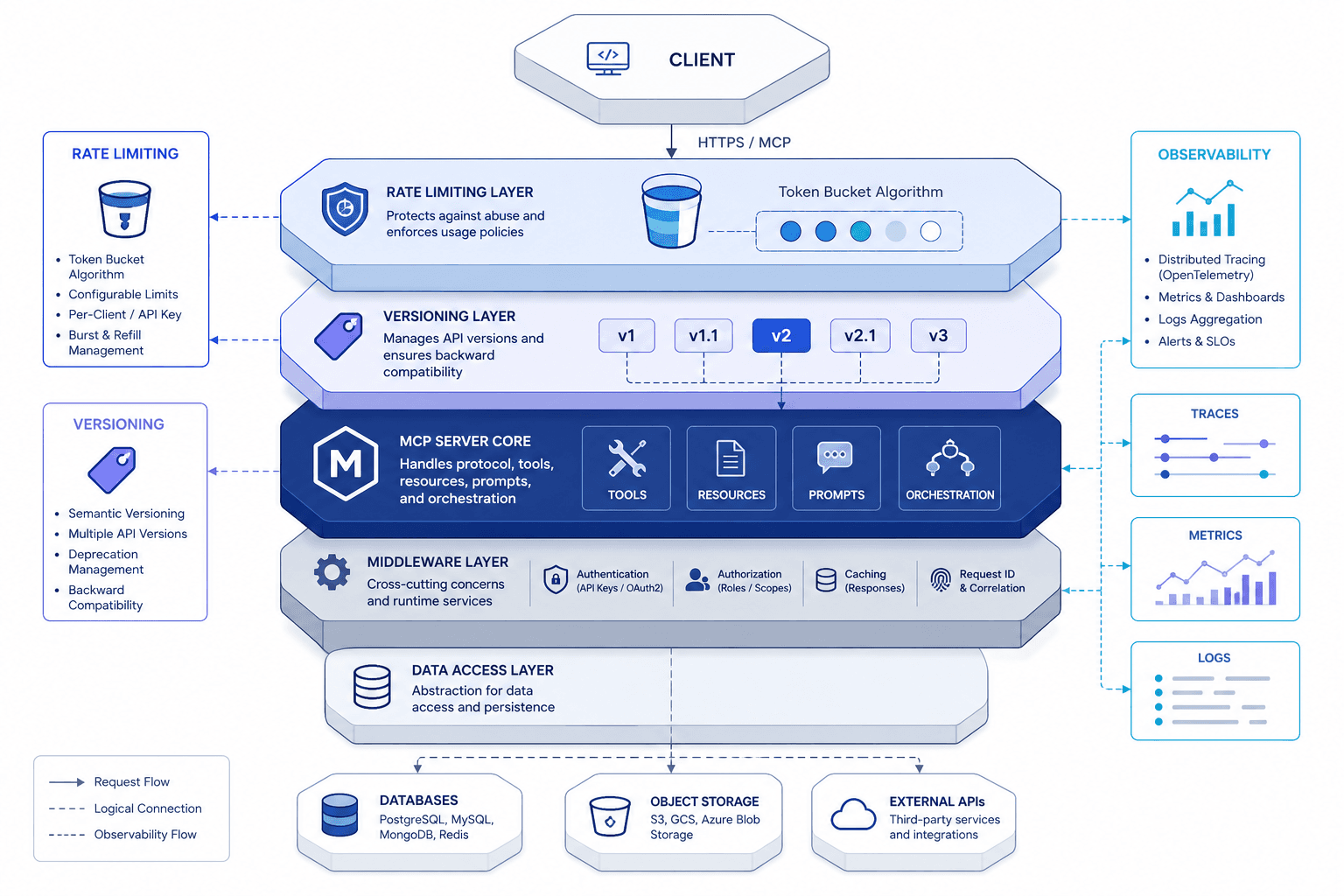
The Model Context Protocol (MCP) was designed to standardize how AI models interact with external tools and data sources. While the specification provides a solid foundation for client-server communication, it assumes a controlled environment. In production, where latency, reliability, and security are non-negotiable, the default MCP implementation is insufficient. Platform engineers and SREs must extend the protocol with operational controls that treat MCP servers as critical infrastructure components, not just experimental endpoints.
This guide outlines the mechanisms required to stabilize MCP servers in production, focusing on rate limiting, versioning, and observability.
The Mechanism of Control: Rate Limiting and Security
MCP defines two primary transport layers: stdio (standard input/output) and SSE (Server-Sent Events). The choice of transport dictates where security controls must be applied.
Stdio: Local Isolation
When an MCP server runs over stdio, it is typically a child process of the host application (e.g., a CLI tool or a local IDE extension). In this mode, the host application controls resource allocation. Rate limiting here is straightforward: the host can impose limits on CPU, memory, and execution time before spawning the process. However, stdio is inherently local and cannot be exposed to remote clients without significant tunneling overhead, making it unsuitable for multi-tenant production environments.
SSE: Network-Level Controls
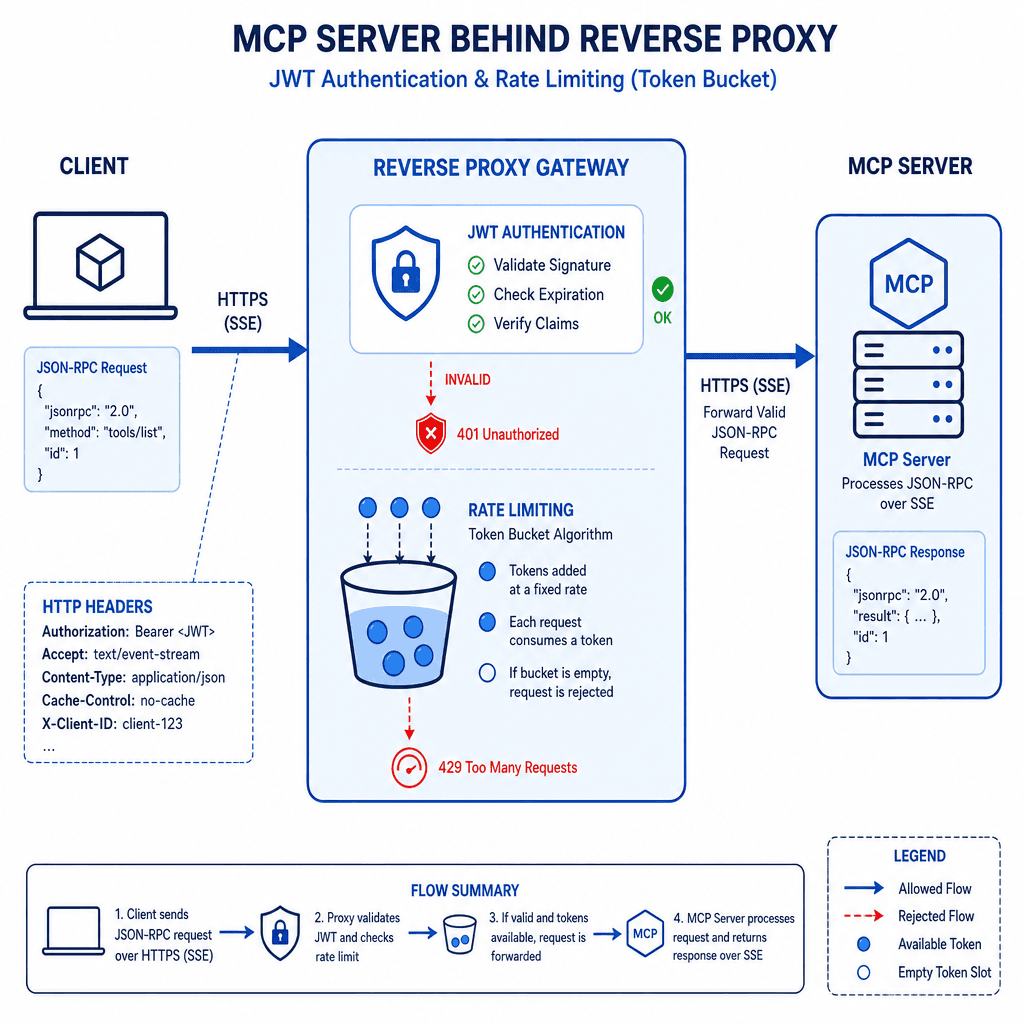
For production deployments, SSE is the preferred transport because it allows long-lived, server-pushed connections over HTTP. This introduces network-level risks that must be mitigated at the gateway or proxy layer, as MCP itself does not define native authentication or rate-limiting mechanisms.
Authentication: Since SSE is HTTP-based, authentication must be handled at the transport layer. You should enforce TLS 1.3 for all connections and require valid API keys or JWTs in the Authorization header during the initial SSE connection establishment.
GET /sse HTTP/1.1
Host: mcp-server.example.com
Authorization: Bearer <valid-jwt-token>
Accept: text/event-stream
Rate Limiting: MCP tools can execute arbitrary code or query databases. A single malicious or misconfigured client could flood the server with requests, causing denial of service. Since MCP messages are JSON-RPC payloads, rate limiting must be implemented at the HTTP/SSE layer.
Use a token bucket algorithm at the reverse proxy (e.g., Nginx, Envoy, or a dedicated API gateway) to limit the number of concurrent SSE connections and the rate of JSON-RPC messages per client. This prevents a single user from overwhelming the MCP server’s resource pool.
Contract Stability: Versioning and Compatibility
The MCP specification includes a version negotiation mechanism during the initialize handshake. The client sends the protocol version it supports, and the server responds with the version it will use. However, this only covers the protocol wire format, not the semantic contract of the tools.
The Risk of Schema Drift
An MCP server exposes a list of tools via the tools/list method. Each tool has a name, description, and input schema (JSON Schema). If a server updates a tool’s schema (e.g., adding a required parameter) without updating the version, existing clients may fail validation or behave unexpectedly.
Strategy: Treat each MCP server as having two version numbers:
- Protocol Version: Managed by the MCP spec (e.g., 2024-11-05).
- Tool Namespace Version: Managed by the platform team. Prefix tool names with a stable namespace, e.g.,
v1.get_userorfinance.quarterly_report.
By prefixing tool names, you can deprecate old tools without breaking clients that depend on the old schema. Clients can explicitly request v1.* tools, while new clients can adopt v2.* tools.
Deprecation Workflow
- Mark Deprecated: Add a
deprecated: trueflag to the tool’s metadata (if supported by the specific MCP implementation) or log a warning in thetools/listresponse. - Notify Clients: Use the MCP notification mechanism (
notifications/message) to alert connected clients of upcoming changes. Note that while the core MCP spec does not mandate a specific 'deprecation' notification type, using the generic message notification for this purpose is a common application-level pattern. - Sunset: Remove the tool after a grace period.
This approach ensures that changes to the tool contract do not break existing integrations, allowing for gradual migration.
Observability and Debugging
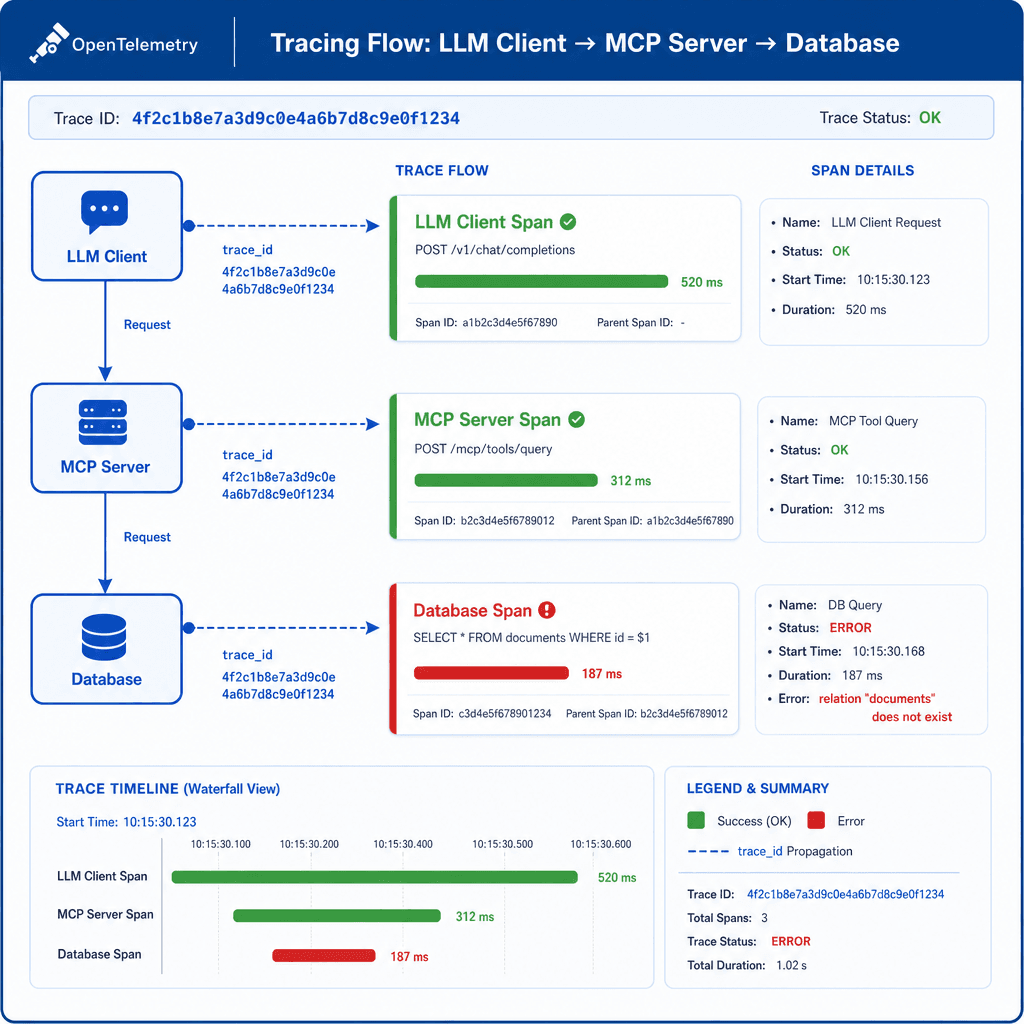
Without observability, an MCP server is a black box. When an LLM fails to call a tool correctly, or when a tool returns an error, you need to trace the failure through the entire stack: from the LLM client, through the MCP transport, to the underlying data source.
Critical Telemetry Points
Implement OpenTelemetry instrumentation to capture the following spans:
- Initialization: Track the handshake duration and version negotiation.
- Tool Invocation: Create a span for each tool call. Include the tool name, input parameters (sanitized), and execution duration.
- Resource Access: If the MCP server queries a database or API, create child spans for those operations.
Example: OpenTelemetry Span for Tool Execution
with tracer.start_as_current_span("mcp.tool.execute") as span:
    span.set_attribute("mcp.tool.name", "get_user")
    span.set_attribute("mcp.tool.input", json.dumps(sanitized_input))
    try:
        result = await call_get_user(input)
        span.set_status(Status(StatusCode.OK))
        return result
    except Exception as e:
        span.record_exception(e)
        span.set_status(Status(StatusCode.ERROR, str(e)))
        raise
Data Privacy and Logging
MCP tools often handle sensitive data (PII, financial records). Standard logging practices apply:
- Sanitize Inputs/Outputs: Before logging, remove or hash sensitive fields (e.g.,
ssn,credit_card_number). - Structured Logging: Use JSON logs with consistent fields (
trace_id,span_id,tool_name,status) to enable correlation with LLM traces. - Avoid Verbose Debug Logs in Production: MCP’s logging notifications (
notifications/message) can be noisy. Configure the server to only emit high-severity logs in production.
Correlating with LLM Traces
The most valuable insight comes from correlating MCP spans with LLM spans. Ensure that the trace_id from the LLM client is propagated through the MCP transport. This allows you to see, for example, that a specific LLM prompt led to a failed tool call due to a malformed input schema.
Operational Patterns: Deployment and Scaling
Containerized Deployment
Deploy MCP servers as stateless containers (Docker/Kubernetes) when using SSE transport. Each container can handle multiple concurrent SSE connections. Use horizontal pod autoscaling (HPA) based on CPU/memory usage or custom metrics like "active SSE connections."
Challenge: If the MCP server maintains state (e.g., a database connection pool), ensure that the state is externalized or that the container is designed to handle graceful shutdowns without dropping active connections.
Sidecar Proxy Pattern
For complex environments, consider deploying an MCP gateway as a sidecar or standalone service. This gateway:
- Manages authentication and rate limiting.
- Routes requests to different MCP servers based on the tool name or tenant.
- Aggregates logs and metrics.
This pattern simplifies the MCP server implementation, allowing developers to focus on tool logic rather than operational concerns.
Health Checks
Implement standard HTTP health checks (/health) that verify:
- The MCP server can respond to a simple
pingorinitializerequest. - Critical dependencies (e.g., database, external APIs) are reachable.
Fail the health check if dependencies are unavailable, triggering automatic restarts or traffic routing away from the instance.
Conclusion
Running MCP servers in production requires extending the protocol with operational controls. By implementing rate limiting at the transport layer, versioning tool contracts explicitly, and integrating detailed observability, platform engineers can ensure that MCP servers are reliable, secure, and maintainable. These practices transform MCP from an experimental protocol into a production-grade standard for AI tool integration.
Related posts
Keycloak Production Mode: Hostname, Proxy, and TLS
Configure Keycloak production mode by setting correct hostnames, proxy headers, and TLS certificates to ensure secure and reliable authentication.
Shadow Traffic for LLM Deployments
Explore how shadow traffic and traffic mirroring enable safe comparison of candidate LLM models in production without impacting user experience.
Building an MCP Server for Your Internal API
A practical guide to building an MCP server that wraps your internal REST API, enabling secure tool design for backend developers and platform engineers.
