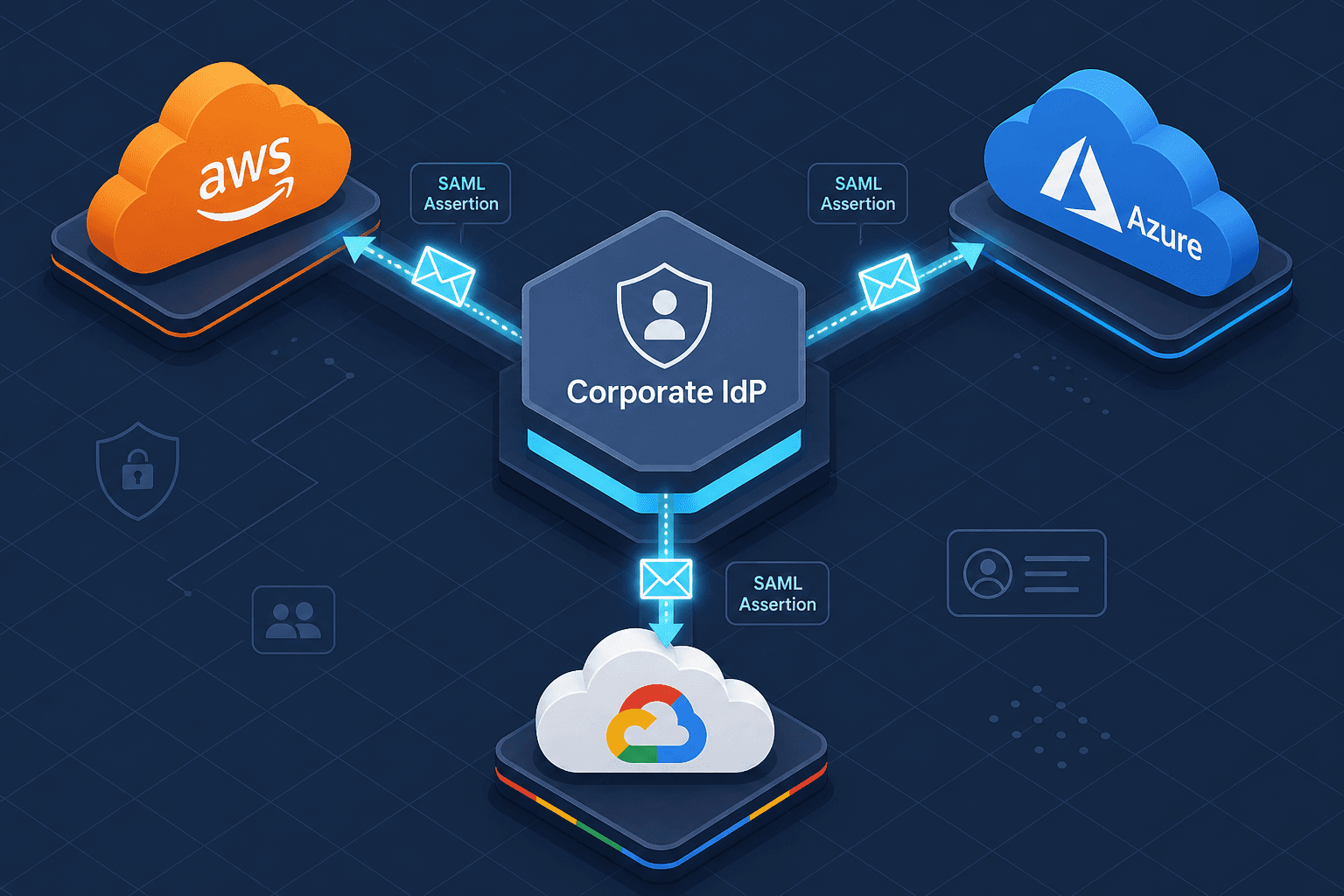
Federating AWS, Azure, and GCP to One Identity Provider
Learn how to federate AWS, Azure, and GCP with a single identity provider using SAML for workforce identity and SSO.
Managing separate credentials for Amazon Web Services (AWS), Microsoft Azure, and Google Cloud Platform (GCP) introduces significant security debt and operational friction. For cloud engineers, the goal is often to establish a single source of truth for workforce identity. By leveraging cloud identity federation via Security Assertion Markup Language (SAML) 2.0, organizations can federate access across all three major public clouds using a single corporate Identity Provider (IdP), such as Okta, Azure Entra ID, or PingIdentity. This walkthrough details the mechanism of establishing this trust, configuring each provider, and mapping identities to cloud roles.
The SAML Federation Mechanism
SAML is an XML-based open standard for exchanging authentication and authorization data between an IdP and a Service Provider (SP). In a cloud federation scenario, the cloud provider acts as the SP, and your corporate directory acts as the IdP.
When an engineer attempts to access the AWS Console, Azure Portal, or GCP Console, they are redirected to the corporate IdP. The IdP authenticates the user against the corporate directory (e.g., Active Directory or LDAP). Upon successful authentication, the IdP generates a signed SAML assertion containing user attributes and sends it back to the cloud provider’s Assertion Consumer Service (ACS) endpoint.
The cloud provider verifies the XML signature using the IdP’s public certificate. If valid, it parses the assertion to identify the user and their groups. This data is then mapped to local cloud roles, granting temporary access credentials. This process ensures that the cloud providers never store user passwords; they only trust the cryptographic signature of the IdP.
Configuring AWS IAM Federation
Configuring saml federation aws requires establishing a trust relationship between the AWS IAM Identity Provider and your corporate IdP.
- Retrieve IdP Metadata: Export the SAML metadata file from your corporate IdP. This XML file contains the IdP’s sign-in URL, entity ID, and public signing certificate.
- Create IAM Identity Provider: In the AWS IAM console, create a new SAML provider. Enter the Entity ID and upload the metadata file. AWS automatically extracts the sign-in URL and certificate.
- Create an IAM Role: Create a new IAM role with a trust policy that allows the newly created SAML provider to assume it. The trust policy must specify the
sts:AssumeRoleWithSAMLaction, and may optionally includests:TagSessionif you want to pass SAML attributes as session tags.
{
  "Version": "2012-10-17",
  "Statement": [
    {
      "Effect": "Allow",
      "Principal": {
        "Federated": "arn:aws:iam::123456789012:saml-provider/CorporateIdP"
      },
      "Action": "sts:AssumeRoleWithSAML",
      "Condition": {
        "StringEquals": {
          "SAML:aud": "https://signin.aws.amazon.com/saml"
        }
      }
    }
  ]
}- Map Attributes: In the IAM Role, define permissions policies (e.g.,
AmazonS3ReadOnlyAccess). You can also use condition keys in the trust policy to restrict access based on SAML attributes, such asSAML:roleorSAML:email.
Configuring Azure Entra ID Federation
Azure uses Entra ID (formerly Azure AD) as its identity backbone. Federation is achieved by configuring an Enterprise Application with SAML Single Sign-On.
- Create Enterprise Application: In the Azure portal, navigate to Entra ID > Enterprise Applications > New Application. Select "Non-gallery application."
- Configure SAML: Under the "Single Sign-On" section, select SAML. Upload the IdP metadata or manually enter the Identifier (Entity ID), Reply URL (ACS URL), and Sign-on URL.
- Attribute Mapping: This is the critical step for authorization. Azure maps SAML attributes to user properties. Common mappings include:
email->User Principal Name (UPN)group->Groups
- Assign Users/Groups: Assign specific users or groups to the Enterprise Application. Only assigned entities can log in.
- RBAC Integration: To grant access to Azure resources, map the Azure AD group (populated via SAML attributes) to an Azure RBAC role (e.g., "Contributor" or "Reader") at the subscription or resource group level.
<!-- Example SAML Attribute Statement for Group Membership -->
<AttributeStatement>
  <Attribute Name="http://schemas.xmlsoap.org/claims/Group">
    <AttributeValue>Cloud-Engineers</AttributeValue>
    <AttributeValue>Security-Admins</AttributeValue>
  </Attribute>
</AttributeStatement>
Configuring Google Cloud Platform Federation
GCP supports SAML federation through Cloud Identity or by bridging with Azure Entra ID. GCP primarily uses Groups to manage access.
- Enable SAML SSO: In Cloud Identity or Google Workspace admin console, enable SAML SSO. Provide the IdP’s SSO URL, certificate, and issuer name.
- Create Groups: Create GCP Groups that correspond to your corporate security groups. These groups will act as the container for IAM policies.
- Map SAML Attributes: Configure the IdP to send group membership in the SAML assertion. GCP expects group names to match the GCP Group IDs or email addresses exactly.
- Assign IAM Policies: Attach IAM roles to the GCP Groups. For example, add the "Compute Admin" role to the "Cloud-Engineers" group. When a user logs in, GCP reads their group memberships from the SAML assertion and grants the corresponding IAM permissions.
Note: SAML federation is primarily for human users. Service accounts in GCP should continue to use key-based authentication or workload identity federation for non-interactive access.
Cross-Cloud Considerations
While SAML provides a unified authentication layer, authorization semantics vary across clouds. AWS uses inline and managed policies attached to roles. Azure uses RBAC roles assigned to principals. GCP uses IAM policies bound to groups. Engineers must maintain consistent group naming conventions across the IdP and all three cloud providers to ensure accurate role mapping between corporate groups and cloud permissions.
Additionally, consider implementing Just-In-Time (JIT) provisioning if users are not pre-provisioned in the cloud directories. Most modern IdPs support JIT, creating user accounts in the cloud on first login. However, for enterprise environments, explicit synchronization via SCIM is recommended for better auditability.
Conclusion
By centralizing identity through SAML, organizations reduce the attack surface associated with static credentials and gain a single point of control for revoking access. This architecture aligns with zero-trust principles, ensuring that access is granted based on verified identity and contextual attributes rather than network location.
FAQ
Can I use OIDC instead of SAML? Yes, OpenID Connect (OIDC) is increasingly popular, especially for newer cloud-native applications and GCP Workload Identity Federation. However, SAML remains the industry standard for enterprise workforce SSO, particularly for legacy AWS and Azure integrations.
How do I handle service accounts? SAML is designed for human users. Service accounts should use key-based authentication, workload identity federation (GCP), or managed identities (Azure) / IAM roles (AWS) to avoid storing long-lived credentials and to enable automated, secure access.
What happens if the IdP goes down? If your corporate IdP is unavailable, users cannot authenticate to the cloud consoles. To mitigate this, implement a "break-glass" procedure with emergency access accounts that are not federated, ensuring you can restore operations during an IdP outage.
How often should I rotate certificates? SAML trust relationships rely on IdP certificates. It is best practice to monitor certificate expiration dates and rotate them before they expire. Most IdPs provide notifications, but automation is recommended to prevent access interruptions.
Common Pitfalls
- Mismatched Entity IDs: The Entity ID (Issuer) in the IdP metadata must exactly match the Entity ID configured in the cloud provider. A typo here will cause immediate authentication failures.
- Incorrect ACS URL Configuration: The Assertion Consumer Service (ACS) URL must be precisely configured in both the IdP and the cloud provider. Mismatches here prevent the cloud provider from accepting the SAML response.
- Over-permissive Role Trust Policies: Avoid configuring trust policies that allow any authenticated user to assume high-privilege roles. Always use condition keys (like
SAML:role) to restrict role assumption to specific groups or attributes.
Practical Takeaways
- Centralize Identity: Using a single IdP reduces the attack surface by eliminating static passwords and providing a single point of revocation.
- Consistent Attribute Mapping: Ensure that group names and attributes flow consistently from the IdP to all cloud providers to enable accurate role mapping.
- Least Privilege Enforcement: Use SAML attributes to dynamically assign roles, ensuring users only have access to the resources necessary for their job function.
- Monitor and Audit: Regularly audit SAML assertions and access logs to detect anomalies and ensure compliance with security policies.
- Plan for Failures: Always have a break-glass plan in place to maintain access in case of IdP outages or configuration errors.
Related posts
Why Multi-Cloud Identity Fragments
An examination of identity fragmentation across AWS, Azure, and GCP, comparing identity models to understand multi-cloud challenges.
SAML Metadata Management: Best Practices
Examination of SAML metadata management, certificate rotation, and identity federation trust to ensure secure integration.
Least Privilege in Practice
A practical guide to implementing least privilege in AWS using IAM Access Analyzer, policy generation, and condition keys for secure access management.