GraphQL Security: Authentication and Authorization Patterns
An examination of GraphQL security patterns for authentication and authorization, including query complexity limits and API security best practices.
GraphQL Security: Authentication and Authorization Patterns
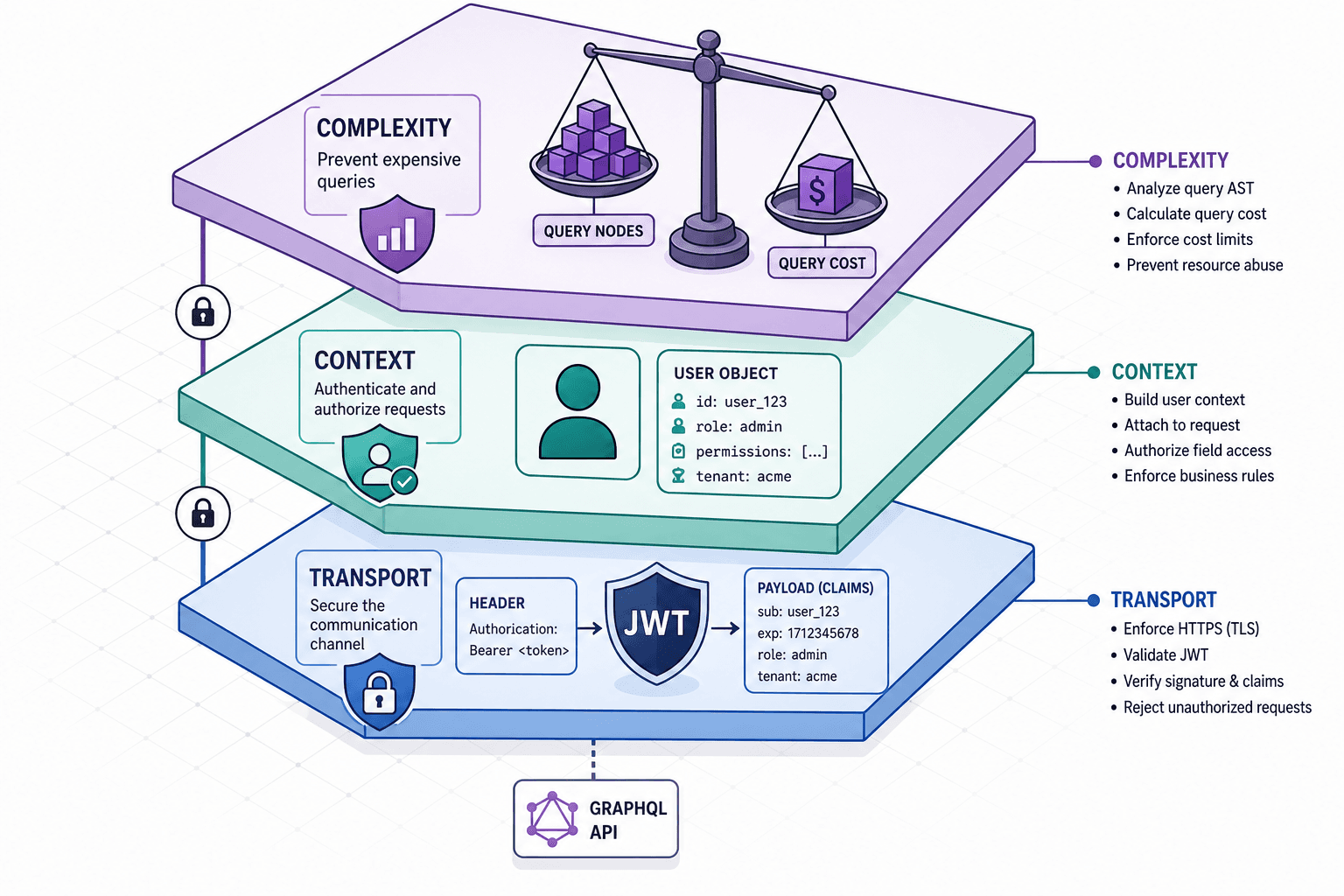
Migrating from REST to GraphQL often fails due to logic gaps that turn the API into a public data dump. Unlike REST, where URL structure and HTTP verbs gate resources, GraphQL exposes the entire schema via a single endpoint. Without strict checks, malicious actors can traverse relationships indefinitely. Securing a GraphQL API requires a layered approach: the transport layer for identity, the execution context for field-level decisions, and the query planner for resource exhaustion prevention.
The Transport Layer: Injecting Identity
Authentication in GraphQL happens before resolver logic executes. The mechanism is standard: the client presents credentials, and the server validates them to establish a principal. However, the injection point matters. Passing tokens as query variables is discouraged because they may be logged in application logs, database audit trails, or proxy caches, potentially exposing secrets. The canonical mechanism is to place the token in the Authorization HTTP header.
Consider a scenario where a client named "Alice" needs to fetch her profile. She sends a request to the /graphql endpoint. The server middleware intercepts the Authorization: Bearer <jwt_token> header. A cryptographic verification step validates the signature and expiration of the JWT. If valid, the server extracts the sub (subject) claim, representing Alice's user ID, and constructs a context object. This context is then passed to every resolver function invoked during the request execution.
// Example middleware handling token injection
app.use('/graphql', async (req, res) => {
  const token = req.headers.authorization?.split(' ')[1];

  if (!token) {
    return res.status(401).json({ errors: [{ message: 'Unauthorized' }] });
  }

  try {
    const payload = await verifyJwt(token); // Cryptographic check
    const user = { id: payload.sub, role: payload.role };

    // Pass user to the execution context
    const result = await graphql({
      schema,
      source: req.body.query,
      contextValue: { user }
    });
    res.json(result);
  } catch (err) {
    res.status(401).json({ errors: [{ message: 'Invalid Token' }] });
  }
});
This pattern ensures that authentication logic is decoupled from business logic. The resolver never asks "Is this user logged in?" because the context.user is either present or the request was rejected at the middleware level.
Field-Level Authorization: The Context Pattern
Once the user is authenticated, the next layer is authorization. A naive approach checks permissions at the root level: "Is Alice allowed to query user?" If yes, the server returns the entire user object, including sensitive fields like email or creditCardNumber. This is a vulnerability known as Insecure Direct Object Reference (IDOR) combined with over-exposure.
The correct mechanism is field-level authorization. Every resolver function receives the context containing the authenticated user. Inside the resolver, the code must explicitly check if the current user has permission to read the specific field being requested. This allows for granular control where one user might see a user's name but not their address, while an admin sees both. This is the core of GraphQL authorization strategies.
Imagine a schema with a User type containing id, name, and secretData. A resolver for secretData must verify the requester's role.
const resolvers = {
  Query: {
    user: (root, args, context) => {
      // Context contains the authenticated user
      const currentUser = context.user;

      // Fetch the target user from DB (ignoring auth here for brevity)
      const targetUser = db.users.findById(args.id);

      if (!targetUser) throw new Error('Not found');

      // Check if the target is the current user or an admin
      if (currentUser.id !== targetUser.id && currentUser.role !== 'ADMIN') {
        // Return null or throw error specifically for this field
        return null;
      }

      return targetUser;
    }
  },
  User: {
    secretData: (parent, args, context) => {
      // Field-level check
      if (context.user.id !== parent.id && context.user.role !== 'ADMIN') {
        throw new Error('Field access forbidden');
      }
      return parent.secretData;
    }
  }
};
By placing the check inside the field resolver, the GraphQL engine stops execution for that specific field if the check fails, returning null or an error without leaking the data. This mechanism scales to nested queries. If a query requests user { posts { author { secretData } } }, the secretData resolver runs for every author in the list, checking the context each time.
Query Complexity: Preventing Resource Exhaustion
Authentication and authorization protect data, but they do not protect the server's compute resources. GraphQL's ability to nest queries allows a client to request deeply related data in a single request. A query that fetches a user, their posts, comments on those posts, and the authors of those comments can explode exponentially in complexity. Without limits, a malicious actor can send a query that consumes 100% of the CPU or memory, causing a Denial of Service (DoS).
The mechanism to prevent this is query complexity analysis. Unlike simple depth limits (which just count how many levels deep you go), complexity analysis assigns a "cost" to each field based on its expected database load. A field that joins three tables might cost 10 points, while a simple string field costs 1 point. The server calculates the total cost of the incoming query against a defined maximum threshold (e.g., 500 points).
If the calculated cost exceeds the limit, the server rejects the entire query before it executes. This is superior to depth limits because a shallow query can still be expensive if it requests heavy aggregations, and a deep query can be cheap if it only fetches indexed scalar fields. Implementing these limits is a critical component of API security.
import { validateQueryComplexity, getComplexity, simpleEstimator } from 'graphql-query-complexity';
import { createComplexityLimitRule } from '@apollo/server-plugin-limits';

// Define cost estimation rules using fieldCosts
const complexityRules = [
  { fieldName: 'user', cost: 10 },
  { fieldName: 'posts', cost: 20 },
  { fieldName: 'comments', cost: 50 },
];

// Middleware or Apollo Plugin
const rule = createComplexityLimitRule(500); // Max 500 points

// Usage in Apollo Server
const server = new ApolloServer({
  typeDefs,
  resolvers,
  plugins: [rule],
});
This approach treats the query as a mathematical problem. The server sums the estimated costs of all fields requested in the AST (Abstract Syntax Tree). If the sum is too high, the request is discarded. This mechanism forces clients to paginate or break down complex requests, ensuring the server remains responsive even under attack.
Schema Hardening and Introspection
The final layer of defense is operational hardening. By default, GraphQL servers expose an introspection query (__schema). This query allows any client to retrieve the entire schema definition, including types, fields, and arguments. While useful for development tools like GraphiQL, this is a critical information disclosure risk in production. An attacker can use introspection to map out the entire API, identify unguarded fields, and craft optimized attacks.
The mechanism to mitigate this is to disable introspection in production environments. This is typically done by checking the environment variable and returning a GraphQL error in the response body (via validationRules), not an HTTP 400 status code, to maintain protocol compliance.
// Simple wrapper to disable introspection
const schema = new GraphQLSchema({
  query: QueryType,
  mutation: MutationType,
  // ... other types

  // Optional: Custom validation rule to block introspection
  validationRules: [
    // Implementation depends on the specific GraphQL library
  ]
});
While disabling introspection removes the convenience of automatic documentation, it significantly raises the barrier for reconnaissance. For teams that require documentation, the recommended practice is to generate static HTML documentation during the build process and serve it separately, rather than exposing the live introspection endpoint.
Conclusion
Securing GraphQL requires shifting the mental model from "protecting endpoints" to "controlling traversal." The transport layer handles who you are, the context pattern handles what you can see, and complexity analysis handles how much you can ask. Ignoring any of these layers leaves the API vulnerable to data leaks or service disruption. By implementing these mechanisms rigorously, you ensure that the flexibility of GraphQL does not come at the cost of security.
Common Pitfalls
- Relying Solely on Depth Limits: Depth limits are insufficient because a shallow query can still trigger expensive database operations if it requests heavy aggregations.
- Exposing Too Much Data via Introspection: Leaving the
__schemaquery enabled in production allows attackers to map your API structure and identify vulnerabilities without authentication. - Missing Field-Level Checks: Assuming root-level authorization is sufficient leads to Insecure Direct Object Reference (IDOR) vulnerabilities where sensitive fields are leaked within authorized queries.
Practical Takeaways
- Defense in Depth: Never rely on a single mechanism; combine transport security, context-based authorization, and query complexity limits.
- Fail Closed: When authorization checks fail or complexity limits are exceeded, return an error rather than partial data to prevent information leakage.
- Least Privilege: Configure resolvers to return
nullor throw specific errors for fields the user cannot access, rather than exposing the data structure itself.
FAQ
Is introspection safe in production?
No. While useful for development, exposing the __schema query in production allows attackers to enumerate your entire API structure, making it easier to craft targeted attacks.
How do I handle N+1 attacks? N+1 attacks occur when a query triggers excessive database calls. Use DataLoader to batch and cache requests, and combine this with query complexity analysis to limit the total cost of the request.
What is the best way to cache GraphQL? Caching GraphQL is complex due to dynamic queries. The best approach is often to cache at the network level (CDN) for GET requests with limited parameters, or use response caching strategies within the server that account for user context and query complexity.
Related posts
Understanding JWKS: Rotating Signing Keys Gracefully
An examination of JSON Web Key Set (JWKS) mechanisms for securely rotating signing keys and verifying JWTs without service interruption.
Spring Security and GraphQL: Securing GraphQL APIs
A technical examination of securing GraphQL APIs using Spring Security, covering authorization, rate limiting, and API security best practices.
OAuth 2.0 vs JWT: Understanding the Relationship
An examination of the relationship between OAuth 2.0 and JSON Web Tokens, covering opaque tokens, token format selection, and JWT best practices.